
SIMATE S2
Manual de usuario del patinete eléctrico SIMATE S2
Modelo: S2
For Kids Ages 6-14, Rider Height 4.0 ft-5.3 ft
1. Introducción
Thank you for choosing the SIMATE S2 Electric Scooter. This manual provides essential information for the safe operation, maintenance, and troubleshooting of your new scooter. Please read it thoroughly before first use and keep it for future reference. Proper use and maintenance will ensure a long and enjoyable experience.
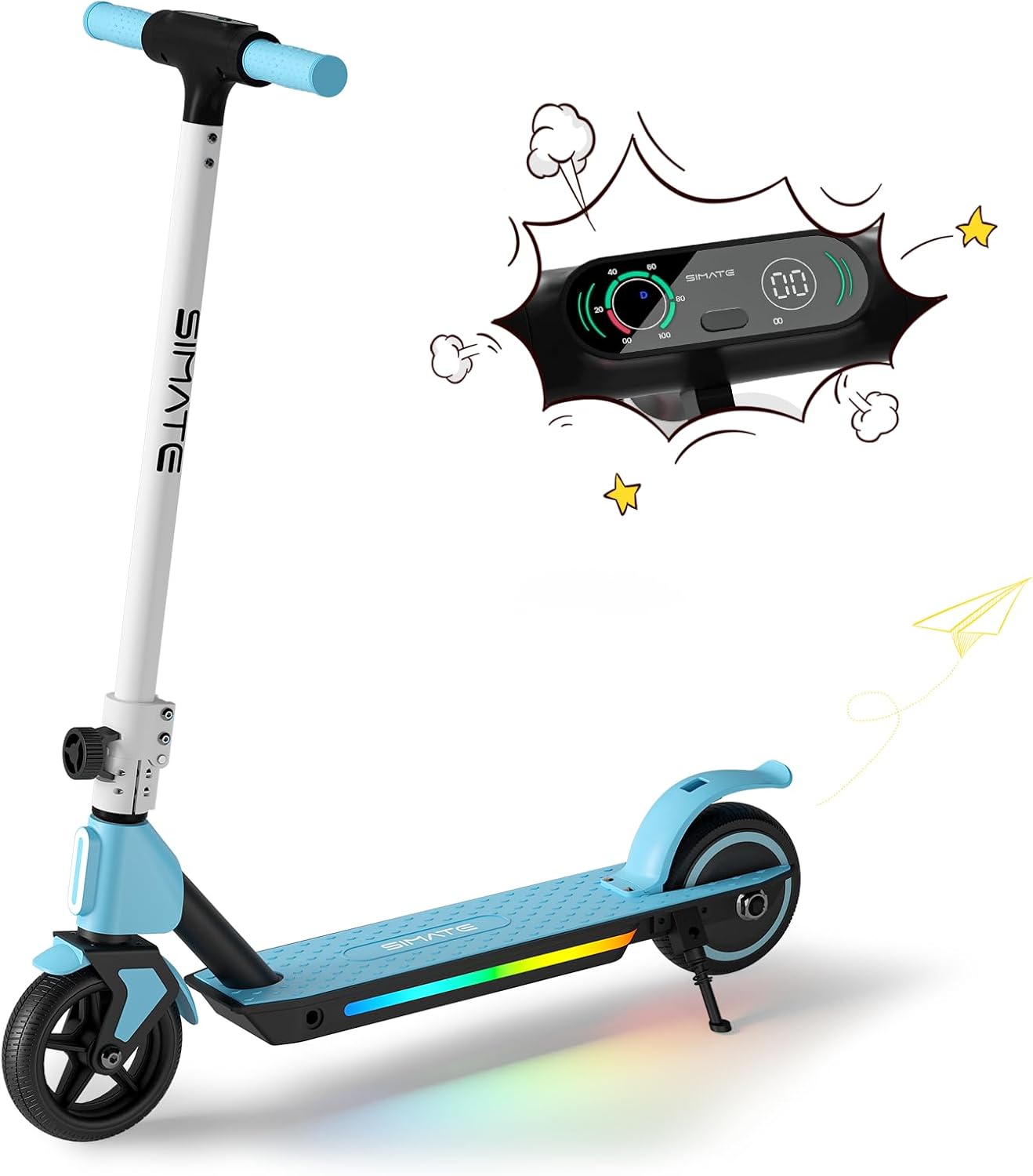
Figure 1: SIMATE S2 Electric Scooter (Blue)
The SIMATE S2 Electric Scooter features a sleek design with an integrated LED display and colorful lights on the deck. It is designed for easy learning and use, making it an ideal choice for young riders.
2. Información de seguridad
WARNING: Always wear a helmet and appropriate safety gear when riding. Adult supervision is recommended for young riders.
- No conduzca en condiciones húmedas, sobre superficies irregulares o cerca del tráfico.
- Asegúrese de que todos los pernos y sujetadores estén bien apretados antes de cada viaje.
- Familiarize yourself with both the electronic brake and foot brake.
- El scooter está diseñado para un solo conductor.
- The motor will not engage until the riding speed reaches 2 mph for safety.
3. Componentes sobreview
The SIMATE S2 Electric Scooter consists of several key components:
- Manillar: Adjustable height for comfortable riding.
- Pantalla digital LED: Shows speed, speed gear, and battery capacity.
- Acelerador electrónico: Controla la aceleración.
- Freno electrónico: Lever on the handlebar for quick stopping.
- Freno de pie: Rear fender brake for additional stopping power.
- Cubierta: Non-slip surface with colorful LED lights.
- Ruedas: Solid anti-puncture rubber tires for smooth riding.
- Mecanismo de plegado: Permite un fácil almacenamiento y transporte.

Figure 2: Handlebar and Display Features
The intuitive LED display provides real-time information about your ride, enhancing safety and control.

Figure 3: Dual Brake System
The scooter is equipped with both an electronic brake and a foot brake for reliable stopping power in various conditions.
4. Configuración
Follow these steps to set up your SIMATE S2 Electric Scooter:
- Deshacer: Retire con cuidado todos los componentes del embalaje.
- Desplegar: Release the folding mechanism and raise the handlebar stem until it locks into place. Ensure it is securely latched.
- Ajustar la altura del manillar: Afloje el cl de liberación rápidaamp on the handlebar stem. Adjust the handlebar to a comfortable height for the rider, ensuring the rider can maintain a slight bend in their elbows while holding the grips. Tighten the clamp de forma segura.
- Carga inicial: Before first use, fully charge the scooter's battery. Connect the charger to the charging port and plug it into a power outlet. The indicator light on the charger will change when fully charged.

Figura 4: Diseño plegable para fácil almacenamiento
The scooter's foldable design makes it easy to store and transport, fitting conveniently into car trunks.
5. Instrucciones de funcionamiento
To operate your SIMATE S2 Electric Scooter:
- Encendido: Mantenga presionado el botón de encendido en la pantalla LED para encender el scooter.
- Kick-Start Assist: For safety, the motor will only engage after the scooter reaches a speed of 2 mph (3.2 km/h). Place one foot on the deck and use the other foot to push off the ground, similar to a traditional kick scooter.
- Acelerar: Once moving, gently press the electronic throttle with your thumb to accelerate.
- Frenado: To slow down or stop, release the throttle and use either the electronic brake lever on the handlebar or press down on the rear foot brake. Use both brakes simultaneously for quicker stops.
- Luces LED: The colorful LED lights on the deck and front light activate automatically when the scooter is powered on, enhancing visibility and style.
- Apagado: Press and hold the power button to turn off the scooter when you are finished riding.

Figure 5: Large-Sized LED Digital Display
The clear LED display provides essential riding information at a glance, including current speed and battery level.

Figure 6: Front and Pedal Lights
The integrated lighting system enhances visibility and adds a fun element to the ride, especially in low-light conditions.
Video 1: SIMATE Electric Kids Scooter in action, demonstrating riding and features.
Watch this video to see the SIMATE Electric Scooter's features and how it performs in various settings.
6. Mantenimiento
El mantenimiento regular garantiza la longevidad y el funcionamiento seguro de su scooter:
- Limpieza: Limpiar el patinete con publicidadamp Limpie con un paño suave después de cada uso. No utilice productos químicos agresivos ni limpiadores abrasivos. Evite rociar agua directamente para evitar dañar los componentes electrónicos.
- Cuidado de la batería: Charge the battery fully after each ride. If storing for an extended period, charge the battery every 30-60 days to maintain its health. Do not overcharge or completely drain the battery.
- Llantas: The scooter is equipped with solid anti-puncture rubber tires, requiring minimal maintenance. Periodically check for debris or damage.
- Frenos: Regularly check the functionality of both the electronic and foot brakes. Ensure they respond promptly and effectively.
- Sujetadores: Periodically inspect all screws, bolts, and connections to ensure they are tight and secure.

Figure 7: Anti-Puncture Tire and Non-Slip Pedal
The durable solid tires and non-slip deck are designed for low maintenance and enhanced safety.
7. Solución de problemas
Problemas comunes y sus soluciones:
| Problema | Posible causa | Solución |
|---|---|---|
| El scooter no enciende. | Batería baja; conexión suelta. | Cargue la batería completamente. Compruebe todas las conexiones de los cables. |
| El motor no se acopla. | Not kick-started; safety feature activated. | Ensure scooter is moving at least 2 mph before pressing throttle. |
| Alcance o velocidad reducidos. | Batería baja; carga pesada; conducción cuesta arriba; clima frío. | Charge battery fully. Ensure rider weight is within limits. Performance may vary with conditions. |
| Los frenos no son efectivos. | Brake mechanism issue. | Inspect brake levers and foot brake for damage or obstruction. Contact support if issues persist. |
8. Especificaciones
| Característica | Detalle |
|---|---|
| Nombre del modelo | S2 |
| Marca | SIMATE |
| Rango de edad (recomendado) | 6-14 años |
| Altura del ciclista (recomendada) | 4.0 pies - 5.3 pies |
| Potencia del motor | 130 W |
| Velocidad máxima | 8.7 mph (14 km/h) |
| Rango máximo | Hasta 5 millas (8 km) |
| Max Load (Weight Limit) | 154 libras |
| Tiempo de carga | 2-3 horas |
| Dimensiones del producto | 32" de largo x 16" de ancho x 6" de alto |
| Material del marco | Aluminio |
| Tipo de neumático | Solid Anti-Puncture Rubber |
| Sistema de frenos | Electronic Brake & Foot Brake |
| Características especiales | Digital Display, Colorful Lights, Lightweight, Foldable, Rechargeable |

Figura 8: Especificaciones clave del producto
A summary of the SIMATE S2 Electric Scooter's performance and physical characteristics.
9. Garantía y soporte
The SIMATE S2 Electric Scooter comes with a limited warranty. Please refer to the warranty card included in your product packaging for specific terms and conditions.
For technical support, replacement parts, or any inquiries not covered in this manual, please contact SIMATE customer service:
- Soporte en línea: Visita el SIMATE Store on Amazon.
- Fabricante: Jinhua Smart Electric Technology Co., Ltd
Ask a question about this manual
Ask about setup, troubleshooting, compatibility, parts, safety, or missing instructions. Manuals+ will review the question and use this page’s manual context to help answer it.