
Introducción
The Kisonli S9 Portable Bluetooth Speaker delivers impressive sound quality in a compact design, suitable for various environments. Featuring a powerful 5W output and an internal magnetic horn, this speaker produces clear and dynamic audio. Its 1200mAh battery provides 3-6 hours of playback, making it ideal for outdoor activities, gatherings, or personal listening. The S9 supports multiple playback options, including Bluetooth, USB, TF card, and AUX, offering versatile listening choices. Simple controls allow for easy mode switching, track selection, and volume adjustment. Small and easy to carry, the S9 is a convenient option for music enthusiasts on the go.
Producto terminadoview
Familiarize yourself with the Kisonli S9 speaker's components and controls.
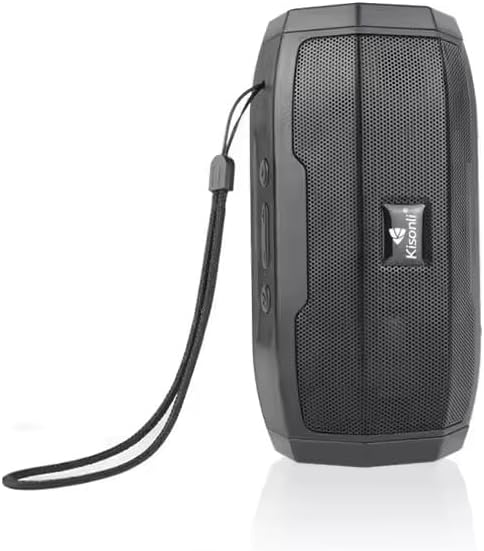
Figura 1: Frente view of the Kisonli S9 portable Bluetooth speaker, black color, with the Kisonli logo visible on the speaker grille. A wrist strap is attached to the side.
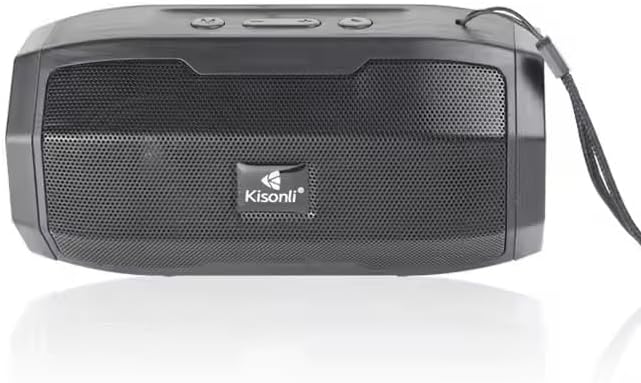
Figura 2: De arriba hacia abajo view of the Kisonli S9 speaker's control panel and ports, with labels indicating functions such as power switch, charging port, USB port, TF card slot, AUX input, and control buttons for volume, track, and mode.
Funciones de control:
- Interruptor encendido / apagado: Located at the back, slides to power the speaker on or off.
- Battery Charging DC-5V Port: Puerto micro USB para cargar el altavoz.
- U Disk Playback / Intelligent Mobile Charging Interface: USB-A port for playing music from a USB drive or potentially charging a mobile device (check product specifications for charging capability).
- Reproducción de tarjeta TF: Ranura para reproducir música directamente desde una tarjeta TF (MicroSD).
- AUX and Audio Antenna: 3.5mm audio input for connecting external devices via an AUX cable. This port may also function as an antenna for FM radio if supported.
- Botón de reproducción/pausa: Controla la reproducción de música.
- Botón Siguiente canción / Subir volumen: Presione brevemente para pasar a la siguiente pista, presione prolongadamente para aumentar el volumen.
- Last Song / Volume Down Button: Presione brevemente para ir a la pista anterior, presione prolongadamente para disminuir el volumen.
- BT/USB/AUX Modes Switch: Button to cycle through different playback modes (Bluetooth, USB, AUX, TF card).
Configuración
1. Carga del altavoz
- Connect the provided USB charging cable to the DC-5V charging port on the speaker.
- Connect the other end of the USB cable to a standard USB power adapter (5V DC) or a computer's USB port.
- La luz indicadora de carga se iluminará (el color puede variar) para mostrar que el altavoz se está cargando.
- Once fully charged, the indicator light may change color or turn off. A full charge typically takes a few hours.
2. Encendido / apagado
- Para encenderlo, deslice el interruptor de encendido/apagado a la posición "ON". Oirá una señal sonora.
- Para apagar, deslice el interruptor de ENCENDIDO/APAGADO a la posición 'APAGADO'.
Instrucciones de funcionamiento
1. Modo Bluetooth
- Encienda el altavoz. Entrará automáticamente en modo de emparejamiento Bluetooth, lo cual se indicará mediante una luz LED parpadeante y una señal sonora.
- En su dispositivo móvil (teléfono inteligente, tableta, computadora), habilite Bluetooth y busque los dispositivos disponibles.
- Seleccione "S9" de la lista de dispositivos.
- Una vez emparejado, la luz LED dejará de parpadear y escuchará un sonido de confirmación.
- Ahora puedes reproducir audio desde tu dispositivo a través del altavoz.
2. Modo de reproducción USB
- Inserte una unidad flash USB que contenga audio MP3 files en el puerto USB.
- Press the Mode Switch button (BT/USB/AUX) until the speaker enters USB mode. It should automatically start playing music.
3. TF Card Playback Mode
- Inserte una tarjeta TF (MicroSD) que contenga audio MP3 files en la ranura para tarjeta TF.
- Press the Mode Switch button (BT/USB/AUX) until the speaker enters TF card mode. It should automatically start playing music.
4. Modo de entrada AUX
- Conecte un extremo de un cable de audio de 3.5 mm (no incluido) al puerto AUX del altavoz.
- Conecte el otro extremo del cable de audio al conector de auriculares o a la salida de audio de su dispositivo externo.
- Press the Mode Switch button (BT/USB/AUX) until the speaker enters AUX mode.
- Play audio from your external device. Volume control may need to be adjusted on both the speaker and the external device.
5. Control de volumen y pista
- Sube el volumen: Long press the 'Next Song / Volume Up' button.
- Bajar volumen: Long press the 'Last Song / Volume Down' button.
- Pista siguiente: Short press the 'Next Song / Volume Up' button.
- Pista anterior: Short press the 'Last Song / Volume Down' button.
- Reproducir/Pausa: Short press the 'Play/Pause' button.
Mantenimiento
- Limpieza: Utilice un paño suave y seco para limpiar el exterior del altavoz. No utilice limpiadores abrasivos ni disolventes.
- Almacenamiento: Guarde el altavoz en un lugar fresco y seco, alejado de la luz solar directa y de temperaturas extremas.
- Cuidado de la batería: Para prolongar la vida útil de la batería, evite descargarla por completo con frecuencia. Cargue el altavoz regularmente, incluso si no lo usa, para mantener la batería en buen estado.
- Resistencia al agua: Este altavoz no es resistente al agua. Evite la exposición al agua o a la humedad excesiva.
Solución de problemas
| Problema | Posible causa | Solución |
|---|---|---|
| El altavoz no se enciende. | La batería está agotada. | Cargue el altavoz durante al menos 2 o 3 horas. |
| No hay sonido. | El volumen está demasiado bajo o silenciado. Se seleccionó el modo incorrecto. | Increase volume on both speaker and connected device. Ensure correct playback mode (Bluetooth, USB, TF, AUX) is selected. |
| No se puede emparejar a través de Bluetooth. | Speaker is not in pairing mode. Device Bluetooth is off. Too far from speaker. | Ensure speaker is in Bluetooth mode and flashing. Turn Bluetooth off and on again on your device. Move device closer to the speaker (within 10 meters). |
| La tarjeta USB/TF no se reproduce. | Incorrecto file Formato. La tarjeta/unidad no se insertó correctamente. | Asegurar audio files are in MP3 format. Reinsert the USB drive or TF card firmly. Ensure speaker is in the correct mode. |
Presupuesto
| Característica | Especificación |
|---|---|
| Nombre del modelo | S9 |
| Potencia de salida | 5W |
| Capacidad de la batería | 1200 mAh |
| Vol de funcionamientotage | 5 V CC |
| Dimensiones (L x An x Al) | 153 x 75 x 75 mm |
| Opciones de reproducción | Bluetooth, USB (U disk), TF card, AUX |
| Duración de la batería | 3-6 horas (dependiendo del volumen y el uso) |
| Color | Negro |
| Peso del artículo | 100 gramos |
| Componentes incluidos | Guía de inicio rápido |
| País natal | Porcelana |
Garantía y soporte
This product is provided without an explicit warranty as per the product specifications. For any operational issues or questions not covered in this manual, please refer to the retailer or point of purchase for further assistance.