
1. Producto terminadoview
The Dormakaba DP 850 is an intelligent door lock designed for enhanced security and convenience. It features a push-pull handle and an automatic motor lock body. This lock offers multiple access methods and integrated safety features.
Las características principales incluyen:
- Métodos de acceso múltiple: Fingerprint, RFID Cards, PIN Code, Bluetooth Low Energy (BLE) via mobile app, and Mechanical Override Keys.
- Innovative Push-Pull Handle: Allows for effortless operation in either direction.
- Automatic Motor Lock Body: Provides secure locking.
- Funciones de seguridad avanzadas: Includes alarms for multiple failed entry attempts, high-temperature warnings, break-in attempts, and child lock functionality.
- Construcción duradera: Made with a metal body.
2. Componentes
Familiarize yourself with the components of your Dormakaba DP 850 Smart Door Lock:

Descripción de la imagen: A detailed diagram illustrating the outdoor and indoor units of the Dormakaba DP 850 Smart Door Lock. Key components are labeled with letters A through O for easy identification. The outdoor unit shows the keypad, RFID reader, fingerprint sensor, and handle. The indoor unit displays the battery compartment, emergency power terminal, and various buttons.
Componentes de la unidad exterior:
- Battery Warning Lamp: Indica estado de batería baja.
- Lector de tarjetas RFID: For unlocking with RFID cards.
- BLE Display Lamp: Indicates Bluetooth Low Energy status.
- Status Display Lamp: Provides visual feedback on lock status.
- Teclado: For entering PIN codes.
- Fingerprint Sensor (DP850): Para desbloqueo biométrico.
- Outdoor Handle: The exterior push-pull handle.
- [Reset] Button: Used for resetting the lock.
Componentes de la unidad interior:
- Emergency Power Supply Terminal: Para alimentación externa en caso de agotamiento de la batería.
- [Register] Button: Used for registering new users (fingerprints, cards, PINs).
- [CLOSE] Button: For manual locking from the inside.
- Blocking Indoor Handle: A mechanism to prevent the indoor handle from operating.
- Mango interior: The interior push-pull handle.
- Tapa de la batería: Protege el compartimento de la batería.
- Batería: Power source for the lock.
3. Contenido del paquete
Verify that all items are present in your Dormakaba DP 850 Smart Door Lock package:
- Dormakaba DP 850 Smart Door Lock Unit (Outdoor and Indoor)
- Tarjeta(s) RFID
- Tornillos para la instalación
- Strip (likely for cable management or sealing)
- Manual Key(s) (3 keys included)
4. Configuración e instalación
Proper installation is crucial for the functionality and security of your smart door lock. It is recommended to utilize professional installation services where available.
4.1 Requisitos de la puerta
- Grosor de puerta adecuado: The lock is designed for doors with a thickness between 40mm and 75mm.
- Ensure the door frame and existing mortise cutout are compatible with the DP 850 lock body dimensions.

Descripción de la imagen: Un primer plano view of a door edge with the mortise lock installed. Text overlays indicate 'Suitable Door Thickness 40-75mm' and 'Double Deadbolt Security', highlighting these key installation and security features.
4.2 Pasos de instalación (general)
While professional installation is advised, the general steps involve:
- Prepara la puerta: Ensure the door is clean and the mortise cutout is correctly sized.
- Instalar el cuerpo de la cerradura de embutir: Inserte la mortaja en el borde de la puerta y fíjela con tornillos.
- Install Outdoor Unit: Mount the outdoor unit, feeding necessary cables through the door.
- Install Indoor Unit: Connect the cables from the outdoor unit to the indoor unit and secure the indoor unit to the door.
- Instale las baterías: Open the battery cover on the indoor unit and insert the required batteries (refer to the diagram for battery location).
- Funcionalidad de prueba: Después de la instalación, pruebe todos los métodos de desbloqueo y asegúrese de que la cerradura funcione sin problemas.
4.3 Free Installation Service
Dormakaba offers free installation services in multiple cities. Please refer to the provided map or contact customer support to check if your location is covered.
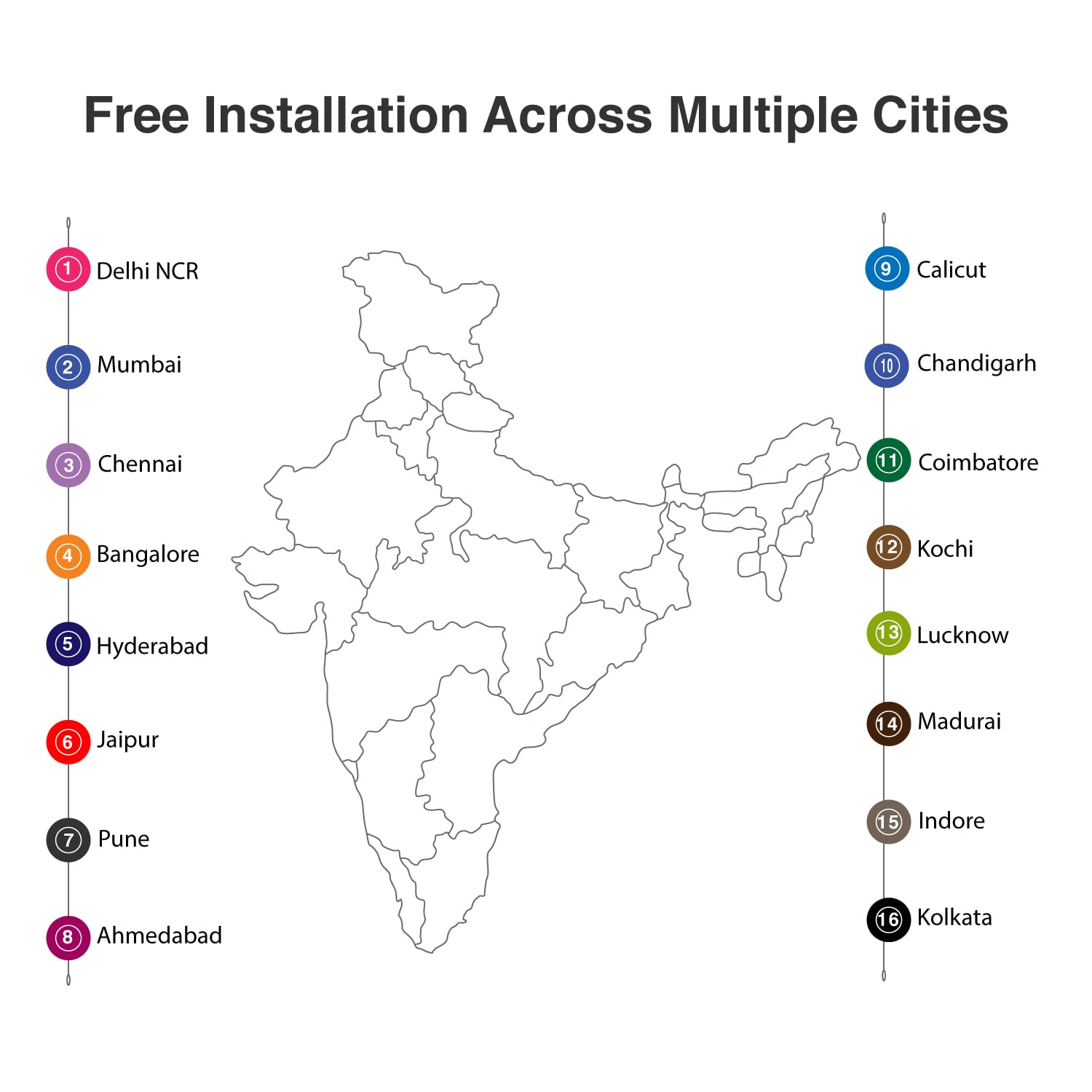
Descripción de la imagen: A map of India with numbered markers indicating cities where free installation services are available. These cities include Delhi NCR, Mumbai, Chennai, Bangalore, Hyderabad, Jaipur, Pune, Ahmedabad, Calicut, Chandigarh, Coimbatore, Kochi, Lucknow, Madurai, Indore, and Kolkata.
5. Instrucciones de funcionamiento
The Dormakaba DP 850 Smart Door Lock provides six methods for access control.

Descripción de la imagen: An infographic displaying six distinct unlocking methods for the Dormakaba DP 850 Smart Door Lock. Icons represent Fingerprint, Password, OTP (One-Time Password), Smart App (Bluetooth), Mechanical Key Override, and RFID, illustrating the versatility of access options.
5.1 Métodos de desbloqueo
- Huella dactilar: Place your registered finger on the fingerprint sensor. The lock will unlock upon successful verification. Up to 100 fingerprints can be registered.
- Tarjetas RFID: Present a registered RFID card to the RFID card reader area. The lock will unlock. Up to 100 RFID cards can be registered.
- Screen Touch PIN Code: Enter your 4-12 digit PIN code on the keypad, followed by the '#' key. The lock will unlock. Up to 4 PIN codes can be stored.
- BLE (Bluetooth Low Energy) Mobile App: Use the dedicated mobile application on a registered device to unlock the door via Bluetooth. Up to 10 mobile devices can be paired.
- Mechanical Override Keys: In case of emergency or battery failure, insert and turn one of the three provided mechanical keys to unlock the door.
- Push & Pull Handle: The innovative handle allows for intuitive opening. Simply push or pull the handle to open the door once unlocked by any of the above methods.

Descripción de la imagen: A visual representation of the Dormakaba DP 850 Smart Door Lock's push-pull handle mechanism. The image highlights the ergonomic design that allows the handle to be pushed or pulled for door operation, emphasizing its ease of use.
5.2 Registro de Usuario
To register new fingerprints, RFID cards, or PIN codes:
- Presione el [Registrarse] botón en la unidad interior.
- Follow the voice prompts or visual cues on the lock's display.
- For fingerprints, place your finger on the sensor multiple times as instructed.
- For RFID cards, present the card to the reader.
- For PIN codes, enter your desired code and confirm it.
- Ensure successful registration is confirmed by the lock.
5.3 Bloquear la puerta
The Dormakaba DP 850 features an automatic motor lock body, which typically locks automatically after the door is closed. You can also manually lock it from the inside by pressing the [CLOSE] botón.
5.4 Child Lock Functionality
To activate or deactivate the child lock, locate the blocking indoor handle mechanism on the indoor unit. Engage this mechanism to prevent the indoor handle from being operated, ensuring children cannot accidentally open the door from the inside.
6. Características de seguridad
The Dormakaba DP 850 Smart Door Lock incorporates several safety and alarm features to enhance security:

Descripción de la imagen: An infographic illustrating the various alarm features of the Dormakaba DP 850 Smart Door Lock. Icons and text describe alarms for high temperature, wrong PIN entry, low battery, high voltage prevention, and break-in attempts, highlighting the lock's comprehensive security.
- Alarm for Multiple Failed Entry Attempts: If an incorrect PIN code or unregistered fingerprint/card is attempted multiple times, an alarm will sound, and the lock may temporarily disable entry.
- High-Temperature Warning System: In case of abnormally high temperatures (e.g., fire), the lock may trigger an alarm and automatically unlock to facilitate escape.
- Break-in Attempt Alarm: If the lock detects forced entry or tampering, an alarm will be activated.
- Alarma de batería baja: The battery warning lamp (A) will illuminate, and an audible alert will sound when the battery level is low, prompting replacement.
- Alto voltage Prevención: The lock is designed with protection against high voltage surge.
7. Mantenimiento
To ensure the longevity and optimal performance of your Dormakaba DP 850 Smart Door Lock, follow these maintenance guidelines:
- Limpieza: Limpie la superficie de la cerradura con un paño suave y seco. Evite usar limpiadores abrasivos, disolventes o productos químicos agresivos, ya que pueden dañar el acabado y los componentes electrónicos.
- Reemplazo de batería: When the low battery alarm activates, replace all batteries promptly. Use high-quality alkaline batteries of the specified type. Refer to the Components section for battery location (O) and cover (N).
- Mechanical Key Usage: Keep the mechanical override keys in a safe, accessible location outside the secured area for emergency use. Test them periodically to ensure they function correctly.
- Cuidado del sensor de huellas dactilares: Keep the fingerprint sensor clean and dry. Avoid scratching its surface.
8. Solución de problemas
If you encounter issues with your Dormakaba DP 850 Smart Door Lock, refer to the following common problems and solutions:
- La cerradura no responde:
- Verifique el nivel de batería. Reemplace las baterías si están bajas.
- If completely unresponsive, use the emergency power supply terminal (I) with a 9V battery or the mechanical override key.
- Huella dactilar no reconocida:
- Asegúrese de que su dedo esté limpio y seco.
- Intente reposicionar su dedo sobre el sensor.
- Si los problemas persisten, vuelva a registrar su huella digital.
- El código PIN no funciona:
- Ensure you are entering the correct PIN code.
- Check if the keypad is illuminated and responsive.
- If multiple incorrect attempts trigger an alarm, wait for the lockout period to expire.
- Tarjeta RFID no detectada:
- Ensure the card is correctly presented to the RFID reader (B).
- Verify the RFID card is registered to the lock.
- Lock Alarms Continuously:
- Identify the type of alarm (e.g., low battery, break-in, high temperature) from the status display lamp or audible cues.
- Address the underlying cause (e.g., replace batteries, secure the door).
- Door Does Not Lock Automatically:
- Check if the door is fully closed and aligned with the frame.
- Inspect the mortise and strike plate for obstructions.
If these steps do not resolve the issue, please contact Dormakaba customer support.
9. Especificaciones
| Característica | Especificación |
|---|---|
| Nombre del modelo | DP-850 |
| Marca | dormakaba |
| Tipo de bloqueo | Biométrico, cerrojo, teclado |
| Material | Metal |
| Color | Oro blanco |
| Dimensiones del artículo (largo x ancho x alto) | 23 x 90 x 420 Millimeters (2.3 x 9 x 42 cm) |
| Peso del artículo | 5.25 kilogramos (5 kg 250 g) |
| Espesor de puerta recomendado | 40-75 milímetros |
| Capacidad de huellas dactilares | Hasta 100 |
| Capacidad de la tarjeta RFID | Hasta 100 |
| Capacidad del código PIN | Hasta 4 (4-12 dígitos) |
| BLE Device Capacity | Up to 10 mobile devices |
| Método de control | Toque, Voz |
| Protocolo de conectividad | Bluetooth |
| Componentes incluidos | RFID Card, Screws, Strip, Manual Key (3) |
10. Información de garantía
The Dormakaba DP 850 Smart Door Lock comes with a 1 año de garantía from the date of purchase. This warranty covers manufacturing defects and ensures the product functions as intended under normal use. Please retain your proof of purchase for warranty claims. For detailed terms and conditions, refer to the warranty card included in your package or contact Dormakaba customer support.
11. Información de contacto y asistencia
For technical assistance, installation queries, or warranty claims, please contact Dormakaba customer support:
- Fabricante: Dormakaba India Private Limited
- Importador/Envasador: Build pro Technologies India Pvt.Ltd
- Refer to your product packaging or the official Dormakaba websitio para obtener los datos de contacto más actualizados, incluidos números de teléfono y direcciones de correo electrónico.