
1. Producto terminadoview
The WANBO T-Type Ceiling Mount is a robust and adjustable mounting solution designed specifically for the Wanbo X5 Pro home projector. Constructed from high-quality aluminum alloy, this mount provides a secure and stable platform for ceiling installation. Its adjustable design allows for precise positioning of your projector, ensuring optimal viewing angles. The minimalist aesthetic integrates seamlessly into various room decors.
2. Contenido del paquete
Verifique que todos los componentes estén presentes en el paquete antes de continuar con la instalación.
- Brazo de montaje
- Herrajes de montaje (tornillos, anclajes)
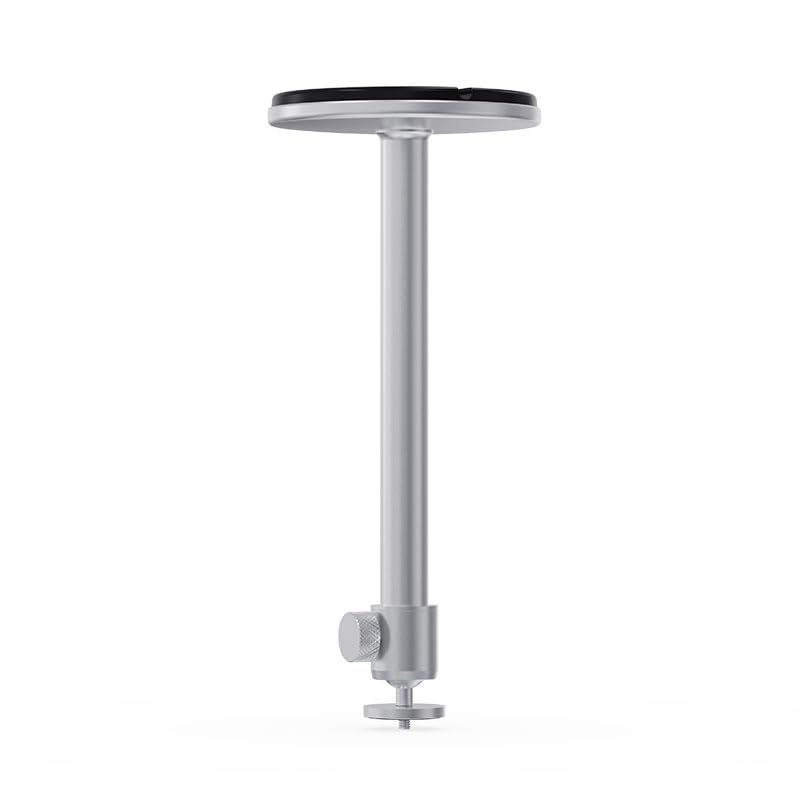
Image 2.1: Components of the WANBO T-Type Ceiling Mount, including the main arm and the ceiling base.
3. Información de seguridad
- Lea todas las instrucciones cuidadosamente antes de la instalación.
- Ensure the mounting surface (ceiling) can safely support the combined weight of the mount and the projector (maximum 10 pounds).
- Utilice herramientas y equipos de seguridad adecuados durante la instalación.
- Si no está seguro acerca de la instalación, consulte a un profesional calificado.
- No apriete demasiado los tornillos, ya que esto puede dañar el soporte o el proyector.
- Mantenga a los niños y las mascotas alejados del área de instalación.
4. Configuración e instalación
Follow these steps to securely install your WANBO T-Type Ceiling Mount.
4.1 Identify Mounting Location
- Choose a suitable location on the ceiling that provides a clear projection path and is structurally sound.
- Ensure there are no electrical wires or plumbing in the drilling path.
4.2 Montar el soporte
- Attach the mounting arm to the circular ceiling base by screwing them together. Ensure it is hand-tightened securely.

Image 4.1: The WANBO T-Type Ceiling Mount fully assembled before ceiling installation.
4.3 Mount to Ceiling
- Hold the assembled mount against the chosen ceiling location and mark the drilling points through the holes in the circular base.
- Drill pilot holes into the ceiling at the marked points. Use appropriate drill bits for your ceiling material.
- Insert the provided wall anchors (if necessary for your ceiling type) into the pilot holes.
- Align the mount's base with the drilled holes and secure it to the ceiling using the provided screws. Ensure the mount is firmly attached and does not wobble.
4.4 Attach Projector
- Locate the mounting screw hole on the bottom of your Wanbo X5 Pro projector.
- Align the projector's mounting hole with the threaded screw at the end of the mount's arm.
- Carefully screw the projector onto the mount until it is secure. Do not overtighten.
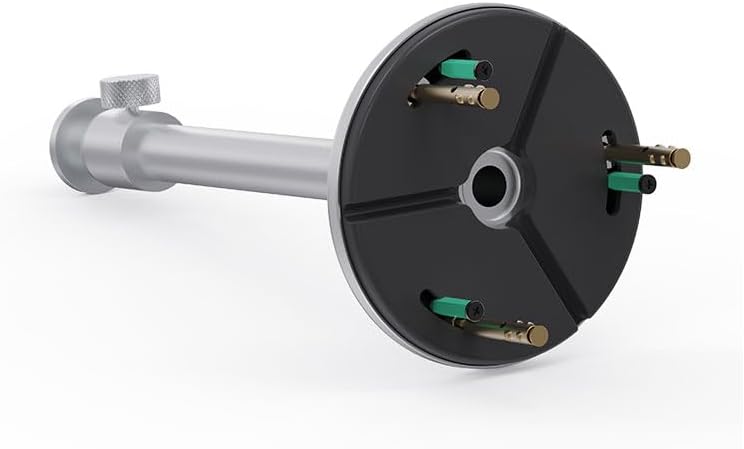
Image 4.2: Detail of the projector attachment mechanism on the mount.
5. Instrucciones de funcionamiento
The WANBO T-Type Ceiling Mount offers adjustable features for optimal projector positioning.
5.1 Ajuste de altura
The mount features a telescoping design. To adjust the height, loosen the knob on the side of the mounting arm, extend or retract the arm to the desired length (up to 13.0 inches), and then tighten the knob firmly to secure the position.
5.2 Rotating the Projector
The mount allows for rotation. Gently rotate the projector to achieve the desired horizontal angle. Ensure the projector is stable after adjustment.
6. Mantenimiento
- Limpieza: Limpie el soporte con un paño suave y seco. No utilice limpiadores abrasivos ni disolventes.
- Controles periódicos: Revise periódicamente todos los tornillos y conexiones para asegurarse de que permanezcan ajustados y seguros.
- Límite de peso: No exceda la capacidad máxima de peso de 10 libras.
7. Solución de problemas
- El monte se siente inestable: Ensure all mounting screws are securely tightened to the ceiling and the projector is firmly attached to the mount. Verify the ceiling structure is adequate.
- Difficulty adjusting height/rotation: Loosen the adjustment knob sufficiently before attempting to move the arm or rotate the projector. Do not force adjustments.
- Projector not level: Re-adjust the rotation and ensure the ceiling mount itself is installed level.
8. Especificaciones
| Marca | WANBO |
| Nombre del modelo | T-Type Ceiling Mount |
| Número de modelo | WBUS-T-X5 Pro (WBCA01) |
| Dispositivos compatibles | Proyector Wanbo X5 Pro |
| Tipo de montaje | Montaje en el techo |
| Material | Aleación de aluminio |
| Color | Plata |
| Capacidad máxima de peso | 10 libras (4.5 kg) |
| Peso del artículo | 0.7 libras (0.32 kg) |
| Longitud del brazo | 13.0 pulgadas (33 cm) |
| Características adicionales | Adjustable, Rotatable |
9. Garantía y soporte
9.1 Información de garantía
This WANBO T-Type Ceiling Mount comes with a 1 año de garantía del fabricante Desde la fecha de compra. Esta garantía cubre defectos de materiales y mano de obra en condiciones normales de uso. No cubre daños causados por instalación incorrecta, mal uso, accidentes o modificaciones no autorizadas.
9.2 Atención al cliente
For technical assistance, warranty claims, or any questions regarding your WANBO T-Type Ceiling Mount, please contact WANBO customer support through the official WANBO website or your retailer's support channels. Please have your model number (WBUS-T-X5 Pro) and proof of purchase ready when contacting support.