
1. Introducción
This manual provides detailed instructions for the proper use, setup, and maintenance of your Caliber Scientific Calculator, Model 297208. Designed for students, engineers, and professionals, this calculator offers 240 functions for a wide range of mathematical and scientific calculations.
Lea este manual detenidamente antes de utilizar la calculadora para garantizar un rendimiento óptimo y una larga vida útil.
2. Información de seguridad
- Keep the calculator away from extreme temperatures, direct sunlight, and high humidity.
- Evite dejar caer la calculadora o someterla a impactos fuertes.
- Do not attempt to disassemble or modify the calculator. This will void the warranty.
- Use only the specified battery type. Incorrect battery usage may cause leakage or explosion.
- Advertencia sobre la batería: Mantenga las pilas fuera del alcance de los niños y las mascotas. Las pilas pueden ser nocivas si se ingieren. Si un niño o una mascota ingiere una pila, busque asistencia médica de inmediato.
3. Contenido del paquete
Upon opening your Caliber Scientific Calculator package, please verify that all items are present and in good condition:
- Caliber Scientific Calculator (Model 297208)
- Protective Hard Sliding Cover
- One AG10 Button Cell Battery (pre-installed or included separately)
- Manual de usuario (este documento)

Image 1: Caliber Scientific Calculator in retail packaging, showing key features.
4. Configuración
4.1. Fuente de alimentación
The Caliber Scientific Calculator operates on dual power sources: solar power and battery power. The solar panel provides power in well-lit environments, while the battery ensures operation in low-light conditions.
4.2. Instalación/Reemplazo de la Batería
Your calculator includes one AG10 button cell battery. If battery replacement is needed:
- Asegúrese de que la calculadora esté apagada.
- Localice el compartimiento de la batería en la parte posterior de la calculadora.
- Con un destornillador pequeño, abra con cuidado la tapa del compartimento de la batería.
- Remove the old battery and insert a new AG10 button cell battery, ensuring the correct polarity (+/-).
- Vuelva a colocar la tapa del compartimiento de la batería y asegúrela con el tornillo.
Note: Some models may require a AAA battery. Refer to the specific markings on your calculator's battery compartment if different from AG10.
5. Funciones claveview
The calculator features a 10-digit LCD display and 240 functions. Familiarize yourself with the key layout:
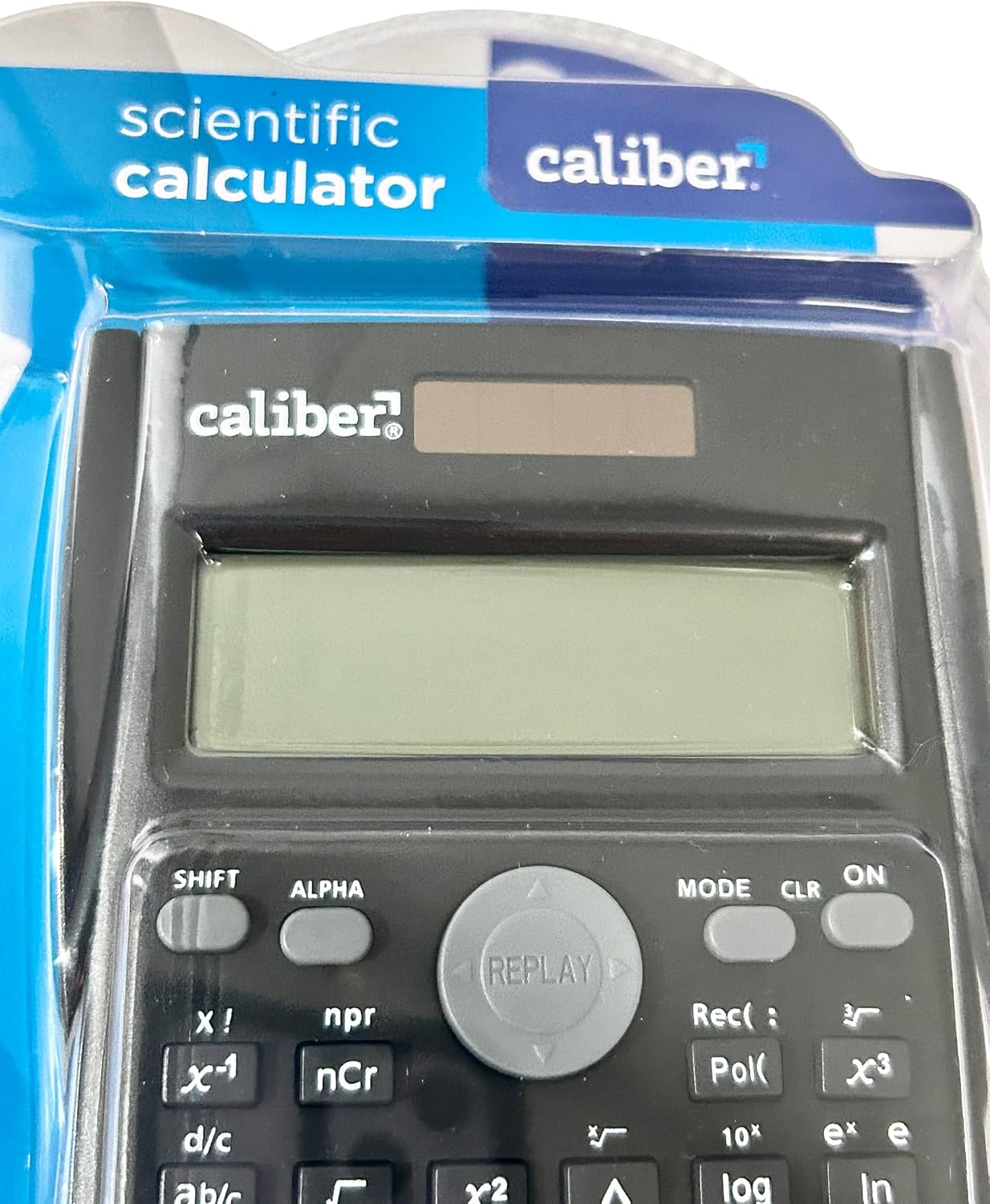
Image 2: Close-up of the calculator's display and key layout.
- Mostrar: 10-digit LCD for clear viewing of inputs and results.
- ENCENDIDO/APAGADO: Power on/off the calculator.
- CAMBIO: Accesses secondary functions printed above the keys (typically in yellow or orange).
- ALFA: Accesses alpha characters and variables (typically in red or green).
- MODO: Changes calculation modes (e.g., COMP, STAT, EQN).
- CLR: Clears memory or settings.
- DEL: Deletes the last entered digit.
- C.A: Clears all entries and resets the calculation.
- Teclas de flecha: Navigate through entries and results.
- = (Igual a): Executes the calculation.
6. Instrucciones de funcionamiento
6.1. Cálculos básicos
Para realizar operaciones aritméticas básicas:
- Presione el ON key to turn on the calculator.
- Introduzca el primer número.
- Presione la tecla de operación deseada (+, -, ×, ÷).
- Introduzca el segundo número.
- Presione el = Tecla para mostrar el resultado.
6.2. Funciones avanzadas
The calculator supports 240 functions, including trigonometric, logarithmic, statistical, and more. To access secondary functions (printed above keys), press the CAMBIO tecla antes de la tecla de función deseada.
- Funciones trigonométricas: pecado, porque, broncearse y sus funciones inversas (CAMBIO + pecado⁻¹, etc.).
- Funciones logarítmicas: registro (base 10), ln (logaritmo natural).
- Funciones de potencia y raíz: x², √, xʸ.
- Funciones de memoria: Usar STO (Tienda) y LCR (Recall) to save and retrieve values.
- Cálculos estadísticos: Ingresar MODO and select STAT mode for statistical computations.
For detailed instructions on specific functions, refer to the comprehensive instructions enclosed with your product (if applicable) or consult online resources for scientific calculator usage.
7. Mantenimiento
7.1. Limpieza
To clean your calculator:
- Limpie el exterior con un paño suave y seco.
- Para suciedad difícil, ligeramente dampEnjuague el paño con agua y jabón suave y séquelo inmediatamente.
- No utilice limpiadores abrasivos, disolventes ni alcohol, ya que pueden dañar el casing o pantalla.
7.2. Almacenamiento
When not in use, store the calculator in a cool, dry place, away from direct sunlight and extreme temperatures. Always use the protective hard sliding cover to prevent damage to the keys and display.

Image 3: Packaging detail showing features including the hard sliding cover and dual power.
8. Solución de problemas
| Problema | Posible causa | Solución |
|---|---|---|
| La calculadora no se enciende. | Luz insuficiente para energía solar o batería agotada. | Move to a brighter area or replace the AG10 button cell battery. |
| Display shows "ERROR". | Mathematical error (e.g., division by zero, invalid input). | Prensa AC to clear the error and re-enter the calculation correctly. |
| Resultados de cálculo incorrectos. | Incorrect mode selected, or input error. | Compruebe el modo actual (MODO key) and ensure correct data entry. Clear all memory (CAMBIO + CLR) si necesario. |
9. Especificaciones
| Número de modelo | 297208 |
| Marca | Calibre |
| Tipo de pantalla | LCD de 10 dígitos |
| Numero de funciones | 240 |
| Tipo de calculadora | Ingeniería/Científico |
| Fuente de poder | Dual Power (Solar & Battery) |
| Tipo de batería | 1 x AG10 Button Cell (included) or 1 x AAA (may vary by model) |
| Tamaño de pantalla | 3 pulgadas |
| Dimensiones (largo x ancho) | 6" x 3" |
| Material del recinto | Plástico |
| Código Postal | 050428205495 |
10. Garantía y soporte
10.1. Información de garantía
This product is subject to a return policy. For details regarding returns, exchanges, or warranty claims, please refer to the retailer's return policy where the product was purchased.
10.2. Atención al cliente
For further assistance, technical support, or inquiries not covered in this manual, please contact Caliber customer service through their official websitio o el minorista al que le compró el producto.