
1. Información importante de seguridad
Please read all safety instructions carefully before using your COLORROOM A30 tablet. Keep this manual for future reference.
- No exponga el dispositivo a temperaturas extremas, luz solar directa o humedad alta.
- Evite dejar caer o someter la tableta a impactos fuertes.
- Utilice únicamente cargadores y accesorios aprobados para evitar daños y garantizar la seguridad.
- No intente desmontar ni reparar el dispositivo usted mismo. Póngase en contacto con el servicio de atención al cliente para obtener ayuda.
- Keep the tablet away from children and pets to prevent accidental ingestion of small parts.
2. Contenido del paquete
Verifique que todos los artículos estén presentes en el paquete:
- COLORROOM A30 Tablet
- Cable USB tipo C
- Power Adapter (18W PD compatible)
- Manual de usuario
- Estuche protector
- Protector de pantalla (preaplicado o incluido)
- SIM Ejector Tool (SD pin)

Image: The COLORROOM A30 tablet and its included accessories, such as the USB-C cable, power adapter, and documentation, neatly arranged in the product box.
3. Dispositivo terminadoview
Familiarize yourself with the physical components of your COLORROOM A30 tablet.
- Cámara frontal: Ubicado en la parte superior central cuando se sostiene horizontalmente, se utiliza para videollamadas y selfies.
- Mostrar: 10.1-inch IPS screen for clear visuals.
- Botón de encendido: Generalmente en el lateral, se utiliza para encender/apagar el dispositivo o activar/desactivar la pantalla.
- Botones de volumen: Junto al botón de encendido, para ajustar los niveles de audio.
- Puerto USB tipo C: Para carga y transferencia de datos.
- Ranura para tarjeta microSD: Para ampliar el almacenamiento hasta 2 TB.
- Cámara trasera: Ubicado en la parte posterior, se utiliza para tomar fotografías y videos.
- Oradores: Altavoces duales para una experiencia de audio mejorada.
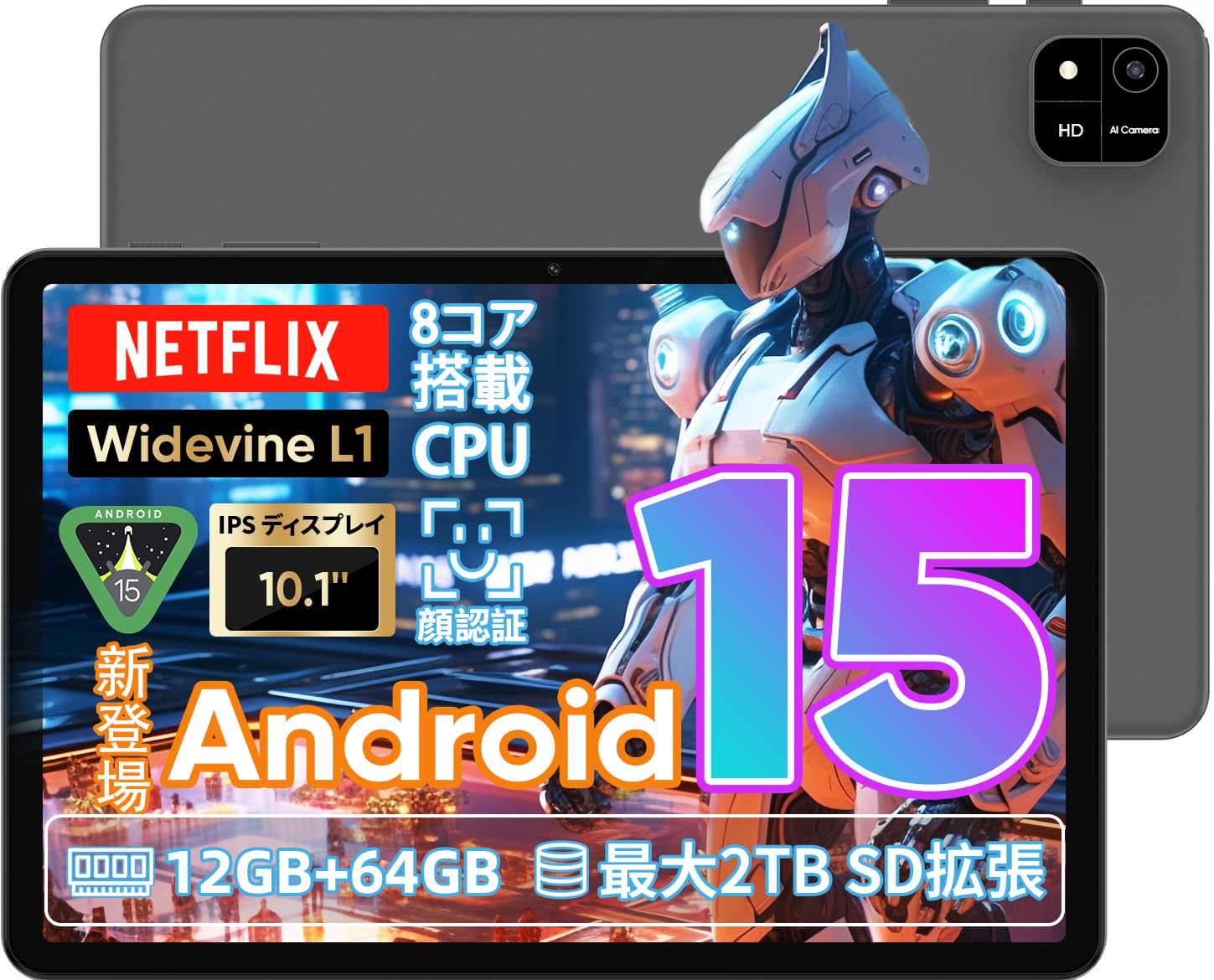
Image: A visual representation of the COLORROOM A30 tablet, highlighting its 10.1-inch display, Android 15 OS, T606 8-core CPU, 12GB RAM, 64GB ROM, 6000mAh battery, 5MP front camera, 8MP rear camera, 2.4G/5G WiFi, Bluetooth 5.0, GPS, and Widevine L1 support.
4. Configuración
4.1 Encendido inicial y selección de idioma
- Mantenga presionado el botón de encendido hasta que aparezca el logotipo COLORROOM.
- Follow the on-screen prompts to select your preferred language (e.g., Japanese).
- Tap 'Start' or 'Next' to proceed.
4.2 Conexión Wi-Fi
- Seleccione la red Wi-Fi deseada de la lista.
- Ingrese la contraseña de Wi-Fi si se le solicita.
- Toque "Conectar".
4.3 Configuración de la cuenta de Google
- Inicia sesión con tu cuenta de Google o crea una nueva. Esto es necesario para descargar aplicaciones de Google Play Store.
- Review and accept the Google Terms of Service and Privacy Policy.
4.4 Set Screen Lock (PIN/Pattern/Password)
- For security, set a screen lock method (PIN, pattern, or password). A 6-digit PIN is recommended.
- You may choose to skip this step, but it is not recommended for device security.
Video: This video demonstrates the initial setup process for an Android 15 tablet, including language selection, Wi-Fi connection, Google account setup, and setting a screen lock. While the video features an M30 tablet, the setup steps are generally applicable to the COLORROOM A30.
5. Instrucciones de funcionamiento
5.1 Operaciones básicas
- Widgets: Long-press on an empty area of the home screen to add widgets like a clock or calendar for quick access to information.
- Pantalla encendida/apagada: The tablet can be configured to turn on the screen automatically when lifted, allowing you to quickly check notifications. This setting can be found under System > Gestures.
Video: This video illustrates basic Android tablet functions, including adding and removing widgets from the home screen, and enabling the 'lift to wake' feature for notifications. Although shown on an M30 tablet, these features are common to Android 15 devices like the COLORROOM A30.
5.2 Funciones de visualización
The COLORROOM A30 features a 10.1-inch IPS display with 1280x800 resolution, offering clear and vibrant visuals for all your content. It supports Widevine L1, enabling high-definition streaming from platforms like Netflix and Hulu.

Image: The COLORROOM A30 tablet showcasing its 10.1-inch IPS display with vivid colors and sharp details, ideal for watching movies and reading e-books.
5.3 Rendimiento
Powered by an 8-core T606 CPU, the COLORROOM A30 delivers smooth performance for multitasking, gaming, and media consumption. It comes with 12GB (virtual) RAM and 64GB of internal storage, expandable up to 2TB via a TF (MicroSD) card.

Imagen: Un detalle view of the COLORROOM A30 tablet's internal components, emphasizing the T606 8-core CPU and the 6000mAh large-capacity battery, indicating high performance and extended usage.
5.4 Cámara
The tablet is equipped with an 8MP rear camera for capturing photos and videos, and a 5MP front camera for video calls and selfies. Face recognition is supported for convenient unlocking.

Image: The COLORROOM A30 tablet displayed from the front and back, showcasing its 8MP rear camera and 5MP front camera, designed for capturing moments and facilitating video communication.
5.5 Conectividad
Enjoy seamless connectivity with 2.4G/5G dual-band Wi-Fi, Bluetooth 5.0, and built-in GPS for navigation and location services.
5.6 Gestión de la batería
The 6000mAh battery provides extended usage, and with Type-C and 18W PD fast charging, you can quickly recharge your device.
5.7 Kids Space
The tablet includes a Kids Space feature, offering a safe and curated environment for children. Parents can manage content, set usage limits, and monitor activities remotely.
Video: This video demonstrates the Kids Space feature on a tablet, showing how children can access age-appropriate content and how parents can manage settings like usage time and content restrictions remotely. While shown on a T10 tablet, the functionality is similar for the COLORROOM A30.
5.8 Multitarea y pantalla dividida
Android 15 enhances multitasking capabilities. You can use the split-screen feature to run two applications simultaneously, improving productivity. For example, watch a video while browsing the web.
Video: This video showcases the unboxing of an Android 15 tablet and demonstrates various features including reading comics, watching videos, using split-screen mode for multitasking, and taking screenshots. While the video features an AvidPad S60, the demonstrated features are applicable to the COLORROOM A30.
6. Mantenimiento
- Limpieza: Utilice un paño suave y sin pelusa para limpiar la pantalla y el cuerpo de la tableta. Evite usar productos químicos agresivos o materiales abrasivos.
- Actualizaciones de software: Revisa e instala periódicamente las actualizaciones del sistema para garantizar un rendimiento óptimo, seguridad y acceso a nuevas funciones. Ve a Configuración > Sistema > Actualización del sistema.
- Administración de almacenamiento: Limpiar periódicamente lo innecesario files y aplicaciones para liberar espacio de almacenamiento y mantener la velocidad del dispositivo.
7. Solución de problemas
| Problema | Solución |
|---|---|
| La tableta no se enciende | Asegúrese de que la batería esté cargada. Conecte el cargador y espere unos minutos antes de volver a encenderlo. Si no responde, fuerce el reinicio manteniendo pulsado el botón de encendido durante 10-15 segundos. |
| Problemas de conexión wifi | Comprueba si el Wi-Fi está activado en la configuración. Reinicia el router y la tableta. Asegúrate de estar dentro del alcance de la señal Wi-Fi. |
| Las aplicaciones se bloquean o se congelan | Close and reopen the app. Clear the app's cache (Settings > Apps > [App Name] > Storage > Clear cache). Ensure the app is updated to the latest version. Restart the tablet. |
| Rendimiento lento | Cierra las aplicaciones que no uses. Borra la caché y los archivos temporales. files. Check for system updates. Consider a factory reset if the issue persists (backup data first). |
8. Especificaciones
| Característica | Detalle |
|---|---|
| Marca | SALA DE COLORES |
| Modelo | A30 |
| Sistema operativo | Androide 15 |
| Procesador | Unisoc T606 8-core CPU |
| RAM | 12GB (Virtual) |
| memoria de sólo lectura | 64 GB |
| Almacenamiento expandible | Up to 2TB via TF (MicroSD) card |
| Mostrar | 10.1-inch IPS, 1280x800 resolution, Widevine L1 support |
| Capacidad de la batería | 6000 mAh |
| Cargando | Type-C, 18W PD |
| Cámara trasera | 8MP |
| Cámara frontal | 5MP |
| Conectividad | Wi-Fi 2.4G/5G, Bluetooth 5.0, GPS |
| Dimensiones | 32.29 x 19.8 x 3.7 cm (tamaño del paquete) |
| Peso | 1.04 kg (peso del paquete) |
9. Garantía y soporte
Your COLORROOM A30 tablet comes with a manufacturer's warranty. Please refer to the warranty card included in your package for specific terms and conditions.
For technical support, troubleshooting, or warranty claims, please contact COLORROOM customer service through the retailer where you purchased the product or visit the official COLORROOM websitio para información de contacto.
Always provide your product model (A30) and purchase details when seeking support.