
Introducción
This manual provides essential information for the safe and efficient use of your new CANDY FIDC X502IT electric built-in oven. This appliance features a 65-liter capacity, convection cooking, and grill functions, designed for modern kitchen integration. Please read these instructions carefully before installation and use, and keep them for future reference.

Imagen: Frente view of the CANDY FIDC X502IT electric built-in oven, showcasing its black and stainless steel design.
Información importante de seguridad
Always adhere to basic safety precautions when using electrical appliances to reduce the risk of fire, electric shock, burns, or injury.
- Seguridad eléctrica: Ensure the oven is properly grounded. Do not use adapters or extension cords. Disconnect power before servicing.
- Seguridad infantil: Keep children away from the oven during operation and cooling. The oven surfaces become hot.
- Riesgo de quemaduras: Use oven mitts when handling hot dishes and oven accessories. Do not touch hot surfaces directly.
- Peligro de incendio: Never leave the oven unattended while cooking. Do not store flammable materials in or near the oven. Clean grease and food debris regularly to prevent fires.
- Uso adecuado: Use the oven only for its intended purpose of cooking food. Do not use it for heating the room.
- Ventilación: Asegúrese de que haya una ventilación adecuada alrededor del aparato según las instrucciones de instalación.
Instalación y configuración
The CANDY FIDC X502IT is a built-in electric oven. Installation should be performed by a qualified technician in accordance with local safety regulations and the provided installation template.
Desembalaje
- Retire con cuidado el horno de su embalaje.
- Inspect the oven for any damage during transit. Report any damage to your retailer immediately.
- Remove all packaging materials, including protective films and accessories, from inside the oven cavity.
Conexión eléctrica
- Asegúrese de que la red vol.tage coincide con la placa de características del aparato.
- El horno debe estar conectado a una toma eléctrica debidamente conectada a tierra.
- The electrical circuit must be protected by a suitable circuit breaker.
Montaje del horno
- Install the oven into a suitable cabinet opening, ensuring proper clearances for ventilation.
- Fije el horno al gabinete utilizando los tornillos provistos.
- Ensure the oven is level before final tightening.

Imagen: Lateral view of the CANDY FIDC X502IT oven, showing its built-in design and ventilation slots.
Instrucciones de funcionamiento
Your CANDY FIDC X502IT oven features intuitive knob controls for function selection, temperature, and a mechanical timer.
Panel de control sobreview

Image: Close-up of the oven's control panel with three rotary knobs for function, temperature, and timer settings.
- Perilla izquierda: Function Selector (e.g., Convection, Grill, Conventional).
- Perilla del medio: Temperature Control (adjustable from 50°C to 250°C).
- Perilla derecha: Temporizador mecánico (hasta 60 minutos).
Estreno
Before cooking food, heat the empty oven for approximately 30 minutes at maximum temperature (250°C) using the conventional cooking mode. This helps to burn off any manufacturing residues and odors. Ensure the kitchen is well-ventilated during this process.
Modos de cocción
- Cocina Convencional: Heat from top and bottom elements. Ideal for baking cakes, bread, and roasting meats.
- Convection Cooking (Fan-Assisted): Heat distributed evenly by a fan. Suitable for cooking multiple dishes simultaneously, or for faster, more even cooking.
- Parrilla: Intense heat from the top element. Perfect for grilling meats, toasting, and browning dishes.
- Defrosting (Hot Air): Uses the fan to circulate ambient air for gentle defrosting.

Image: The CANDY FIDC X502IT oven installed in a kitchen, actively cooking a pizza on a rack inside.

Image: The CANDY FIDC X502IT oven installed in a kitchen, actively cooking a pie on a rack inside.
Configuración del temporizador
The mechanical timer can be set for up to 60 minutes. Turn the right knob clockwise to the desired cooking time. The oven will automatically switch off when the timer reaches zero, and an audible signal will sound.
Cuidado y mantenimiento
La limpieza y el mantenimiento regulares garantizarán la longevidad y el rendimiento óptimo de su horno.
Limpieza del interior del horno
- Asegúrese siempre que el horno esté frío y desconectado de la fuente de alimentación antes de limpiarlo.
- Limpie el interior con publicidad.amp cloth and mild detergent after each use to prevent food residue from baking on.
- For stubborn stains, use a specialized oven cleaner, following the product instructions carefully. Avoid abrasive cleaners or scourers.
- The oven features a polished stainless steel finish. Clean with a soft cloth and non-abrasive cleaner.
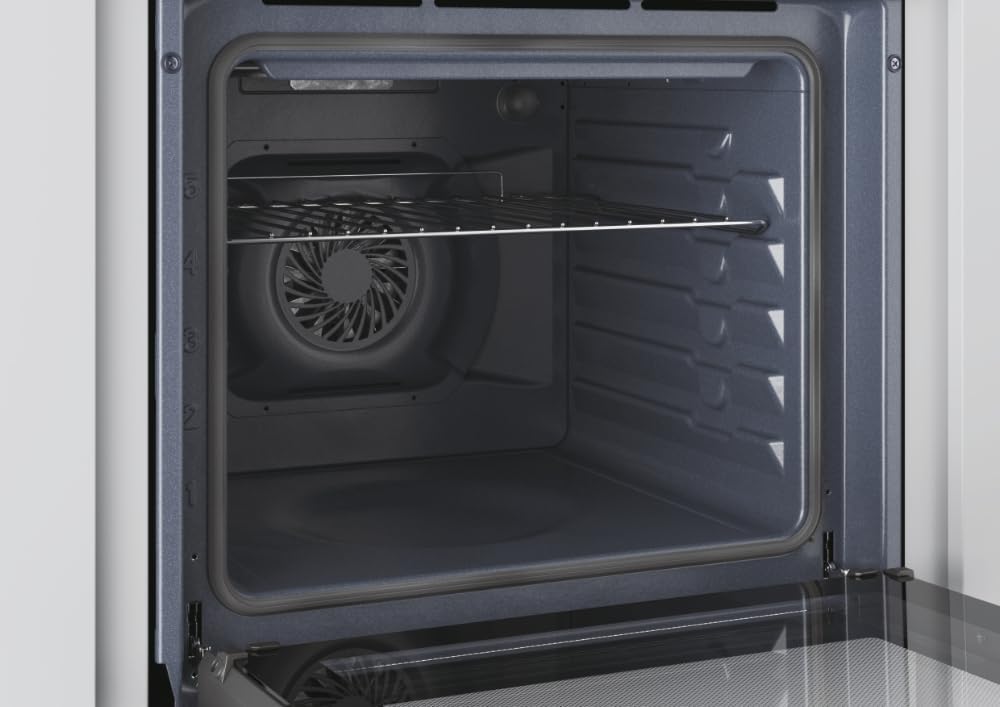
Imagen: Interior view of the CANDY FIDC X502IT oven, showing the removable wire rack and the fan at the back.
Accesorios de limpieza
- Remove oven racks and the grill tray. Wash them in warm soapy water or in a dishwasher.
- The included grill rack is designed for easy cleaning.

Image: A standard black enamel baking tray, typically included with the oven.
Reemplazo de la luz del horno
Ensure the oven is cool and disconnected from the power supply. Unscrew the protective glass cover, replace the bulb with a new oven-specific bulb (check wattage and type in specifications), and reattach the cover.
Guía para resolver problemas
Antes de ponerse en contacto con el servicio de atención al cliente, consulte la siguiente tabla para conocer los problemas más comunes y sus soluciones.
| Problema | Posible causa | Solución |
|---|---|---|
| El horno no calienta. | No hay suministro de energía; el horno no está encendido; el temporizador no está configurado. | Check power connection and circuit breaker. Ensure function and temperature knobs are set. Set the mechanical timer. |
| Los alimentos se cocinan de manera desigual. | Incorrect temperature or cooking mode; improper rack position; overloaded oven. | Adjust temperature/mode. Use recommended rack position. Avoid overcrowding the oven. |
| La luz del horno no funciona. | La bombilla está defectuosa o suelta. | Replace or tighten the oven light bulb (see Maintenance section). |
| Exceso de humo durante la cocción. | Derrames de alimentos o acumulación de grasa. | Clean the oven interior thoroughly. Avoid excessive grease. |
Especificaciones técnicas
| Característica | Detalle |
|---|---|
| Nombre del modelo | FIDCX502IT |
| Marca | DULCE |
| Tipo de horno | Electric, Built-in |
| Capacidad | 65 litros |
| Clase de eficiencia energética | A |
| Tipo de control | Perilla |
| Métodos de calentamiento | Convection, Grill, Conventional |
| Características especiales | Convection cooking, grill, LED indicator, adjustable temperature, mechanical timer, hot air defrosting |
| Color | Negro, acero inoxidable |
| Material | Acero inoxidable |
| Peso del artículo | 24.4 kilogramos |
| Componentes incluidos | Parrilla |
| Dirección de apertura de la puerta | Bien |
Garantía y soporte
Garantía del producto
This CANDY FIDC X502IT oven comes with a Garantía del fabricante de 2 años from the date of purchase. This warranty covers manufacturing defects and material faults under normal domestic use. Please retain your proof of purchase for warranty claims. The warranty does not cover damage caused by improper installation, misuse, neglect, or unauthorized repairs.
Atención al cliente
For technical assistance, spare parts, or warranty claims, please contact CANDY customer service. You can find contact details on the official CANDY website or through your local retailer. When contacting support, please have your oven's model number (FIDC X502IT) and serial number ready.