
Introducción
This manual provides detailed instructions for the safe and efficient operation of your THINKYA Y11 Portable Retro CD Bluetooth Player. This versatile device supports multiple audio playback modes including CD, Bluetooth, USB, AUX, and Optical. It features dual HiFi speakers, a rechargeable battery, and an RGB light show, all controllable via a convenient remote.
Contenido del paquete
Por favor, marque la casilla correspondiente a los siguientes artículos:
- THINKYA Y11 Portable CD Player
- Control remoto (pilas no incluidas)
- Cable de carga USB
- Cable de audio AUX
- Manual de usuario

Image: Contents of the THINKYA Y11 package, showing the player, remote control, USB cable, AUX cable, and user manual.
Producto terminadoview
Familiarize yourself with the various parts and controls of your THINKYA Y11 CD Player.
Image: Labeled diagram of the THINKYA Y11 CD Player, indicating the Ambient Light, Previous/Next buttons, Play/Pause, Volume Adjustment, Power Switch, Power Supply Port, USB, Headphone, Audio, and Optical ports.
- Luz ambiental: Multi-color LED indicator.
- Pre/Next Buttons: Navigate tracks or adjust settings.
- Botón de reproducción/pausa: Controlar la reproducción.
- Perilla de ajuste de volumen: Ajustar el nivel de salida de audio.
- Interruptor de alimentación: Encienda o apague el dispositivo.
- Puerto de fuente de alimentación: USB-C input for charging and power.
- Puerto USB: Para reproducción de unidad USB.
- Toma de auriculares: Salida de 3.5 mm para escucha privada.
- Puerto AUX: Entrada de 3.5 mm para fuentes de audio externas.
- Puerto óptico: Salida de audio digital.
Configuración
- Desembalaje: Retire con cuidado todos los componentes del embalaje. Conserve el embalaje para su posterior transporte o almacenamiento.
- Carga de la batería: Connect the provided USB charging cable to the Power Supply Port on the back of the player and to a USB power adapter (not included). The built-in 2600mAh battery provides 8-10 hours of playback on a full charge. Charging time is approximately 3.5 hours.
- Encendido/apagado: Flip the Power Switch on the back of the unit to turn the player on or off.
- Configuración del control remoto: Inserte 2 pilas AAA (no incluidas) en el control remoto.

Image: Visual representation of the THINKYA Y11's 2600mAh battery, 4-6 hours playback time, and 3.5 hours charging time.
Instrucciones de funcionamiento
1. Reproducción de CD
- Open the transparent lid of the CD player.
- Carefully place a CD (CD, CD-R, CD-DA, MP3, WMA, WAV, APE, FLAC compatible) onto the spindle, ensuring it is seated correctly.
- Close the lid. The player will automatically detect the CD and begin playback.
- Use the Play/Pause button, Pre/Next buttons, and Volume Adjustment knob on the unit or remote control to manage playback.
- Modos de repetición: Use the remote control to cycle through 'Repeat All', 'Random', 'In Order', and 'Repeat 1' track playback modes.

Image: The THINKYA Y11 CD Player showcasing its HiFi stereo sound capabilities and various CD playback options.
2. Modo Bluetooth
The Y11 player functions as both a Bluetooth transmitter and receiver.
Bluetooth Transmitter (Connecting to external Bluetooth devices)
- Ensure the player is in Bluetooth transmission mode (refer to the display or manual for mode indication).
- Coloque sus auriculares o altavoz Bluetooth en modo de emparejamiento.
- The player will search for and connect to nearby Bluetooth devices. Once connected, audio from the CD player will stream to your external device.
Bluetooth Receiver (Connecting your phone/tablet to the player)
- Switch the player to Bluetooth receiver mode.
- En su teléfono móvil, tableta o computadora, habilite Bluetooth y busque los dispositivos disponibles.
- Select "THINKYA Y11" from the list to pair. Once connected, audio from your device will play through the Y11's speakers.

Image: The THINKYA Y11 CD Player's two-way Bluetooth functionality, enabling it to transmit to Bluetooth headphones/speakers and receive from smartphones/tablets.
3. Reproducción USB
- Inserte una unidad flash USB que contenga audio files (MP3, WMA, WAV, APE, FLAC compatible) into the USB Port on the back of the player.
- The player will automatically switch to USB mode and begin playing audio from the drive.
- Use the Play/Pause and Pre/Next buttons to control playback.
Image: A USB flash drive inserted into the USB port of the THINKYA Y11 CD Player, ready for audio playback.
4. Modo AUX
- Connect one end of the 3.5mm AUX audio cable to the AUX Port on the back of the player.
- Connect the other end to the headphone jack or audio output of an external device (e.g., smartphone, MP3 player).
- Switch the player to AUX mode. Audio from the external device will play through the Y11's speakers.
5. Modo óptico
- Connect an optical audio cable (not included) from the Optical Port on the back of the player to an optical audio input on a compatible device (e.g., TV, amplifier, soundbar).
- Switch the player to Optical mode. This allows for high-quality digital audio output to your connected system.
6. Uso del control remoto
The included remote control allows convenient operation from a distance of up to 15 feet (10 meters).
- Botón de encendido: Enciende / apaga la unidad.
- Volumen +/-: Ajuste el nivel del volumen.
- Reproducir/Pausa: Iniciar o pausar la reproducción.
- Anterior Siguiente: Skip tracks or navigate menus.
- Botón de modo: Cycle through CD, Bluetooth, USB, AUX, and Optical modes.
- EQ/Bass/Treble: Adjust sound equalization (if available).
- Botón de luz: Control the RGB night light modes.
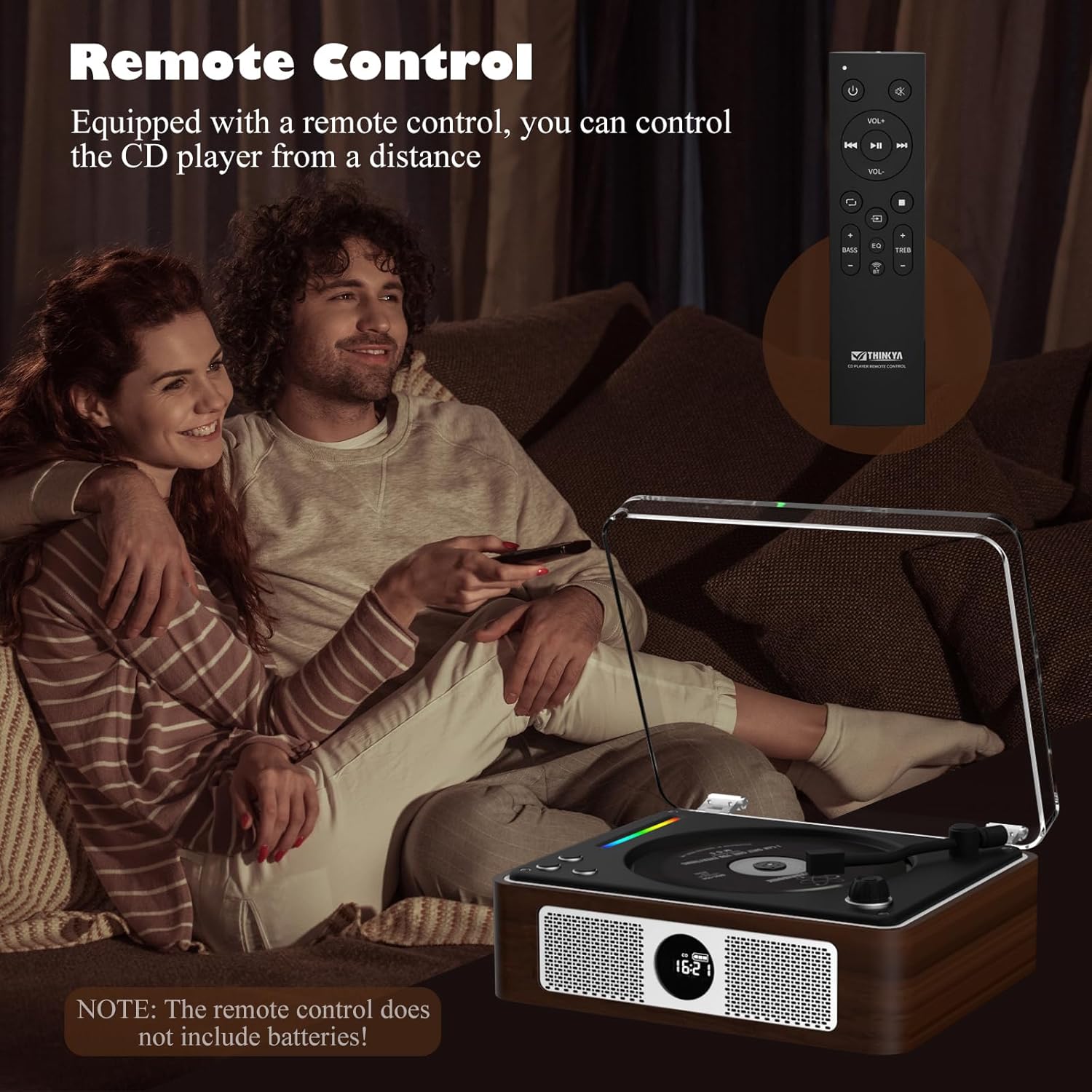
Image: A person using the remote control to operate the THINKYA Y11 CD Player while relaxing on a sofa.
7. Espectáculo de luces RGB de colores
The player features an RGB light bar that offers 10 different color-changing themes. Use the 'Light' button on the remote control to cycle through these modes, including colorful lights, automatic change, white light, blue light, and yellow light.
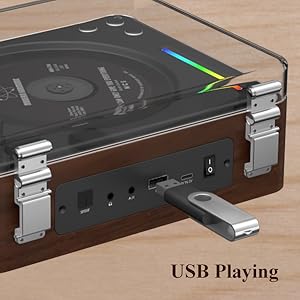
Imagen: Un primer plano view of the vibrant RGB light bar integrated into the THINKYA Y11 CD Player.
Mantenimiento
- Limpieza: Utilice un paño suave y seco para limpiar el exterior del reproductor. Para la lente de CD, utilice un limpiador especializado. No utilice limpiadores abrasivos ni disolventes.
- Cuidado de la batería: To prolong battery life, avoid fully discharging the battery frequently. Charge the player regularly, even if not in use for extended periods.
- Almacenamiento: Guarde el reproductor en un lugar fresco y seco, alejado de la luz solar directa y de temperaturas extremas.
- Diseño a prueba de golpes: The player features a 3-point silicone shockproof design to reduce vibrations and prevent skipping. However, avoid harsh impacts.

Image: Diagram illustrating the 3-point silicone shockproof design of the THINKYA Y11 CD Player, which helps maintain stability and prevent disc skipping.
Solución de problemas
| Problema | Posible causa | Solución |
|---|---|---|
| El reproductor no se enciende. | La batería está agotada o el cable de alimentación no está conectado. | Charge the battery using the USB-C cable. Ensure the power switch is in the 'ON' position. |
| CD is not playing or skipping. | CD is dirty, scratched, or incorrectly placed. Player is unstable. | Clean the CD with a soft cloth. Ensure the CD is placed correctly on the spindle. Place the player on a stable, flat surface. |
| El dispositivo Bluetooth no se puede conectar. | Player is not in correct Bluetooth mode or device is out of range. | Ensure the player is in the correct Bluetooth mode (transmitter or receiver). Place devices within 10 meters. Restart both devices. |
| No hay salida de sonido. | Volume is too low, incorrect mode selected, or cables are loose. | Increase volume. Verify the correct playback mode (CD, Bluetooth, USB, AUX, Optical) is selected. Check all cable connections. |
| El control remoto no funciona. | Las baterías están agotadas o el control remoto está fuera de alcance. | Replace remote control batteries (2x AAA). Ensure you are within 15 feet (10 meters) of the player and pointing the remote towards it. |
Presupuesto
- Número de modelo: Y11
- Marca: PIENSA EN TI
- Tecnología de conectividad: Auxiliary, USB, Bluetooth, Optical
- Tipo de altavoz: Estéreo
- Fuente de energía: Alimentado por batería (2600 mAh recargable)
- Duración de la batería: 8-10 hours playback
- Tiempo de carga: Aproximadamente 3.5 horas
- Formatos de disco compatibles: CD, CD-R, CD-DA
- Formatos de audio compatibles: MP3, WMA, WAV, MONO, FLAC
- Peso del artículo: 2.88 libras
- Dimensiones del paquete: 14.17 x 10.87 x 5.28 pulgadas
- Color: Marrón

Image: The THINKYA Y11 Portable CD Player with its dimensions clearly marked, highlighting its compact and portable size.
Garantía y soporte
THINKYA products are designed for reliability and performance. This product comes with a standard manufacturer's warranty against defects in materials and workmanship. For specific warranty terms, please refer to the warranty card included in your package or contact THINKYA customer support.
For technical assistance, troubleshooting, or service inquiries, please contact THINKYA customer support through the contact information provided in your product documentation or on the official THINKYA websitio.