
1. Producto terminadoview
The TOWODE Light Bulb Security Camera (Model TAHEIS) is a versatile surveillance device designed for indoor use, primarily in areas like garages, homes, and offices. It features 3MP HD video, AI human detection, two-way audio, color night vision, and compatibility with Alexa. The camera is designed for easy installation into a standard E27 light socket.

Figure 1: Product components including the camera, mobile application interface, 64GB TF card, and power adapter.
Características principales:
- Vídeo HD de 3 MP: Proporciona video nítido con resolución 2K para un monitoreo detallado.
- Panorámica de 355° e inclinación de 90°: Ofrece gran angular viewing to cover large areas and reduce blind spots.
- AI Human Detection & Motion Tracking: Intelligently identifies human movement and tracks subjects.
- Audio bidireccional: Enables communication through the camera's built-in microphone and speaker.
- Visión nocturna en color: Utilizes LED lights for full-color video in low-light conditions, with an infrared option.
- Compatibilidad con Alexa: Integrates with Alexa-enabled devices for voice control and viewEn.
- Almacenamiento local y en la nube: Supports up to 64GB TF card (included) and optional cloud storage for video recording.
- 30W 3000 Lumens LED Lighting: Functions as an adjustable LED light source.
2. Configuración e instalación
Contenido del paquete:
- TOWODE Light Bulb Security Camera (Model TAHEIS)
- 64G TFcard
- Power Adapter (if applicable for non-E27 direct installation)
- Mounting Screws (if applicable for alternative mounting)
Instalación física:
- Identificar la ubicación de la instalación: Choose an indoor E27 light socket in your desired monitoring area (e.g., garage, living room, basement). Ensure the socket is powered off before installation.
- Insertar tarjeta TF: Locate the SD card slot on the camera body. Gently insert the included 64GB TF card until it clicks into place.
- Screw in Camera: Carefully screw the camera into the E27 light socket. Ensure it is securely fastened.
- Encendido: Turn on the power to the light socket. The camera will initiate its startup sequence.

Video 1: Demonstrates the location of the SD card slot and reset button on the camera.

Figure 2: Visual guide for screwing the camera into a standard E27 light socket for power and mounting.
Descarga y conexión de la aplicación:
- Descargar aplicación: Scan the QR code in the product packaging or search for the 'AJCloud' app in your smartphone's app store (iOS/Android).
- Registrar Cuenta: Open the AJCloud app and follow the on-screen instructions to register a new account. This typically requires an email address and phone number.
- Agregar dispositivo: In the app, select 'Add Device' or the '+' icon. Choose 'Light Bulb Camera' from the device list.
- Conectarse a Wi-Fi: The app will guide you through connecting the camera to your Wi-Fi network. Ensure your Wi-Fi is 2.4GHz, as 5GHz networks may not be supported. Enter your Wi-Fi password when prompted.
- Emparejamiento: Follow the app's instructions for pairing. This may involve scanning a QR code displayed on your phone with the camera or listening for an audible prompt.
- Nombre del dispositivo: Once paired, name your camera (e.g., "Garage Camera", "Living Room").
Video 2: Demonstrates the process of connecting the light bulb camera to the mobile application, including Wi-Fi setup and device pairing.
3. Instrucciones de funcionamiento
Vivir View y Control:
- Acceso a la transmisión en vivo: Open the AJCloud app and select your camera to view la transmisión de video en vivo.
- Control de panorámica/inclinación: Use the on-screen joystick or swipe gestures to remotely control the camera's 355° pan and 90° tilt movements.
- Audio bidireccional: Toque el ícono del micrófono en la aplicación para hablar a través del altavoz de la cámara y escuchar a través del micrófono.
- Control de luz: The camera features a 30W LED light. Use the app to turn the light on/off and adjust its brightness (stepless adjustment).
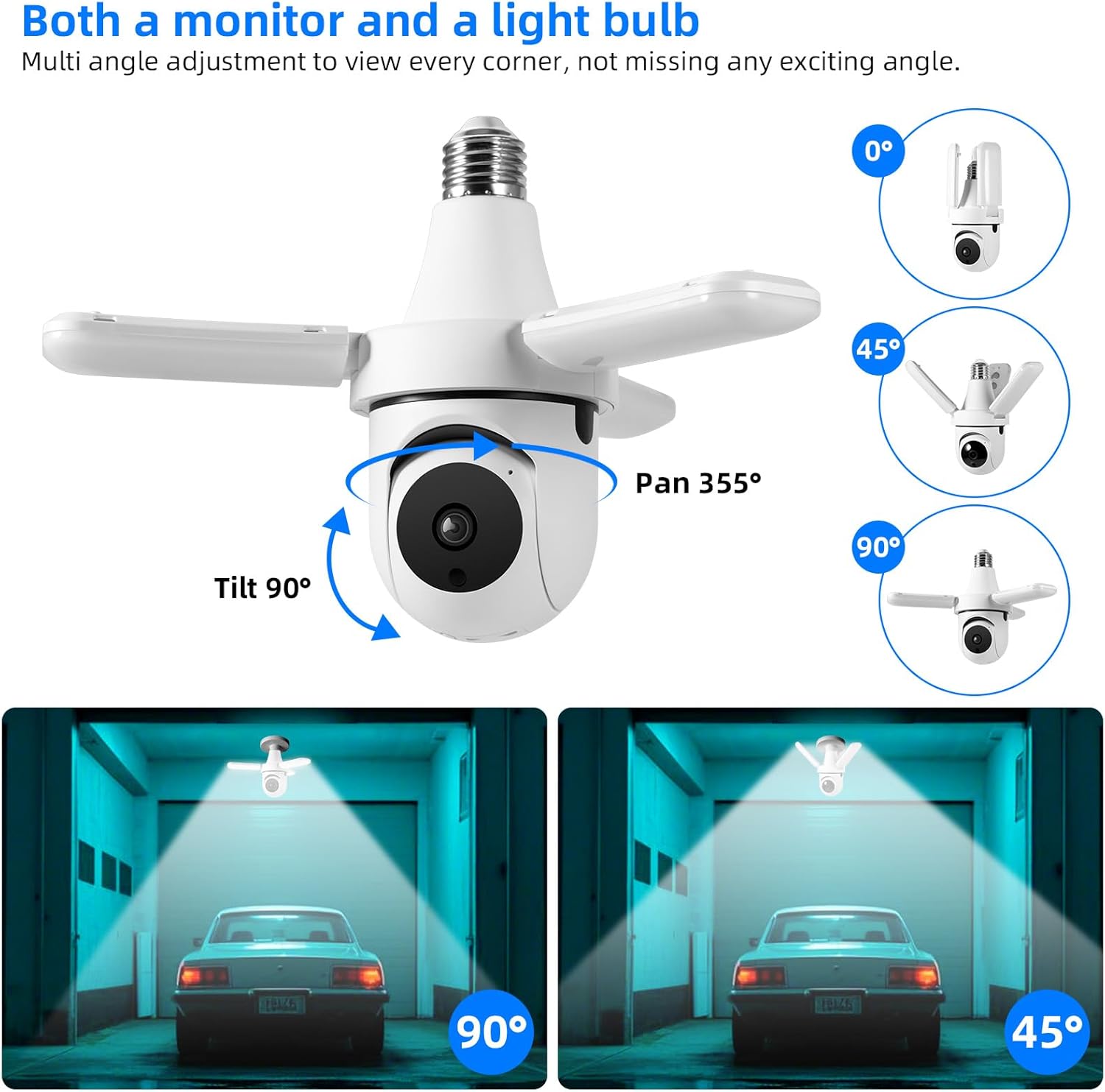
Figure 3: The camera offers extensive pan and tilt functionality to monitor a wide area.

Figure 4: Control the camera's integrated 30W LED light directly from the mobile application.
Recording and Alerts:
- Detección de movimiento: The camera is equipped with AI human detection. When motion is detected, the camera can automatically track the subject and send alerts to your phone.
- Visión nocturna: The camera offers both color night vision (with LED lights on) and infrared night vision (LED lights off) for clear visibility in the dark.
- Almacenamiento de vídeo: Recordings are saved to the installed 64GB TF card. You can review playback directly from the app. Cloud storage options may also be available through the app for an additional subscription.
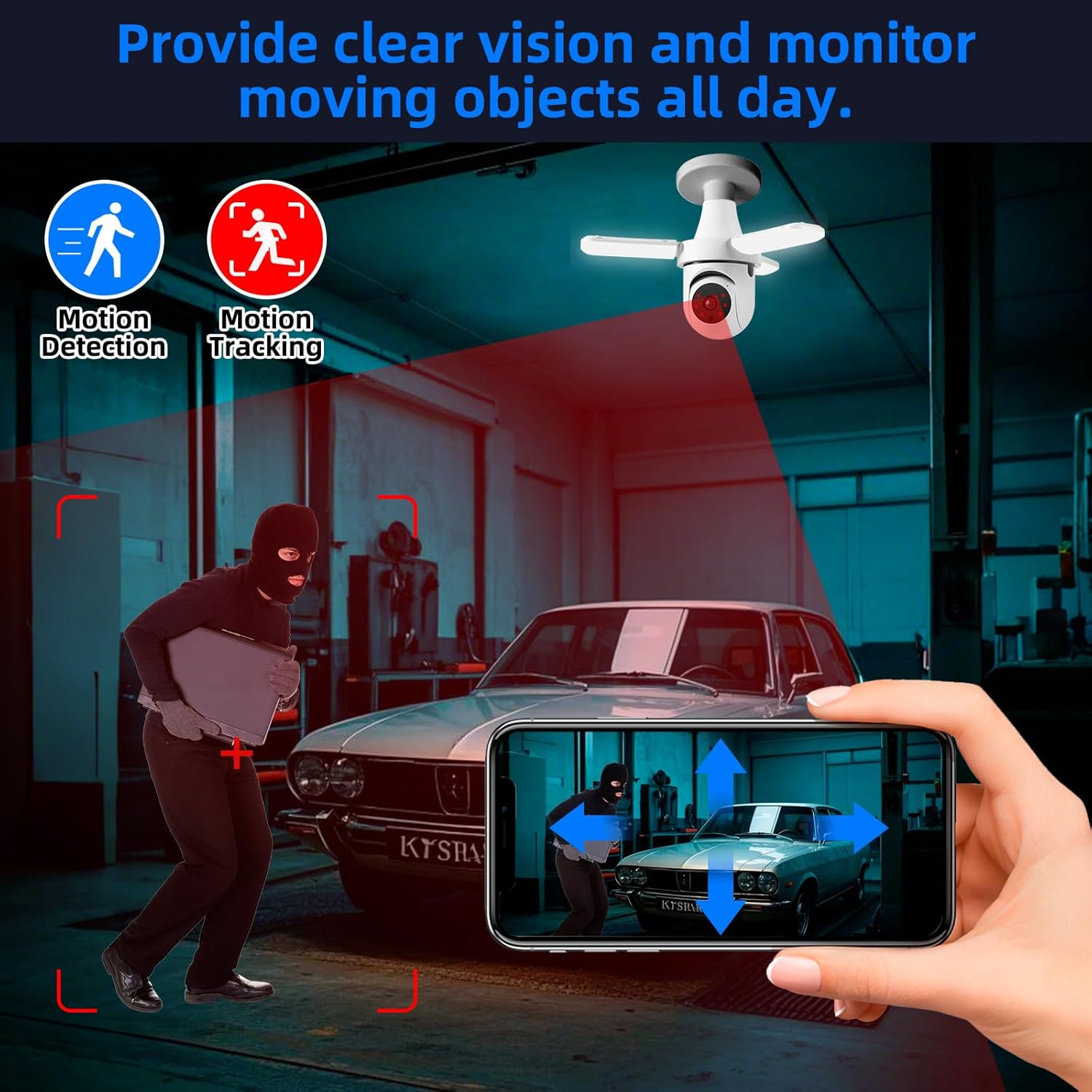
Figure 5: The camera's motion detection and tracking features provide real-time alerts and continuous monitoring.

Figure 6: Experience clear visibility day and night with 3MP HD video and color night vision capabilities.
Integración de casa inteligente:
- Compatibilidad con Alexa: The camera is compatible with Alexa. Link your AJCloud account to your Alexa app to enable voice commands for viewing the camera feed on compatible Alexa devices with screens.
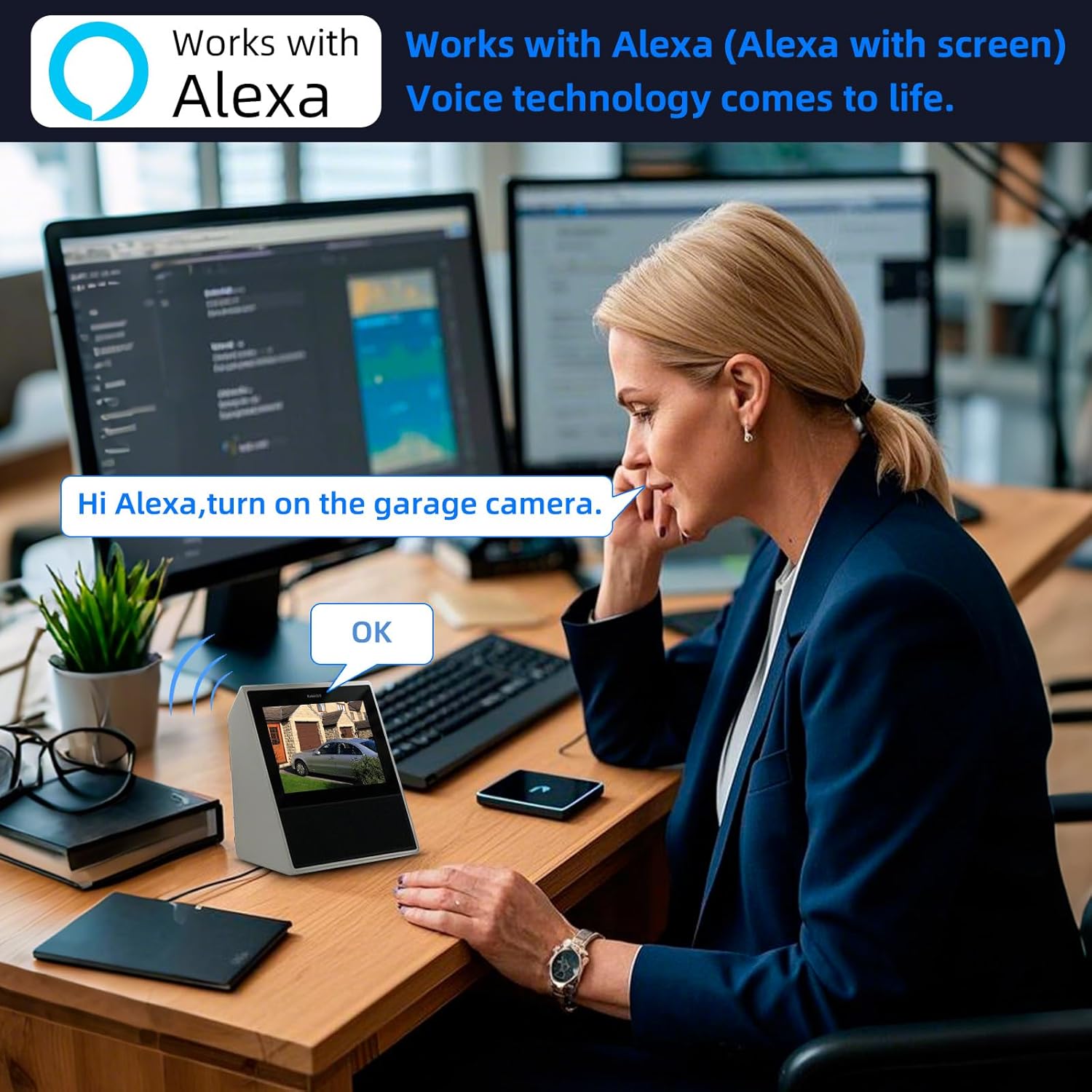
Figure 7: Control and view your camera feed using Alexa voice commands on compatible smart displays.
4. Mantenimiento
- Limpieza: Limpie regularmente la lente y el cuerpo de la cámara con un paño suave y seco para eliminar el polvo y las manchas. No utilice productos químicos agresivos ni limpiadores abrasivos.
- Gestión de tarjetas TF: Periodically check the TF card storage status in the app. Format the card if necessary to ensure continuous recording. Back up important footage antes de formatear.
- Actualizaciones de firmware: Check the AJCloud app regularly for available firmware updates. Keeping the firmware updated ensures optimal performance and security.
- Ciclo de energía: If the camera experiences issues, try turning off the power to the light socket for a few seconds, then turning it back on to restart the device.
5. Solución de problemas
- La cámara no se conecta a Wi-Fi:
- Asegúrese de que su red Wi-Fi sea de 2.4 GHz. La cámara no es compatible con Wi-Fi de 5 GHz.
- Verifique que la contraseña de Wi-Fi sea correcta.
- Check the camera's proximity to the Wi-Fi router for a strong signal.
- Perform a factory reset on the camera by pressing the reset button (often located near the SD card slot) for several seconds until you hear a prompt. Then, attempt to pair again.
- Sin alertas de movimiento:
- Check the motion detection settings in the AJCloud app. Ensure it is enabled and sensitivity is adjusted appropriately.
- Verifique que las notificaciones de la aplicación estén habilitadas en su teléfono inteligente.
- No Recording/Playback Issues:
- Ensure the 64GB TF card is correctly inserted and not full. Format the card if needed (this will erase all data).
- Si utiliza almacenamiento en la nube, verifique que su suscripción esté activa.
- Mala calidad de vídeo:
- Comprueba la intensidad de la señal de tu Wi-Fi. Una señal débil puede afectar la calidad de la transmisión de video.
- Asegúrese de que la lente de la cámara esté limpia y libre de obstrucciones.
- El audio bidireccional no funciona:
- Verifique la configuración del micrófono y el altavoz en la aplicación.
- Asegúrese de que el volumen de su teléfono esté alto y que la aplicación tenga permisos de micrófono.
6. Especificaciones
| Característica | Especificación |
|---|---|
| Nombre del modelo | TAHEIS |
| Resolución de imágenes fijas efectiva | 3 MP |
| Resolución de captura de video | 2K |
| Viewángulo de ing | 360 grados (355° de giro, 90° de inclinación) |
| Rango de visión nocturna | 20 pies |
| Tipo de fuente de luz | LED (30W, 3000 Lumens) |
| Tecnología de conectividad | Inalámbrico (Wi-Fi 2.4 GHz) |
| Dispositivos compatibles | iOS, Smartphone, Alexa |
| Tipo de montaje | Light Socket (E27) |
| Componentes incluidos | 64G TFcard |
| Fuente de poder | Eléctrico con cable |
| Uso en interiores y exteriores | Interior |
| Material | Plástico |
| Dimensiones del producto | 6 x 3 x 3 pulgadas |
| Peso del artículo | 11.7 onzas |
7. Garantía y soporte
Información de garantía: For detailed warranty terms and conditions, please refer to the product packaging or the official TOWODE websitio. Guarde su recibo de compra para reclamos de garantía.
Apoyo técnico: If you encounter any issues not covered in this manual or require further assistance, please contact TOWODE customer service through their official websitio o la plataforma donde se compró el producto.