
1. Introducción
Gracias por la compraasing the XO F41 Mirror Bluetooth Speaker. This device combines a digital clock display with a portable Bluetooth speaker, offering multiple playback options including Bluetooth, TF card, and FM radio. Please read this manual carefully before use to ensure proper operation and to maximize your experience with the product.

Image 1.1: The XO F41 Mirror Bluetooth Speaker in use, showing its digital clock display.
2. Características del producto
- Conectividad Bluetooth 5.3: Para una transmisión de audio inalámbrica estable y eficiente.
- Pantalla espejo: Clear digital time display with adjustable brightness.
- Múltiples modos de reproducción: Supports Bluetooth, TF card, and FM radio.
- Micrófono integrado: Para llamadas manos libres.
- Tiempo de reproducción prolongado: Up to 8 hours at 50% volume, 5 hours at 100% volume.
- Diseño compacto y portátil: Easy to carry and place anywhere.
- Carga USB-C: Puerto de carga moderno y cómodo.
3. Contenido del paquete
Por favor revise el paquete para ver los siguientes artículos:
- XO F41 Mirror Bluetooth Speaker
- Cable de carga USB-C
- Manual de usuario

Image 3.1: The XO F41 Mirror Bluetooth Speaker packaging.
4. Disposición y controles del dispositivo
Familiarícese con los botones y puertos del altavoz:
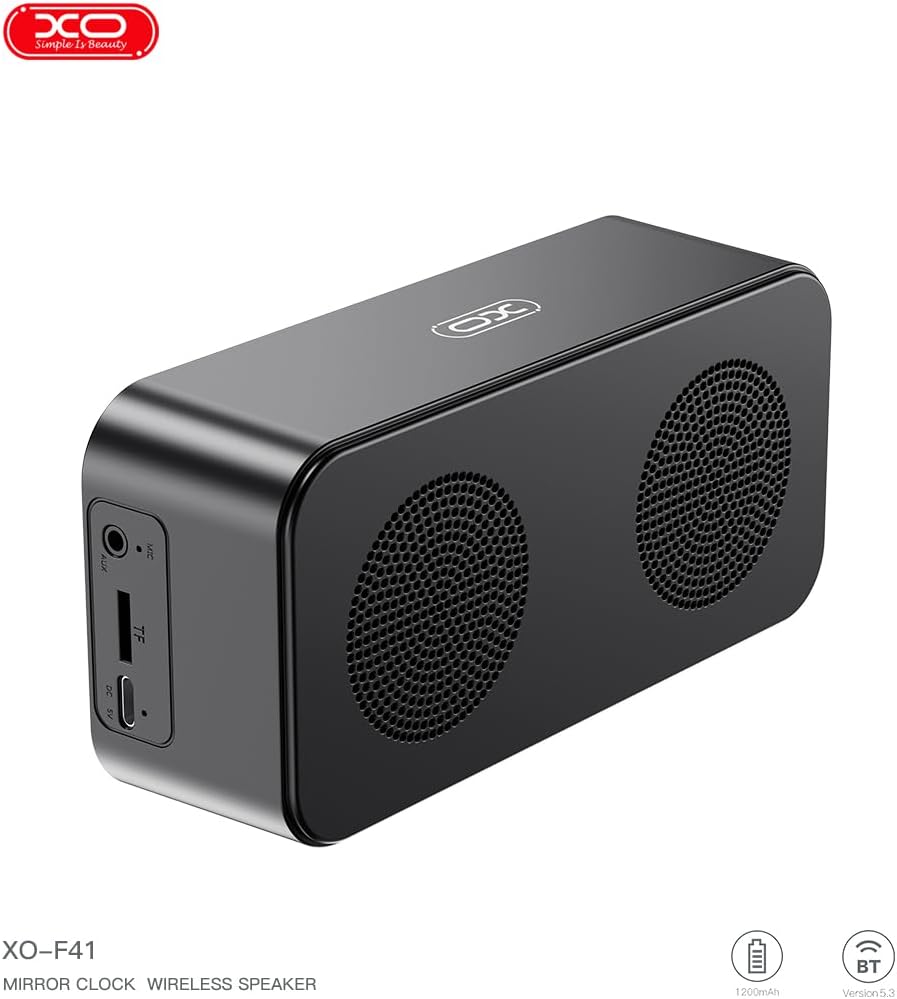
Imagen 4.1: Lateral view of the XO F41 with ports labeled.
- Botón de encendido: Mantenga pulsado para encender o apagar. Pulse brevemente para cambiar de modo.
- Botón de reproducción/pausa: Reproducir o pausar audio. Responder o finalizar llamadas.
- Subir volumen / Pista siguiente: Presione brevemente para subir el volumen, presione prolongadamente para la siguiente pista.
- Bajar volumen / Pista anterior: Presione brevemente para bajar el volumen, presione prolongadamente para la pista anterior.
- Puerto USB-C: Para cargar el dispositivo.
- Ranura para tarjetas TF: Inserte una tarjeta TF (MicroSD) para reproducir música local.
- Puerto AUX: Para entrada de audio con cable.
5. Configuración
5.1 Carga del altavoz
- Conecte el cable USB-C provisto al puerto de carga del altavoz.
- Conecte el otro extremo del cable a un adaptador de corriente USB (no incluido) o al puerto USB de una computadora.
- The charging indicator will illuminate. It takes approximately 3 hours for a full charge.
- The indicator will turn off or change color once fully charged.
5.2 Encendido y apagado
- Para encender: Mantenga presionado el botón de encendido durante aproximadamente 3 segundos. Oirá una señal sonora.
- Para apagar: Mantenga presionado el botón de encendido durante aproximadamente 3 segundos. Oirá una señal sonora.
6. Instrucciones de funcionamiento
6.1 Emparejamiento Bluetooth
- Ensure the speaker is powered on and in Bluetooth mode. If not, short press the Power button to cycle through modes until "BT" or a Bluetooth icon appears on the display.
- En su dispositivo móvil, habilite Bluetooth y busque dispositivos disponibles.
- Select "XO-F41" from the list of devices.
- Una vez emparejado, el altavoz indicará una conexión exitosa y podrá comenzar a reproducir audio desde su dispositivo.
6.2 Modo de tarjeta TF
- Inserte una tarjeta TF (MicroSD) con audio MP3 files en la ranura para tarjeta TF.
- The speaker will automatically switch to TF card mode and begin playing music. If not, short press the Power button to cycle to TF card mode.
- Use the Volume Up/Down buttons for track navigation and the Play/Pause button for playback control.
Modo de radio 6.3 FM
- Short press the Power button to switch to FM radio mode. The display will show the FM frequency.
- Mantenga presionado el botón Reproducir/Pausa para escanear y guardar automáticamente las estaciones de FM disponibles.
- Short press the Volume Up/Down buttons to switch between saved stations.
6.4 Configuración del reloj y la alarma
The XO F41 features a digital clock display. Specific instructions for setting the time and alarm are typically found in the detailed manual included with the product. Generally, a dedicated 'M' (Mode) or 'Set' button is used to enter time/alarm setting mode, and volume buttons are used to adjust values.

Image 6.1: The XO F41 speaker functioning as a bedside clock.
6.5 Ajuste del brillo de la pantalla
The display brightness is adjustable. Look for a dedicated button (often labeled with a sun icon or similar) or a combination of button presses (e.g., double-pressing the Power button) to cycle through brightness levels. Refer to the included quick start guide for exact steps.
7. Mantenimiento
- Limpieza: Utilice un paño suave y seco para limpiar la superficie del altavoz. No utilice limpiadores abrasivos ni disolventes.
- Almacenamiento: Guarde el altavoz en un lugar fresco y seco, alejado de la luz solar directa y de temperaturas extremas cuando no lo utilice durante períodos prolongados.
- Resistencia al agua: Este dispositivo no es resistente al agua. Evite la exposición al agua o a la humedad excesiva.
- Cuidado de la batería: Para prolongar la vida útil de la batería, evite descargarla por completo con frecuencia. Cargue el dispositivo regularmente, incluso si no lo usa constantemente.
8. Solución de problemas
| Problema | Posible causa | Solución |
|---|---|---|
| El altavoz no se enciende. | Batería baja. | Cargue el altavoz durante al menos 30 minutos. |
| No se puede emparejar a través de Bluetooth. | El altavoz no está en modo de emparejamiento; Bluetooth desactivado en el dispositivo; demasiado lejos del dispositivo. | Ensure speaker is in Bluetooth mode. Enable Bluetooth on your device. Move speaker closer to your device (within 10 meters). |
| No sound from TF card. | La tarjeta TF no se insertó correctamente; no es compatible file formato; sin audio files on card. | Vuelva a insertar la tarjeta TF. Asegúrese files are in MP3 format. Verify audio files están presentes en la tarjeta. |
| Mala recepción de radio FM. | Señal débil; interferencia ambiental. | Move the speaker to a different location. Re-scan for stations. |
9. Especificaciones
| Característica | Detalle |
|---|---|
| Número de modelo | XO-F41 |
| Versión de Bluetooth | Bluetooth V5.3 |
| Frecuencia de Bluetooth | 2.402 GHz-2.480 GHz |
| Capacidad de la batería | 1200 mAh |
| Entrada de carga | USB-C, CC 5 V/0.5 A |
| Tiempo de carga | Aproximadamente 3 horas |
| Tiempo de juego | 8H (50% volume); 5H (100% volume) |
| Distancia efectiva | Menos de 10 metros |
| Máxima potencia | 5W |
| Unidad de altavoz | 52 mm |
| Relación señal a ruido | >80dB |
| Dimensiones del producto | 15 x 3.81 x 11 cm (aprox. 150 x 45 x 72 mm) |
| Peso del producto | 320 g (approx. 0.28 kg) |
| Material | Plástico |
| Característica especial | Brillo ajustable |

Imagen 9.1: Parámetros detallados del producto.
10. Información de garantía
The XO F41 Mirror Bluetooth Speaker comes with a standard manufacturer's warranty. Please refer to the warranty card included in your package for specific terms, conditions, and duration. Keep your purchase receipt as proof of purchase for any warranty claims.
11. Atención al cliente
For further assistance, technical support, or inquiries regarding your XO F41 Mirror Bluetooth Speaker, please contact the retailer or manufacturer's customer service department. Contact details are typically provided on the product packaging or the official brand websitio.