
Introducción
This manual provides detailed instructions for the setup, operation, and maintenance of your OLEVS IN-3652 Men's Multifunction Chronograph Watch. This timepiece features multiple dials, a luminous display, chronograph functions, date display, and moon phase indicator, all housed in a durable stainless steel case with water resistance.

Figure 1: OLEVS IN-3652 Multifunction Chronograph Watch (Two-tone strap, white dial variant)
Producto terminadoview
The OLEVS IN-3652 watch is designed with precision and functionality. Key features include:
- Multi-Dial Display: Includes minute timer, 24-hour lunar phase, second time zone, second timer, and calendar window.
- Manecillas y marcadores luminosos: Ensures visibility in low-light conditions after absorbing sufficient light.
- Resistencia al agua: Rated for 30 meters, suitable for daily use and splashes, but not for swimming or hot water exposure.
- Construcción duradera: Stainless steel band and case with a high-hardness coated mirror surface.
- Movimiento de cuarzo: Proporciona un cronometraje preciso.

Figure 2: Key features of the OLEVS IN-3652 watch, including water resistance, crystal coating, movement type, and luminous display.
Configuración
1. Configuración inicial de hora y fecha
Before wearing your watch, set the correct time and date.
- Saca la corona: Tire suavemente de la corona (la perilla en el costado del reloj) hasta la posición 2 (la posición más externa).
- Establece el tiempo: Rotate the crown to adjust the hour and minute hands to the current time. Ensure you differentiate between AM and PM for the 24-hour indicator and moon phase.
- Establecer la fecha: Push the crown back to position 1 (middle position). Rotate the crown to adjust the date in the calendar window.
- Empuje la corona hacia atrás: Once time and date are set, push the crown fully back into position 0 (normal position) to start the watch and ensure water resistance.
2. Ajuste de la correa
The stainless steel strap can be adjusted for a comfortable fit. A watch adjustment tool is included with your purchase.
- To shorten the strap, use the provided tool to remove pins from the links.
- To lengthen the strap, additional links may be required (not included).
- It is recommended to have a professional jeweler adjust the strap to prevent damage.
Instrucciones de funcionamiento
Your OLEVS IN-3652 watch features several sub-dials and pushers for various functions.
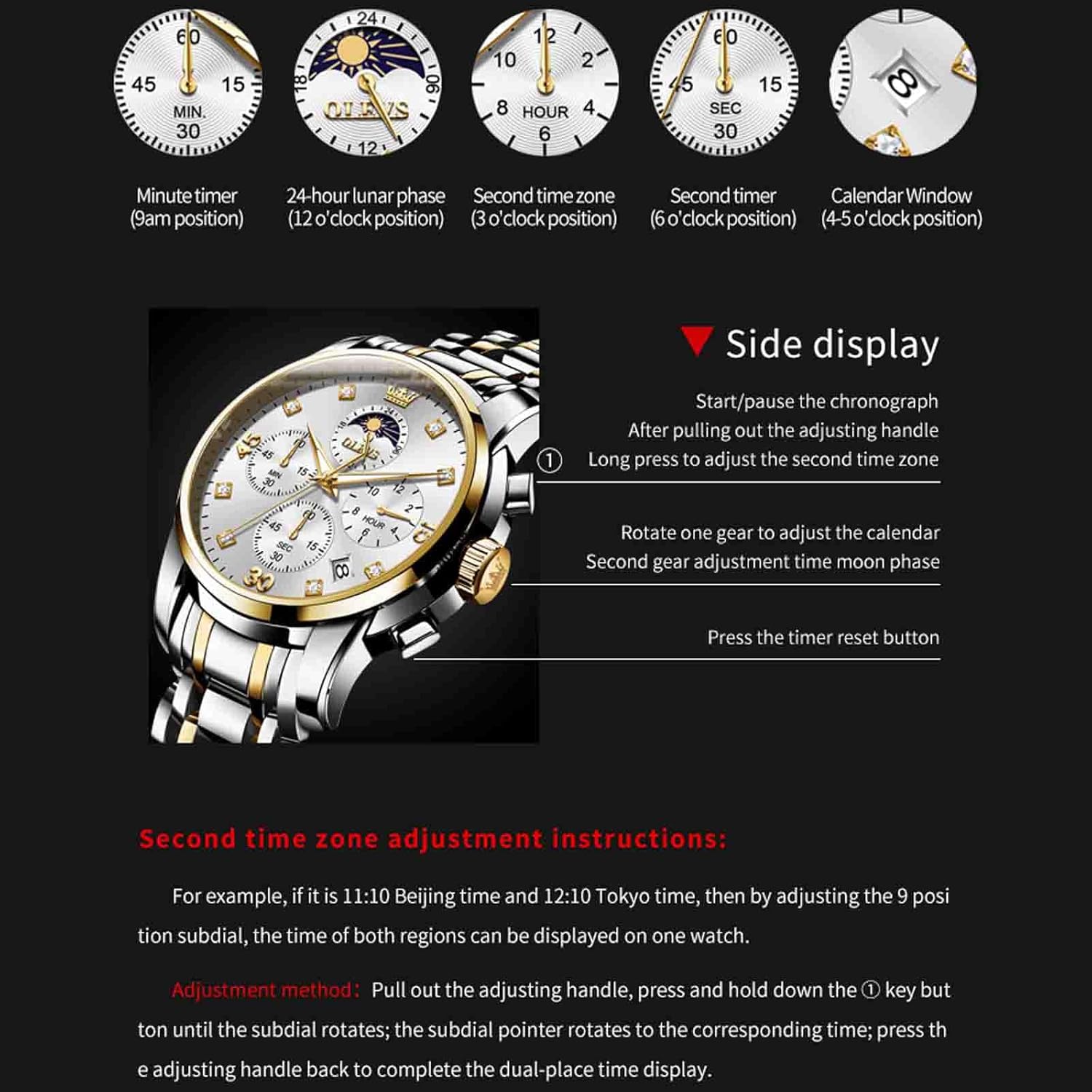
Figure 3: Watch dial functions and side control diagram.
1. Función de cronógrafo (cronómetro)
- The 9 o'clock sub-dial indicates the minute timer (up to 60 minutes).
- The 6 o'clock sub-dial indicates the second timer (up to 30 seconds).
- Iniciar pausa: Press the top pusher (button above the crown) to start or pause the chronograph.
- Reset: Press the bottom pusher (button below the crown) to reset the chronograph to zero. This only works when the chronograph is stopped.
2. 24-Hour Lunar Phase (Moon Phase)
- The 12 o'clock sub-dial displays the 24-hour time and lunar phase.
- To adjust the moon phase, pull the crown to position 1 (middle position) and rotate it. The moon phase will advance as you rotate.
3. Second Time Zone Adjustment
- The 3 o'clock sub-dial displays the second time zone.
- Método de ajuste: Pull out the adjusting handle (crown) to position 2. Press and hold down the top pusher (button above the crown). While holding, rotate the crown. The sub-dial pointer will rotate to the corresponding time. Press the adjusting handle back to position 0 to complete the dual-place time display.
4. Calendar Window
- The calendar window is located between the 4 and 5 o'clock positions.
- To adjust the calendar, pull the crown to position 1 (middle position) and rotate it.
5. Pantalla luminosa
The watch hands and markers contain luminous material. For optimal glow in the dark, expose the watch to a bright light source for a period of time to allow the phosphor to absorb sufficient light.
Mantenimiento
1. Resistencia al agua
Your OLEVS IN-3652 watch is rated for 30 meters (3ATM) water resistance. This means it is suitable for:
- Uso diario, como lavado de manos o lluvia ligera.
- Accidental splashes.
Precauciones importantes:
- No wear the watch while swimming, diving, or showering.
- Evitar exposure to hot water, steam, or extreme temperature changes, as this can compromise the water-resistant seals.
- Asegúrese de que la corona esté completamente presionada en todo momento para mantener la resistencia al agua.

Figura 4: Posterior view of the watch highlighting water resistance and buckle type.
2. Limpieza
- Limpie periódicamente la caja y la correa del reloj con un paño suave y seco para eliminar la suciedad y el sudor.
- Para correas de acero inoxidable, una ligera damp Se puede utilizar un paño y secarlo inmediatamente.
- Evite utilizar limpiadores químicos, disolventes o materiales abrasivos, ya que pueden dañar el acabado del reloj.
3. Reemplazo de la batería
The watch is powered by a quartz movement, which requires a battery. When the watch stops or runs erratically, the battery may need replacement. It is recommended to have the battery replaced by a qualified watch technician to ensure proper sealing and functionality.
Solución de problemas
- El reloj no funciona: Compruebe si la corona está completamente insertada. Si es así, es posible que sea necesario reemplazar la batería.
- Hora/fecha incorrecta: Refer to the "Initial Time and Date Setting" section to re-adjust.
- El cronógrafo no se reinicia a cero: Ensure the chronograph is stopped before pressing the reset pusher. If it still doesn't reset, a service may be required.
- Empañamiento bajo el cristal: Esto indica una pérdida de resistencia al agua. Evite cualquier contacto con el agua y busque asistencia profesional de inmediato.
Presupuesto
| Característica | Especificación |
|---|---|
| Número de modelo | ZC-3652-men (IN-3652) |
| Marca | OLEVS |
| Tipo de movimiento | Cuarzo |
| Tipo de pantalla | Cosa análoga |
| Diámetro de la caja | 41.5 milímetros |
| Grosor de la caja | 11 milímetros |
| Ancho de banda | 20 milímetros |
| Material de la banda | Acero inoxidable |
| Tipo de cierre | Butterfly double button hidden buckle |
| Profundidad de resistencia al agua | 30 metros (3 ATM) |
| Características especiales | Glow In The Dark, Multifunction, Waterproof, Chronograph, Date, Moon Phase, Second Time Zone |
| Peso del artículo | 130 g (0.13 kilogramos) |
Garantía y soporte
Información de garantía
Your OLEVS IN-3652 watch comes with a Garantía limitada. Please refer to the warranty card included with your purchase for specific terms and conditions. This warranty typically covers manufacturing defects but does not cover damage resulting from improper use, accidents, or unauthorized repairs.
An optional 1-Year Extended Warranty Plan by Onsitego may be available for purchase separately.
Atención al cliente
For any questions, service requests, or technical support regarding your OLEVS watch, please contact OLEVS customer service through the retailer where the product was purchased or visit the official OLEVS brand store online.
Fabricante: OLEVS
Importador: OLEVS
Envasador: ECONETING E-COMMERCE PRIVATE LIMITED