Introducción
This manual provides detailed instructions for the setup, operation, and maintenance of your Generic F988 Live Sound Card Audio Mixer. Designed for live streaming, gaming, and audio production, this device offers versatile DJ mixer effects, voice changing capabilities, and professional sound mixing. Please read this manual thoroughly before use to ensure optimal performance and longevity of your device.
Producto terminadoview
The F988 Live Sound Card is a compact yet powerful audio interface designed to enhance your audio experience. It features a range of controls for adjusting audio input, output, and applying various effects.
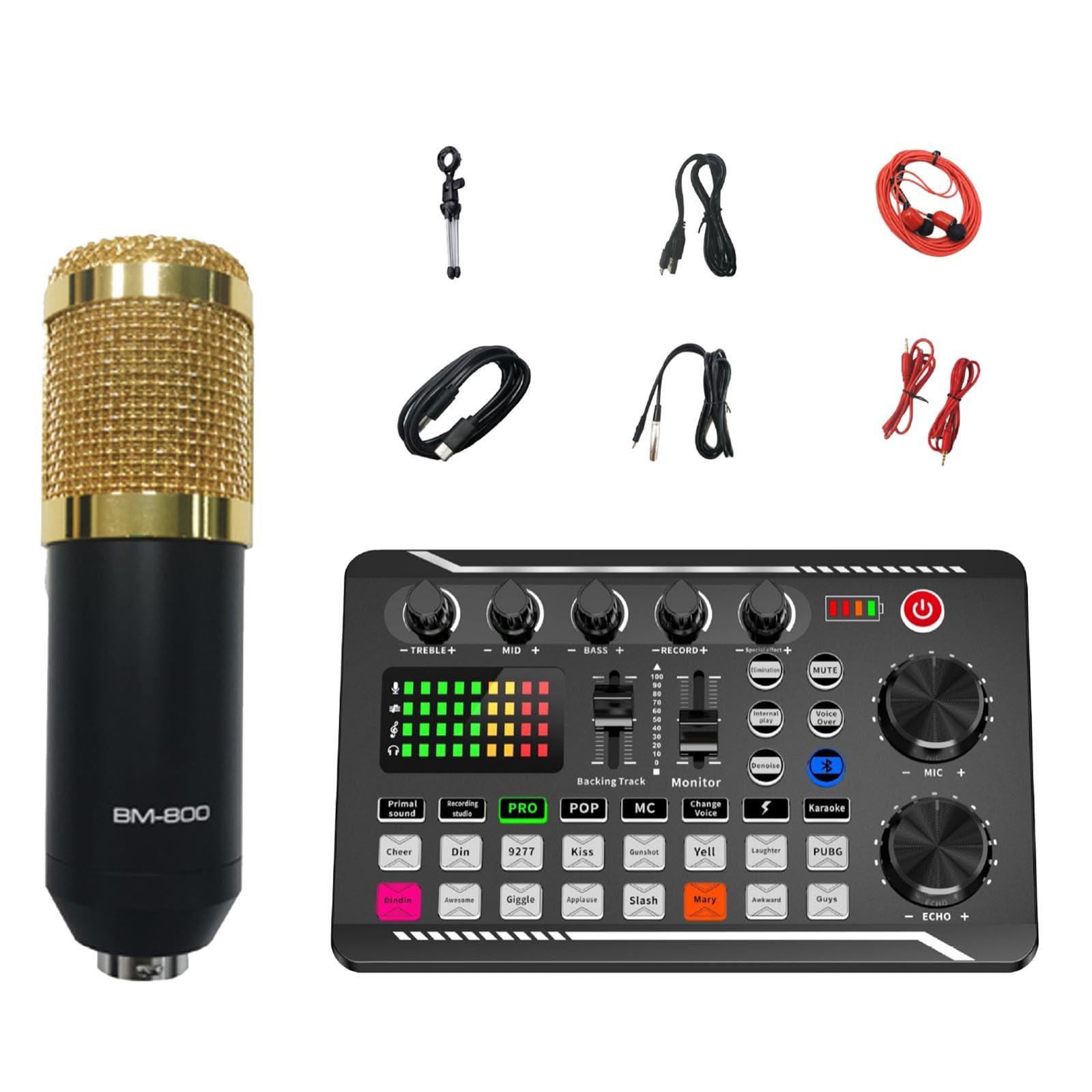
Figura 1: Frente view of the F988 Live Sound Card with approximate dimensions (19cm/7.48inch width, 12cm/4.72inch height, 4.5cm/1.77inch depth).
Componentes y controles clave:
- Puertos de entrada/salida: Various ports for microphones, headphones, instruments, and connection to computers or mobile devices.
- Perillas de volumen: Individual controls for microphone, music, and echo levels.
- Controles del ecualizador: Treble, Mid, and Bass adjustments for fine-tuning audio.
- Botones de efectos especiales: Dedicated buttons for DJ mixer effects, voice changer, and other sound enhancements.
- Sección de Monitor: Visual indicators for audio levels and monitoring controls.
- Botón de encendido: Para encender y apagar el dispositivo.

Figura 2: Encimaview of key features including DSP Audio chip, 3 voice change options, 12 electronic tones, Bluetooth connectivity, and a dodge button. The device allows adjustment of high, medium, and low frequencies for clear and stable sound.
Guía de configuración
Siga estos pasos para configurar su tarjeta de sonido F988 Live para un rendimiento óptimo.
1. Conexión eléctrica:
- Connect the sound card to a power source using the provided USB cable. The device is powered via Corded Electric (USB).
- Presione el botón de encendido para encender el dispositivo.
2. Audio Input Connections:
- Micrófono: Plug your microphone into the designated MIC input port.
- Instruments/Other Audio Sources: Connect other audio devices (e.g., musical instruments, external audio players) to the appropriate input ports (e.g., RCA audio input).
3. Conexiones de salida:
- Auriculares / Altavoces: Connect your headphones or speakers to the MONITOR output for real-time audio monitoring.
- Streaming/Recording Device: Connect the sound card to your computer, smartphone, or other streaming/recording device using the appropriate USB or audio cables.
4. Conectividad Bluetooth:
The F988 features a built-in wireless Bluetooth-compatible link for connecting to mobile devices or other Bluetooth-enabled audio sources.
- Ensure Bluetooth is enabled on your external device (e.g., smartphone).
- On the F988 sound card, activate the Bluetooth function (refer to the 'BT' button or indicator).
- Buscar "F988" or a similar device name on your external device and pair.
- Once connected, you can stream backing tracks or other audio wirelessly to the sound card.

Figura 3: Illustration of connecting a mobile device via Bluetooth to the F988 Live Sound Card for wireless audio input.
Instrucciones de funcionamiento
This section details how to use the various features of your F988 Live Sound Card.
1. Basic Audio Adjustment:
- Volumen del micrófono: Use the MIC knob to adjust your microphone input level.
- Music/Backing Track Volume: Adjust the volume of your connected music source (e.g., via Bluetooth or line-in) using the dedicated knob.
- Eco/Reverberación: Control the amount of echo effect applied to your vocals using the ECHO knob.
- Equalizer (TREBLE, MID, BASS): Use these knobs to fine-tune the tonal quality of your audio. Increase TREBLE for brighter sound, MID for vocal clarity, and BASS for deeper tones.
2. DJ Mixer Effects:
The F988 comes with a variety of DJ mixer effects to enhance your live streams or performances. These effects can be activated via dedicated buttons on the sound card.
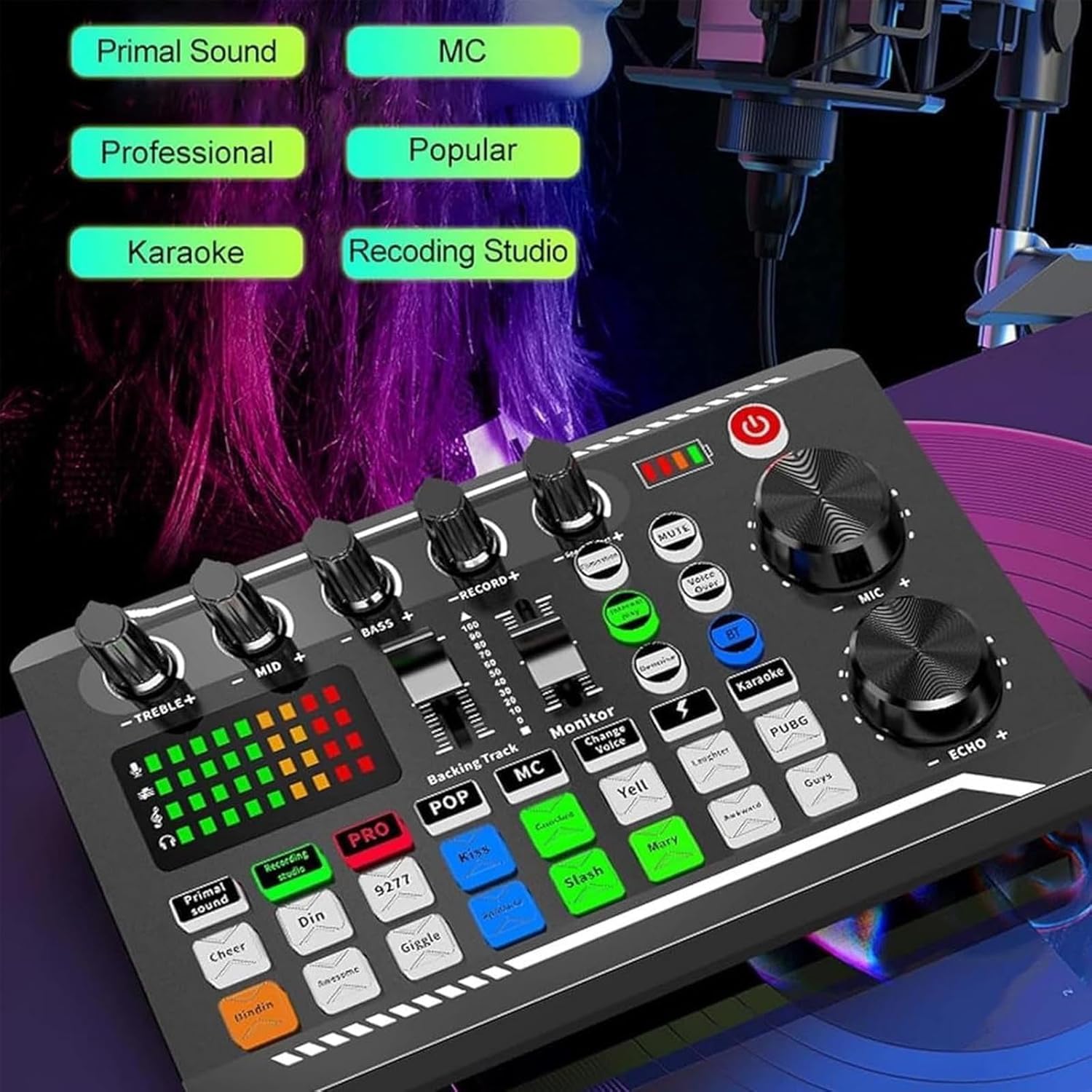
Figura 4: Close-up of the F988 Live Sound Card showing various sound effect buttons such as "Primal sound", "Recording studio", "PRO", "POP", "MC", "Karaoke", "Cheer", "Din", "Kiss", "Gunshot", "Yell", "Laughter", "PUBG", "Dindin", "Awesome", "Giggle", "Applause", "Slash", "Mary", "Awkward", and "Guys".
- Efectos sonoros: Press buttons like "Primal sound", "PRO", "POP", "MC", "Karaoke", "Cheer", "Gunshot", "Laughter", "Applause", etc., to trigger pre-set sound effects.
- Efectos especiales: Utilize buttons such as "Elimination", "MUTE", "Denoise", and "Voice Over" for advanced audio control during live sessions.
3. Voice Changer Functionality:
Modify your voice in real-time using the built-in voice changer.
- Locate the "Change Voice" or similar button/control.
- Pressing this button typically cycles through different voice modulation options. Experiment to find the desired effect.
4. Electric Tone Adjustment:
The F988 offers 12 steps of electric tone adjustment to customize your vocal output.

Figura 5: The F988 Live Sound Card highlighting the "12 Step Electric Tone Adjustment" feature, allowing professional customization of personal voice.
- Refer to the specific controls labeled for "Electric Tone" or similar.
- Adjust these settings to alter your voice for different effects or to match specific musical styles.
Mantenimiento
Un mantenimiento adecuado garantiza la longevidad y el rendimiento óptimo de su tarjeta de sonido F988 Live.
- Limpieza: Utilice un paño suave y seco para limpiar la superficie del dispositivo. Evite usar limpiadores líquidos o materiales abrasivos.
- Almacenamiento: Store the sound card in a cool, dry place away from direct sunlight and extreme temperatures when not in use.
- Manejo: Handle the device with care to avoid physical damage to knobs, buttons, and ports.
- Apagado: Always power off the device when not in use for extended periods.
Solución de problemas
Si tiene problemas con su tarjeta de sonido F988 Live, consulte los siguientes problemas y soluciones comunes.
| Problema | Posible causa | Solución |
|---|---|---|
| No hay salida de sonido | Incorrect connections, low volume, device not powered on. |
|
| El micrófono no funciona | Microphone not connected, MIC volume too low, microphone faulty. |
|
| Problemas de conexión Bluetooth | Dispositivo no en modo de emparejamiento, fuera de alcance, interferencia. |
|
| Audio distorsionado | Input levels too high, faulty cable, interference. |
|
Presupuesto
| Característica | Detalle |
|---|---|
| Modelo | Mezclador de audio con tarjeta de sonido en vivo F988 |
| Marca | Genérico |
| Tecnología de conectividad | USB, Bluetooth |
| Número de canales | 1 |
| Entrada de audio | RCA, Microphone Input |
| Fuente de poder | Eléctrico con cable (USB) |
| Características especiales | DJ Mixer Effects, Voice Changer, 12-Step Electric Tone Adjustment, Denoise, Mute, Voice Over |
Garantía y soporte
Para obtener información sobre la garantía o asistencia técnica, consulte al vendedor o al fabricante oficial. webSitio. Conserve su recibo de compra para cualquier reclamación de garantía.
For further assistance, please contact customer support through the platform where the product was purchased.


