
1. Introducción
This manual provides essential instructions for the setup, operation, and maintenance of your TMY Projector. Please read this manual thoroughly before using the product to ensure proper functionality and to maximize your viewexperiencia. Guarde este manual para referencia futura.
2. Producto terminadoview
2.1 Contenido del paquete
Verifique que todos los artículos estén presentes en el paquete:
- TMY Projector Unit
- Mando a distancia
- Cable HDMI
- Cable de alimentación
- Tarjeta de garantía
2.2 Características principales
- Licencia oficial de Netflix: Access streaming services directly without external devices.
- Resolución 1080P: Ofrece imágenes claras y detalladas.
- Enfoque eléctrico y corrección trapezoidal automática: Ajuste automático de imagen para una claridad y forma óptimas.
- Soporte giratorio de 270°: Ángulos de proyección flexibles, incluida proyección en el techo.
- Upgraded WiFi 6 Connectivity: Garantiza una transmisión inalámbrica estable y rápida.
- Dual-Mode Bluetooth 5.2: Connects to external speakers or functions as a standalone Bluetooth speaker.
- Múltiples opciones de conectividad: HDMI, USB, Phone/PC mirroring.
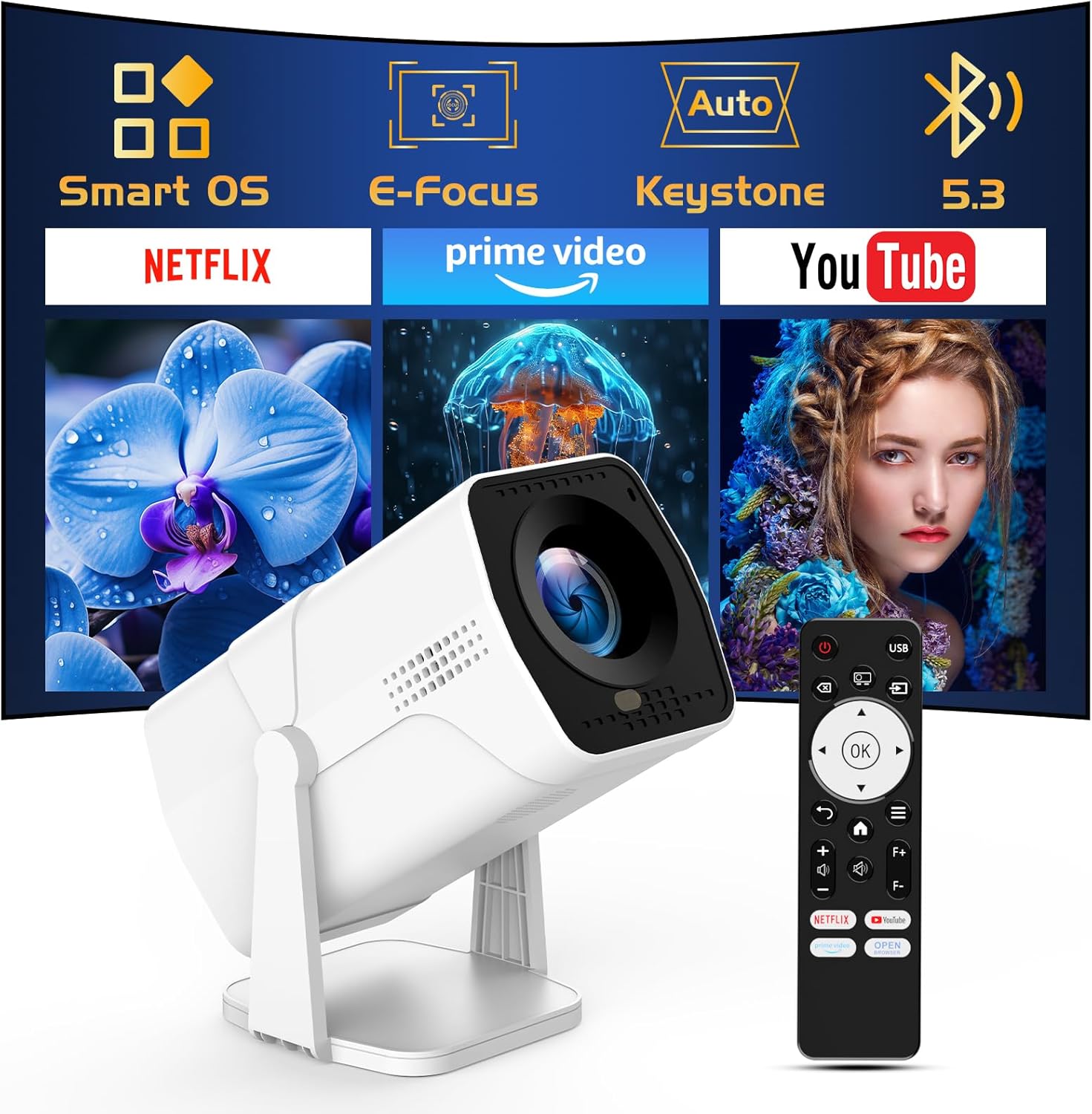
Image: The TMY Projector unit, its remote control, and a projected screen displaying logos for Smart OS, E-Focus, Auto Keystone, Bluetooth 5.3, Netflix, Prime Video, and YouTube.
3. Configuración
3.1 Colocación
Position the projector on a stable, flat surface. The 270° rotatable stand allows for versatile placement, including projecting onto walls or ceilings. Ensure adequate ventilation around the projector.

Image: A TMY Projector positioned on a bedside table, projecting an image onto the ceiling, demonstrating its 270° rotatable stand for multi-angle viewEn.
3.2 Conexión de alimentación
- Conecte el cable de alimentación al puerto de entrada de energía del proyector.
- Conecte el otro extremo del cable de alimentación a una toma eléctrica estándar.
3.3 Encendido inicial y ajuste del enfoque
- Presione el botón de encendido en el proyector o el control remoto para encender el dispositivo.
- Características del proyector Foco eléctrico y Keystone automático correction. The image will automatically adjust for clarity and a rectangular shape within approximately 2 seconds.
- If further adjustment is needed, use the remote control to fine-tune the focus.

Image: A TMY Projector projecting a vibrant image onto a screen, with an overlay illustrating the 'FOCUS' function and icons for Auto Keystone and 50%-100% Zoom.
3.4 Conexión de red (WiFi)
The projector supports WiFi 6 for a fast and stable internet connection.
- Navegue hasta el menú 'Configuración' usando el control remoto.
- Seleccione “Red” o “Configuración WiFi”.
- Choose your desired WiFi network from the list and enter the password.
- Confirme la conexión.

Image: A TMY Projector wirelessly connected to a tablet, smartphone, and laptop, illustrating its WiFi 6 connectivity for faster streaming with no lagging.
3.5 Conexión Bluetooth
The projector features Dual-Mode Bluetooth 5.2 for audio connectivity.
- Projector Mode (Output): To connect to external Bluetooth speakers or soundbars: Navigate to 'Bluetooth Settings', enable Bluetooth, and pair with your audio device.
- Speaker Mode (Input): To use the projector's built-in speakers as a standalone Bluetooth speaker: Select 'Speaker Mode' in the Bluetooth settings. Your phone or other device can then connect to the projector to play audio.

Image: A TMY Projector illustrating its two-way Bluetooth 5.2 functionality, showing connections to a soundbar (Projector Mode) and a smartphone (Speaker Mode).
4. Operación
4.1 Navegación por el sistema operativo inteligente
The projector runs on a smart TV operating system. Use the provided remote control to navigate menus, select applications, and control playback.

Image: The TMY Projector unit with a projected screen showing a grid of built-in smart OS applications, including Netflix, YouTube, Prime Video, TikTok, and others.
4.2 Acceso a aplicaciones integradas
The projector comes with pre-installed and officially licensed applications such as Netflix, Prime Video, and YouTube. Access these directly from the home screen or through the 'App Store' for additional content.

Image: A TMY Projector projecting a screen filled with content from officially licensed apps like Netflix, Prime Video, and YouTube, with the remote control in the foreground.
4.3 Conexión de dispositivos externos
El proyector ofrece múltiples puertos para conectar dispositivos externos:
- HDMI: Connect TV sticks, TV boxes, PCs/Laptops, or gaming consoles (e.g., PS).
- USB: Reproducir medios files directly from USB drives or connect other USB accessories.
- Phone/PC Mirroring: Wirelessly mirror content from your smartphone or PC (refer to the on-screen instructions for specific mirroring protocols).
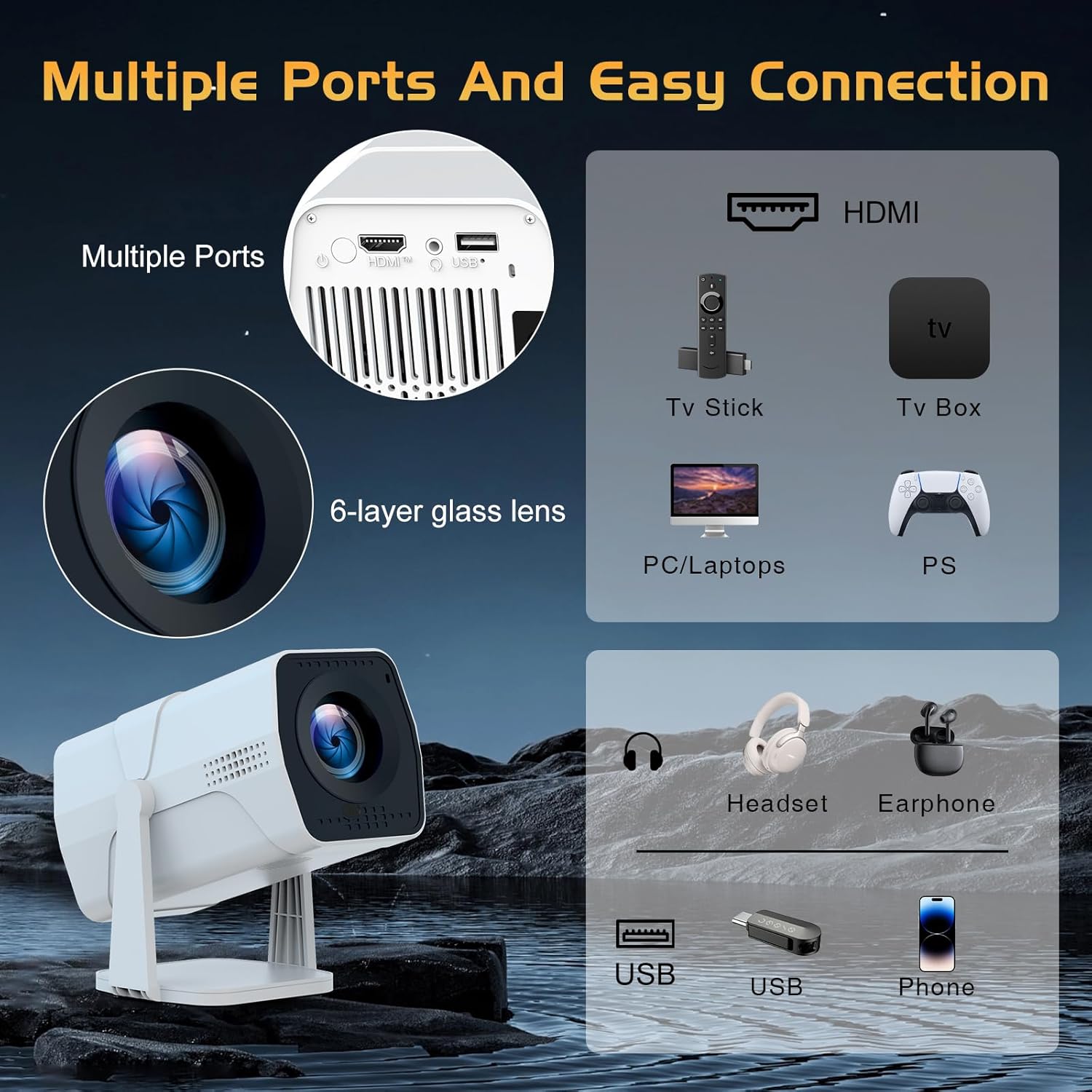
Image: A detailed diagram showing the multiple ports on the TMY Projector (HDMI, USB) and various connection possibilities, including TV sticks, PCs, gaming consoles, headsets, and phones.
4.4 Screen Zoom Function
The projector includes a 50%-100% zoom function, allowing you to adjust the screen size without moving the projector. This feature can be accessed via the remote control or settings menu.
5. Mantenimiento
To ensure the longevity and optimal performance of your TMY Projector, follow these maintenance guidelines:
- Limpieza de la lente: Utilice un paño suave y sin pelusa, especialmente diseñado para lentes ópticas. Evite materiales abrasivos o productos químicos agresivos.
- Limpieza del exterior: Limpie el exterior del proyector con un paño suave y seco. No utilice limpiadores líquidos directamente sobre el dispositivo.
- Ventilación: Asegúrese de que las aberturas de ventilación no estén bloqueadas para evitar el sobrecalentamiento.
- Almacenamiento: Cuando no utilice el proyector durante períodos prolongados, guárdelo en un lugar fresco y seco, alejado de la luz solar directa y del polvo.
6. Solución de problemas
If you encounter issues with your TMY Projector, refer to the following common problems and solutions:
- Sin energía:
- Asegúrese de que el cable de alimentación esté conectado de forma segura tanto al proyector como a una toma eléctrica que funcione.
- Compruebe si la toma de corriente funciona.
- Sin imagen/Imagen borrosa:
- Verify the projector is powered on and the lens cap is removed.
- Allow the automatic focus and keystone correction to complete. If still blurry, manually adjust focus using the remote.
- Ensure the projection surface is suitable and the projector is within the recommended distance.
- If using an external source (HDMI), ensure the correct input source is selected.
- Sin sonido:
- Verifique el nivel de volumen del proyector y de cualquier dispositivo de audio externo conectado.
- Si utiliza altavoces Bluetooth, asegúrese de que estén correctamente emparejados y conectados.
- If using internal speakers, ensure external Bluetooth output is not selected.
- El control remoto no responde:
- Ensure the batteries are correctly inserted and not depleted.
- Apunte el control remoto directamente al receptor IR del proyector.
- Problemas de conexión WiFi:
- Ensure your WiFi network is active and within range.
- Verifique nuevamente la contraseña de WiFi.
- Reinicie el proyector y su enrutador WiFi.
- If the connection times out, try moving the projector closer to the router or reducing interference.
7. Especificaciones
| Característica | Especificación |
|---|---|
| Marca | TMI |
| Modelo | B0DRFF5KMF |
| Peso del artículo | 2.79 libras |
| Dimensiones del producto | 5.35 x 4.84 x 7.09 pulgadas |
| Color | Blanco |
| Características especiales | Speakers, Electric Focus, Auto Keystone, 270° Rotatable Stand |
| Tecnología de conectividad | HDMI, USB, Wi-Fi 6, Bluetooth 5.2 |
| Resolución de pantalla | 1920 x 1080 (1080P Full HD) |
| Usos recomendados | Interior |

Image: A visual comparison showing the TMY Projector's 1080P Full HD image quality, emphasizing that it is recommended for use in dark environments for optimal viewing, contrasted with daytime or light-on conditions.
8. Garantía y soporte
TMY is committed to providing excellent customer service and product support.
- Garantía: Este producto viene con una garantía de 3 años.
- Política de devoluciones: Enjoy a 30-day return period.
- Apoyo técnico: Se encuentra disponible servicio posventa y soporte técnico de por vida.
- Tiempo de respuesta: Expect a quick reply within 24 hours for support inquiries.
Para obtener más ayuda, visite el sitio oficial Tienda TMY en Amazon or contact customer support through the provided channels in your warranty card.