
1. Producto terminadoview
The MOVE SPEED 145W Laptop Power Bank is a high-capacity portable charging solution designed for a wide range of electronic devices, including laptops, smartphones, and tablets. Featuring PD 3.1 fast charging technology and a 25,000mAh capacity, it ensures your devices remain powered during travel, work, or outdoor activities. The integrated digital display provides real-time charging insights, enhancing user convenience.
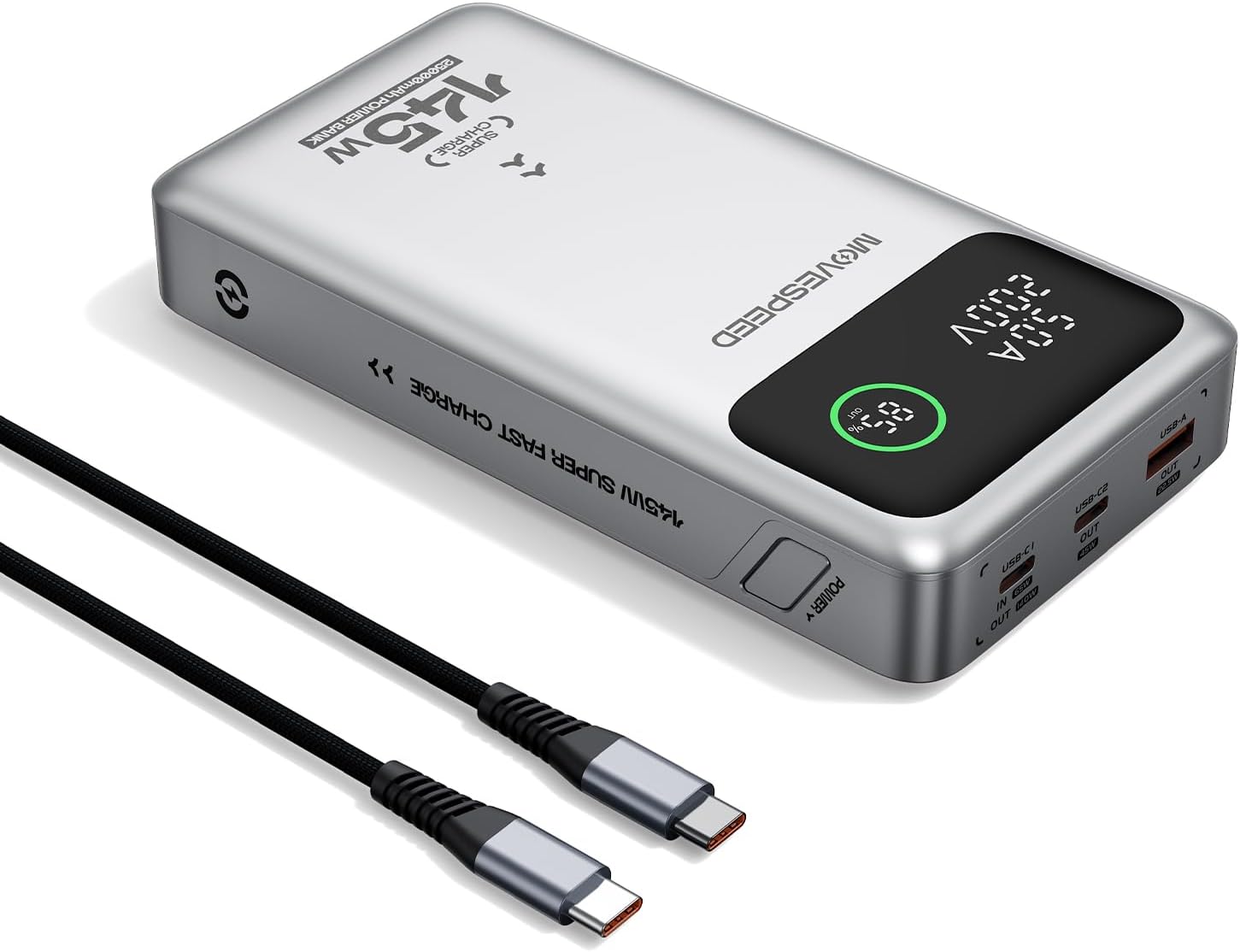
Figure 1.1: MOVE SPEED 145W Laptop Power Bank and 240W Type-C Cable.
2. Información de seguridad
Precauciones de seguridad importantes:
- No exponga el banco de energía a temperaturas extremas, luz solar directa o fuego.
- Evite dejar caer, desmontar o intentar reparar el dispositivo usted mismo.
- Mantener alejado del agua y de la humedad alta.
- Asegúrese de que haya una ventilación adecuada durante el uso y la carga.
- This power bank is flight-approved (25000mAh/92.5Wh) and meets FAA and TSA carry-on regulations.
- The device incorporates 9-layer protection against overcharging, overheating, and short circuits.

Figure 2.1: The power bank is designed to be air-travel friendly.

Figure 2.2: Built-in NTC Temperature Sensor and comprehensive protection features.
3. Contenido del paquete
Verifique que todos los artículos estén presentes en el paquete:
- MOVE SPEED 145W Laptop Power Bank x 1
- 240W 3.28Ft Type-C Cable x 1
- Manual de usuario x 1

Figura 3.1: Elementos incluidos en el paquete del producto.
4. Características del producto
- 140W Ultra-Fast Single-Port Charging: Supports PD 3.1, capable of charging a 16-inch MacBook Pro to 56% in approximately 30 minutes.
- 65W Ultra-Fast Recharging: Fully recharges the power bank in about 2 hours using a compatible high-wattage cargador.
- Capacidad masiva de 25,000 mAh: Provides multiple charges for various devices (e.g., 4 full charges for iPhone 16, 3 for Galaxy S24, 2 for iPad 11).
- Triple-Port Output:
- USB-C1 (IN/OUT): Up to 140W output, 65W input.
- USB-C2 (OUT): Up to 45W output.
- USB-A (OUT): Up to 22.5W output.

Figure 4.1: Single port output capabilities.

Figure 4.2: Two-port simultaneous output capabilities.

Figure 4.3: Three-port simultaneous output capabilities.
- Smart Dynamic Charging: Optimizes power distribution up to 145W combined output when multiple USB-C ports are active.
- Pantalla LED inteligente: Muestra el porcentaje preciso de bateríatage, charging status (INPUT/OUTPUT), and real-time voltage and current for each active port.
- Carga de transferencia: Allows simultaneous charging of devices while the power bank itself is being recharged.

Figure 4.4: Key features of the MOVE SPEED 145W Power Bank.

Figure 4.5: Fast charging capability for laptops.

Figure 4.6: Extended power supply for multiple devices.

Figure 4.7: Simultaneous charging of up to three devices.

Figure 4.8: Rapid recharging of the power bank.

Figure 4.9: The smart LED display provides comprehensive charging information.

Figure 4.10: Pass-through charging capability for convenience.
5. Configuración
Antes del primer uso, se recomienda cargar completamente el banco de energía.
- Connect the included 240W Type-C cable to the USB-C1 port (IN/OUT) on the power bank.
- Connect the other end of the cable to a compatible USB-C wall charger (65W or higher recommended for optimal charging speed).
- The digital display will show "IN" and the battery percentage increasing, indicating that the power bank is charging.
- Una vez que la pantalla muestre 100%, el banco de energía estará completamente cargado y listo para usar.
6. Instrucciones de funcionamiento
6.1 Dispositivos de carga
Para cargar sus dispositivos electrónicos:
- Conecte el cable de carga de su dispositivo al puerto de salida apropiado del banco de energía (USB-C1, USB-C2 o USB-A).
- Conecte el otro extremo del cable a su dispositivo.
- The digital display will show "OUT" and the real-time voltage and current, indicating that your device is charging.
- The power bank will automatically detect the connected device and deliver the optimal charging speed.
Video 6.1: Demonstration of the MOVE SPEED power bank charging a laptop. This video highlights the product's ability to provide power to larger devices.
Vídeo 6.2: Terminadoview of the MOVE SPEED laptop power bank's features and usage. This video provides a general demonstration of the product.
Video 6.3: Demonstration of the MOVESPEED portable laptop charger and its 145W power bank capabilities. This video showcases the power bank in action with various devices.
6.2 Recarga del banco de energía
Para recargar el banco de energía:
- Connect the included 240W Type-C cable to the USB-C1 port (IN/OUT) on the power bank.
- Connect the other end of the cable to a power source, such as a wall adapter or a computer's USB-C port.
- The digital display will indicate "IN" and the charging progress.
Note: For optimal recharging speed, use a power adapter that supports 65W Power Delivery (PD) or higher.
7. Especificaciones
| Característica | Detalle |
|---|---|
| Número de modelo | YSPB-M25pro-US |
| Capacidad de la batería | 25,000 mAh/92.5 Wh |
| Entrada USB-C1 | 65W Max |
| Salida USB-C1 | 140 W máx. (PD 3.1) |
| Salida USB-C2 | 45W Max |
| Salida USB-A | 22.5W Max |
| Producción total | 145W Max (Dynamic Distribution) |
| Dimensiones | 8.19 x 4.49 x 1.56 pulgadas |
| Peso | 1.41 libras |
| Cable incluido | 240W 3.28Ft Type-C Cable |
| Características de seguridad | 9-layer protection (overcharging, overheating, short circuits, etc.), UN38.3 certified |
| Flight Approved | Yes (under 100Wh limit) |
8. Mantenimiento
- Limpie la batería externa con un paño suave y seco. No utilice productos químicos agresivos ni materiales abrasivos.
- Guarde el banco de energía en un lugar fresco y seco, alejado de la luz solar directa y de temperaturas extremas.
- Si lo va a almacenar durante un período prolongado, recargue el banco de energía cada 3 a 6 meses para mantener la salud de la batería.
- Evite exponer los puertos al polvo o residuos.
9. Solución de problemas
Problemas comunes y soluciones:
- El banco de energía no carga:
- Ensure the charging cable is securely connected to both the power bank (USB-C1 port) and the power adapter.
- Verifique que el adaptador de pared esté funcionando correctamente y proporcione suficiente energía (se recomiendan 65 W).
- Pruebe con un cable de carga o adaptador de corriente diferente.
- El dispositivo no se carga desde el banco de energía:
- Compruebe si el banco de energía tiene suficiente carga.
- Asegúrese de que el cable de carga esté conectado de forma segura tanto al banco de energía como a su dispositivo.
- Pruebe un puerto de salida diferente en el banco de energía.
- Verify that your device's charging cable is not damaged.
- Carga lenta:
- Ensure you are using the included 240W Type-C cable or another high-quality cable that supports fast charging.
- For recharging the power bank, use a 65W or higher PD-compatible wall adapter.
- When charging multiple devices, the total output power is dynamically distributed, which may result in slower charging for individual devices compared to single-port charging.
- La pantalla digital no funciona:
- Asegúrese de que el banco de energía esté suficientemente cargado.
- Si el problema persiste, póngase en contacto con el servicio de atención al cliente.
10. Garantía y soporte
MOVE SPEED offers a 36-month protection plan for this product. If you encounter any issues or have questions regarding your MOVE SPEED 145W Laptop Power Bank, please contact our customer support team for assistance.
For further support, visit the official MOVE SPEED store on Amazon: MOVE SPEED Store