
Introducción
The Rapoo MT760Mini is a versatile wireless mouse designed for multi-device productivity. It supports Bluetooth 5.0/3.0 and 2.4GHz multi-mode connections, allowing seamless switching between up to four devices. Key features include adjustable DPI, M+ Cross-Computer Technology, 11 programmable buttons, ergonomic design, and wireless charging capability. This manual provides detailed instructions for setup, operation, maintenance, and troubleshooting to ensure optimal use of your device.
¿Qué hay en la caja?
- Ratón inalámbrico 1 x
- 1 cable de carga USB-C (USB-A a USB-C)
- 2 adaptadores USB
- 1 x Manual de usuario
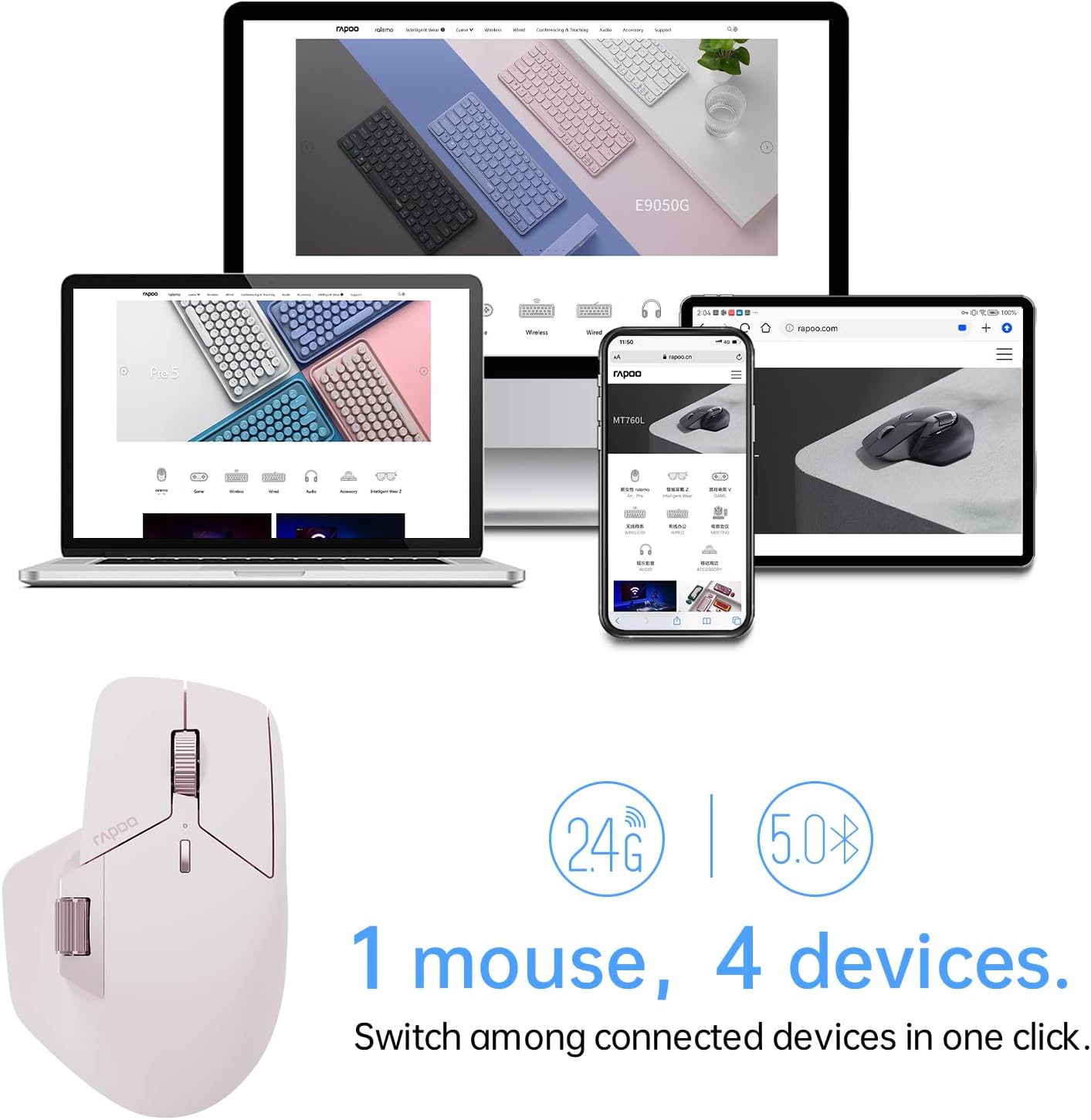
Image: The Rapoo MT760Mini mouse, USB-C charging cable, and two USB dongles laid out on a wooden surface.
Características del producto
Multi-Mode Wireless Connection
The MT760Mini supports Bluetooth 5.0, Bluetooth 3.0, and 2.4GHz wireless connections. This allows you to connect and switch between up to four different devices (e.g., desktop computer, laptop, tablet, smartphone) with ease.

Image: The Rapoo MT760Mini mouse positioned in front of a laptop, tablet, and smartphone, demonstrating its ability to connect to multiple devices.
DPI ajustable
The mouse features 7 adjustable DPI levels: 800, 1000, 1200, 1600, 2400, 3200, and 4000. You can switch between these preset values using the dedicated DPI button to match your preference and task requirements. Further adjustments in 50-interval steps are possible via the mouse driver software.

Image: The Rapoo MT760Mini mouse highlighting the DPI switch button and illustrating the 7 adjustable DPI levels from 800 to 4000.
Tecnología entre computadoras M+
Utilize M+ Cross-Computer Technology to seamlessly control multiple computers by moving the cursor to the edge of your screen. The mouse automatically switches between screens, enabling efficient multi-tasking and easy transfer of text, images, and files between devices. This feature requires the mouse driver to be installed and all connected computers to be on the same Wi-Fi or Ethernet network.

Image: A visual representation of M+ Cross-Computer Technology, showing a mouse cursor moving between two computer screens to copy and paste a folder.
Diseño ergonómico
The mouse features an ergonomic bow-back design with thumb support, providing a comfortable palm grip. Its anti-slip and anti-sweat surface ensures comfort and ease of use during long periods of work, reducing hand strain.

Image: A hand demonstrating the comfortable grip on the Rapoo MT760Mini mouse, emphasizing its ergonomic shape and thumb support.
11 botones programables
The MT760Mini is equipped with 11 programmable buttons, including a Hall magnetic induction side scroll wheel and a center scroll wheel with a 1,000,000 times scale feel. These buttons can be customized via the driver software to assign shortcuts, media keys, or macros, streamlining your workflow and boosting efficiency.

Image: An annotated diagram of the Rapoo MT760Mini mouse, labeling its 11 programmable buttons such as Left button, Scroll right/left, Forward/Back, Roller forward/middle/backward, Right button, Switch over DPI, and DIY key.
Wireless Charging & Ultra-Long Battery Life
The mouse is powered by an 800mAh Li-Po battery and supports USB-C quick charging. A full charge can last up to 90 days. It is also compatible with most Qi wireless charging mouse pads, allowing for effortless power boosts during use. (Note: P3 Wireless Charging Module sold separately).

Image: The Rapoo MT760Mini mouse being wirelessly charged on a pad, with text highlighting Qi wireless charging, 800mAh Li-Po battery, and USB-C fast charging capabilities.
Funciona en la mayoría de las superficies
Equipped with a high-performance laser sensor, the MT760Mini provides precise and accurate tracking on various surfaces, including wood, cloth, leather, resin, and paper.

Image: The Rapoo MT760Mini mouse resting on a stack of various materials like wood, fabric, and leather, illustrating its ability to track on most surfaces.
Dimensiones del producto
The MT760Mini is designed to be compact and portable, with dimensions suitable for various hand sizes and grip styles.

Image: A side-by-side comparison of the Rapoo MT760 and MT760Mini mice, displaying their respective weights and dimensions for size reference.
Configuración y conexión
Conexión inalámbrica 2.4GHz
- Remove the USB dongle from its storage slot on the bottom of the mouse.
- Conecte el dispositivo USB a un puerto USB disponible en su computadora.
- Encienda el ratón con el interruptor de encendido en la parte inferior. El ratón debería conectarse automáticamente.

Image: A screenshot of the Rapoo pairing utility, illustrating the three steps to pair the USB receivers with the mouse via 2.4GHz connection.
Conexión Bluetooth
- Encienda el mouse usando el interruptor de encendido en la parte inferior.
- Press the device switching button on the bottom of the mouse to select a Bluetooth channel (1, 2, or 3). The indicator light for the selected channel will blink.
- En su dispositivo (computadora, computadora portátil, tableta o teléfono inteligente), vaya a la configuración de Bluetooth y busque nuevos dispositivos.
- Select "Rapoo MT760Mini" from the list of available devices to pair.
Instalación del controlador
To unlock the full functionality of your MT760Mini mouse, including programmable buttons and M+ Cross-Computer Technology, it is recommended to install the official Rapoo mouse driver. Visit the Rapoo support webSitio para descargar el controlador más reciente para su sistema operativo.

Image: A screenshot of the Rapoo Download Center, showing the option to download the MT760/MT760 mini Mouse Driver.
Instrucciones de funcionamiento
Cambiar entre dispositivos
Use the device switching button located on the bottom of the mouse to cycle through connected devices (1, 2, 3 for Bluetooth, and 2.4G for the USB dongle connection). The corresponding indicator light will illuminate to show the active connection.
Ajuste de ppp
Press the DPI switch button (usually located near the scroll wheel) to cycle through the preset DPI levels. Observe the cursor speed change to find your preferred setting.
Using Scroll Wheels
The MT760Mini features both a main scroll wheel and a Hall magnetic induction side scroll wheel. Use the main scroll wheel for vertical scrolling and the side scroll wheel for horizontal scrolling or other assigned functions.

Imagen: Un primer plano view of the Rapoo MT760Mini mouse, highlighting the Hall magnetic induction side scroll wheel.
Personalización de botones
After installing the Rapoo mouse driver software, you can customize the functions of the 11 programmable buttons. Open the software, navigate to the button settings, and assign desired actions such as shortcuts, media controls, or macros.

Image: A screenshot of the Rapoo mouse driver software, displaying the programmable button settings and parameter adjustments.
M+ Cross-Computer Setup
To enable M+ Cross-Computer Technology, ensure the mouse driver is installed on all computers you wish to connect. Connect all computers to the same Wi-Fi or Ethernet network. Within the driver software, activate and configure the M+ Cross-Computer settings to enable seamless cursor movement and file transfer between screens.

Image: A screenshot of the Rapoo mouse driver software, illustrating the M+ Cross-Computer settings with options for 'Current device' and 'Not online' devices, and modes for LAN or offline operation.
Mantenimiento
To ensure the longevity and optimal performance of your Rapoo MT760Mini mouse, follow these maintenance guidelines:
- Limpieza: Use a soft, dry cloth to wipe the mouse regularly. For stubborn dirt, slightly dampLave el paño con agua o una solución limpiadora suave. Evite productos químicos agresivos o materiales abrasivos.
- Cuidado del sensor: Mantenga el sensor óptico de la parte inferior del ratón limpio y sin polvo ni residuos. Utilice un hisopo de algodón o aire comprimido si es necesario.
- Almacenamiento: Cuando no lo use durante un tiempo prolongado, apague el mouse para prolongar la vida útil de la batería. Guárdelo en un lugar fresco y seco, alejado de la luz solar directa y de temperaturas extremas.
- Cargando: Always use the provided USB-C charging cable or a compatible Qi wireless charging pad. Avoid using damaged cables or non-certified chargers.
Solución de problemas
If you encounter issues with your Rapoo MT760Mini mouse, refer to the following common troubleshooting steps:
- El ratón no responde:
- Asegúrese de que el mouse esté encendido.
- Verifique el nivel de la batería y cargue el mouse si es necesario.
- For 2.4GHz connection, ensure the USB dongle is securely plugged into your computer. Try a different USB port.
- Para la conexión Bluetooth, asegúrese de que esté activado en su dispositivo y de que el ratón esté correctamente emparejado. Intente volver a emparejarlo.
- Switch to a different connection mode (2.4GHz or Bluetooth) to see if the issue persists.
- El movimiento del cursor es errático o impreciso:
- Limpie el sensor óptico en la parte inferior del mouse.
- Intente utilizar el ratón en una superficie diferente o en un mouse pad.
- Ajuste la configuración de DPI a un valor más bajo.
- Los botones programables no funcionan:
- Ensure the Rapoo mouse driver software is installed and up to date.
- Check the button assignments within the driver software.
- Try restoring the mouse to default settings via the driver software.
- M+ Cross-Computer Technology not functioning:
- Verify that the mouse driver is installed on all connected computers.
- Ensure all computers are connected to the same Wi-Fi or Ethernet network.
- Check the M+ settings within the driver software to ensure it is enabled and configured correctly.
Restaurar configuración predeterminada
If issues persist, you may restore the mouse to its factory default settings through the driver software. This will clear all custom configurations.

Image: A screenshot from the Rapoo driver software, displaying a confirmation prompt for restoring factory settings, warning that current settings will be cleared.
Presupuesto
| Característica | Detalle |
|---|---|
| Dimensiones del producto | 4.52 x 2.97 x 0.1 pulgadas |
| Peso del artículo | 10.8 onzas |
| Número de modelo del artículo | MT760Mini |
| Baterías | Se requieren 2 pila AA (incluida) |
| Marca | Rapó |
| Color | Rosa |
| Tecnología de conectividad | Bluetooth, radiofrecuencia (2.4 GHz) |
| Características especiales | 7 Adjustable DPI, M+ Cross-Computer Technology, 11 Programmable Buttons, Up to 4 Devices, Wireless Charging Enabled |
| Tecnología de detección de movimiento | Láser |
| Fabricante | Tecnología Co., Ltd. de Shenzhen Rapoo |
Garantía y soporte
For warranty information, technical support, or any product-related inquiries, please contact Rapoo customer service. Refer to the packaging or the official Rapoo webSitio para obtener detalles de contacto y términos de garantía específicos de su región.
Demostración en video
Video: An official demonstration of the Rapoo MT760 Multi Device Wireless Mouse, showcasing its various features and multi-device connectivity.