1. Introducción
This manual provides detailed instructions for the safe and efficient operation of your SUPVAN G15M Mini Label Maker. Please read this manual thoroughly before using the device to ensure proper functionality and to maximize its lifespan. The SUPVAN G15M Mini is a portable, rechargeable industrial label maker designed for various labeling needs, featuring thermal transfer printing for durable, long-lasting labels.

Image: The SUPVAN G15M Mini Label Maker shown in an outdoor environment, highlighting its design for both indoor and outdoor use and key features like rechargeable battery, QWERTY keyboard, minimal margin, no ink required, 10-year durability, and portability.
2. Producto terminadoview y contenido del paquete
The SUPVAN G15M Mini Label Maker package includes the following items:
- SUPVAN G15M Mini Portable Label Maker x1
- White Continuous Label Tape (12 mm x 7.5 m) x1
- Cable de carga USB tipo C x1
- Manual de usuario x1

Image: A visual representation of the SUPVAN G15M Mini Label Maker, a white label roll, a USB Type-C cable, and the user manual, illustrating all items included in the product package.
3. Configuración
3.1 Carga del dispositivo
Before first use, fully charge the label maker using the provided USB Type-C cable. Connect the cable to the device's charging port and a compatible USB power source. The charging indicator will show the charging status.
3.2 Instalación de la cinta de etiquetas
- Abra la tapa del compartimento de etiquetas en el dispositivo.
- Insert the label tape cassette, ensuring it clicks into place correctly.
- Cierre la tapa del compartimento de etiquetas.
3.3 Encendido / Apagado
Mantenga presionado el botón de encendido (generalmente marcado con un símbolo de encendido) para encender o apagar el dispositivo.

Image: The SUPVAN G15M Mini Label Maker, displaying its QWERTY keyboard and screen, alongside a roll of white label tape, ready for use.
4. Instrucciones de funcionamiento
4.1 Basic Text Entry
Utilice el teclado QWERTY para escribir el texto deseado. Este aparecerá en la pantalla LCD.
4.2 Adjusting Text Properties
The G15M Mini supports various text customization options:
- Tamaño de fuente: Elija entre 9 tamaños de fuente diferentes.
- Estilos de fuente: Select from 6 available font styles.
- Fronteras: Apply one of 5 border styles to your label.
- Símbolos: Access over 400 built-in symbols to enhance your labels.
- Idiomas: The device supports 17 languages, including French.
4.3 Multi-Line Printing
The label maker supports up to 4 lines of text. For 4-line printing, labels must be at least 12mm wide.
4.4 Barcodes and QR Codes
Generate and print various types of barcodes and QR codes directly from the device.
4.5 Printing and Cutting
After composing your label, press the print button. The device will print the label. Use the integrated cutter to cleanly separate the printed label from the tape roll.

Image: A graphic illustrating the SUPVAN G15M Mini's extensive features, including support for 17 languages, over 400 symbols, 9 barcode and QR code types, and up to 4 lines of text printing.
5. Tipos y características de las etiquetas
5.1 Thermal Transfer Printing
The G15M Mini utilizes thermal transfer printing technology, which ensures labels are resistant to UV, water, and wear. This technology prevents fading, making labels suitable for long-term outdoor use (up to 10 years).
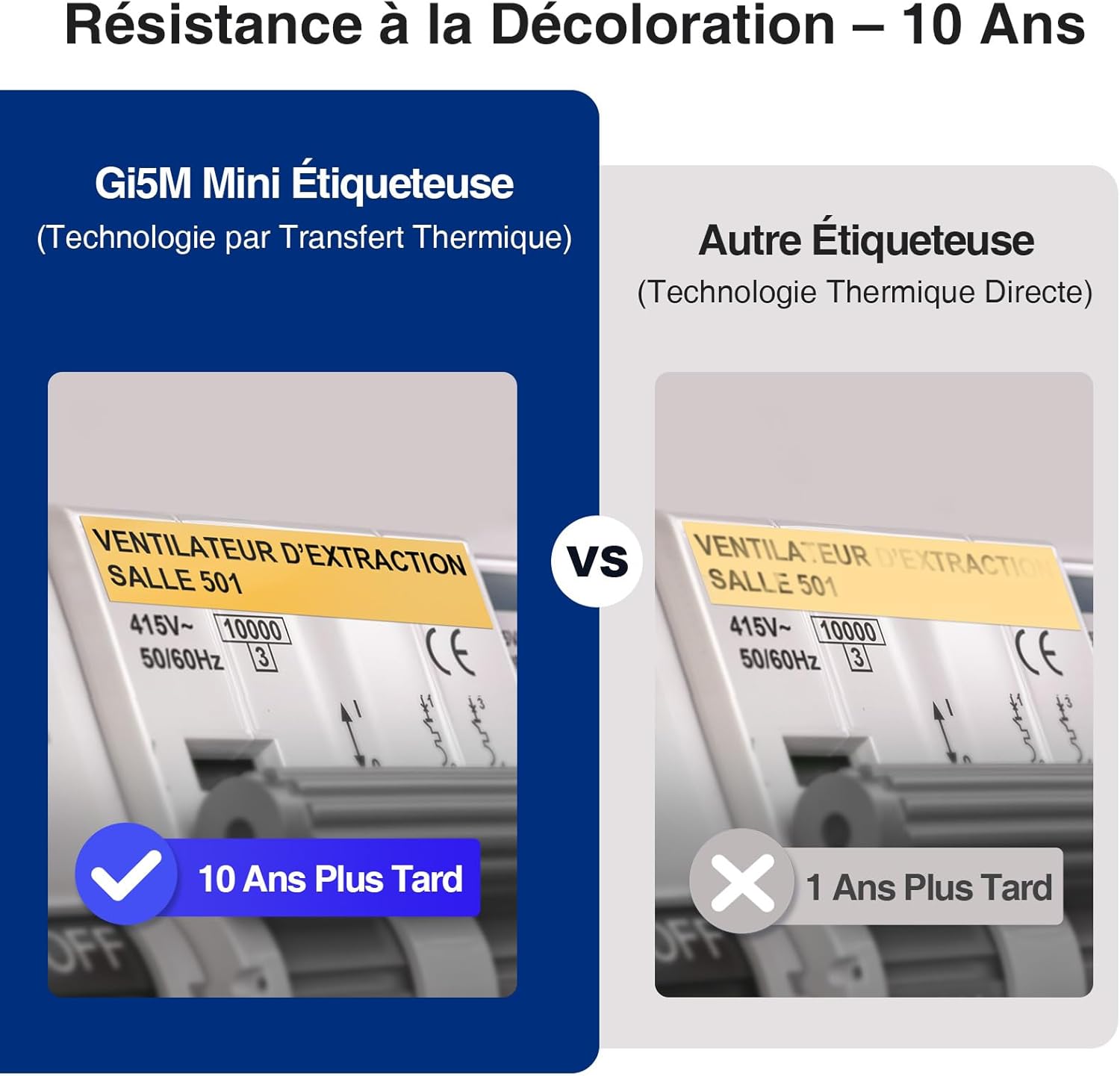
Image: A visual comparison demonstrating the superior fade resistance of thermal transfer labels produced by the SUPVAN G15M Mini, which can last up to 10 years, versus direct thermal labels that degrade much faster.
5.2 Supported Label Media
The device is compatible with various label types and sizes:
- Etiquetas continuas: 6 mm to 15 mm width.
- Heat Shrink Tubes: 3.5 mm to 9 mm width, ideal for cable identification.
- Etiquetas de cable: Specifically designed labels for wrapping around cables.
- Fixed Size Labels: Etiquetas precortadas para aplicaciones específicas.
- Wrap-Around Labels: Labels designed to wrap around objects.
- Identification Labels: Labels for general identification purposes.

Image: A display of various label applications, including heat shrink tubes for wires, cable labels, continuous labels for storage, wrap-around labels, identification labels, and fixed-size labels for electrical panels.
5.3 Duración de la batería
The integrated 1200mAh lithium battery provides approximately three months of standby time on a full charge, reducing the need for frequent recharging.

Image: A comparison highlighting the SUPVAN G15M Mini's 1200mAh rechargeable battery capacity, emphasizing its environmental benefits and cost-effectiveness over devices powered by disposable AAA batteries.
5.4 Backlit LCD Screen
The 300 nits backlit LCD screen ensures clear readability in various lighting conditions, from bright daylight to low-light environments.

Image: Two images demonstrating the SUPVAN G15M Mini's backlit LCD screen, showing its clear visibility in both a brightly lit outdoor setting during the day and a dimly lit indoor environment at night.
5.5 Minimal Margin Printing
The G15M Mini is designed to print with minimal margins (5mm), significantly reducing label tape waste compared to other label makers (10mm margins).

Image: A visual comparison showing the SUPVAN G15M Mini's ability to print with a minimal 5mm margin, effectively reducing label waste, contrasted with other label makers that typically use a larger 10mm margin.
5.6 Aplicaciones versátiles
The G15M Mini is suitable for a wide range of applications, including electrical cabling, industrial equipment identification, outdoor labeling, and organizing items at home or in the office.
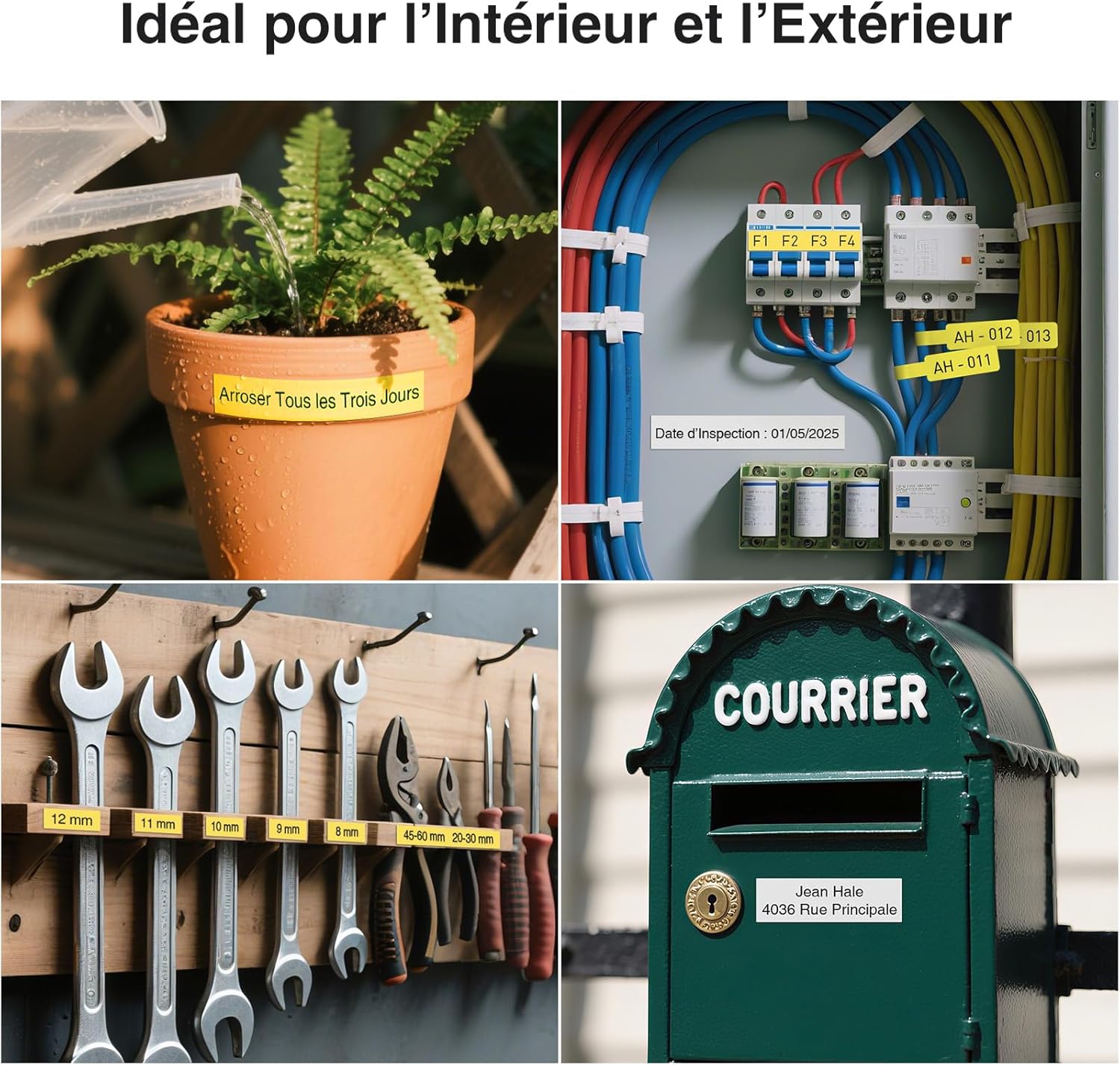
Imagen: Un collage muestraasing the versatility of the G15M Mini label maker, with examples of labels used for a plant pot, electrical wiring, tool organization, and a mailbox, demonstrating its suitability for both indoor and outdoor environments.

Image: A series of images demonstrating the durability of SUPVAN labels, highlighting their resistance to water, oil, UV light, scratches, and heat, as well as their ability to be removed without leaving residue.
6. Mantenimiento
6.1 Limpieza del cabezal de impresión
Regularly clean the print head with a soft, lint-free cloth or a specialized cleaning pen to ensure optimal print quality. Refer to the detailed cleaning instructions in the full manual for best practices.
6.2 Cuidado de la batería
To prolong battery life, avoid fully discharging the device frequently. Store the label maker in a cool, dry place when not in use for extended periods.
7. Solución de problemas
If you encounter any issues with your SUPVAN G15M Mini Label Maker, please refer to the following general troubleshooting tips:
- Sin energía: Ensure the device is charged. Connect it to a power source using the USB Type-C cable.
- Mala calidad de impresión: Check if the label tape is installed correctly. Clean the print head. Ensure the label tape is not damaged or expired.
- Atasco de cinta: Open the label compartment and carefully remove any jammed tape. Reinstall the tape cassette.
- El dispositivo no responde: Try resetting the device by turning it off and on again. If the issue persists, contact customer support.
For more detailed troubleshooting steps, consult the comprehensive user manual included with your product.
8. Especificaciones
| Característica | Especificación |
|---|---|
| Número de modelo | G15M Mini |
| Marca | SUPVÁN |
| Tecnología de impresión | Transferencia térmica |
| Tamaño máximo de medios | 15 milímetros |
| Resolución máxima de impresión (blanco y negro) | 203 ppp |
| Velocidad máxima de impresión (blanco y negro) | 20 páginas por minuto |
| Conectividad | USB tipo C, Bluetooth |
| Batería | Batería de litio de 1200 mAh (recargable) |
| Dimensiones (L x An x Al) | 17 x 8.5 x 4.3 cm |
| Consumo de energía | 5W |
| Profundidad de color | 1 bpp (bits por píxel) |
| Dispositivos compatibles | ordenador, teléfono inteligente |
9. Garantía y soporte
9.1 Información de garantía
The SUPVAN G15M Mini Label Maker comes with a 2-year limited manufacturer's warranty. Please retain your proof of purchase for warranty claims. The warranty covers defects in materials and workmanship under normal use.
9.2 Atención al cliente
For technical assistance, troubleshooting, or warranty inquiries, please visit the official SUPVAN website or contact their customer service department. Refer to the contact information provided in your product packaging or on the official SUPVAN webSitio para obtener los detalles de soporte más actualizados.


