
1. Producto terminadoview
The Tomzn TOMPD-63SW is a WiFi-enabled smart energy meter and leakage current protection relay designed to provide reliable protection and monitoring for your electrical installation. This 63A capacity device offers remote monitoring and control capabilities via a smartphone application. Its integrated LCD screen displays instantaneous voltage, current, and power consumption values. Featuring DIN rail mounting, it ensures easy installation within electrical panels. The device automatically disconnects the circuit in cases of over-voltage, bajo voltage, or leakage current, safeguarding connected appliances. Through the mobile application, users can track energy consumption data and review historical records. It is an ideal solution for ensuring the safety of electrical devices in both residential and commercial environments, offering a compact design and user-friendly interface.
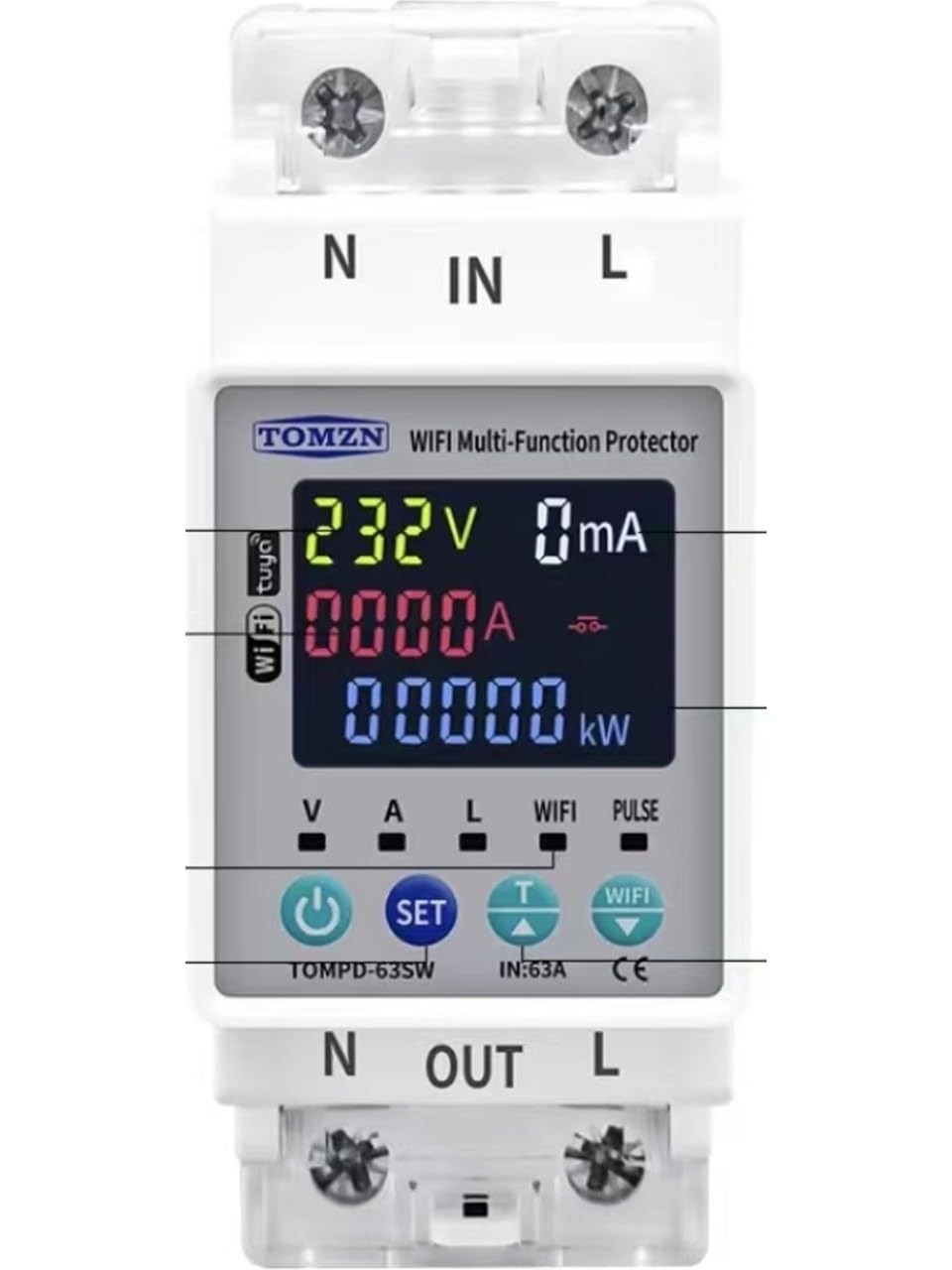
Imagen que muestra el frente view of the Tomzn WiFi Smart Energy Meter, highlighting its LCD display and compact design for DIN rail mounting.
2. Información de seguridad
- Instalación profesional recomendada: La instalación debe ser realizada por un electricista calificado para garantizar la seguridad y el cumplimiento de los códigos eléctricos locales.
- Desconectar la energía: Always ensure the main power supply is disconnected before installing, maintaining, or servicing the device.
- Volumentage y calificaciones actuales: No exceda el volumen especificadotage and current ratings (63A) of the device.
- Cableado adecuado: Ensure all wiring connections are secure and correctly terminated according to the wiring diagram. Loose connections can cause overheating or malfunction.
- Condiciones ambientales: No exponga el dispositivo a la humedad, temperaturas extremas o ambientes corrosivos.
3. Contenido del paquete
Por favor revise el paquete para ver los siguientes artículos:
- Tomzn WiFi Smart Energy Meter and Leakage Current Protection Relay (Model TOMPD-63SW)
- Manual de usuario
4. Características del producto
- Monitoreo inteligente: Wi-Fi connectivity for remote tracking of energy consumption and voltage values via a mobile application.
- Especificaciones técnicas: 63A capacity, suitable for single-phase electrical systems, DIN rail mountable.
- Funciones de protección: Automatic protection against over-voltage, bajo voltage, y corriente de fuga.
- Pantalla LCD: Digital screen showing instantaneous voltage, current, and energy consumption values.
- Instalación: Easy and secure mounting onto electrical panels.
5. Especificaciones
| Especificación | Valor |
|---|---|
| Fabricante | Tomzn |
| Referencia del fabricante | TMZN01 |
| Dimensiones del producto | 4.5 x 4.5 x 8.5 cm |
| Peso | 150 gramos |
| Tipo de conector | Agujero pasante |
| Calificación actual | 63 Amperes |
| Tipo de montaje | Carril DIN |
| Marca | TOMZN |
| Modo de funcionamiento | Automático |
6. Instalación (Configuración)
Advertencia: La instalación debe ser realizada por un electricista cualificado. Asegúrese de que la alimentación esté desconectada antes de continuar.
- Desconexión de energía: Turn off the main power supply at the circuit breaker before starting any installation work. Verify that no voltage is present using a suitable testing device.
- Montaje: Mount the TOMPD-63SW device onto a standard 35mm DIN rail within your electrical panel. Ensure it is securely fastened.
- Conexiones de cableado:
- Connect the incoming live (phase) wire to the ENTRADA L Terminal.
- Connect the incoming neutral wire to the N-IN Terminal.
- Connect the outgoing live (phase) wire to the PATÁN terminal, leading to your load.
- Connect the outgoing neutral wire to the N-FUERA terminal, leading to your load.
- Ensure all connections are tight and correct according to the wiring diagram provided with the product.
- Restauración de energía: Once all connections are verified, restore the main power supply. The device's LCD screen should illuminate.
- Configuración de la aplicación: Download the designated mobile application (e.g., Tuya Smart or Smart Life, as commonly used for such devices) from your smartphone's app store. Follow the in-app instructions to add and configure the TOMPD-63SW device to your Wi-Fi network. This typically involves putting the device into pairing mode (refer to the device's specific button sequence for pairing).
7. Operación
The TOMPD-63SW offers both local display and remote control/monitoring capabilities.
7.1. Pantalla LCD
The integrated LCD screen provides real-time information:
- Volumentagmi(V): Displays the instantaneous line voltage.
- Corriente (A): Shows the instantaneous current flowing through the circuit.
- Power (W/kW): Indicates the instantaneous active power consumption.
- Energía (kWh): Accumulates total energy consumption.
- Indicadores de estado: May show indicators for Wi-Fi connectivity, protection status (e.g., over-voltage, bajo voltage, leakage current trip).
7.2. Control de aplicaciones móviles
After successful app setup, you can:
- Monitoreo remoto: View volumen en tiempo realtage, current, power, and energy consumption from anywhere.
- Mando a distancia: Turn the connected circuit ON or OFF remotely (if this feature is enabled for the specific model).
- Configuración de protección: Adjust parameters for over-voltage, bajo voltage, and leakage current protection thresholds.
- Información histórica: Access and analyze historical energy consumption data and event logs (e.g., protection trips).
- Programación: Set schedules or timers for the device to turn ON/OFF automatically.
8. Mantenimiento
The Tomzn TOMPD-63SW is designed for minimal maintenance. However, regular checks can ensure optimal performance and safety:
- Limpieza: Periodically clean the device's exterior with a dry, soft cloth. Do not use abrasive cleaners or solvents.
- Verificación de conexión: Annually, or as needed, verify that all wiring connections are secure and free from corrosion. Ensure power is disconnected before performing this check.
- Actualizaciones de firmware: Check the mobile application periodically for any available firmware updates for the device. Updates can improve performance and add new features.
9. Solución de problemas
If you encounter issues with your TOMPD-63SW, refer to the following common problems and solutions:
- El dispositivo no se enciende:
- Verifique la fuente de alimentación principal y el disyuntor.
- Verify all wiring connections (L-IN, N-IN) are correct and secure.
- Sin conexión Wi-Fi:
- Ensure your Wi-Fi network is 2.4GHz (5GHz networks are typically not supported by these devices).
- Check the Wi-Fi signal strength at the device's location.
- Reinicie su enrutador Wi-Fi.
- Attempt to re-pair the device with the mobile application (refer to app instructions for pairing mode).
- El dispositivo se activa con frecuencia:
- Check the load connected to the device; it might be drawing excessive current or experiencing a fault.
- Review el exceso de voltage, bajo voltage, and leakage current protection settings in the mobile application. They might be set too sensitively.
- Inspect the electrical system for actual faults (e.g., ground fault, short circuit).
- Lecturas inexactas:
- Ensure wiring connections are correct and tight.
- Compare readings with a calibrated multimeter if possible.
Si el problema persiste, comuníquese con el servicio de atención al cliente o con un electricista calificado.
10. Garantía y soporte
Garantía: Please refer to your purchase documentation, retailer, or the manufacturer's official website for detailed warranty information regarding the Tomzn TOMPD-63SW device.
Apoyo técnico: For technical assistance, troubleshooting beyond this manual, or inquiries about your device, please contact your point of purchase or the official Tomzn customer support channels. Ensure you have your product model number (TOMPD-63SW) and purchase details ready when contacting support.