Introducción
This manual provides detailed instructions for the installation, operation, maintenance, and troubleshooting of your Inefala 4G 128G Car Stereo. This unit is designed for Mitsubishi Mirage models from 2012 to 2022, featuring a 9-inch Incell Touchscreen with Android 15, CarPlay, Android Auto, Bluetooth 5.0, GPS, and WiFi connectivity. Please read this manual thoroughly before use to ensure proper functionality and safety.
¿Qué hay en la caja?
Verifique que todos los componentes enumerados a continuación estén incluidos en su paquete:
- 1 x Inefala Android Radio for Mitsubishi Mirage
- 1 x cable de alimentación
- 1 arnés RCA
- 1 x Antena GPS
- 1 cámara de respaldo AHD
- 1 x cable de entrada de cámara trasera
- 1 x micrófono externo
- 2 x Cables USB
- 1 x herramienta de instalación

Image: The package contents, showing the main head unit, power cable, RCA harness, GPS antenna, AHD backup camera, rear camera input cable, external microphone, two USB cables, and an installation tool.
Configuración e instalación
This section outlines the general steps for installing your Inefala car stereo. Professional installation is recommended if you are unfamiliar with car audio systems.
Comprobación de compatibilidad
Ensure your vehicle is a Mitsubishi Mirage model manufactured between 2012 and 2022. Before purchasing, verify that the power cable port on the product detail page matches your original car's power cable port.
Prueba de preinstalación
- Combine the red and yellow wires of the car stereo and connect them to the positive pole of the 12V battery. Connect the black wire to the negative pole of the battery.
- After approximately 2 seconds, check the car stereo. If the screen lights up, it indicates that the car stereo is functioning correctly. If the car player turns on but the device does not work after installation, recheck the installation procedure.
Cableado y conexiones
- Cable de energía: Conecte el arnés de alimentación principal al cableado de su vehículo.
- Arnés RCA: Use for external audio/video connections.
- Antena GPS: Install in a location with a clear view del cielo para una recepción óptima de la señal.
- Cables USB: Connect for data transfer or charging.
- Micrófono externo: Conéctese para mejorar la calidad de las llamadas y los comandos de voz.
Cableado de la cámara de marcha atrás
The reversing input must be plugged in even if the reversing camera is not used. Failure to do so may affect your WiFi and Bluetooth signals.
- Cable 1 y Cable 5: Conecte el polo positivo del cable de la luz de marcha atrás del automóvil.
- Cable 2: Conecte el polo negativo del cable de la luz de marcha atrás del automóvil.
- Cable 3 and Cable 4: Connect to the reverse trigger wire of the power cable (labeled "Reverse/Back"). No need to connect if without this wire. Pull it out and connect it if the last step doesn't work.

Image: A detailed diagram illustrating the wiring connections for the AHD backup camera, including power and signal cables.
Control del volante
The unit supports steering wheel button functions for easy audio system control while driving.
- Sin caja CANBUS: La activación de los controles del volante requiere un aprendizaje clave en la configuración.
- Con caja CANBUS:
- Connect the 20-pin white port in the power cable to the Canbus itself.
- Conecte el puerto blanco de 8 pines restante al puerto correspondiente en la parte posterior de la radio.
- Match the car model: Ruta de coincidencia de CANBUS: Configuración > Configuración de fábrica (contraseña 1234) > Configuración de CAN.

Image: A visual guide to connecting and configuring steering wheel controls, showing the physical buttons and the on-screen settings interface.
Detalles del puerto

Image: A diagram detailing the rear ports of the head unit, including Power Cable, RCA Cable, USB Cable, Camera Input, and GPS Antenna connections.
Efecto de instalación
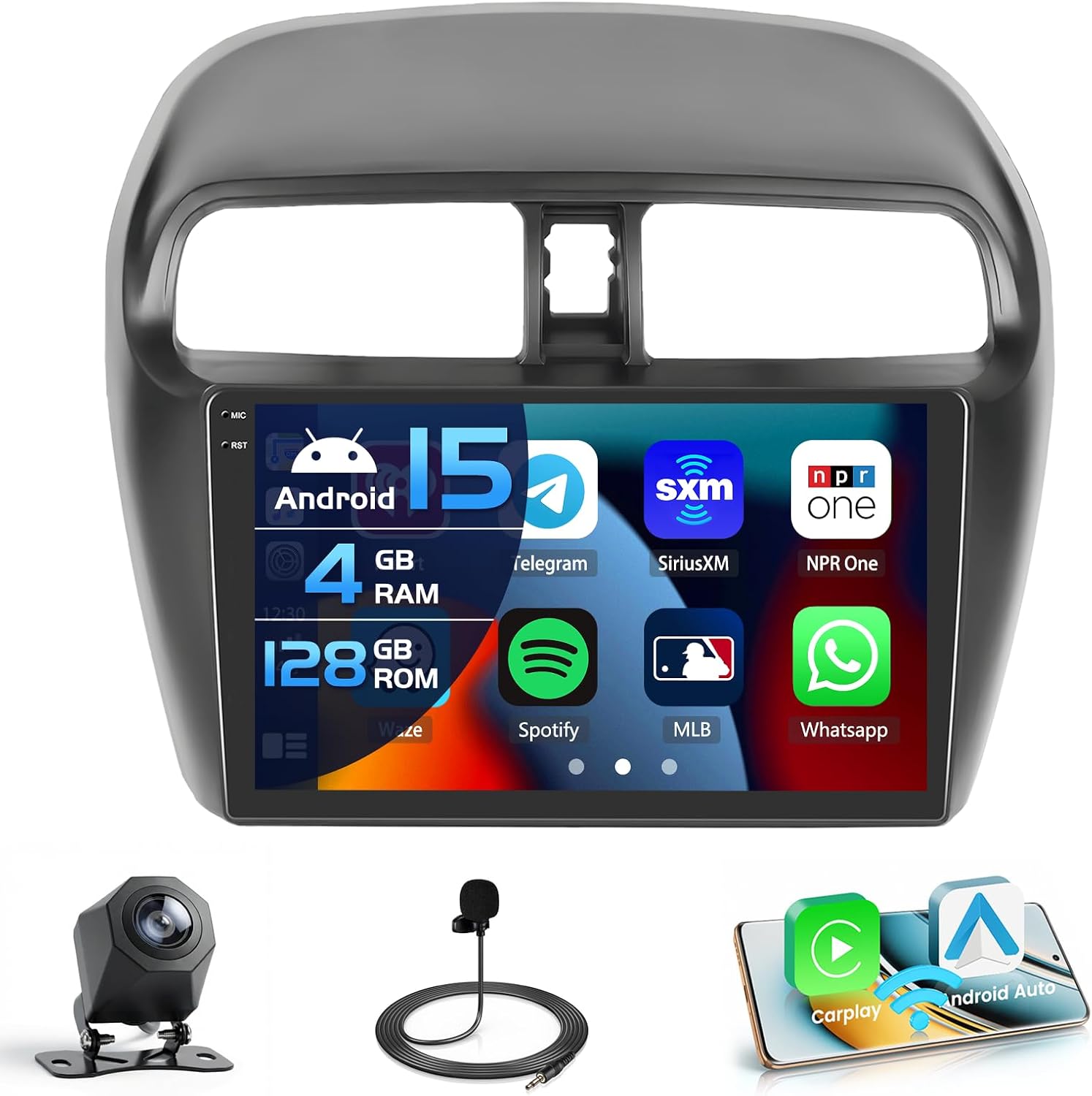
Image: The Inefala car stereo seamlessly integrated into the dashboard of a Mitsubishi Mirage, showcasing its 9-inch display with various application icons.

Image: A comparison view of the Mitsubishi Mirage dashboard, showing the factory radio and the upgraded Inefala car stereo installed, highlighting the fit and finish.
Instrucciones de funcionamiento
Pantalla táctil en la celda
The 9-inch Incell screen features a 1280 x 720 ultra-high resolution, improving light transmission and color contrast by approximately 20%. It offers a wide viewing angle of 178° and supports 1080P video playback and split-screen functionality. You can switch between 15 different desktop themes.

Image: An illustration demonstrating the advanced features of the In-Cell Touch Screen, such as enhanced color accuracy, contrast, brightness, and wide viewing angles, along with split-screen capability.
CarPlay, Android Auto y Mirror Link
Connect your smartphone wirelessly for voice-assisted controls and easy access to music, navigation, calls, and messages. The system supports both Wireless CarPlay and Android Auto. Mirror Link functionality allows syncing your phone's screen via WiFi hotspot or USB cable. Note: Some Samsung and Huawei phones may have limited compatibility with Android Auto and Mirror Link.

Image: A visual representation of Wireless CarPlay and Android Auto in action, displaying phone applications like music, navigation, and messaging on the car stereo screen, alongside a mirrored smartphone display.
Bluetooth 5.0
Bluetooth 5.0 enables hands-free calling, phone book download, and music playback, enhancing safety and convenience while driving.

Image: A depiction of the Bluetooth 5.0 interface on the car stereo, showing a dial pad for hands-free calls and music controls, with a woman interacting with the system.
Navegación GPS
The system supports both online and offline navigation using GPS, BeiDou, Galileo, and Glonass for wide coverage. Real-time road conditions help avoid traffic, and accurate satellite positioning prevents you from getting lost.

Image: The GPS navigation screen displaying a detailed map with routes, landmarks, and satellite icons, indicating global positioning capabilities.
Radio FM/RDS
La radio FM/RDS estable le permite preestablecer hasta 54 estaciones, proporcionando transmisiones de canales, pronósticos del tiempo y condiciones de la carretera en tiempo real.
Conectividad WiFi
Connect to a WiFi hotspot to download various applications like YouTube and TikTok, enriching your in-car experience.

Image: The WiFi function display, showing a variety of application icons and an online interface, demonstrating internet access and app download capabilities.
EQ Options (32-band DSP)
The system supports EQ options with a 32-band DSP (Digital Signal Processor) for fine-tuning your audio experience.
Official Product Video: Interface and Features Overview
Video Description: This video demonstrates the various functions and user interface of the Inefala Android car stereo, including desktop themes, CarPlay/Android Auto music and navigation, hands-free calls, voice control, dual screen mode, FM/RDS radio, weather forecast, network radio, 32-band EQ DSP, GPS navigation, and rear view pantalla de la cámara
Mantenimiento
Para garantizar la longevidad y el rendimiento óptimo de su estéreo para automóvil Inefala, siga estas pautas generales de mantenimiento:
- Limpieza: Utilice un paño suave y seco para limpiar la pantalla y el exterior. Evite limpiadores abrasivos o disolventes que puedan dañar la superficie.
- Actualizaciones de software: Periodically check for software updates to ensure you have the latest features and performance enhancements.
- Condiciones ambientales: Evite exponer la unidad a temperaturas extremas o a la luz solar directa durante períodos prolongados.
- Conexiones de cable: Asegúrese de que todos los cables estén conectados de forma segura para evitar problemas intermitentes.
Solución de problemas
If you encounter issues with your Inefala car stereo, refer to the following common troubleshooting tips:
- Sin energía: Double-check all power connections. Ensure the red and yellow wires are correctly connected to the 12V battery positive, and the black wire to the negative.
- Sin sonido: Verify speaker connections and audio settings. Check if the volume is muted or set too low.
- La pantalla táctil no responde: If the touchscreen is not responding, try restarting the unit. Ensure all cables are properly seated, as loose connections can sometimes affect functionality.
- La cámara de respaldo no se muestra: Confirm the rear camera input cable is correctly connected and the reverse trigger wire is properly wired. Remember, the reversing input must be plugged in even if the camera is not used to avoid WiFi/Bluetooth signal issues.
- Problemas con CarPlay/Android Auto: Ensure your phone is compatible and has the necessary apps installed (e.g., Android Auto app for Android devices). Check your phone's settings for wireless projection.
- Mala señal de GPS: Asegúrese de que la antena GPS esté instalada en un lugar con una vista despejada. view del cielo, libre de obstrucciones.
Si el problema persiste, consulte la sección de soporte para obtener información de contacto.

Image: A visual guide providing quick installation tips and instructions on how to reach customer support for further assistance.
Presupuesto
| Sistema | El último sistema Android |
| Resolución de pantalla | 1280*720 Incell Screen |
| Potencia de salida | 4*45 W |
| Versión de Bluetooth | 5.0 |
| Función de control del volante | Apoyo |
| Banda de radio | FM/RDS |
| Cámara trasera estándar | AHD y CVBS |
| Micrófono externo | Apoyo |
| Pantalla dividida | Apoyo |
| Wi-Fi | Apoyo |
| Carplay / Android Auto | Sólo conexión inalámbrica |
| Enlace espejo | Inalámbrico / cableado |
| USB | Doble interfaz USB |
| Formato de audio | APE / FLAC / WAV / MP3 / WMA etc |
| Formato de vídeo | MKV / RMVB / AVI / MP4 / MDV etc |
| Formato de imagen | PNG / JPEG / JPG / GIF / WBMP / BNP etc |
| Palabra clave de configuración de fábrica | 1234 |
| Mapas | Mapas integrados en línea y fuera de línea (requiere Internet para descargar datos) |
| Idioma | English / Spanish / Chinese / French / Italian / Korean / Japanese / Arabic / Portuguese / Russian / Turkish / Vietnamese / Hebrew / Polish / German |

Image: A comprehensive table listing the technical specifications of the Inefala car stereo, including system details, screen resolution, power output, Bluetooth version, and supported features.
Garantía y soporte
Su estéreo para automóvil Inefala viene con un Garantía de 1 años. For any technical assistance, troubleshooting, or warranty claims, please contact Inefala customer support.
Cómo Encontrarnos:
- Click on the seller name "Inefala Direct" on the product page.
- Haga clic en "Hacer una pregunta".
- Please send us questions you met, and attach relevant pictures or videos will help to solve the problem faster!
All messages will be replied within 24 hours, regardless of holidays.

Image: An image displaying the Inefala customer service email address for support inquiries.