
Samsung SM-A066B
Manual de usuario del Samsung Galaxy A06 5G
Modelo: SM-A066B
1. Introducción
Welcome to the user manual for your new Samsung Galaxy A06 5G smartphone. This guide provides essential information on setting up, operating, maintaining, and troubleshooting your device. Please read this manual thoroughly to ensure optimal performance and longevity of your smartphone.

Imagen: delantera y trasera view del Samsung Galaxy A06 5G.
2. Primeros pasos
2.1. Contenido del paquete
Ensure your product package contains the following items:
- Teléfono inteligente Samsung Galaxy A06 5G
- Cable de datos (USB-C a USB-C)
- Pin de expulsión de SIM
- Guía de inicio rápido
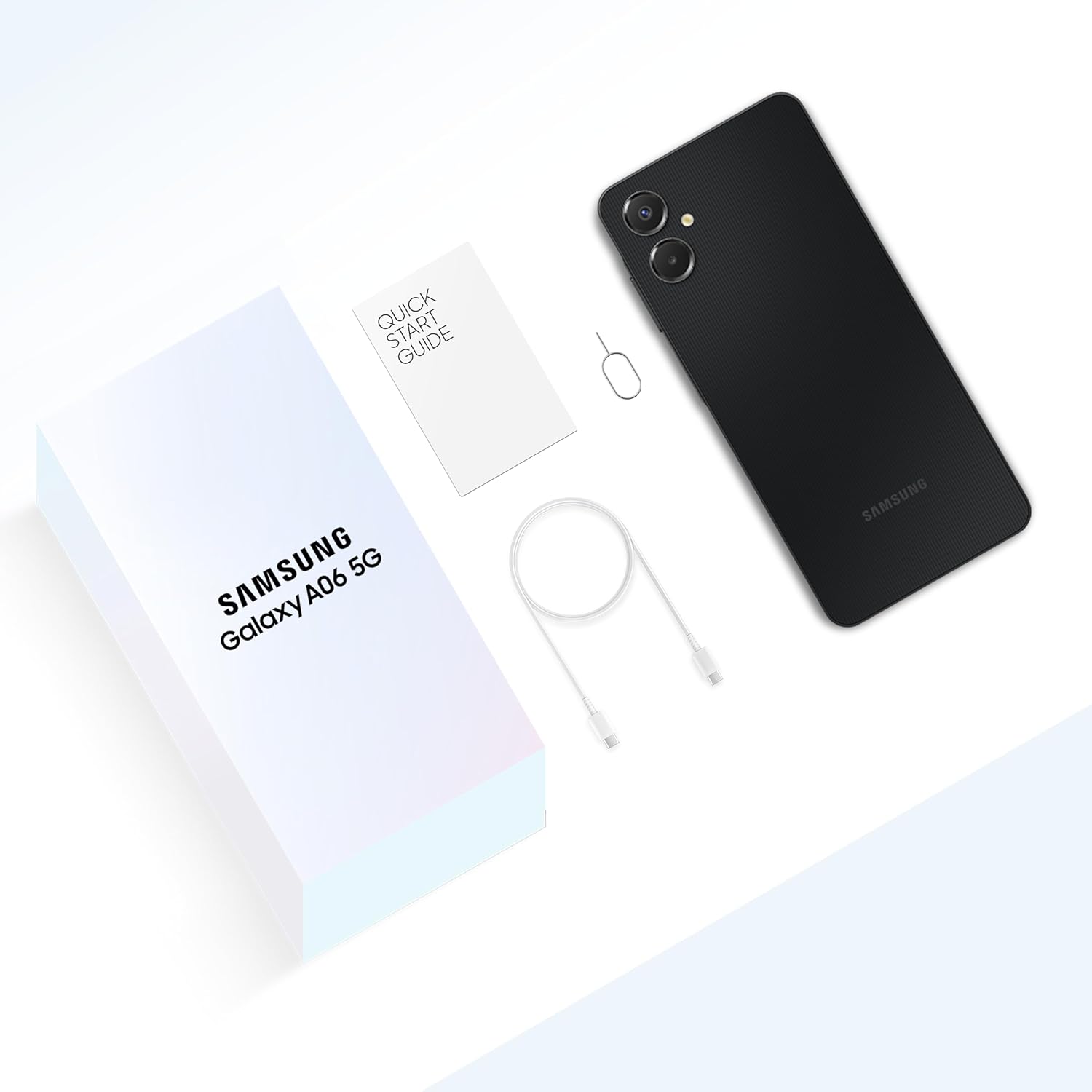
Image: Unboxed contents of the Samsung Galaxy A06 5G.
2.2. Inserción de la tarjeta SIM y la tarjeta MicroSD
- Localice la bandeja de la tarjeta SIM en el costado de su dispositivo.
- Inserte el pin de expulsión de la tarjeta SIM en el pequeño orificio junto a la bandeja para abrirla.
- Coloque su(s) tarjeta(s) Nano-SIM y/o tarjeta microSD en la bandeja con los contactos dorados hacia abajo.
- Empuje suavemente la bandeja dentro de la ranura hasta que encaje en su lugar.
2.3. Carga del dispositivo
Before first use, fully charge your device. Connect the USB-C cable to the phone's charging port and the other end to a compatible power adapter. Plug the adapter into a wall outlet.
2.4. Encendido / apagado
- To power on: Press and hold the Side key until the Samsung logo appears.
- To power off: Press and hold the Side key and Volume Down button simultaneously, then tap 'Power off'. Alternatively, swipe down from the top of the screen to open the Quick Panel, tap the Power icon, and select 'Power off'.
2.5. Asistente de configuración inicial
Upon first power-on, follow the on-screen instructions to set up your device. This includes selecting your language, connecting to Wi-Fi, signing in to your Google account, and setting up security features.
3. Dispositivo terminadoview y características clave

Image: Key features of the Galaxy A06 5G.
3.1. Pantalla
The Galaxy A06 5G features an immersive 6.7-inch HD+ display with a 20:9 aspect ratio and smooth 90Hz scrolling for an enhanced viewExperiencia de aprendizaje.

Image: Large display of the Galaxy A06 5G.
3.2. Rendimiento
Equipped with the MediaTek Dimensity 6300 Processor, the device offers superior performance for multitasking, gaming, and video streaming.

Image: Device performance for smooth app usage.
3.3. Conectividad
Experience true 5G connectivity with support for up to 12 5G bands and 4 antennas, ensuring fast and reliable network access. The device also supports Wi-Fi, Bluetooth, USB, and built-in GPS.

Image: Superfast 5G connectivity.
3.4. Sistema de cámara
Capture high-quality photos and videos with the pro-grade 50MP main camera, a 2MP depth camera, and an 8MP front camera for clear selfies.
- Cámara principal: 50 megapíxeles
- Cámara de profundidad: 2 megapíxeles
- Cámara frontal: 8 megapíxeles

Image: Pro-grade 50MP main camera diagram.

Imagen: Sample photos demonstrating high-definition capture.
3.5. Batería
The device is powered by a 5000 mAh (typical) battery, providing extended usage. It also supports 25W Fast Charging to quickly power up your device.

Image: 5000 mAh battery and fast charging capability.
3.6. Durabilidad
With an IP54 rating, the Galaxy A06 5G offers reliable protection against dust and splashes of water, suitable for daily use.

Image: IP54 rating for dust and splash resistance.
3.7. Software & Security
- Sistema operativo: Runs on Android 15.0, with a commitment to 4 generations of OS upgrades and 4 years of security updates.
- Enfoque de voz: Eliminates background noise during calls for crystal clear conversations.
- Seguridad Knox: Samsung Knox Vault provides a secure environment for sensitive data like PINs and passwords.
- Sensor de huellas dactilares: A side-mounted fingerprint sensor offers secure and convenient unlocking.

Image: Commitment to OS upgrades.

Image: Voice Focus feature for clear calls.

Image: Side fingerprint sensor for secure unlocking.

Image: Samsung Knox Vault for data security.
4. Funcionamiento básico
4.1 Navegación
The Galaxy A06 5G uses a touchscreen interface. You can navigate by tapping, swiping, pinching, and spreading your fingers on the screen.
4.2. Hacer llamadas
Open the Phone app, enter the number using the keypad, and tap the call icon. To answer an incoming call, swipe the green phone icon upwards. To decline, swipe the red phone icon downwards.
4.3. Envío de mensajes
Open the Messages app, tap the 'New message' icon, enter the recipient's number or select from contacts, type your message, and tap the send icon.
4.4. Uso de la cámara
Open the Camera app. Tap the shutter button to take a photo. Swipe left or right to switch between photo and video modes. Tap the camera switch icon to toggle between front and rear cameras.
4.5. Conexión a Wi-Fi y Bluetooth
Ir a Ajustes > Conexiones. Toggle Wi-Fi or Bluetooth on. For Wi-Fi, select a network and enter the password if required. For Bluetooth, select a device from the list to pair.
4.6. Managing Notifications and Quick Panel
Swipe down from the top of the screen to access notifications and the Quick Panel. The Quick Panel allows quick access to frequently used settings like Wi-Fi, Bluetooth, and flashlight.

Image: Accessing Quick Panel and Notifications.
5. Mantenimiento y cuidado
5.1. Actualizaciones de software
Verifique e instale periódicamente actualizaciones de software para asegurarse de que su dispositivo tenga las últimas funciones, parches de seguridad y mejoras de rendimiento. Vaya a Configuración > Actualización de software > Descargar e instalar.
5.2. Limpieza del dispositivo
Use a soft, lint-free cloth to clean your device. Avoid using harsh chemicals or abrasive materials. For stubborn smudges, slightly dampEnjuague el paño con agua o con un limpiador de pantalla diseñado para dispositivos electrónicos.
5.3. Optimización de la batería
Para extender la vida útil de la batería:
- Reducir el brillo de la pantalla.
- Apague Wi-Fi, Bluetooth y GPS cuando no estén en uso.
- Cierre las aplicaciones no utilizadas que se ejecutan en segundo plano.
- Enable Power saving mode in Settings.
5.4. Gestión del almacenamiento
Limpie periódicamente lo innecesario files, desinstale aplicaciones no utilizadas y mueva archivos multimedia grandes files to a microSD card or cloud storage to free up internal storage and maintain device performance.
6. Solución de problemas
6.1. Problemas comunes
- El dispositivo no enciende: Asegúrese de que la batería esté cargada. De lo contrario, conéctela a un cargador y espere unos minutos antes de intentar encenderla.
- Mala duración de la batería: Consulte la Sección 5.3 para obtener sugerencias sobre cómo optimizar la batería.
- Problemas de conectividad (Wi-Fi/Bluetooth): Try toggling the respective setting off and on. Restart your device or the router/Bluetooth accessory.
- Las aplicaciones se bloquean o se congelan: Cierra la aplicación y vuelve a abrirla. Si el problema persiste, borra la caché de la aplicación (Ajustes > Aplicaciones > [Nombre de la aplicación] > Almacenamiento > Borrar caché).
6.2. Restablecimiento de fábrica
Si su dispositivo experimenta problemas persistentes, un restablecimiento de fábrica puede resolverlos. Advertencia: A factory reset will erase all data from your device. Back up important data before proceeding. Go to Ajustes > Administración general > Restablecer > Restablecer datos de fábrica.
7. Especificaciones
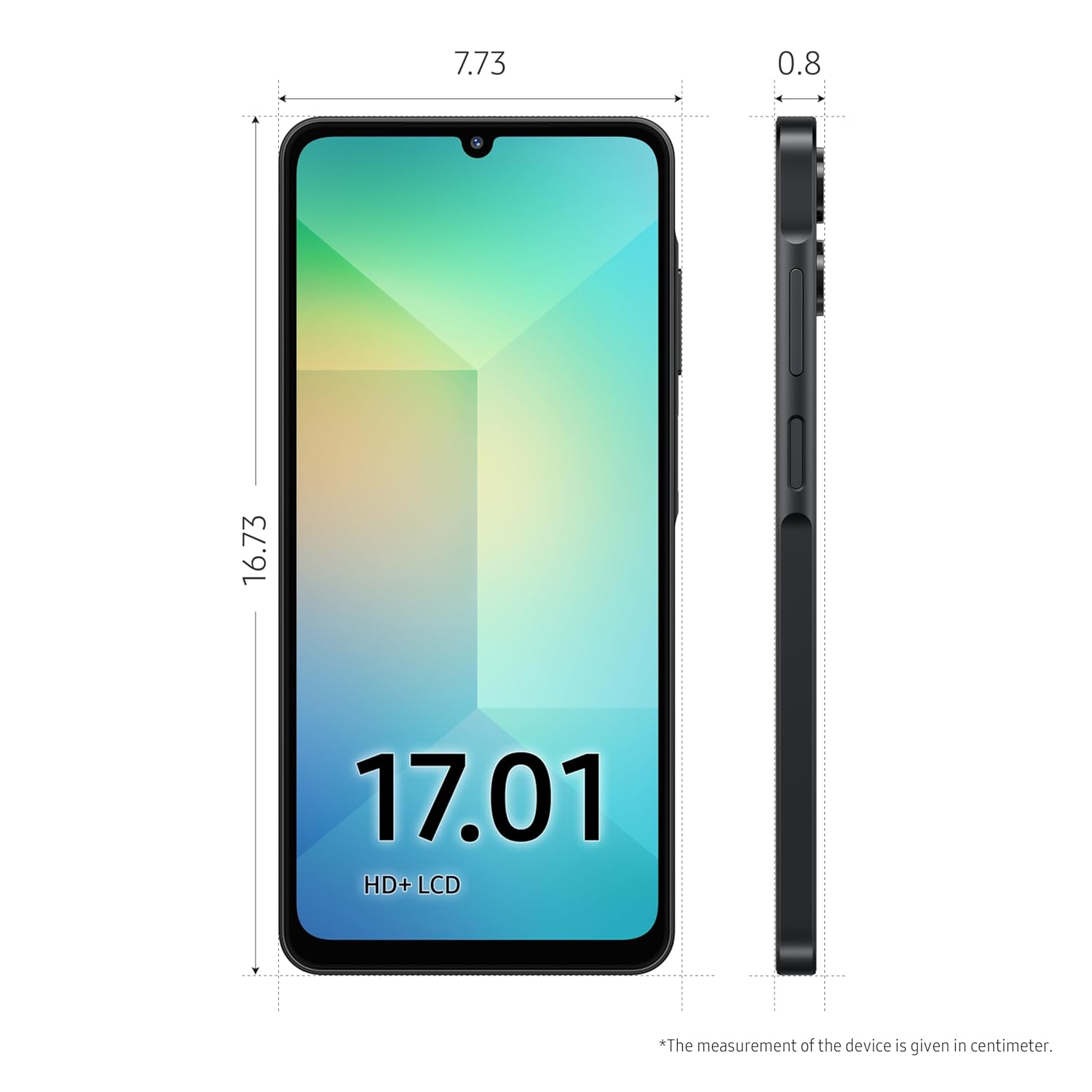
Image: Physical dimensions of the device.
| Característica | Especificación |
|---|---|
| Número de modelo | SM-A066B |
| Sistema operativo | Androide 15.0 |
| Procesador | MediaTek Dimensity 6300 |
| RAM | 4 GB |
| Almacenamiento interno | 64 GB |
| Tamaño de la pantalla | 6.7 pulgadas HD+ |
| Resolución | 720 x 1600 |
| Cámara principal | 50 MP |
| Cámara frontal | 8 MP |
| Capacidad de la batería | 5000 mAh |
| Conectividad | 5G (12 bands), Bluetooth, USB, Wi-Fi |
| Características especiales | Built-In GPS, Dual SIM, Expandable Memory, Mobile Hotspot, Stereo Speakers, IP54 Rating, Voice Focus, Side Fingerprint Sensor |
| Dimensiones (LxAnxAl) | 0.8 x 7.73 x 16.73 cm |
| Peso | 191 gramos |
8. Garantía y soporte
8.1. Información de garantía
Your Samsung Galaxy A06 5G comes with a limited manufacturer's warranty. Please refer to the warranty card included in your product package or visit the official Samsung websitio para conocer los términos y condiciones detallados.
8.2. Atención al cliente
For technical assistance, service, or additional information, please contact Samsung Customer Service. You can find contact details and online support resources on the official Samsung websitio: www.samsung.com/support