
Oclean X Lite
Manual de usuario del cepillo de dientes eléctrico Oclean X Lite
Model: X Lite
Introducción
The Oclean X Lite Electric Toothbrush is designed to provide a superior oral cleaning experience for adults. Featuring a smart screen display, multiple cleaning modes, and long-lasting battery life, it helps ensure comprehensive plaque removal and promotes overall oral health.

Image: The Oclean X Lite Electric Toothbrush, shown both in its retail packaging and as a standalone unit, highlighting its sleek design and smart display.
Contenido del paquete
Antes del primer uso, verifique que todos los elementos estén presentes en el paquete:
- Oclean X Lite Electric Toothbrush Handle (x1)
- Brush Head (x1)
- Cable de carga USB tipo C (x1)
- Manual de usuario (x1)

Image: A visual representation of the Oclean X Lite package contents, including the toothbrush handle, brush head, USB-C cable, and user manual.
Configuración
1. Carga del cepillo de dientes
The Oclean X Lite features a long-lasting battery, providing up to 30 days of usage on a single charge. For optimal performance, fully charge the toothbrush before first use.
- Localice el puerto de carga USB tipo C en la parte inferior del mango del cepillo de dientes.
- Abra la tapa protectora del puerto de carga.
- Insert the provided USB Type-C cable into the port.
- Conecte el otro extremo del cable USB a un adaptador de corriente USB compatible (no incluido) o a un puerto USB de una computadora.
- The screen display will indicate the charging status. A full charge typically takes approximately 3 hours.

Imagen: Un primer plano view of the Oclean X Lite's USB-C charging port, illustrating how to connect the charging cable for power.
2. Colocación del cabezal del cepillo
Alinee el cabezal con el eje metálico del mango y presiónelo firmemente hasta que encaje en su lugar. Asegúrese de que esté bien fijado antes de usarlo.
Instrucciones de funcionamiento
1. Encendido/Apagado y Selección de Modo
Press the power button to turn the toothbrush on or off. While the toothbrush is on, press the power button repeatedly to cycle through the available cleaning modes. The smart screen will display the selected mode.
2. Modos de limpieza
The Oclean X Lite offers 5 distinct cleaning modes to cater to various oral care needs:
- Limpieza diaria: Modo estándar para la eliminación de placa diaria.
- Limpieza profunda: Provides a more intense cleaning for thorough plaque removal.
- Sensible: Limpieza suave para dientes y encías sensibles.
- Blanqueo: Diseñado para ayudar a eliminar las manchas superficiales para conseguir dientes más brillantes.
- Masaje: Gently massages gums to improve circulation and health.
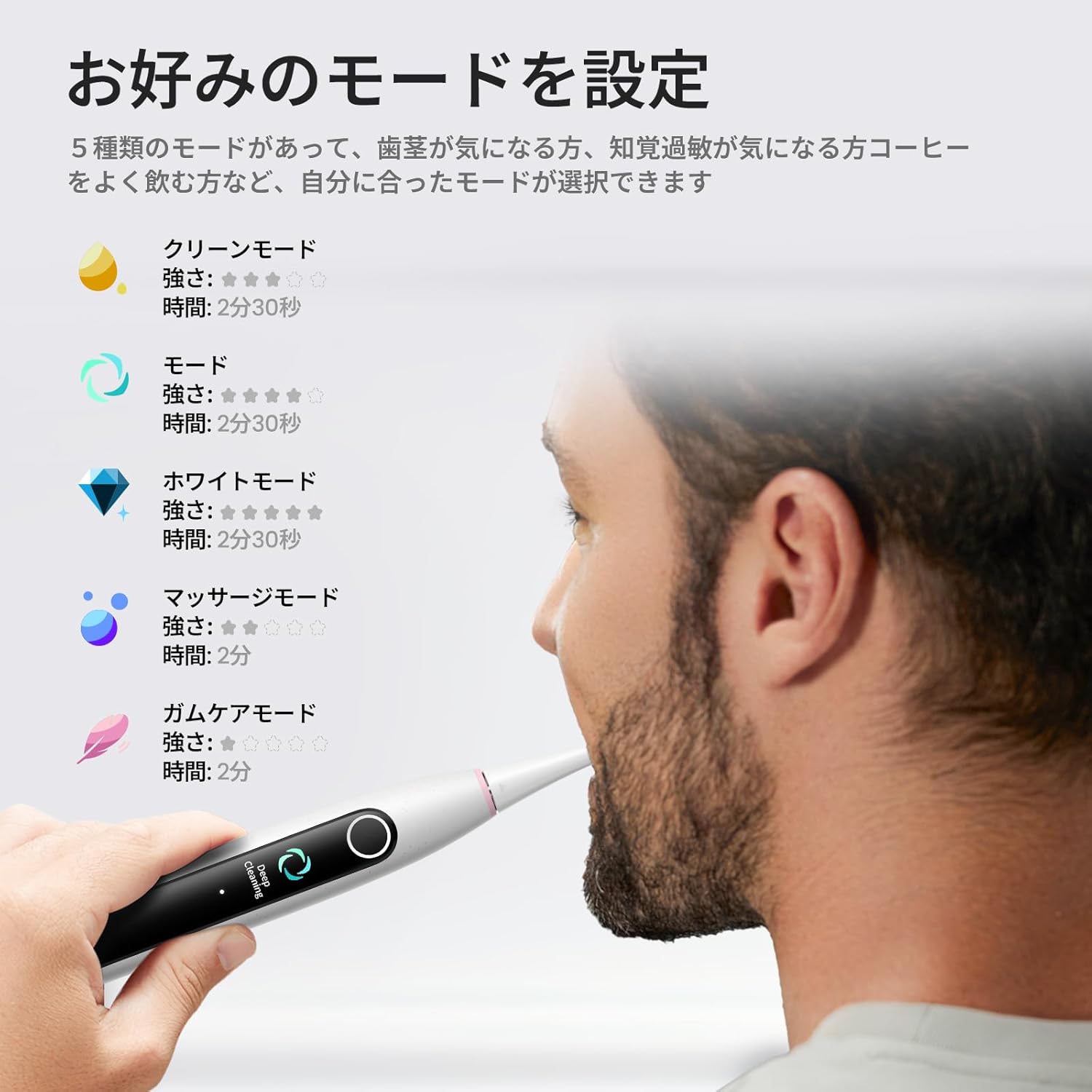
Image: The Oclean X Lite's smart screen displaying the various cleaning modes, illustrating the options available for customized brushing.
3. Brushing Technique and Smart Display
Apply a small amount of toothpaste to the brush head. Place the brush head against your teeth at a slight angle towards the gumline. Move the brush slowly across each tooth, allowing the 40,000 vibrations per minute to clean effectively.
The smart display screen provides real-time feedback on your brushing. It shows brushing zones, helping you ensure no area is missed for a thorough clean. The toothbrush also features a brushing timer and pressure sensor to guide optimal brushing.
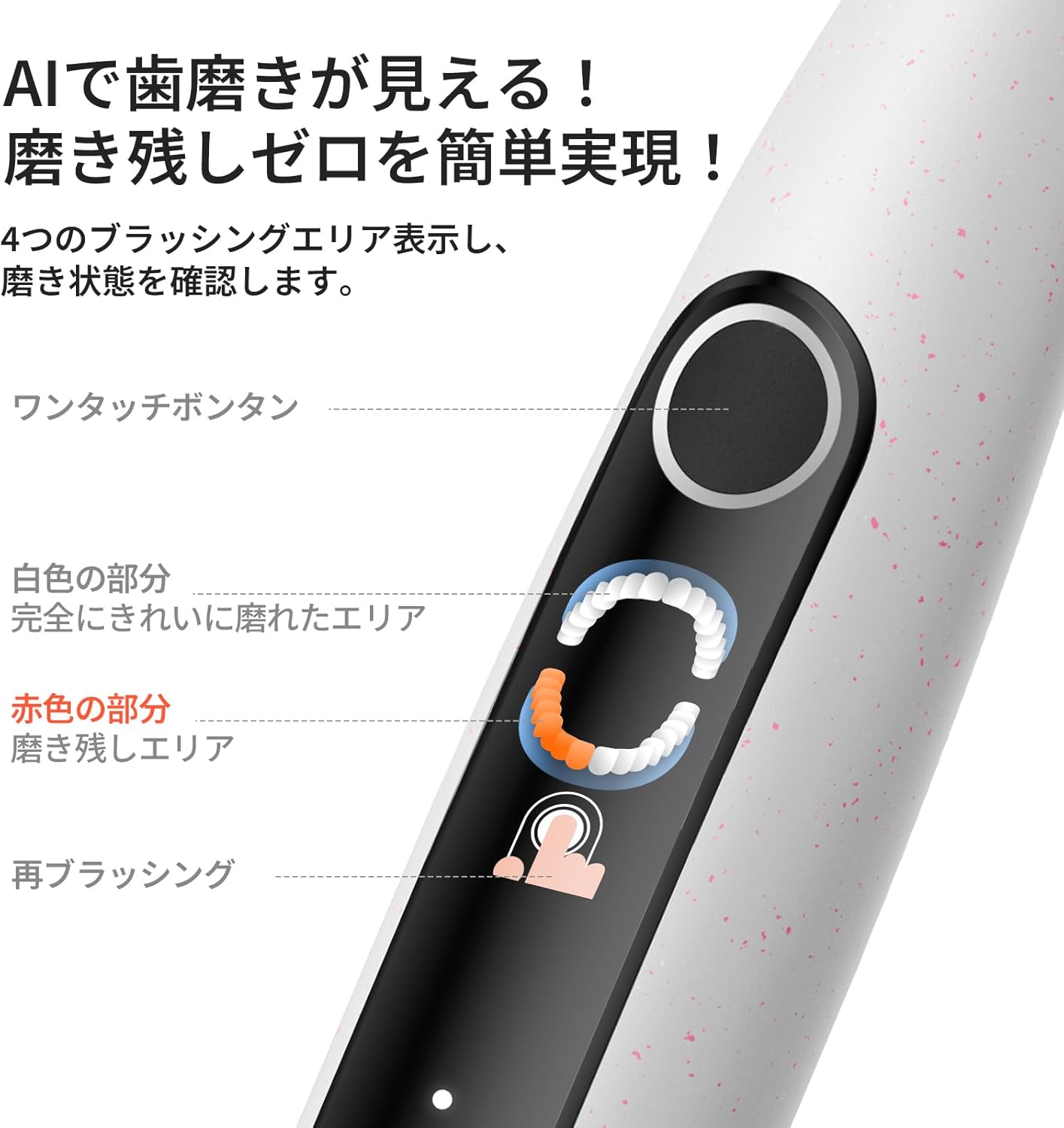
Image: A close-up of the Oclean X Lite's screen showing real-time brushing feedback, indicating areas that have been cleaned and those that require more attention.

Image: An illustration demonstrating the high-frequency sonic vibrations of the Oclean X Lite's bristles, highlighting its powerful cleaning action.
4. Supplementary Brushing Guidance
The Oclean X Lite automatically sets a supplementary brushing guide to target missed areas. After your initial brushing session, the screen may highlight areas that need more attention. With one click, you can activate this guidance to achieve up to 38% more plaque removal for a deeper clean.

Image: A step-by-step visual guide on how the Oclean X Lite provides supplementary brushing guidance to ensure no areas are missed during cleaning.
Mantenimiento
1. Limpieza del cepillo de dientes
After each use, rinse the brush head thoroughly under running water. You can also detach the brush head and rinse both the head and the handle separately. Wipe the handle with a soft, damp cloth. Do not immerse the entire toothbrush handle in water for extended periods, although it is IPX7 waterproof.
2. Reemplazo del cabezal del cepillo
Dentists recommend replacing your toothbrush head every 3 months, or sooner if the bristles become frayed. To replace, simply pull the old brush head off the handle and push a new one into place until it clicks.

Imagen: Una ilustración que muestraasing different types of Oclean brush heads, including a professional clean brush head, W-shaped brush head, and tongue cleaner, emphasizing their features.
Solución de problemas
| Problema | Posible causa | Solución |
|---|---|---|
| El cepillo de dientes no se enciende. | La batería está agotada. | Charge the toothbrush fully using the provided USB-C cable. |
| Las vibraciones se sienten débiles. | Low battery or brush head not securely attached. | Recargue el cepillo de dientes. Asegúrese de que el cabezal esté bien colocado. |
| La visualización de la pantalla no funciona. | Fallo de software o batería baja. | Try restarting the toothbrush. Ensure it is fully charged. If the issue persists, contact customer support. |
| El cepillo de dientes se detiene durante el uso. | Battery depleted or automatic timer activated. | Recharge the toothbrush. The toothbrush has a built-in timer; simply restart if you wish to continue brushing. |
Presupuesto
- Modelo: Xlite
- Marca: Oclean
- Vibraciones: 40,000 VPM (vibraciones por minuto)
- Modos de limpieza: 5 (Daily Clean, Deep Clean, Sensitive, Whitening, Massage)
- Duración de la batería: Hasta 30 días (según el uso típico)
- Cargando: USB Type-C, approx. 3 hours for full charge
- Características especiales: Smart Screen Display, Brushing Timer, Pressure Sensor, Supplementary Brushing Guidance
- Fuente de energía: Funciona con pilas (1 pila de 12 V incluida)
- Descripción de la firmeza del artículo: Medio
- Fabricante: Shenzhen Yunding Tecnología de la Información Co., Ltd.
- ASIN: B0DXZ9PDLC
- Dimensiones del paquete: 8.82 x 3.86 x 1.26 pulgadas; 7.05 onzas
Garantía y soporte
For warranty information, product support, or to purchase replacement parts and accessories, please visit the official Oclean website or contact their customer service. Refer to the original product packaging or purchase documentation for specific warranty terms and contact details.
Fabricante: Shenzhen Yunding Tecnología de la Información Co., Ltd.
Tienda de la marca: Visit the Oclean Store on Amazon
Ask a question about this manual
Ask about setup, troubleshooting, compatibility, parts, safety, or missing instructions. Manuals+ will review the question and use this page’s manual context to help answer it.