
1. Introducción
The SINGMOOD S100 Portable Karaoke Machine is an all-in-one entertainment system designed for superior audio and visual performance. Featuring a 14.1-inch touchscreen, dual wireless UHF microphones, and a powerful 1000W Bluetooth PA speaker, this machine offers a seamless karaoke experience. Its advanced internal components ensure smooth operation and high-fidelity sound, making it ideal for various settings from home entertainment to outdoor gatherings.

Figure 1: The SINGMOOD S100 Portable Karaoke Machine with its two wireless microphones.
2. Qué incluye
Upon unboxing your SINGMOOD S100, please verify that all the following components are present:
- Máquina de karaoke S-100
- 2x UHF Microphones
- 2x Microphone Battery
- Adaptador
- Manual de usuario (este documento)

Figure 2: Visual representation of the contents included in the product package.
3. Características principales
The SINGMOOD S100 is equipped with several advanced features to enhance your karaoke and entertainment experience:
- Pantalla táctil de 14.1": A vibrant display for lyrics, video streaming, and intuitive navigation.
- Micrófonos UHF inalámbricos duales: Provides crystal-clear sound with enhanced stability and long-range connectivity. These microphones are rechargeable via Type-C.
- 1000W Bluetooth PA Speaker: Delivers powerful, full-bodied sound for immersive audio.
- Componentes internos avanzados: Powered by an RK3566 chip with 4GB RAM and 64GB ROM, ensuring smooth singing, fast loading, and seamless video streaming without lag.
- 32-bit Digital Audio Decoder Chip: For unparalleled clarity, depth, and richness in every note.
- Integrated App Store: Access and download popular applications like Apple Music, YouTube, Spotify, and Chrome directly from the device.
- Modo Karaoke: A dedicated function to lower vocals in songs, transforming any track into a karaoke version with a single click.
- RGB Lighting Show: Dynamic lighting effects on the speaker create a vibrant party atmosphere.
- Diseño portátil: Features a hand-carry handle and four transport wheels, making it as portable as a suitcase for easy transport.
- Conectividad versátil: Includes inputs for guitar, condenser microphone, headset, Live OTG, TF card, USB1, USB2, HDMI, and DC12V input.

Figura 3: Sobreview of the internal technology stack ensuring lag-free performance.
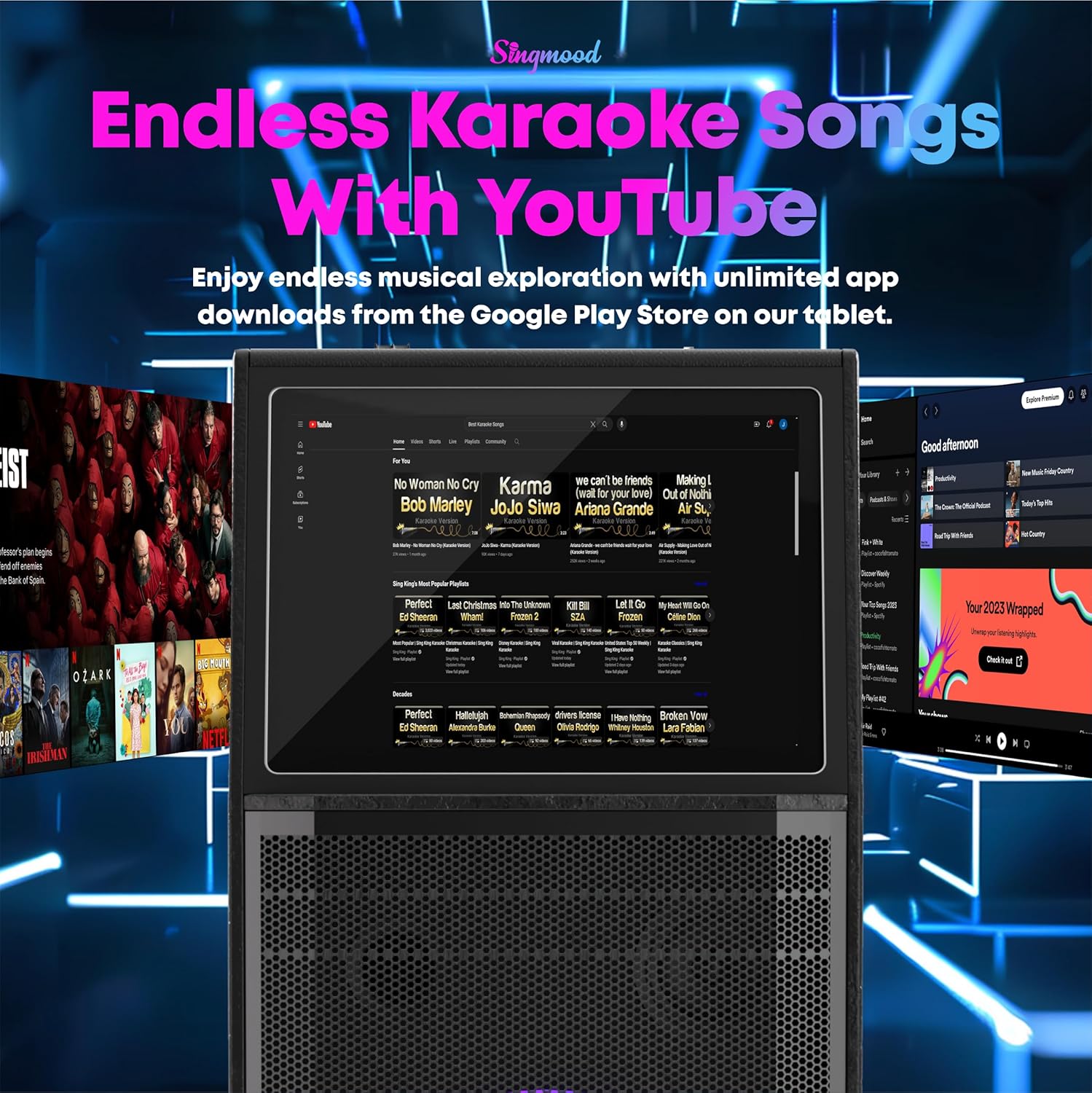
Figure 4: The 32-bit Digital Audio Decoder Chip provides superior sound clarity.

Figure 5: Features of the True UHF Microphones.

Figure 6: The portable design with a hand-carry handle and transport wheels.
4. Configuración
Follow these steps to set up your SINGMOOD S100 for the first time:
- Deshacer: Retire con cuidado todos los componentes del embalaje. Conserve el embalaje para su posterior almacenamiento o transporte.
- Conexión de energía: Connect the provided adapter to the DC12V INPUT port on the control panel and plug it into a power outlet. The machine can operate on battery power once charged.
- Configuración del micrófono: Insert the included 9V batteries into each wireless microphone. The microphones are pre-paired with the machine.
- Encendido: Locate the red POWER ON/OFF switch on the control panel and switch it to the 'ON' position. The touchscreen will illuminate.
- Arranque inicial: Allow the system to fully boot up. This may take a few moments.
5. Instrucciones de funcionamiento
Navigate and utilize the various functions of your karaoke machine:
5.1. Navegación con pantalla táctil
The 14.1-inch touchscreen serves as your primary interface. Tap on icons to launch applications or adjust settings. The main screen provides quick access to YouTube, Spotify, Bluetooth, My Application, Apple Music, Chrome, Play Store, MediaPlayer, and Settings.

Figure 7: The intuitive touchscreen interface for app access.
5.2. Modo karaoke
To activate karaoke mode and reduce original song vocals, press the dedicated 'KARAOKE M' button on the control panel. This allows your voice to be prominent over the instrumental track.

Figure 8: Activating Karaoke Mode.
5.3. Efectos de sonido y controles
The control panel features various knobs and buttons for sound customization:
- Control de volumen: Adjust the overall volume using the 'VOLUME+' and 'VOLUME-' knobs.
- Microphone Adjustments: Control microphone bass, treble, and echo using the dedicated 'MIC.BASS+', 'MIC.TREBLE+', and 'ECHO+' knobs.
- Sound Effects Buttons: Buttons for 'APPLAUSE', 'LAUGHTER', 'CHEER', and 'BOOING' are available for interactive fun.
- Control de LED: Press the 'LED' button to cycle through or turn off the RGB lighting effects on the speaker.

Figura 9: detallada view del panel de control.
5.4. External Connectivity
The S100 supports various external connections:
- Salida HDMI: Connect an HDMI cable from the machine to a TV or external display for a larger screen experience.
- Puertos USB: Use USB1 and USB2 for connecting external storage devices or a mouse for easier navigation.
- Bluetooth: Pair your smartphone or tablet via Bluetooth for wireless audio streaming.
Video 1: A demonstration of the SINGMOOD S100's features, including its touchscreen interface, sound effects, and connectivity options.
6. Mantenimiento
To ensure the longevity and optimal performance of your SINGMOOD S100, follow these maintenance guidelines:
- Limpieza: Use a soft, dry cloth to clean the exterior surfaces. For the touchscreen, use a microfiber cloth specifically designed for electronics. Avoid abrasive cleaners or solvents.
- Almacenamiento: When not in use, store the machine in a cool, dry place away from direct sunlight and extreme temperatures. If storing for extended periods, ensure the battery is partially charged (around 50%) to preserve its lifespan.
- Cuidado de la batería: Recharge the internal battery regularly, even if not frequently used, to prevent deep discharge.
- Cuidado del micrófono: Store microphones in a safe place to prevent damage. Ensure they are charged when needed.
7. Solución de problemas
If you encounter issues with your SINGMOOD S100, refer to the following common solutions:
- Ruido de retroalimentación: If you hear feedback noise from the speaker, lower the microphone treble, echo, and delay settings on the control panel. Adjusting the microphone's proximity to the speaker can also help.
- Sin sonido: Ensure the volume is turned up on both the machine and any connected external devices. Check all cable connections (HDMI, audio inputs). Verify microphones are powered on and paired.
- La pantalla no responde: Try restarting the machine. If the issue persists, ensure the power connection is stable.
- Problemas de conectividad (Bluetooth/Wi-Fi): Ensure the machine is within range of the Bluetooth device or Wi-Fi router. Restart both the machine and the connecting device.
8. Especificaciones
| Característica | Especificación |
|---|---|
| Número de modelo | S100 |
| Tipo de montaje | Piso de pie |
| Fuente de poder | Funciona con pilas |
| Tipo de conector | HDMI |
| Salida Wattage | 1000 vatios |
| Número de canales | 2 |
| Entrada de audio | Micrófono inalámbrico |
| Dimensiones del producto | 12 x 7 x 16 pulgadas |
| Peso del artículo | 51.9 libras |
| Baterías | Se requieren 1 pilas de 9 V (incluidas) |
| Tecnología de conectividad | Wifi |
| Color | Negro |
| Dispositivos compatibles | Audio Source, Microphone, Smartphone, Tablet |
9. Garantía y soporte
The SINGMOOD S100 Portable Karaoke Machine comes with a 10 año de garantía, as stated in the product title, ensuring long-term reliability and customer satisfaction. For any support needs, please contact the seller, Singmood, directly. Additionally, protection plans are available for purchase to extend coverage beyond the standard warranty period:
- Plan de protección de 2 años: Disponible por $49.99.
- Plan de protección de 3 años: Disponible por $64.99.
- Protección completa: A monthly plan at $16.99/month covering all eligible past and future purchases.
For further assistance or inquiries, please refer to the contact information provided with your purchase or visit the official SINGMOOD support channels.