
1. Introducción
Welcome to the Noise ColorFit Pulse 4 Pro Smartwatch user manual. This guide provides essential information for setting up, operating, and maintaining your new smartwatch. Please read this manual thoroughly to ensure proper use and to maximize your device's features.
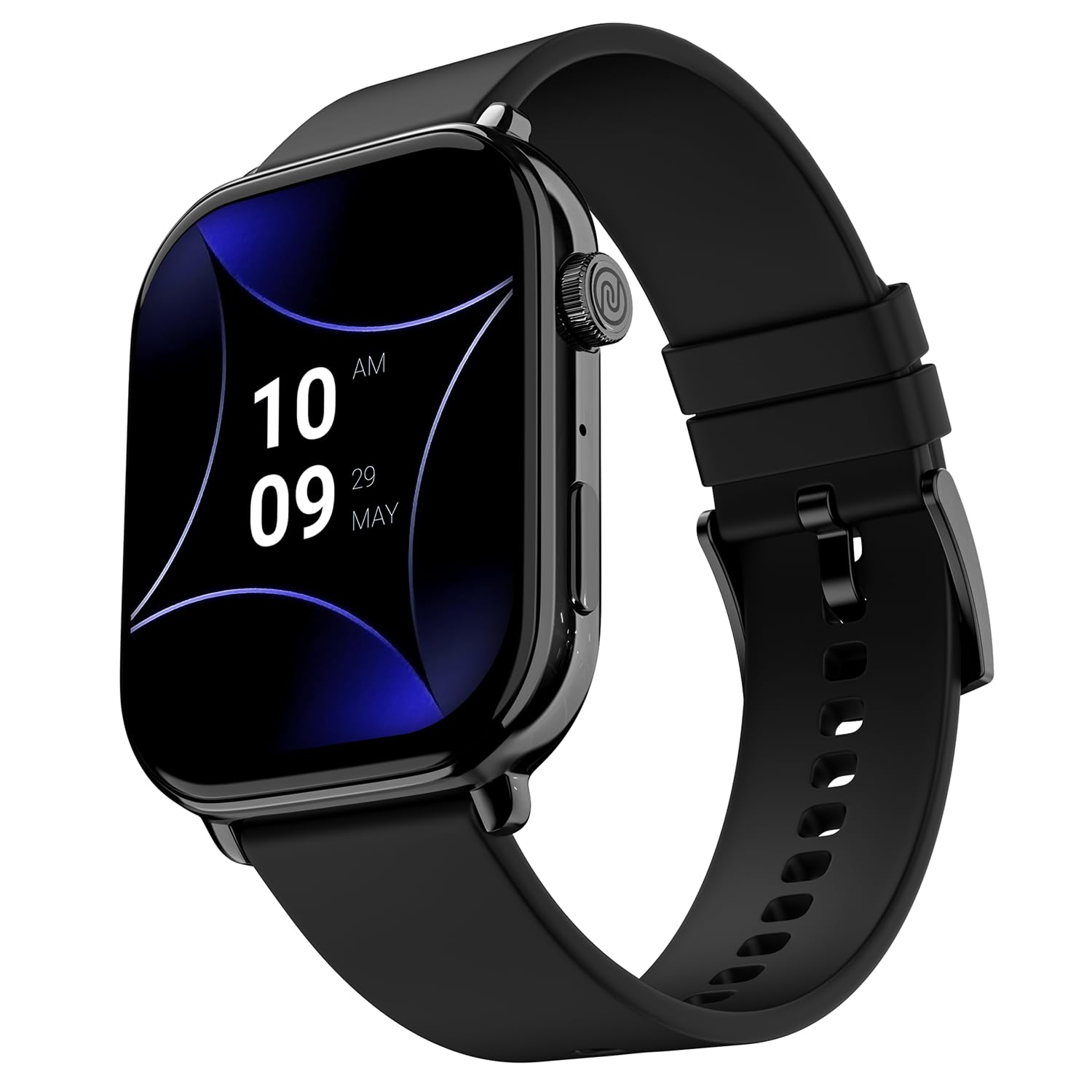
Image 1.1: The Noise ColorFit Pulse 4 Pro Smartwatch in Jet Black.
2. ¿Qué hay en la caja?
Upon unboxing your Noise ColorFit Pulse 4 Pro Smartwatch, please verify that all the following items are included:
- Noise ColorFit Pulse 4 Pro Smartwatch
- Cargador magnético
- Manual de usuario (este documento)
- Tarjeta de garantía
Vídeo 2.1: Un finalview of the Noise ColorFit Pulse 4 Pro Smartwatch and its contents, including the watch, color options, and items found in the box.
3. Configuración
3.1 Carga inicial
Before first use, fully charge your smartwatch. Connect the magnetic charger to the charging pins on the back of the watch and plug the USB end into a power adapter (not included) or a computer's USB port. The watch display will indicate charging status.
3.2 Descarga y emparejamiento de la aplicación
Para liberar todo el potencial de su reloj inteligente, descargue el Ajuste de ruido application on your smartphone. The app is compatible with both Android and iOS devices.
- Scan the QR code below or search for 'NoiseFit' in your smartphone's app store.
- Install and open the NoiseFit app.
- Follow the on-screen instructions in the app to create an account and pair your smartwatch via Bluetooth. Ensure Bluetooth is enabled on your smartphone.
- Confirme la solicitud de emparejamiento tanto en su teléfono inteligente como en su reloj inteligente.

Image 3.1: The smartwatch display showing a QR code for payments, which can also be used to illustrate app download. For app download, please refer to the official NoiseFit app store page or Este enlace.
4. Instrucciones de funcionamiento
4.1 Encendido y apagado
- Encendido: Press and hold the functional crown button on the side of the watch until the Noise logo appears.
- Apagado: Swipe down from the watch face, tap the settings icon, then select 'Power Off'. Alternatively, press and hold the functional crown button and select 'Power Off' when prompted.
4.2 Navegación
The Noise ColorFit Pulse 4 Pro features a responsive touchscreen and a functional crown for intuitive navigation.
- Pantalla táctil: Swipe left, right, up, or down to access different menus, notifications, and widgets. Tap to select items.
- Corona funcional: Rotate the crown to scroll through lists and menus. Press the crown to return to the watch face or to confirm a selection.

Imagen 4.1: Detallada view of the functional crown on the Noise ColorFit Pulse 4 Pro Smartwatch, used for navigation.
4.3 Pantalla
The smartwatch features a 1.96-inch AMOLED display with Always-on Display functionality for clear visibility and quick access to information.

Image 4.2: The smartwatch display highlighting its 1.96-inch AMOLED screen with Always-on Display capabilities.
5. Monitoreo de la salud
The Noise ColorFit Pulse 4 Pro integrates the Noise Health Suite™ to help you monitor various aspects of your well-being. Access these features via the watch menu or the NoiseFit app.
- 24*7 Heart Rate Monitor: Realiza un seguimiento continuo de tu frecuencia cardíaca durante todo el día.
- SpO2 Measure: Mide tus niveles de saturación de oxígeno en sangre.
- Monitor de estrés: Proporciona información sobre sus niveles de estrés.
- Monitor de sueño: Tracks your sleep patterns, including awake, REM, and deep sleep stages.
- Breathe Practice: Ejercicios de respiración guiados para ayudarte a relajarte.
- Rastreador de ciclo femenino: Ayuda a rastrear y predecir los ciclos menstruales.

Image 5.1: An illustration of the Noise Health Suite™ features available on the smartwatch.
6. Funciones inteligentes
Llamadas Bluetooth 6.1
Stay connected directly from your wrist. The Noise ColorFit Pulse 4 Pro supports Bluetooth calling, allowing you to make and receive calls without reaching for your phone.
- Teclado de marcación: Utilice el teclado de marcación en pantalla para iniciar llamadas.
- Contactos favoritos: Save up to 10 favorite contacts for quick dialing.
- In-built Speaker: Listen to calls directly from the watch.

Image 6.1: The smartwatch interface displaying Bluetooth calling options.
6.2 AI Voice Assistance
Control your smartwatch and connected devices using voice commands. Simply activate the AI Voice Assistant and speak your commands.

Image 6.2: The smartwatch displaying the AI Voice Assistance feature, ready for voice commands.
6.3 QR Code Payments
Facilitate quick and convenient payments directly from your wrist by displaying your UPI QR code on the smartwatch screen.
6.4 Características de seguridad y conveniencia
- Scheduled DND: Set specific time windows during which notifications will be silenced.
- Protección con contraseña: Secure your smartwatch with a password to prevent unauthorized access.

Image 6.3: Smartwatch screens illustrating the Scheduled DND and Password Protection functionalities.
7. Mantenimiento
7.1 Limpieza de su reloj inteligente
Regular cleaning helps maintain the performance and appearance of your device.
- Limpie la pantalla y el cuerpo con un paño suave que no suelte pelusa.
- Para suciedad difícil, ligeramente dampEnjuague el paño con agua. Evite usar productos químicos agresivos o materiales abrasivos.
- Ensure the charging pins are clean and dry before charging.
7.2 Resistencia al agua
The Noise ColorFit Pulse 4 Pro is rated IP68 for water resistance, meaning it can withstand immersion in water up to 1.5 meters for a limited time. It is suitable for daily use, such as hand washing or light rain. However, it is not recommended for swimming, diving, or high-pressure water activities.
7.3 Pautas de carga
Use only the provided magnetic charger. Do not attempt to charge the watch if it or the charger is wet. Avoid exposing the charger to extreme temperatures.
8. Solución de problemas
If you encounter issues with your Noise ColorFit Pulse 4 Pro Smartwatch, refer to the following common solutions:
- El reloj no enciende: Asegúrese de que el reloj esté completamente cargado. Conéctelo al cargador magnético y espere unos minutos antes de volver a encenderlo.
- No se puede emparejar con el teléfono inteligente: Make sure Bluetooth is enabled on your phone and the watch is within range. Restart both devices and try pairing again through the NoiseFit app.
- Datos de salud inexactos: Asegúrese de que el reloj esté bien ajustado a su muñeca, ni demasiado apretado ni demasiado suelto. Limpie los sensores de la parte trasera del reloj.
- Las notificaciones no aparecen: Check notification settings in the NoiseFit app and on your smartphone. Ensure the app has necessary permissions.
- Duración de la batería corta: Reduce screen brightness, disable unnecessary features like Always-on Display, and limit background app refresh.
For persistent issues, consult the NoiseFit app's help section or contact customer support.
9. Especificaciones
Key technical specifications for the Noise ColorFit Pulse 4 Pro Smartwatch:
| Tipo de pantalla | AMOLED |
| Tamaño de pantalla | 1.96 pulgadas |
| Material de la banda | Silicona |
| Material de la caja | Aleación de zinc |
| Peso del artículo | 45 gramos |
| Tecnología de conectividad | Bluetooth |
| Clasificación de resistencia al agua | IP68 (1.5 Metres) |
| Sistema operativo | Android (compatible) |
| Dispositivos compatibles | Laptop, Smartphone, Tablet (Android, iOS) |
| Métricas medidas | Calories Burned, Distance, Heart Rate, Step Count |
| Características especiales | Activity Tracker, Alarm Clock, Lightweight, Notifications, Touchscreen, Voice Call |
10. Garantía y soporte
10.1 Información de garantía
The Noise ColorFit Pulse 4 Pro Smartwatch comes with a Garantía limitada de 1 años Provisto por el fabricante desde la fecha de compra. Conserve el recibo de compra y la tarjeta de garantía para cualquier reclamación.
10.2 Atención al cliente
Para asistencia técnica, reclamos de garantía o cualquier otra consulta, comuníquese con el servicio de atención al cliente de Noise:
- Teléfono: 02268056289
- Correo electrónico: ayuda@nexxbase.com
- Fabricante: Nexxbase Marketing Pvt. Limitado. Ltd, Khasra No-146/25/2/1, Jail Road Badshahpur, Gurugram Haryana-122101