
Producto terminadoview
The GOBOULT Y1 Pro Wireless Earbuds are designed to provide a high-quality audio experience with features like extended playtime, clear calling, and low-latency gaming. This manual provides detailed instructions for setting up, operating, and maintaining your earbuds.

Imagen: Un collage muestraasing key features of the GOBOULT Y1 Pro Earbuds, including 60 hours playtime, Zen Quad Mic ENC, 45ms low latency gaming, 13mm bass drivers, Type-C fast charging, and Bluetooth 5.3.
Contenido del paquete
- GOBOULT Y1 Pro Wireless Earbuds
- Estuche de carga
- Cable de carga USB-C
- Almohadillas para los oídos (varios tamaños)
- Puntas para los oídos (varios tamaños)
- Tarjeta de garantía
Configuración
1. Carga de los auriculares y el estuche
Before initial use, ensure both the earbuds and the charging case are fully charged. This optimizes battery life and performance.
- Connect the provided USB Type-C charging cable to the charging port on the case and to a compatible USB power adapter (not included).
- El indicador LED en el estuche de carga se iluminará para mostrar el estado de carga.
- A full charge typically takes a few hours. A quick 10-minute charge can provide approximately 120 minutes of playtime.

Image: The GOBOULT Y1 Pro earbuds and charging case, illustrating the Type-C fast charging capability, where 10 minutes of charge provides 120 minutes of playtime.
2. Emparejamiento inicial
Follow these steps to pair your earbuds with your device for the first time:
- Remove any protective film from the charging contacts on the earbuds.
- Place both earbuds into the charging case and close the lid for a few seconds.
- Open the charging case lid. The earbuds will automatically power on and enter pairing mode, indicated by flashing LED lights.
- En su teléfono inteligente u otro dispositivo con Bluetooth habilitado, vaya a la configuración de Bluetooth.
- Buscar dispositivos disponibles y seleccione "GOBOULT Y1 Pro" de la lista.
- Una vez conectado, un mensaje de voz confirmará que el emparejamiento se realizó correctamente.

Image: A diagram illustrating the initial setup steps, including removing protective film and opening the case, along with a detailed guide to the touch controls for both left and right earbuds.
3. Reconexión automática
After initial pairing, the earbuds will automatically connect to the last paired device when removed from the charging case and Bluetooth is enabled on the device.

Image: GOBOULT Y1 Pro earbuds and charging case, demonstrating Bluetooth 5.3 for stable, efficient, and fast pairing with a connected smartphone.
Instrucciones de funcionamiento
Encendido/apagado
- Encendido: Open the charging case lid. The earbuds will power on automatically. Alternatively, if outside the case, long press the touch area on both earbuds for 3 seconds.
- Apagado: Place both earbuds back into the charging case and close the lid. They will power off automatically. Alternatively, long press the touch area on both earbuds for 5 seconds.
Controles táctiles
The GOBOULT Y1 Pro earbuds feature intuitive touch controls for managing music, calls, and other functions. Refer to the diagram below and the following list for specific actions:
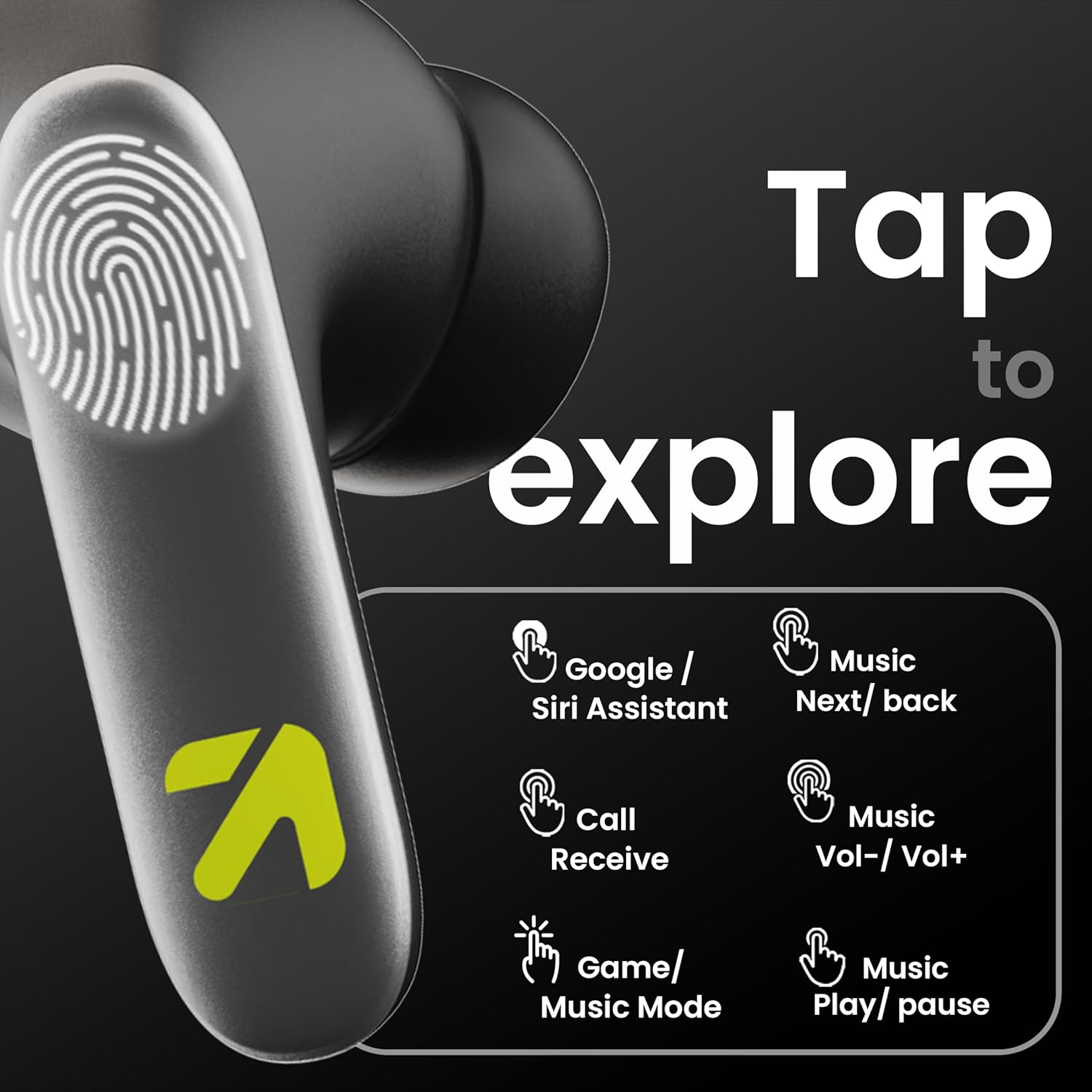
Image: A visual guide to the touch controls on the GOBOULT Y1 Pro earbuds, detailing actions for Google/Siri Assistant, music navigation, call management, volume control, and game/music mode switching.
- Un solo toque (izquierda/derecha): Reproducir/Pausar música, Responder/Finalizar llamada.
- Doble toque (auricular izquierdo): Canción anterior.
- Doble toque (auricular derecho): Siguiente canción.
- Triple toque (auricular izquierdo): Bajar volumen.
- Triple toque (auricular derecho): Subir volumen.
- Long Press (2 seconds, Left/Right): Reject incoming call, Activate Voice Assistant (Google/Siri).
- Four Taps (Left/Right): Activate/Deactivate Gaming Mode.
Modo de juego
For an enhanced gaming experience, activate the ultra-low latency Gaming Mode:
- Activación: Tap the touch area four times on either earbud.
- Desactivación: Tap the touch area four times again.

Image: GOBOULT Y1 Pro earbuds and charging case, highlighting the 45ms low latency gaming mode for real-time audio synchronization, activated by four taps.
Asistente de voz
Quickly access your device's voice assistant (Siri or Google Assistant) for hands-free control:
- Activación: Perform a long tap on the touch area of either earbud.

Image: Illustration showing how to access Siri or Google Assistant with a long tap on the earbud's touch sensor.
Cancelación de ruido ambiental (ENC)
The GOBOULT Y1 Pro features Zen Quad Mic ENC technology, ensuring crystal-clear calls by effectively filtering out ambient noise from your surroundings.

Image: A diagram explaining how Environmental Noise Cancellation (ENC) works by isolating your voice from environmental noise, ensuring clear communication during calls.
Mantenimiento
Limpieza
- Limpie periódicamente los auriculares y el estuche de carga con un paño suave, seco y sin pelusa.
- Ensure the charging contacts on both the earbuds and inside the case are free from dust and debris to maintain proper charging.
- Do not use abrasive cleaners, solvents, or harsh chemicals, as these may damage the product.
Resistencia al agua
The GOBOULT Y1 Pro earbuds are rated IPX5 water-resistant. This means they are protected against low-pressure water jets from any direction, making them suitable for workouts and light splashes.
- No sumerja los auriculares en agua.
- Avoid exposing them to heavy rain or extreme moisture.
- Asegúrese de que los auriculares estén secos antes de volver a colocarlos en el estuche de carga para evitar daños.

Image: GOBOULT Y1 Pro earbuds with water droplets, illustrating their IPX5 water resistance, providing protection against sweat and splashes.
Solución de problemas
If you encounter any issues with your GOBOULT Y1 Pro earbuds, refer to the following common troubleshooting steps:
Los auriculares no se emparejan ni se conectan
- Asegúrese de que tanto los auriculares como el estuche de carga tengan suficiente batería.
- Turn off Bluetooth on your device, wait 5 seconds, then turn it back on.
- On your device, "Forget" or "Unpair" "GOBOULT Y1 Pro" from the Bluetooth list, then attempt the pairing process again.
- Place both earbuds back into the charging case, close the lid, wait 10 seconds, then open the lid to re-enter pairing mode.
Solo funciona un auricular
- Asegúrese de que ambos auriculares estén cargados.
- Vuelve a colocar ambos auriculares en el estuche de carga, cierra la tapa y vuelve a abrirla. Esto suele resincronizarlos.
- Si el problema persiste, intenta restablecer los auriculares (consulta las instrucciones del fabricante). websitio para obtener instrucciones de reinicio específicas si no se detallan aquí).
Mala calidad de sonido o volumen bajo
- Ensure the earbuds are properly seated in your ears to create a good seal. Try different sized eartips.
- Limpie cualquier residuo de las rejillas de los auriculares.
- Verifique la configuración de volumen y sonido del dispositivo de fuente de audio.
- Acérquese a su dispositivo conectado para evitar interferencias de señal.
Problemas de carga
- Asegúrese de que el cable de carga esté conectado de forma segura tanto al estuche como a la fuente de alimentación.
- Try a different USB Type-C charging cable or power adapter.
- Limpie los contactos de carga de ambos auriculares y del interior del estuche con un hisopo de algodón seco.
Presupuesto
| Característica | Detalle |
|---|---|
| Marca | GOBOULT |
| Nombre del modelo | AirBass |
| Versión de Bluetooth | 5.3 |
| Colocación de orejas | En el oído |
| Control de ruido | Cancelación de ruido ambiental (ENC) |
| Tamaño del controlador de audio | 13 milímetros |
| Tiempo total de juego | Hasta 60 horas (con estuche de carga) |
| Baja latencia | 45 ms (modo de juego) |
| Tipo de carga | Carga rápida tipo C |
| Resistencia al agua | IPX5 |
| Método de control | Tocar |
| Dispositivos compatibles | Teléfonos inteligentes, tabletas, computadoras portátiles, computadoras de escritorio, altavoces inteligentes |
| Peso del artículo | 50 gramos |
| País natal | Porcelana |
Información de garantía
The GOBOULT Y1 Pro Wireless Earbuds are covered by a 1 año de garantía del fabricante a partir de la fecha de compra.
This warranty covers manufacturing defects. Please retain your proof of purchase for any warranty claims. The warranty does not cover damage caused by misuse, accidents, unauthorized modifications, or normal wear and tear.
Apoyo
For further assistance, technical support, or warranty inquiries, please contact:
- Fabricante: Exotic Mile Private Limited, B-67 Wazirpur Industrial Area, New Delhi 110052
- Importador: Exotic Mile Pvt. Ltd. , B67 Wazirpur Industrial Area , New Delhi 110052
- For customer service contact details, please refer to the GOBOULT official websitio o la plataforma donde compró el producto.