
MRSCOZ TCR
MRSCOZ Toddlers Sleep Training Clock
Model: TCR
Manual de instrucciones de usuario
1. Introducción
The MRSCOZ Toddlers Sleep Training Clock is a multifunctional device designed to assist children with sleep training, provide alarm clock functionality, act as a Bluetooth music player, and offer various night light and sound machine features. Its intuitive design and multiple settings aim to create a comfortable and consistent sleep environment for toddlers and kids.

Image: The MRSCOZ Sleep Training Clock displaying different light colors, highlighting its versatile illumination options.
2. Información de seguridad
- Este producto no es un juguete. Se recomienda la supervisión de un adulto para niños pequeños.
- Keep the device away from water and excessive moisture to prevent electrical hazards.
- Utilice únicamente el cable USB-C incluido para cargar. No utilice cables ni cargadores dañados.
- No intente desmontar ni reparar el dispositivo usted mismo. Póngase en contacto con el servicio de atención al cliente para obtener ayuda.
- Ensure the clock is placed on a stable, flat surface to prevent it from falling.
3. Contenido del paquete
Por favor, compruebe el contenido del paquete al abrirlo:
- MRSCOZ Toddlers Sleep Training Clock (White)
- Cable de carga USB-C
- Manual de usuario (este documento)
4. Producto terminadoview
Familiarícese con los componentes y controles del reloj.

Image: The multifunctional MRSCOZ Sleep Training Clock highlighting its use as an alarm clock, night light, Bluetooth music player, and sound machine.
Controles e indicadores:
| Botón / indicador | Función |
|---|---|
| Time Setting Button (Clock icon) | Presione para ingresar al modo de configuración de hora. |
| Alarm Setting Button (Bell icon) | Press to set or adjust alarms. |
| Night Light Button (Sun icon) | Short press to change light color. Long press to adjust brightness. |
| Music/Sound Button (Music note icon) | Press to cycle through sleep sounds. |
| Bluetooth Button (M icon) | Mantenga presionado para ingresar al modo de emparejamiento de Bluetooth. |
| Volume Up/Down Buttons (+/-) | Adjust volume for sounds and music. |
| Pantalla de visualización | Shows time, AM/PM, sleep/wake icons, and other indicators. |
| USB-C Port (Rear) | Para cargar el dispositivo. |
5. Configuración
5.1 Carga del dispositivo
Before first use, fully charge the sleep training clock. Connect the provided USB-C cable to the charging port on the back of the clock and plug the other end into a compatible USB power adapter (not included).

Image: The sleep training clock connected to a USB-C charging cable, indicating its portable night light feature.
5.2 Encendido inicial
The clock will automatically power on when connected to power or if it has sufficient battery charge. The display will light up.
5.3 Time Synchronization via Bluetooth
When connected to a smartphone via Bluetooth, the clock will automatically synchronize with your phone's time, simplifying initial setup.
6. Instrucciones de funcionamiento
6.1 Configuración de la hora
Para configurar manualmente la hora:
- Presione el Botón de ajuste de hora (Clock icon) to enter time setting mode.
- Utilice el +/- Botones para ajustar la hora.
- Presione el Botón de ajuste de hora nuevamente para pasar al ajuste de minutos.
- Utilice el +/- Botones para ajustar los minutos.
- Presione el Botón de ajuste de hora one more time to confirm and exit setting mode.
For a visual guide on setting up the time, please refer to the video below:
Video: A short demonstration on how to set up the time on the MRSCOZ Sleep Training Clock.
6.2 Función de entrenamiento del sueño
The clock uses visual cues to help children understand when it's time to sleep and wake up:
- Time to Sleep: The clock displays a closed-eye icon and emits a blue light, indicating it's bedtime.
- Time to Wake Up: The clock displays an open-eye icon and emits a yellow light, signaling it's okay to wake up.
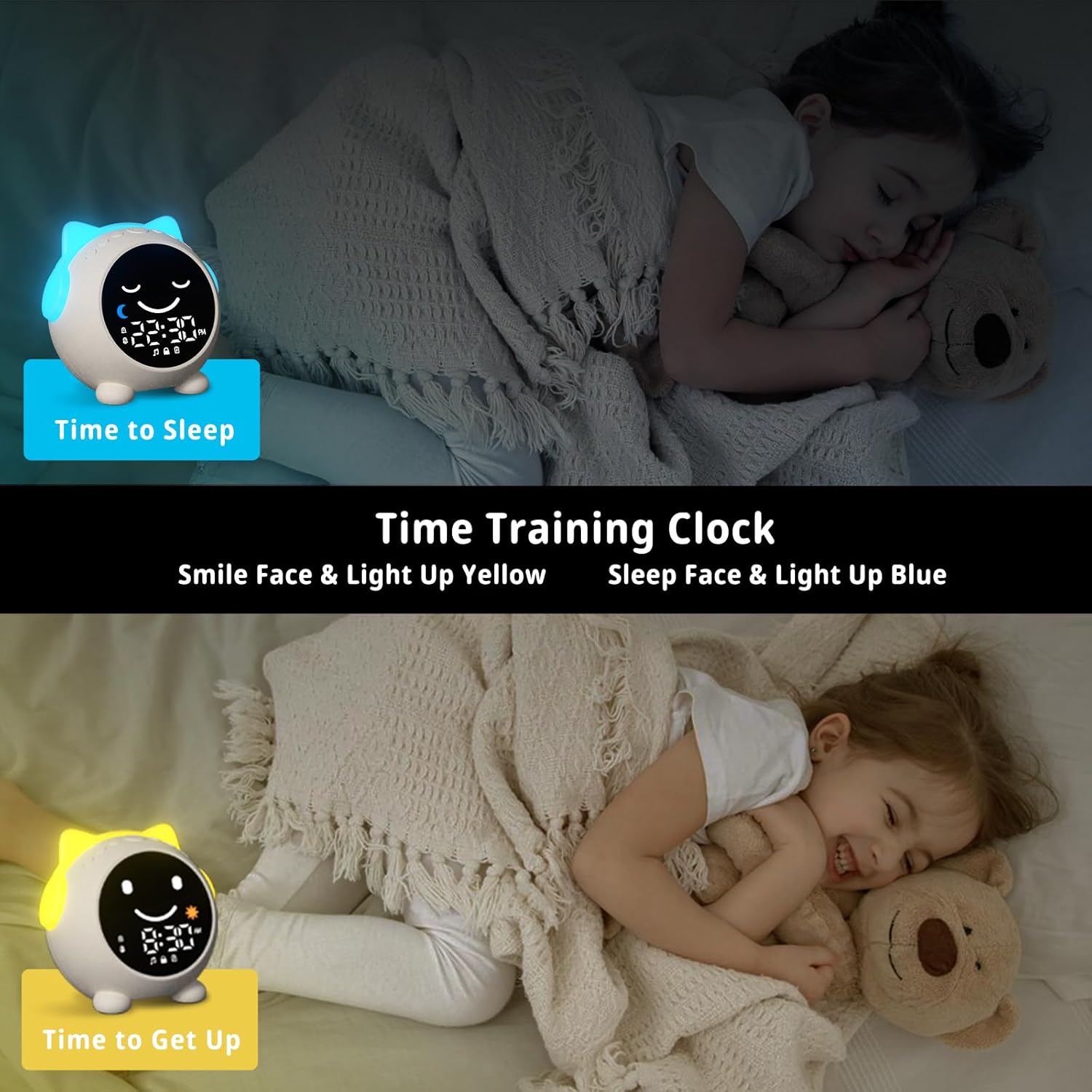
Image: The sleep training clock illustrating the "Time to Sleep" (blue light, closed eyes) and "Time to Get Up" (yellow light, open eyes) features.
6.3 configuraciones de reloj despertador
The clock features dual alarms and a snooze function:
- Presione el Botón de ajuste de alarma (Bell icon) to select Alarm 1 or Alarm 2.
- Utilice el +/- Botones para configurar la hora de alarma deseada.
- Presione el Botón de ajuste de alarma De nuevo para confirmar.
- To activate the snooze function, simply touch the clock when the alarm sounds. It will ring again after 10 minutes, up to 3 times.
- To stop the alarm, press any button on the clock.
Vídeo: Un overview of the Toddlers Sleep Training Clock and its alarm features, including snooze functionality.
6.4 Funcionamiento de la luz nocturna
The clock offers 9 light colors and 2 brightness levels:
- Cambio de colores: Presione brevemente el Botón de luz nocturna (Sun icon) to cycle through the 9 available colors.
- Ajuste del brillo: Mantenga pulsado el Botón de luz nocturna to switch between the 2 brightness levels.

Image: The sleep training clock demonstrating its 9 distinct night light colors and two brightness settings.
6.5 Máquina de sonido para dormir
Choose from 7 soothing sleep sounds to help your child relax:
- Presione el Botón de música/sonido (Music note icon) to cycle through the available sounds: Ocean Wave, Rain, Campfire, Summer Night, Bird Songs, Wind Bell, and Fan.
- Utilice el +/- Botones to adjust the volume of the selected sound.

Image: The sleep training clock illustrating its 7 white noise options, including natural sounds like ocean waves and rain.
6.6 Reproductor de música Bluetooth
Connect your smartphone or other Bluetooth-enabled device to play music through the clock's speaker:
- Mantenga pulsado el Botón Bluetooth (M icon) to enter Bluetooth pairing mode. The display will show a Bluetooth icon.
- On your device, enable Bluetooth and search for "C1" (or similar device name).
- Select "C1" to pair. Once connected, the clock will synchronize its time with your phone.
- You can now play music from your device through the clock. Use the +/- Botones para ajustar el volumen.
7. Mantenimiento
- Limpie el reloj con un paño suave y seco. No utilice limpiadores abrasivos ni disolventes.
- Evite exponer el dispositivo a temperaturas extremas o luz solar directa durante períodos prolongados.
- Guarde el reloj en un lugar fresco y seco cuando no lo utilice durante períodos prolongados.
8. Solución de problemas
| Problema | Posible solución |
|---|---|
| Clock display is blank or unresponsive. | Ensure the clock is charged. Connect it to a power source using the USB-C cable. If the issue persists, try resetting the device (if a reset button is available, otherwise let it fully discharge and recharge). |
| La alarma no suena. | Check if the alarm is enabled and the volume is not set to zero. Verify the alarm time is correctly set. |
| No se puede conectar a través de Bluetooth. | Ensure the clock is in Bluetooth pairing mode (long press M button). Make sure Bluetooth is enabled on your device and it's within range. Try forgetting the device on your phone and re-pairing. |
| Time format stuck in 24-hour mode. | Refer to the time setting instructions. Some models may automatically switch based on phone sync, or require specific button combinations (e.g., long press time button) not explicitly detailed in general instructions. |
| Night light not changing colors/brightness. | Ensure you are using short presses for color change and long presses for brightness adjustment on the Night Light button. |
9. Especificaciones
| Característica | Detalle |
|---|---|
| Marca | MRSCOZ |
| Número de modelo | TCR |
| Color | Blanco |
| Tipo de pantalla | Digital |
| Dimensiones del producto | 3.8" de ancho x 3.9" de alto |
| Fuente de poder | Eléctrico con cable (batería recargable) |
| Material | Acrilonitrilo butadieno estireno (ABS) |
| Características especiales | Bluetooth, Timer, Adjustable Brightness, LED Display, Adjustable Volume, Sleep Training, Night Light, Sound Machine |
| Número de baterías | 1 12V battery required (internal) |
| Peso del artículo | 9.6 onzas |
10. Garantía y soporte
This MRSCOZ product comes with a limited warranty. For detailed warranty information, product support, or to report any issues, please contact MRSCOZ customer service through the retailer's platform or the official brand webSitio web. Conserve su comprobante de compra para reclamaciones de garantía.
Ask a question about this manual
Ask about setup, troubleshooting, compatibility, parts, safety, or missing instructions. Manuals+ will review the question and use this page’s manual context to help answer it.