
1. Introducción
The AirheadStorm FS899C is a versatile digital multimeter designed for accurate electrical measurements. This device can measure AC/DC current and voltage, capacitance, continuity, resistance, frequency, non-contact voltage (NCV), and ambient temperature. Featuring a large backlit display and a rechargeable battery, it is suitable for both home and industrial electrical tasks.
This manual provides essential information for the safe and effective use of your FS899C Digital Multimeter. Please read it thoroughly before operation and retain it for future reference.
2. Contenido del paquete
Verifique que todos los elementos enumerados a continuación estén presentes y en buenas condiciones al abrir el paquete:
- 1 x AirheadStorm FS899C Digital Multimeter
- 2 cables de prueba (rojo y negro)
- Cable de carga 1 x USB-C
- 1 x Manual de instrucciones (este documento)
- 1 x caja de embalaje

Figure 2.1: Contents of the FS899C package, including the multimeter, test leads, and charging cable.
3. Información de seguridad
Always adhere to basic safety precautions when using electrical testing equipment to reduce the risk of fire, electric shock, or personal injury. Improper use can result in electric shock or damage to the meter.
- Inspect the Meter: Before each use, check the meter and test leads for any damage. Do not use the meter if it appears damaged or if the insulation on the test leads is compromised.
- Volumentage Límites: No aplique más del volumen nominal.tage, como está marcado en el medidor, entre los terminales o entre cualquier terminal y tierra.
- Proper Terminal Use: Ensure the test leads are connected to the correct input terminals for the measurement function selected.
- Evite los circuitos activos: Do not measure current on a circuit with voltage exceeding the meter's specified limits.
- Entorno de trabajo: Utilice el medidor en un entorno seco. Evite utilizarlo en lugares húmedos o secos.amp condiciones.
- Equipo de protección personal: Always wear appropriate personal protective equipment, such as safety glasses, when working with electrical circuits.
- Protección contra impactos: The meter features an impact-resistant plastic housing designed to protect against damage from drops. However, avoid unnecessary drops and handle the device with care.
- Servicio: Refer all servicing to qualified service personnel. Do not attempt to repair the meter yourself.
4. Características del producto
The AirheadStorm FS899C Digital Multimeter offers a range of features for efficient and accurate electrical testing:
- Capacidades de medición versátiles: Accurately measures AC/DC current and voltage, capacitance, continuity, resistance, frequency, non-contact voltage (NCV), and ambient temperature.
- Batería recargable: Equipped with a USB-C rechargeable battery, providing up to 8 hours of operation after approximately 2 hours of charging.
- Gran pantalla retroiluminada: Features a 4.8-inch display with backlight for clear visibility in various lighting conditions.
- Integrated Torch: A practical torch function assists in illuminating dark work areas.
- Función de retención de datos: Allows users to freeze the current reading on the display for convenient recording.
- Construcción duradera: Impact-resistant plastic housing provides protection against accidental drops.
- High Accuracy with True RMS: Offers precise measurements with a count capacity of up to 6000.
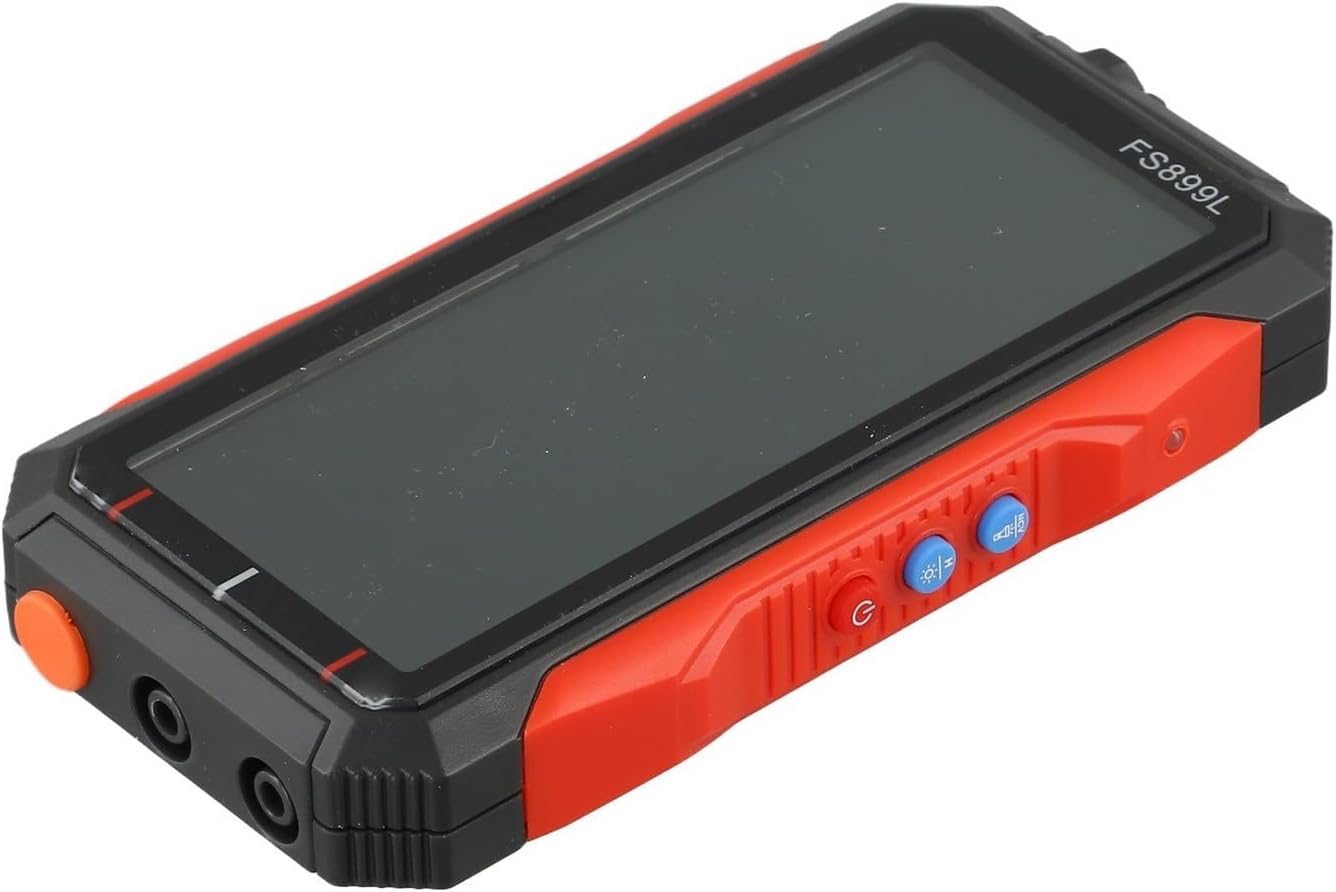
Figura 4.1: Lado view of the FS899C multimeter, highlighting its robust casing e interfaz de control.
5. Configuración
5.1 Carga del multímetro
- Locate the USB-C charging port on the side of the multimeter.
- Connect the provided USB-C charging cable to the multimeter and to a standard USB power adapter (not included).
- The charging indicator on the display will show the charging status. A full charge typically takes approximately 2 hours and provides up to 8 hours of operation.
5.2 Conexión de cables de prueba
Always ensure the multimeter is powered off before connecting or disconnecting test leads.
- Insertar el rojo cable de prueba en el VΩmA conector de entrada para volumentage, resistance, capacitance, frequency, and low current measurements.
- Insertar el negro cable de prueba en el COM conector de entrada (común).
- Para mediciones de corriente alta (hasta 10 A), inserte el rojo cable de prueba en el 10A toma de entrada.
6. Instrucciones de funcionamiento
6.1 Encendido y apagado
Mantenga pulsado el Fuerza Botón para encender o apagar el multímetro.
6.2 Selección de función
The FS899C typically features an auto-ranging function, simplifying operation. For specific modes, use the function buttons on the device.

Figure 6.1: The FS899C display showing active measurements for voltage, resistance, and temperature, along with mode indicators.
6.3 Medidas comunes
- VolumentagMedición electrónica (CA/CC):
- Conecte el cable rojo a VΩmA y el cable negro a COM.
- Seleccione el volumen de CA o CC apropiadotage modo.
- Conecte las sondas de prueba en paralelo al circuito o componente bajo prueba.
- Medición de corriente (CA/CC):
- ADVERTENCIA: Asegúrese de que el circuito esté desenergizado antes de conectar el medidor en serie.
- For low current, connect the red lead to VΩmA; for high current (up to 10A), connect the red lead to 10A. Connect the black lead to COM.
- Select the appropriate AC or DC current mode.
- Conecte las sondas de prueba en serie con el circuito.
- Medida de resistencia:
- Conecte el cable rojo a VΩmA y el cable negro a COM.
- Select the resistance mode (Ω).
- Ensure the circuit or component is de-energized before measuring resistance. Connect the probes across the component.
- Prueba de continuidad:
- Conecte el cable rojo a VΩmA y el cable negro a COM.
- Select the continuity mode (often indicated by a speaker icon).
- Touch the probes to the ends of the circuit or component. A beep indicates continuity.
- Medición de capacitancia:
- Conecte el cable rojo a VΩmA y el cable negro a COM.
- Select the capacitance mode (F).
- Ensure the capacitor is fully discharged before testing. Connect the probes across the capacitor terminals.
- Medida de frecuencia:
- Conecte el cable rojo a VΩmA y el cable negro a COM.
- Select the frequency mode (Hz).
- Conecte las sondas a la fuente de señal.
- Vol sin contactotagDetección de e (NCV):
- Seleccione el modo NCV.
- Hold the top of the multimeter near a live conductor. The meter will indicate the presence of AC voltagy mediante una alarma sonora y/o indicador visual.
6.4 Función de retención de datos
Presione el SOSTENER button to freeze the current reading on the display. Press it again to release the hold function and resume live readings.
7. Mantenimiento
7.1 Limpieza
Limpie el medidor casing con anuncioamp Paño y detergente suave. No utilice abrasivos ni disolventes. Asegúrese de que el medidor esté completamente seco antes de usarlo.
7.2 Cuidado de la batería
The FS899C uses a rechargeable battery. To prolong battery life:
- Cargue la batería completamente antes del primer uso.
- Evite descargar completamente la batería con frecuencia.
- If storing the meter for an extended period, charge it periodically (e.g., every 3-6 months) to maintain battery health.
7.3 Inspección de los cables de prueba
Regularly inspect the test leads for any cuts, cracks, or damage to the insulation. Replace damaged leads immediately to prevent electric shock hazards.
8. Solución de problemas
| Problema | Posible causa | Solución |
|---|---|---|
| El medidor no se enciende. | Batería baja o descargada. | Charge the multimeter using the provided USB-C cable. |
| Incorrect or unstable readings. | Función incorrecta seleccionada; mala conexión del cable de prueba; interferencia externa. | Verify the correct measurement function. Ensure test leads are securely connected. Move away from strong electromagnetic fields. |
| "OL" or "OVERLOAD" displayed. | La medición excede el rango del medidor. | Select a higher range if available, or ensure the measured value is within the meter's specifications. |
| No hay pitido de continuidad. | Circuito abierto; modo de continuidad no seleccionado. | Check the circuit for breaks. Ensure the meter is in continuity mode. |
9. Especificaciones
| Parámetro | Valor |
|---|---|
| Modelo | FS899C |
| Mostrar | 4.8-inch, Backlit |
| Count Capacity | Up to 6000 counts |
| Vol DCtage Rango | 60mV to 600V (Accuracy: ±(1.2%+5d)) |
| Vol. CAtage Rango | 60mV to 600V (Accuracy: ±(1.5%+8d)) |
| Rango de corriente DC | 300mA to 10A (Accuracy: ±(2.2%+8d)) |
| Rango de corriente CA | 300mA to 10A (Accuracy: ±(2.5%+8d)) |
| Rango de resistencia | 600Ω to 60MΩ (Accuracy: ±(1.5%+10d)) |
| Rango de capacitancia | 10nF to 60mF (Accuracy: ±(10%+88d)) |
| Rango de frecuencia | (Specific range not provided, but implied by feature) |
| Batería | Recargable (USB-C) |
| Tiempo de funcionamiento | Hasta 8 horas (después de 2 horas de carga) |
| Dimensiones del producto | 6.3 x 4.72 x 1.38 pulgadas |
| Peso del artículo | 9.4 onzas (267 gramos) |
| Fabricante | AirheadStorm |
10. Garantía y soporte
For warranty information, technical support, or service inquiries regarding your AirheadStorm FS899C Digital Multimeter, please contact the retailer or manufacturer directly. Retain your proof of purchase for warranty claims.