
KEFEYA S5 PRO
KEFEYA 15.6" Portable Monitor S5 PRO Instruction Manual
Modelo: S5 PRO
Introducción
This manual provides detailed instructions for the KEFEYA 15.6" Portable Monitor S5 PRO. This device is designed to expand your laptop's display capabilities, offering a versatile multi-screen setup for enhanced productivity and entertainment. It features a 1080P FHD IPS display with 120% sRGB color gamut, a magnetic 10,000 mAh power bank, and broad compatibility with various operating systems and devices.
¿Qué hay en la caja?
Por favor, compruebe el contenido del paquete al desembalarlo:
- Monitor (SS Monitor) *1
- Banco de energía * 1
- Adaptador de corriente * 1
- Cable tipo C a tipo C *2
- HDMI to Type-C Cable *1
- Cable USB-A a Tipo-C *1
- USB Flash Disk *1 (Contains drivers and user manual)
- Bolsa de transporte *1
- Manual de usuario *1 (Este documento)
- Guía de inicio rápido * 1
- Caja *1

Figure 1: Contents of the KEFEYA Portable Monitor package.
Configuración
Follow these steps to set up your KEFEYA Portable Monitor:
- Desempaque el monitor: Retire con cuidado todos los componentes del embalaje.
- Posicionamiento: The monitor features an autonomous stand. For laptops between 13 and 17 inches, the monitor attaches securely. Laptops under 14.2 inches can be used without additional clamps. The chassis pivots 180° for flexible positioning.
- Conectar el Power Bank: The magnetic 10,000 mAh power bank attaches to the back of the stand. Ensure the POGO PIN male and female connectors are perfectly aligned for proper power delivery. This provides 5-6 hours of wireless dual-screen operation. The power bank can also be removed for separate charging of mobile phones or tablets.
- Conéctese a su dispositivo:
- Conexión USB-C: For devices with a full-featured USB-C port (supporting video and power), use one of the provided Type-C to Type-C cables. This single cable can transmit video, audio, and power.
- Conexión HDMI: For devices with an HDMI output, use the provided HDMI to Type-C cable. You may also need to connect a USB-A to Type-C cable for power if your HDMI port does not supply sufficient power.
- Instalación del controlador: The monitor is designed for plug-and-play convenience. However, if you encounter any display issues, especially with specific operating systems or older devices, use the provided USB flash disk to install necessary drivers.
- Encendido inicial: Press the multi-function button to power on the monitor.
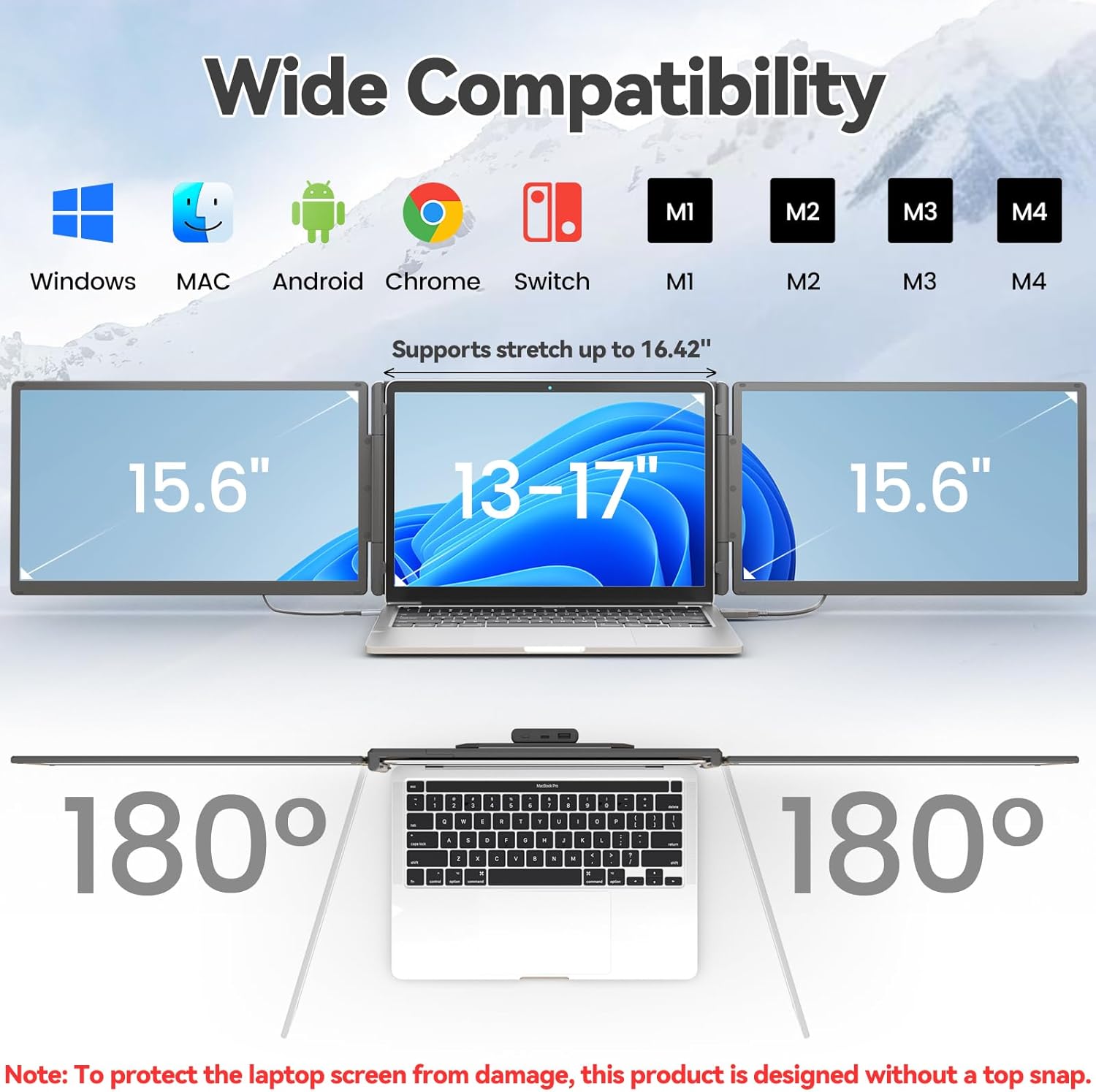
Figure 2: The monitor supports various devices and offers 180° rotation for flexible viewángulos de ing.

Figure 3: Attaching the magnetic power bank to the monitor stand.

Figura 4: Sobreview of the ports (Type-C1, Type-C2, USB-C with PD) and multi-function button on the monitor.
Instrucciones de funcionamiento
The KEFEYA Portable Monitor offers various display modes and adjustable settings to optimize your viewExperiencia de aprendizaje.
Modos de visualización
The monitor supports the following display configurations:
- Modo de extensión: Extends your laptop's desktop across multiple screens, allowing for increased workspace and multitasking.
- Duplication (Mirror) Mode: Duplicates your laptop's display onto the portable monitor, ideal for presentations or sharing content.
- Modo retrato: The monitor can be rotated 180° to be used in portrait orientation, beneficial for coding, document viewing, or specific creative tasks.
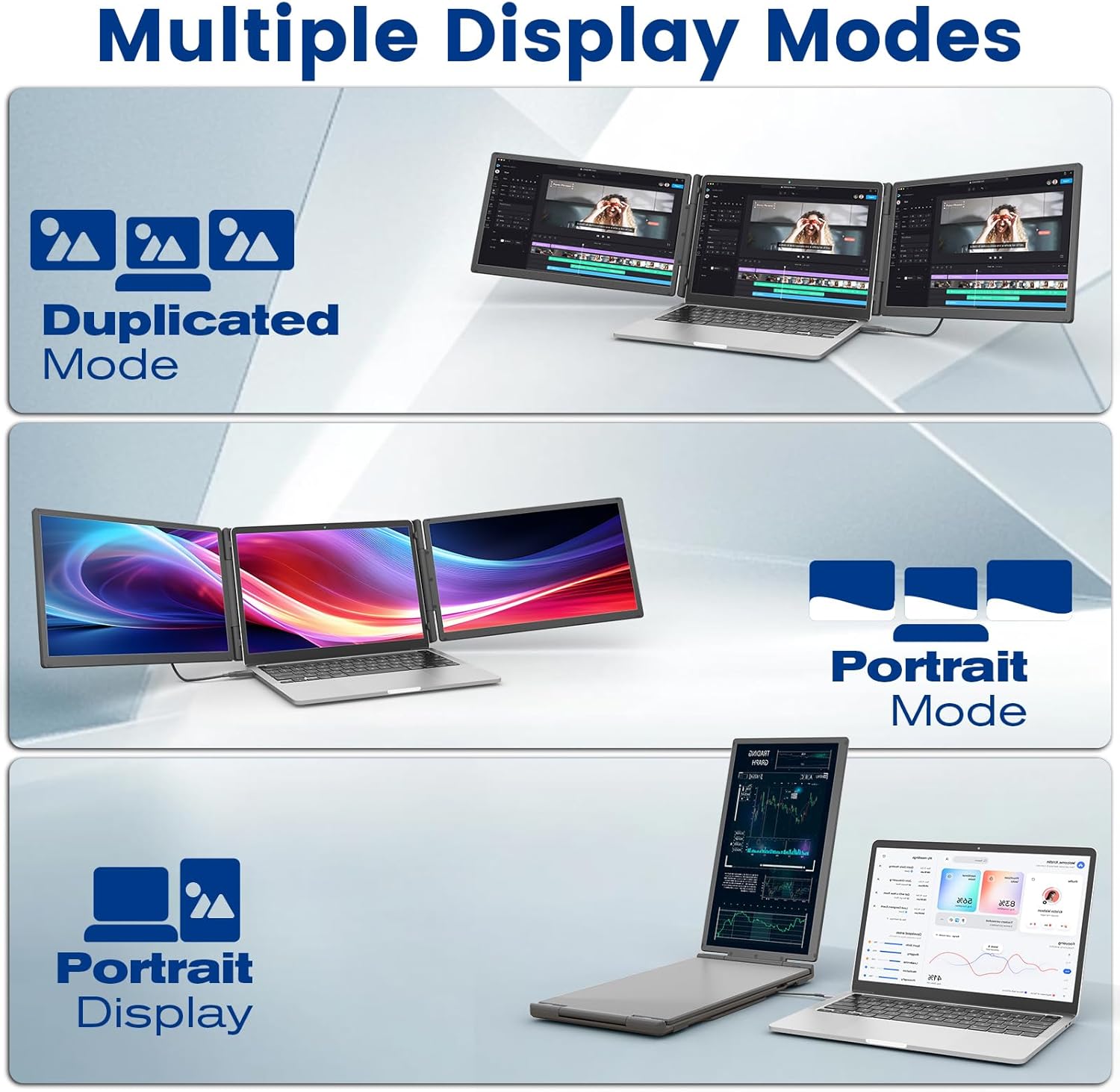
Figure 5: Illustration of Duplicated, Extended, and Portrait display modes.

Figura 6: Examples of using the monitor for multiple tasks like web programming, video conferencing, and online shopping.
Ajuste de la configuración
The multi-function buttons on the monitor allow for precise control over display parameters:
- Brillo: Ajuste el brillo de la pantalla para adaptarlo a su entorno.
- Tint/Color: Fine-tune color settings for optimal visual accuracy.
- Volumen: Control the volume of the integrated speakers.
The monitor also features advanced low blue light technology, anti-glare design, and flicker-free operation for a comfortable viewExperiencia de aprendizaje.
Uso de baterías externas
The integrated 10,000 mAh power bank provides 5-6 hours of battery life for the monitor, reducing reliance on your laptop's battery. It can also be detached and used as a standalone power source for other USB-powered devices.

Figure 7: Details of the power bank, including its capacity display and ports (Type-C, USB-A).
Mantenimiento
To ensure the longevity and optimal performance of your KEFEYA Portable Monitor, follow these maintenance guidelines:
- Limpieza de la pantalla: Utilice un paño suave y sin pelusa, diseñado específicamente para dispositivos electrónicos. Ligeramente dampEnjuague el paño con agua o una solución limpiadora de pantallas. Evite productos químicos agresivos, alcohol o materiales abrasivos.
- Limpieza de la Casing: Limpie el exterior con un paño suave y seco.
- Almacenamiento: When not in use, store the monitor in its provided carrying bag to protect it from dust and scratches. Avoid placing heavy objects on top of the monitor.
- Condiciones ambientales: Mantenga el monitor alejado de temperaturas extremas, luz solar directa y humedad alta.
- Cuidado de cables: Handle cables gently. Avoid bending or twisting them sharply, which can damage the internal wires.
Solución de problemas
If you encounter issues with your KEFEYA Portable Monitor, refer to the following common problems and solutions:
| Problema | Posible causa / solución |
|---|---|
| Sin pantalla / Pantalla negra |
|
| Unstable Connection / Screen Flickering |
|
| Drivers Not Working / System Bugs |
|
| Monitor Does Not Stay Firmly Attached |
|
| Poor Image Quality / Incorrect Colors |
|
Presupuesto
| Característica | Detalle |
|---|---|
| Marca | KEFEYA |
| Número de modelo | S5 PRO |
| Tamaño de pantalla | 15.6 pulgadas |
| Tipo de pantalla | IPS |
| Resolución | 1920 x 1080 píxeles (FHD 1080p) |
| Relación de aspecto | 16:9 |
| Gama de colores | 120 % sRGB |
| Brillo | 300 nits (cd/m²) |
| Relación de contraste | 1000:1 |
| Tiempo de respuesta | 2 milisegundos |
| Frecuencia de actualización | 60 Hz |
| Superficie de la pantalla | Matte, Anti-glare |
| Conectividad | USB Type C (x2), USB Type A, HDMI |
| Características especiales | 120% sRGB, Anti-glare screen, Energy efficiency, Blue light filter, Built-in speakers, Magnetic 10,000 mAh Power Bank |
| Dimensiones (L x An x Al) | 39.1 x 21.5 x 3.3 centímetros |
| Compatibilidad | Windows, Chrome, Android, Mac (M1/M2/M3/M4), Linux, Dex, PS4/5, Xbox |
Garantía y soporte
KEFEYA offers a one-year warranty for this product. Our customer service team is available 24 hours a day, 7 days a week, 365 days a year to assist you.
For questions regarding compatibility, installation assistance, or if you find any missing accessories, please contact us using the contact information provided inside the product packaging. Our professional team will provide prompt assistance.
For the latest information and support resources, please visit our official website or refer to the contact details in your Quick Start Guide.
Ask a question about this manual
Ask about setup, troubleshooting, compatibility, parts, safety, or missing instructions. Manuals+ will review the question and use this page’s manual context to help answer it.