
1. Producto terminadoview
The Hisense 65E7Q QLED Smart TV offers a premium viewing experience with its 65-inch QLED display. This television integrates advanced technologies such as Dolby Vision and Dolby Atmos for immersive audio-visuals, AI Smooth Motion for fluid images, and dedicated modes for gaming and sports. Powered by the VIDAA operating system, it provides easy access to a wide range of streaming content and smart features, including voice control.

Frente view of the Hisense 65E7Q QLED Smart TV.
Características principales:
- Color QLED: Experience rich, vibrant, and realistic colors.
- Movimiento suave con IA: Advanced MEMC and 3D Noise Reduction for fluid, blur-free images.
- Dolby Visión y Dolby Atmos: Cinematic picture and immersive sound for an enhanced entertainment experience.
- Modo de juego Plus: Reduces input lag to 16ms, with 60Hz VRR and ALLM for ultra-fluid gaming.
- Modo deportivo IA: Optimizes picture and sound for sports content, reducing motion blur and enhancing stadium-like audio.
- Escalador AI 4K: Enhances blurry images to near-4K quality.
- VIDAA Smart TV OS: Fast, secure, and intuitive operating system with access to popular streaming applications.
- Control de voz: Integrated Alexa and VIDAA Voice for convenient operation.
2. Información de seguridad
Please read all safety instructions carefully before using your TV. Keep this manual for future reference. Always ensure the TV is placed on a stable surface to prevent tipping. Do not expose the TV to rain or moisture. Refer to the full safety guidelines in the included safety manual.
3. Contenido del paquete
Verifique que todos los elementos estén presentes en la caja:
- Televisor inteligente QLED Hisense 65E7Q
- Cable de alimentación
- Control remoto (con 1 pila AAAA incluida)
- Soporte para TV (2 piezas)
- Tornillos para montaje del soporte
- Manual de usuario (este documento)
- Tarjeta de garantía
4. Configuración
4.1 Montaje del soporte
- Coloque con cuidado el televisor con la pantalla hacia abajo sobre una superficie suave y plana para evitar daños.
- Alinee las piezas del soporte con las ranuras correspondientes en la parte inferior del televisor.
- Fije las piezas del soporte con los tornillos incluidos. Asegúrese de que estén bien apretados.

Diagram illustrating TV dimensions and stand installation points.
4.2 Montaje en pared
If you plan to wall mount your TV, ensure you use a VESA-compatible wall mount kit (not included). The Hisense 65E7Q supports a VESA mounting standard of 600 x 400 mm. Follow the instructions provided with your wall mount kit for safe installation.
4.3 Conexión de periféricos
Connect your external devices to the TV's ports as needed. Refer to the port diagram below:

Trasero view showing available ports and connections.
- Puertos HDMI (x3): Connect Blu-ray players, game consoles, and other HDMI devices. One port supports eARC for enhanced audio return.
- Puertos USB (x2): Connect USB flash drives for media playback. (1x USB 3.0, 1x USB 2.0)
- Entradas de antena (x2): Conecte su antena terrestre o de cable.
- Ethernet (LAN): Para conexión de red cableada.
- Salida de audio óptica: Conéctese a una barra de sonido o un receptor de audio para audio digital.
- Toma de auriculares: Para escucha privada.
- Entradas AV: Para conectar dispositivos más antiguos mediante cables de audio estéreo y vídeo compuesto.
4.4 Encendido inicial
- Conecte el cable de alimentación al televisor y luego a una toma de corriente.
- Presione el botón de encendido en el control remoto o en el televisor.
- Siga las instrucciones en pantalla para completar la configuración inicial, incluida la selección de idioma, la conexión de red y el escaneo de canales.
5. Uso de su televisor
5.1 control remoto
The included remote control allows you to navigate the TV's features. Insert the provided AAAA battery into the remote. The remote supports voice control for convenient operation.
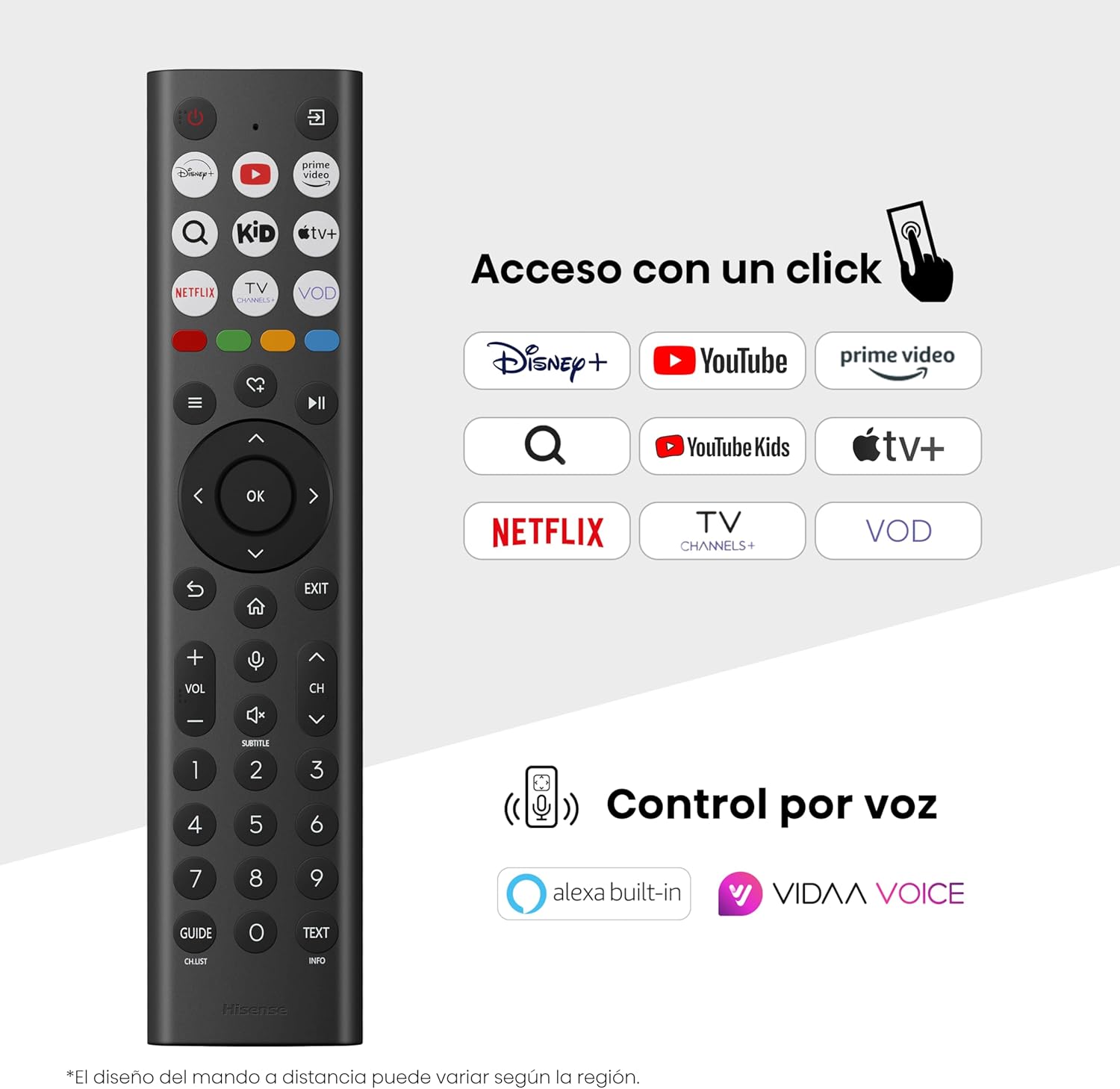
Hisense Smart TV remote control with dedicated app buttons and voice control.
5.2 Funciones de Smart TV (SO VIDAA)
Your Hisense TV runs on the VIDAA operating system, offering a user-friendly interface for accessing various applications and services.

The VIDAA Smart TV interface with popular streaming applications.
- Aplicaciones: Acceda a aplicaciones preinstaladas como Netflix, YouTube, Prime Video y más.
- Control de voz: Use the remote's voice function to search for content, adjust settings, or interact with Alexa built-in and VIDAA Voice.
- Screen Mirroring (AirPlay): Share content from your Apple devices directly to the TV.
- Compartir en TV: Easily send content from your mobile devices to the TV.
5.3 Configuración de imagen
Optimiza tu viewing experience with various picture enhancement technologies:
- Color QLED: Delivers over a billion shades of vibrant, lifelike colors.
- Escalador AI 4K: Automatically enhances lower-resolution content to near-4K quality.
- Movimiento suave con IA: Reduces motion blur in fast-paced scenes, ensuring clear and fluid visuals.
- Visión Dolby: Provides stunning brightness, contrast, and color for a dramatic visual experience.
- Modo cineasta: Preserves the original aspect ratio, colors, and frame rates to display movies as intended by the director.
- Sensor de luz IA: Intelligently adjusts screen brightness based on ambient light for optimal viewing y eficiencia energética.
- Modo de cuidado de los ojos: Reduce la emisión de luz azul para minimizar la fatiga visual.
- Modo de ahorro de energía: Optimizes power consumption without significantly compromising picture quality.

QLED technology delivers over a billion vibrant color tones.

AI 4K Upscaler enhances lower resolution content to near 4K clarity.

AI Smooth Motion ensures fluid images without blur, especially in fast-moving scenes.

Filmmaker Mode presents content exactly as the director intended.
5.4 Configuración de sonido
Mejora tu experiencia de audio con:
- Dolby Atmos: Immersive, multi-dimensional sound that fills your room.
- Altavoz integrado: Built-in speakers with a maximum output of 1 Watt per channel.
- EzPlay: Seamlessly control compatible Hisense soundbars directly from your TV screen.

Dolby Vision and Dolby Atmos combine for a spectacular audio-visual experience.
5.5 Características de juego
For gamers, the TV offers:
- Modo de juego Plus: Reduces input lag to 16ms, ensuring responsive gameplay.
- VRR de 60 Hz (frecuencia de actualización variable): Synchronizes the TV's refresh rate with the game console's output to prevent screen tearing.
- ALLM (modo automático de baja latencia): Automatically switches the TV to low-latency mode when a game is detected.
- Barra de juegos: An integrated control center for quick access to game settings and real-time performance monitoring.

Game Mode Plus provides ultra-fluid, lag-free gaming.

The Game Bar offers centralized control for game settings.
5.6 Características deportivas
- Modo deportivo IA: Automatically detects sports content and optimizes picture and sound settings for a stadium-like experience, enhancing clarity and audio effects.
6. Mantenimiento
6.1 Limpieza del televisor
- Desenchufe siempre el televisor antes de limpiarlo.
- Utilice un paño suave, seco y sin pelusa para limpiar suavemente la pantalla y el cuerpo del televisor.
- Para marcas difíciles, aplique ligeramenteampEnjuague el paño con agua o un limpiador de pantallas especializado (no rocíe directamente sobre la pantalla).
- Evite utilizar limpiadores abrasivos, alcohol, benceno o disolventes, ya que pueden dañar la superficie del televisor.
6.2 Actualizaciones de software
Tu televisor puede recibir actualizaciones de software periódicamente para mejorar el rendimiento y añadir nuevas funciones. Asegúrate de que esté conectado a internet para recibir estas actualizaciones. Normalmente, puedes buscar actualizaciones manualmente en el menú de configuración del televisor.
7. Solución de problemas
Si tiene problemas con su televisor, consulte las siguientes soluciones comunes:
- Sin energía: Compruebe que el cable de alimentación esté bien conectado y que la toma de corriente funcione. Pruebe con otra toma.
- Sin imagen/sonido: Asegúrese de que la fuente de entrada seleccionada sea la correcta. Compruebe todas las conexiones de cable (HDMI, antena).
- El control remoto no funciona: Check the battery (1 AAAA battery). Ensure there are no obstructions between the remote and the TV.
- Problemas de conexión de red: Verifica tu contraseña de Wi-Fi o la conexión Ethernet. Reinicia el router.
- Mala calidad de imagen: Ajuste la configuración de la imagen (brillo, contraste y nitidez). Asegúrese de que la fuente de entrada proporcione una señal de alta calidad.
- Distorsión de sonido: Check audio settings. If using external speakers, ensure they are connected correctly.
For more detailed troubleshooting, consult the full electronic user manual or contact Hisense customer support.
8. Especificaciones
Especificaciones técnicas detalladas del televisor inteligente QLED Hisense 65E7Q:
| Característica | Especificación |
|---|---|
| Número de modelo | 65E7Q |
| Tamaño de pantalla | 65 pulgadas |
| Tecnología de visualización | LED Q |
| Resolución | 4K (3840 x 2160) |
| Frecuencia de actualización | 60 Hz |
| Soporte de formato HDR | Visión Dolby |
| Motion Enhancement Technology | Movimiento suave con IA |
| Mejora de la calidad de la imagen | AI 4K Upscaler, AI Smooth Motion, QLED Colour |
| Tiempo de respuesta | 100 milisegundos |
| Configuración de retroiluminación | Direct Illumination, Dimming |
| Descripción del orador | Integrated speaker with Dolby Atmos |
| Potencia máxima de salida del altavoz | 1 vatios |
| Canales de audio | Multicanal |
| Surround Sound Format | Dolby Atmos |
| Sistema operativo | VIDA |
| Capacidad de almacenamiento de memoria | 1 GB |
| Método de control | Voz |
| Tecnología de conectividad | Bluetooth, HDMI, Wi-Fi |
| Internet Applications | Netflix, YouTube, Prime Video, AirPlay 2 |
| Puertos HDMI | 3 (including HDMI 2.1 with eARC) |
| Puertos USB | 2 (1 USB 3.0, 1 USB 2.0) |
| Tecnología inalámbrica | Wifi |
| Screen Mirroring Technology | Salida en antena |
| Estándar de montaje VESA | 600 x 400 mm |
| Dimensiones del producto (Pr x An x Al) | 7.6 x 145.3 x 83.8 cm |
| Peso del producto | 15.2 kg (con soporte) |
| Clase de eficiencia energética | E |
| Consumo anual de energía | 84 kWh/1000 h (SDR), 160 kWh/1000 h (HDR) |
| Fuerza | 1 Watt (standby) |
| Volumentage | 100-240 VCA 50-60 Hz |
| Componentes incluidos | Cable de alimentación, mando a distancia, soporte |
| Año del modelo | 2025 |
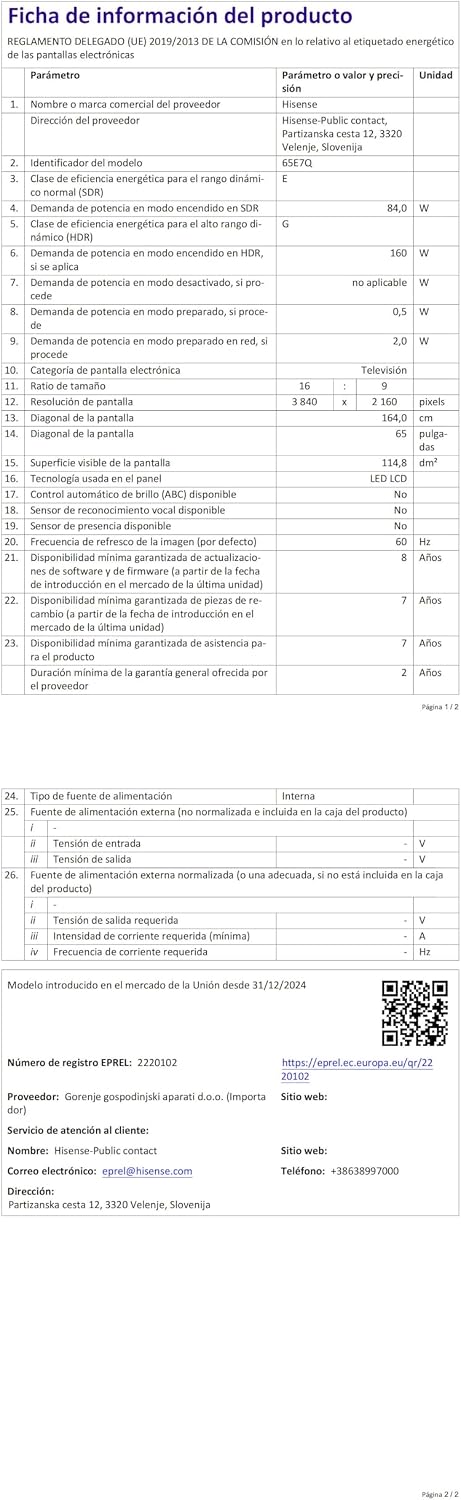
Energy label for the Hisense 65E7Q TV.
Para obtener información más detallada sobre el producto, consulte la base de datos EPREL: https://eprel.ec.europa.eu/qr/2220102
9. Garantía y soporte
9.1 Garantía del producto
Este televisor Hisense viene con un Garantía del producto por 3 añosConserve su comprobante de compra para reclamaciones de garantía.
9.2 Disponibilidad de repuestos
Spare parts for this model are guaranteed to be available in the EU for a duration of 10 años from the product's market introduction.
9.3 Atención al cliente
For technical assistance, troubleshooting, or warranty service, please contact Hisense customer support. Refer to the contact information provided in your warranty card or visit the official Hisense websitio para su región.