
1. Introducción
This manual provides detailed instructions for the installation, operation, and maintenance of your Olafus 2K QHD Outdoor Flood Light Camera. This device is designed to enhance your home security with advanced features including 2K QHD video, 360° panoramic view, motion detection alerts, two-way audio, and powerful adjustable floodlights. Please read this manual thoroughly before use and retain it for future reference.
2. Información de seguridad
- Asegúrese de que la fuente de alimentación esté desconectada antes de la instalación o el mantenimiento para evitar descargas eléctricas.
- La instalación debe ser realizada por un electricista calificado o de acuerdo con los códigos eléctricos locales.
- No intente desmontar ni modificar el dispositivo. Esto podría anular la garantía y suponer riesgos de seguridad.
- Mantenga el dispositivo alejado de materiales inflamables o explosivos.
- Utilice el dispositivo dentro del rango de temperatura especificado de -20 °C a 50 °C (-4 °F a 122 °F).
- This product is waterproof (IP65 rated) but should not be submerged in water.
3. Contenido del paquete
Verifique que todos los componentes estén presentes en el paquete:
- Olafus Flood Light Camera (Model 3-LBC65M)
- Soporte de montaje
- Machine Screws (various sizes)
- Tornillo de máquina largo
- Expansion Rubber Plugs
- Tuercas de alambre
- Junta de silicona
- Junta EVA
- Manual de usuario

Figura 3.1: Dimensiones del producto y accesorios incluidos para la instalación.
4. Producto terminadoview
The Olafus Flood Light Camera combines a high-resolution security camera with powerful, adjustable floodlights. Key features include:
- Vídeo 2K QHD: Captura alimentos claros y detallados.tage.
- Panorámico 360 ° View: Offers a 340° horizontal and 120° vertical rotation range for comprehensive coverage.
- Smart Auto-Tracking: Automatically tracks moving subjects within its field of view.
- Visión nocturna en color mejorada: Provides vivid images even in low-light conditions.
- Detección de movimiento avanzada: 180° PIR motion sensor triggers instant mobile notifications.
- Audio bidireccional: Permite la comunicación en tiempo real a través de la cámara.
- 55W Adjustable Lighting: Three independently adjustable heads (5500 lumens) controlled via the app.
- Almacenamiento flexible: Supports secure cloud storage and local Micro SD card storage (up to 128GB).
- Dual Wi-Fi Connectivity: Compatible with both 2.4G and 5G Wi-Fi networks.
- Diseño resistente a la intemperie: Clasificación IP65 para uso en exteriores en diversas condiciones climáticas.

Figura 4.1: Sobreview of the Olafus 4MP Floodlight Camera's features.
5. Configuración
5.1 Instalación
The floodlight camera is designed for wall mounting. Refer to the 'Product Size' diagram in Section 3 for dimensions and wiring details. Professional installation is recommended for electrical wiring.
- Choose a suitable outdoor location for mounting, ensuring a stable surface and access to power.
- Secure the mounting bracket to the wall using the provided screws and expansion plugs.
- Connect the Live Wire (L), Neutral Wire (N), and Ground Wire (N) from your electrical supply to the camera's corresponding wires using the wire nuts. Ensure connections are secure and insulated.
- Conecte la unidad de cámara al soporte de montaje.

Figure 5.1: Installation steps for the floodlight camera.
5.2 Descarga y conexión de la aplicación
The Olafus Flood Light Camera operates with the Smart Life APP. Ensure your smartphone is connected to a 2.4GHz or 5GHz Wi-Fi network.
- Download the "Smart Life" APP from the App Store (iOS) or Google Play (Android), or scan the QR code provided in the product packaging.
- Regístrese o inicie sesión en su cuenta Smart Life.
- Power on the floodlight camera.
- In the Smart Life APP, tap "Add Device" or the "+" icon.
- Follow the on-screen instructions to connect the camera to your Wi-Fi network. You may need to scan a QR code displayed on your phone with the camera.
- Una vez conectada, la cámara aparecerá en su lista de dispositivos.
5.3 Integración de casa inteligente (Alexa/Asistente de Google)
The camera can be integrated with Amazon Alexa and Google Assistant for voice control and live view en dispositivos compatibles.
Video 5.3.1: Instructions on how to connect the Smart Life camera with Amazon Alexa.
Video 5.3.2: Detailed guide on connecting the camera with Alexa for voice commands and live viewEn.
To connect with Amazon Alexa:
- Ensure your Alexa device, phone, and floodlight camera are on the same Wi-Fi network.
- Open the Smart Life App, click "Me" (bottom right), then "Alexa" under "Third-Party Services".
- Click "Link to Amazon Alexa". This will redirect you to the Alexa App.
- In the Alexa App, click "Link" to enable the Smart Life skill.
- Once successfully linked, click "Done".
- Alternatively, open the Amazon Alexa App, click "More" (bottom right), then "Skills & Games".
- Buscar "Smart Life" and click on it.
- Click "ENABLE TO USE". This will redirect you to the Smart Life App.
- After clicking "Agree and link," you will be redirected back to the Amazon Alexa app.
- Click "Next" to discover devices. Once found, select the connected device and click "Next" to complete the setup.
You can now use voice commands like: "Alexa, show me the Security Camera" or "Alexa, turn on/off the Security Camera."

Figure 5.3: Voice control with Amazon Alexa for live camera feed.
6. Instrucciones de funcionamiento
6.1 en vivo View y Grabación
Access the live feed of your camera through the Smart Life APP. The camera provides 2K QHD resolution for clear images. You can switch between full-color night vision and infrared night vision modes.

Figure 6.1: Demonstrates 2K QHD Color Night Vision and Infrared Night Vision.

Figure 6.2: Illustrates the superior 2K QHD image quality.

Figura 6.3: Diferentes modos de visión nocturna disponibles.
6.2 Detección de movimiento y alertas
The camera features a 180° PIR motion sensor. When motion is detected, you will receive instant mobile notifications. The smart auto-tracking feature ensures that moving subjects remain in focus.
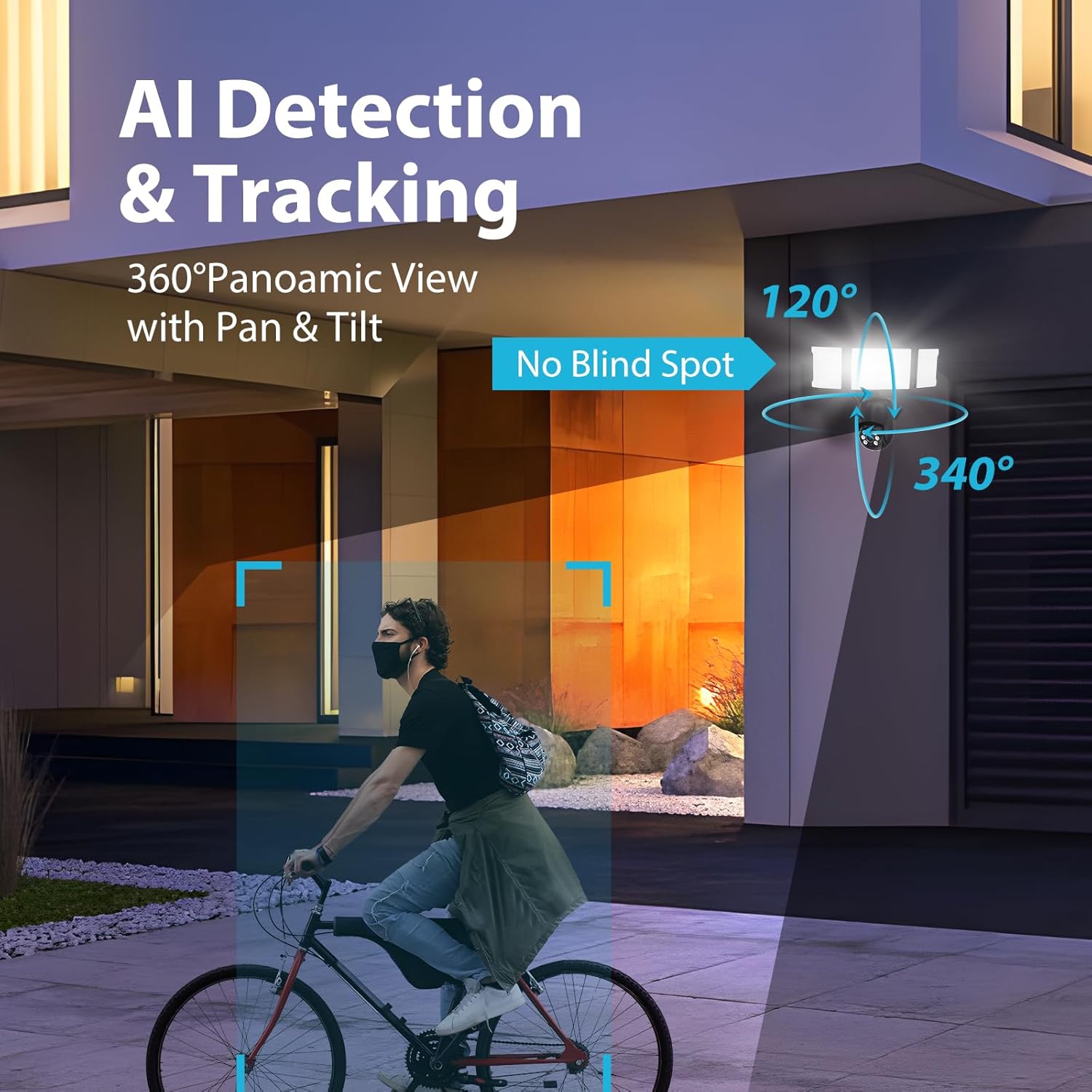
Figure 6.4: AI Detection & Tracking with panoramic view.

Figure 6.5: Motion detection alarm and mobile notification.

Figure 6.6: AI Lock and Tracking in action.

Figure 6.7: Motion detection triggering floodlights and notifications.
6.3 Audio bidireccional
Utilize the built-in microphone and speaker for two-way communication. This allows you to speak to visitors or deter unwanted guests directly through the app.

Figure 6.8: Two-way audio for communication and deterrence.

Figure 6.9: Real-time two-way audio communication.
6.4 Control de iluminación
The 55W floodlights (5500 lumens) can be adjusted for brightness and scheduled via the Smart Life APP. The three light heads are independently adjustable.

Figure 6.10: Adjustable lighting features and coverage.

Figure 6.11: Scheduling options for floodlight activation.
6.5 Opciones de almacenamiento y reproducción
The camera supports both cloud storage and local storage via a Micro SD card (up to 128GB, not included). You can review non-stop recordings or event-triggered recordings.

Figure 6.12: Video playback interface and storage options.

Figure 6.13: Cloud and Micro SD card storage for recorded footage.
7. Mantenimiento
Regular maintenance ensures optimal performance and longevity of your floodlight camera.
- Limpieza: Gently wipe the camera lens and floodlight surfaces with a soft, damp Paño. Evite limpiadores abrasivos o disolventes.
- Actualizaciones de firmware: Periodically check the Smart Life APP for available firmware updates to ensure your device has the latest features and security enhancements.
- Condiciones ambientales: The camera is IP65 waterproof, suitable for temperatures between -20°C and 50°C. Ensure proper drainage around the installation area to prevent water accumulation.

Figure 7.1: IP65 Waterproof rating and operating temperature range.
8. Solución de problemas
If you encounter issues with your Olafus Flood Light Camera, refer to the following common problems and solutions:
- La cámara no se conecta al Wi-Fi:
- Asegúrese de que su red Wi-Fi sea de 2.4 GHz o 5 GHz y estable.
- Verifique que la contraseña de Wi-Fi sea correcta.
- Acerque la cámara al enrutador Wi-Fi para mejorar la intensidad de la señal.
- Reinicie la cámara y el enrutador.
- Lights not turning off automatically:
- Check the light schedule and motion detection settings in the Smart Life APP.
- Ensure the motion sensor is not obstructed and its sensitivity is set appropriately.
- Mala calidad de video:
- Limpiar la lente de la cámara.
- Ensure a strong Wi-Fi connection for optimal streaming.
- Check the resolution settings in the Smart Life APP.
- Alertas de detección de movimiento:
- Verify motion detection is enabled in the Smart Life APP.
- Check the detection zone and sensitivity settings.
- Asegúrese de que las notificaciones de aplicaciones estén habilitadas en su teléfono inteligente.
9. Especificaciones
| Característica | Especificación |
|---|---|
| Número de modelo | 3-LBC65M |
| Uso en interiores y exteriores | Exterior |
| Resolución de captura de video | 2K (4 MP Effective) |
| Viewángulo de ing | 360 Degrees (340° horizontal, 120° vertical) |
| Fuente de poder | Eléctrico con cable |
| Protocolo de conectividad | Wi-Fi (2.4G & 5G compatible) |
| Tipo de controlador | Amazon Alexa, aplicación |
| Tipo de montaje | Montaje en pared |
| Quétage | 55 watts (5500 lumens) |
| Material | Aluminio |
| Nivel de resistencia al agua | Impermeable (IP65) |
| Temperatura de funcionamiento | -20 °C a 50 °C (-4 °F a 122 °F) |
| Tipo de memoria flash | Micro SD (hasta 128 GB) |
| Dimensiones del producto | 9.5 x 5.7 x 10.7 pulgadas |
| Peso del artículo | 2.93 libras |
10. Garantía y soporte
Olafus provides a standard manufacturer's warranty for this product. For specific warranty details, please refer to the warranty card included in your package or contact Olafus customer support. If you require technical assistance or have questions not covered in this manual, please visit the official Olafus websitio o comuníquese con su equipo de servicio al cliente.
Fabricante: olafus