Introducción
This manual provides detailed instructions for the setup, operation, and maintenance of your Lotus Smartwatch 50050/4. Please read this manual thoroughly before using your device to ensure proper functionality and to maximize its features.
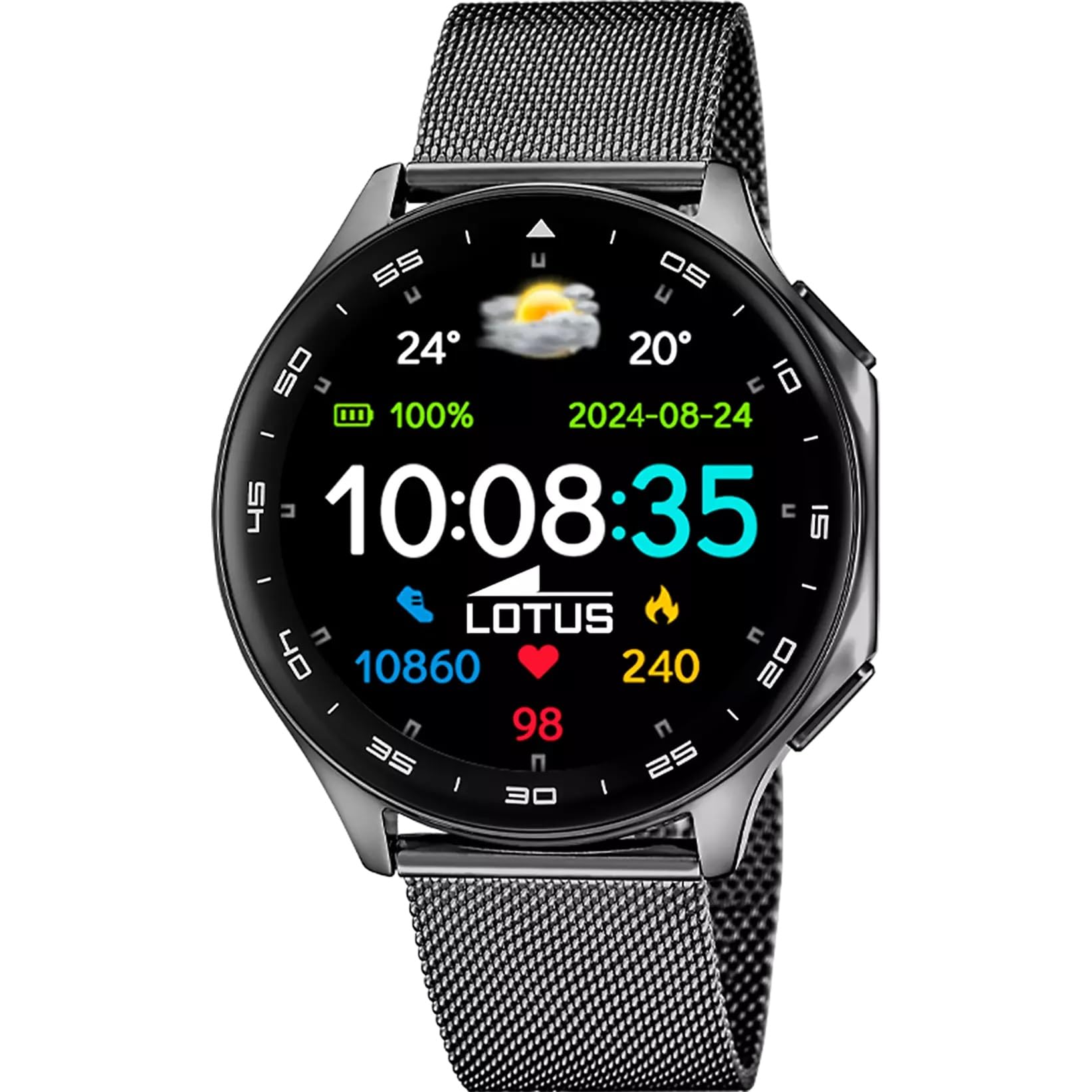
The Lotus Smartwatch 50050/4 is an outdoor sports watch designed for active lifestyles. It features a durable zinc alloy case, a black Milanese steel mesh strap, and a digital display. The watch offers a range of functions including sports tracking, health monitoring, and smart notifications.
¿Qué hay en la caja?
- Lotus Smartwatch 50050/4
- Cable de carga
- Manual de usuario (este documento)
- Correa adicional
Configuración
1. Carga del reloj inteligente
Before initial use, fully charge your smartwatch. Connect the charging cable to the charging port on the back of the watch and plug the other end into a USB power adapter (not included) or a computer's USB port. The watch display will indicate charging status.
Nota: Use a standard 5V/1A USB charger. Overcharging or using incompatible chargers may damage the device.
2. Encendido / apagado
- Para encender: Press and hold the side button for a few seconds until the Lotus logo appears.
- Para apagar: Mantenga presionado el botón lateral, luego seleccione "Apagar" en la pantalla.
3. Instalación y emparejamiento de la aplicación
To unlock the full potential of your smartwatch, download the official Lotus Smartwatch application on your smartphone. The app is compatible with Android devices.
- Buscar the "Lotus Smartwatch" app in your smartphone's app store (Google Play Store for Android).
- Instalar la aplicación.
- Abra la aplicación y siga las instrucciones en pantalla para crear una cuenta o iniciar sesión.
- Habilite Bluetooth en su teléfono inteligente.
- In the app, navigate to the device pairing section and select your Lotus Smartwatch 50050/4 from the list of available devices.
- Confirme la solicitud de emparejamiento tanto en su teléfono inteligente como en el reloj inteligente.
Una vez emparejado, el reloj sincronizará la hora, la fecha y otras configuraciones con su teléfono inteligente.
Instrucciones de funcionamiento
Navegación básica
- Pantalla táctil: Swipe left, right, up, or down to navigate through menus and functions. Tap to select an item.
- Botón lateral: Press to return to the previous screen or to the watch face. Press and hold for power options.
Funciones clave
- Modos deportivos: Access various sports modes (e.g., running, walking, cycling) to track your activity, including steps, calories burned, and distance.
- Vigilancia de la salud:
- Frecuencia cardíaca: Monitoriza tu frecuencia cardíaca en tiempo real.
- Oxígeno en sangre: Mida sus niveles de oxígeno en sangre.
- Seguimiento del sueño: Analyze your sleep patterns (deep sleep, light sleep, awake time).
- Ejercicios de respiración: Ejercicios de respiración guiada para la relajación.
- Notificaciones: Receive notifications for incoming calls, SMS messages, and app alerts directly on your watch. You can reject calls from the watch.
- Control de música: Controle la reproducción de música en su teléfono inteligente conectado (reproducir, pausar, saltar pistas).
- Clima: View Condiciones meteorológicas actuales y previsiones.
- Alarmas y temporizadores: Set alarms, use the stopwatch, or set a countdown timer.
- Control remoto de la cámara: Utilice su reloj como obturador remoto para la cámara de su teléfono inteligente.
- Video Calculator: Access a video calculator function.
- AI Voice Calculator: Utilize an AI voice-activated calculator.
- Buscador de teléfono: Localiza tu teléfono inteligente emparejado haciéndolo sonar.
- Flash: Activar la pantalla como linterna.
- Personalización del dial: Change the watch face (dial) through the watch settings or the companion app.
- Actualización de firmware: Update the watch's software via the companion app to ensure optimal performance and access new features.
- Language, Time, and Date: Adjust these settings through the watch or the companion app.
Mantenimiento
Limpieza y cuidado
- Limpie la pantalla y el cuerpo del reloj con un paño suave, seco y sin pelusa.
- Para manchas difíciles, ligeramente dampLave el paño con agua. No utilice productos químicos agresivos ni materiales abrasivos.
- Asegúrese de que los contactos de carga estén limpios y secos antes de cargar.
Resistencia al agua (IP65)
The Lotus Smartwatch 50050/4 has an IP65 rating, meaning it is protected against dust ingress and low-pressure water jets from any direction. This rating indicates resistance to splashes and light rain. It is not suitable for swimming, showering, or submersion in water. Exposure to high-pressure water or prolonged submersion may cause damage.
Reemplazo de la correa
The watch comes with an additional strap. To replace the strap, locate the quick-release pins on the underside of the strap where it connects to the watch case. Slide the pin to detach the strap, then align the new strap and slide the pin back into place to secure it.
Solución de problemas
El reloj no se enciende
- Asegúrese de que el reloj esté completamente cargado. Conéctelo al cargador durante al menos 30 minutos.
- Intente mantener presionado el botón lateral durante 10 a 15 segundos para forzar el reinicio.
No se puede emparejar con el teléfono inteligente
- Asegúrese de que Bluetooth esté habilitado en su teléfono inteligente.
- Ensure the watch is within range of your smartphone (typically 10 meters).
- Reinicie tanto su teléfono inteligente como el reloj inteligente.
- Borre la memoria caché de Bluetooth de su teléfono inteligente (si corresponde) e intente emparejarlo nuevamente.
- Ensure the Lotus Smartwatch app is updated to the latest version.
Datos de salud inexactos
- Asegúrese de que el reloj esté ajustado cómodamente a su muñeca, pero no demasiado apretado.
- Mantenga el sensor en la parte posterior del reloj limpio y libre de residuos.
- Los factores ambientales y la fisiología individual pueden afectar la precisión del sensor.
Restablecimiento de fábrica
If you experience persistent issues, a factory reset may resolve them. This will erase all data on the watch and restore it to its original settings. Consult the watch's settings menu or the companion app for the factory reset option.
Presupuesto
| Número de modelo | 50050/4 |
| Marca | Loto |
| Tamaño de la pantalla | 46.7 milímetros |
| Forma | Redondo |
| Material de la caja | Aleación de zinc |
| Material de la correa | Milanese Steel Mesh |
| Resistencia al agua | IP65 (Splash and dust resistant) |
| Conectividad | Bluetooth |
| Sistema operativo compatible | Android (for companion app) |
| GPS | No |
| Características especiales | Advanced sport and health functions |
Garantía y soporte
The Lotus Smartwatch 50050/4 comes with a 3 año de garantía from the date of purchase. This warranty covers manufacturing defects. It does not cover damage caused by misuse, accidents, unauthorized modifications, or failure to follow the instructions in this manual, including water damage beyond the specified IP65 rating.
For warranty claims or technical support, please contact your authorized Lotus retailer or visit the official Lotus webSitio web con información de atención al cliente.
Política de devoluciones: If purchased from Amazon, the product is subject to a 30-day return policy for refund or replacement, as per Amazon's terms.
Imagen del producto