
1. Introducción
This manual provides detailed instructions for the setup, operation, and maintenance of your EGate Atom 4X Projector. Please read this manual thoroughly before using the product to ensure proper functionality and to maximize your viewExperiencia de aprendizaje.
The EGate Atom 4X is a compact and powerful mini projector designed for home cinema use. It supports 4K Ultra HD content at a native 1080p resolution, offering stunning visuals on screens up to 300 inches. Featuring Android 13, wireless display capabilities, and dual-band WiFi, it provides seamless streaming and a versatile entertainment experience.
2. Contenido del paquete
Verifique que todos los artículos enumerados a continuación estén incluidos en su paquete:
- 1x EGate Atom 4X Projector
- 1x cable de alimentación
- 1x control remoto
- 1x User Manual with Warranty Card

Imagen: Frente view of the EGate Atom 4X Projector, showing the lens and sensors.
3. Producto terminadoview
3.1 Características principales
- Native 1080p Resolution with 4K Support: Delivers clear and sharp images, supporting 4K content for enhanced detail.
- Android TV 13.0: Integrated smart TV operating system with access to numerous apps like Netflix, Prime Video, and YouTube.
- Enfoque automático y corrección trapezoidal: AI-powered dual camera setup ensures instant, razor-sharp focus and perfect image alignment (4P and 6D correction).
- Diseño giratorio de 270°: Allows projection onto walls, ceilings, or floors, offering flexible placement options.
- Dual Band Wi-Fi 6 & Bluetooth 5.0: Provides fast, stable wireless connectivity for streaming and connecting external audio devices.
- Múltiples puertos de conectividad: Includes HDMI 2.1 (ARC/eARC/CEC), USB, and 3.5mm Audio Out for versatile device connections.
- High Contrast & Brightness: 6000:1 contrast ratio and 400 ISO lumens with HDR10+/HLG support for vibrant and lifelike colors.
- Largo Lamp Vida: LED lamp designed for up to 60,000 hours of operation.
- Altavoz incorporado: 7 Watt integrated speaker for audio output.
3.2 Componentes del proyector

Imagen: Lateral view of the EGate Atom 4X Projector, highlighting its compact design and red strap.

Imagen: Trasera view of the EGate Atom 4X Projector, showing the power input and ventilation.
The projector features a cylindrical main body housing the lens and internal components, mounted on a stable base. A red strap is integrated for portability. The rear panel includes essential ports for connectivity.
4. Configuración
4.1 Colocación inicial
- Deshacer: Retire con cuidado el proyector y todos los accesorios del embalaje.
- Conexión de energía: Conecte el cable de alimentación a la entrada de alimentación del proyector y luego a una toma de corriente.
- Posicionamiento: Place the projector on a stable, flat surface. Utilize the 270° rotatable design to adjust the projection angle as needed.

Image: Diagram illustrating the 270-degree rotation capability of the EGate Atom 4X Projector, allowing projection onto various surfaces.
The projector's flexible stand allows for projection onto walls, ceilings, or even the floor. Ensure the projection path is clear of obstructions.
4.2 Enfoque automático y corrección trapezoidal
The EGate Atom 4X features fully automatic focus and keystone correction for a clear, rectangular image without manual adjustments.
- Encendido: Encienda el proyector usando el botón de encendido o el control remoto.
- Ajuste automático: The projector will automatically detect the projection surface and adjust focus and keystone within approximately 5 seconds.
- Ajuste manual (opcional): If minor adjustments are still needed, use the remote control to fine-tune focus or keystone settings in the projector's menu.

Image: The EGate Atom 4X Projector projecting an image, with overlays indicating automatic focus and 4P+4D keystone correction for perfect alignment.
5. Instrucciones de funcionamiento
5.1 Encendido / Apagado
- Para encender: Pulse el botón de encendido del proyector o del control remoto.
- Para apagar: Press the power button on the remote control once to enter standby mode, or press and hold to fully shut down.
5.2 Navegación por Android TV 13.0
Your EGate Atom 4X Projector runs on Android TV 13.0, providing a smart interface for apps and media.
- Mando a distancia: Use the provided remote control to navigate the interface. The directional pad, OK button, Back button, and Home button are essential for navigation.
- Conexión Wi-Fi: Go to Settings > Network & Internet to connect to your home Wi-Fi network.
- Cuenta Google: Inicia sesión con tu cuenta de Google para acceder a Google Play Store y personalizar tu experiencia.
- Acceso a la aplicación: Pre-loaded apps like Netflix, Prime Video, and YouTube are available. Download more apps from the Google Play Store.

Image: The EGate Atom 4X Projector displaying the Android 13 interface with various streaming app icons like YouTube, Netflix, and Prime Video.
5.3 Ajuste de la configuración de imagen y sonido
Access the projector's settings menu to customize picture and sound preferences.
- Modos de imagen: Select from various picture modes (e.g., Standard, Vivid, Cinema) or adjust brightness, contrast, and color manually.
- Modos de sonido: Choose sound presets or adjust bass and treble for the built-in 7W speaker or connected audio devices.

Image: A split screen comparison showing the superior picture quality of the EGate Atom 4X (1080p) versus a 720p projector, highlighting vibrant colors and sharp details.
6. Conectividad
6.1 Conexiones por cable
The projector offers several wired ports for connecting external devices:
- HDMI 2.1 (ARC/eARC/CEC): Connect gaming consoles, Blu-ray players, laptops, or streaming devices. ARC/eARC allows audio return to compatible sound systems, and CEC enables control of connected devices with a single remote.
- USB: Connect USB flash drives for media playback or external hard drives.
- Salida de audio de 3.5 mm: Conecte auriculares o altavoces externos.

Image: The EGate Atom 4X Projector surrounded by various devices (laptop, tablet, game controller, speaker, headphones) illustrating its HDMI, USB, Audio, Wi-Fi 6, and Bluetooth connectivity.
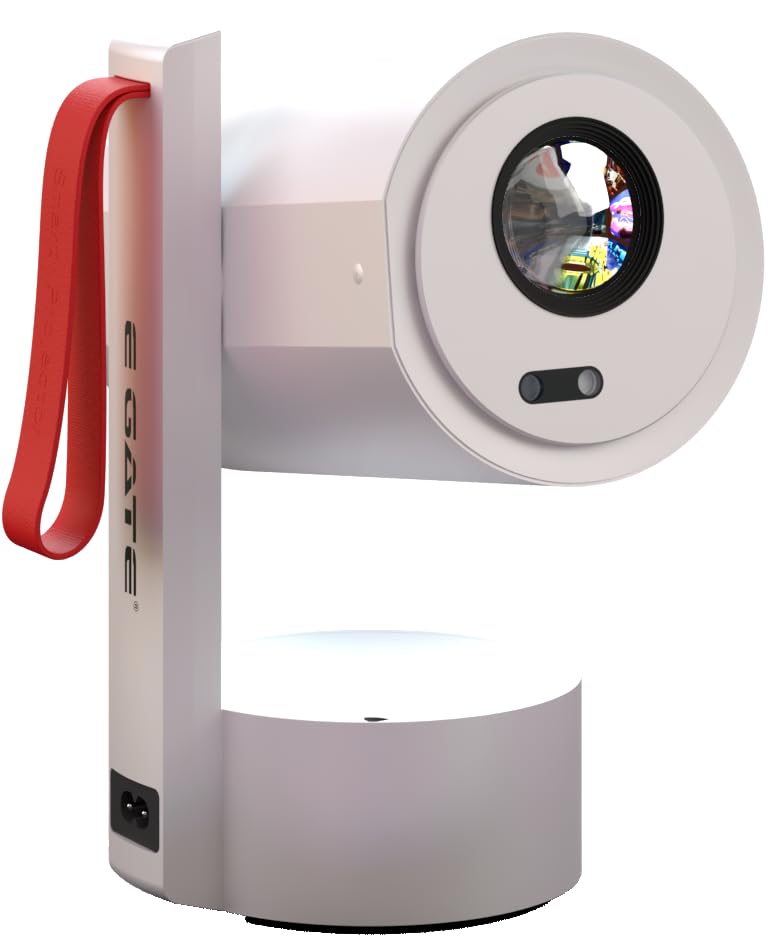
Imagen: Primer plano view of the EGate Atom 4X Projector's rear panel, detailing the HDMI, USB, and Audio ports for universal device compatibility.
6.2 Conexiones inalámbricas
- Wi-Fi 6 de doble banda: Connect to 2.4GHz or 5GHz Wi-Fi networks for high-speed internet access and seamless streaming.
- Bluetooth 5.0: Pair with Bluetooth speakers, headphones, or other compatible audio devices for wireless sound.
- Duplicar pantalla: Wirelessly cast content from Windows, iOS, and Android devices using Miracast or similar protocols.

Image: A smartphone screen being mirrored wirelessly to the EGate Atom 4X Projector via Dual-Band Wi-Fi 6, showing compatibility with Miracast, Android, iOS, and Windows.

Image: The EGate Atom 4X Projector positioned with Bluetooth headphones and a portable speaker, illustrating seamless Bluetooth 5.0 connectivity for audio.
7. Mantenimiento
7.1 Limpieza del proyector
- Exterior: Utilice un paño suave y seco para limpiar el exterior del proyector. No utilice limpiadores abrasivos ni disolventes.
- Lente: Gently clean the projector lens with a lens cleaning cloth or a soft, lint-free cloth specifically designed for optical surfaces. Avoid touching the lens directly with your fingers.
- Ventilación: Asegúrese de que las aberturas de ventilación estén libres de polvo y residuos para evitar el sobrecalentamiento. Utilice un cepillo suave o aire comprimido para limpiarlas periódicamente.
7.2 Almacenamiento
Cuando no lo utilice durante un período prolongado, guarde el proyector en un lugar fresco y seco, alejado de la luz solar directa y de temperaturas extremas. Se recomienda usar el embalaje original o una funda protectora para evitar la acumulación de polvo y daños.
8. Solución de problemas
If you encounter issues with your EGate Atom 4X Projector, refer to the following common problems and solutions:
8.1 Sin imagen o mensaje "Sin señal"
- Comprobar potencia: Asegúrese de que el proyector esté correctamente conectado a una fuente de alimentación y encendido.
- Fuente de entrada: Verifique que la fuente de entrada correcta (HDMI, USB, etc.) esté seleccionada en el menú del proyector.
- Conexión de cable: Ensure all HDMI or USB cables are securely connected to both the projector and the source device.
- Dispositivo de origen: Confirm that the source device (laptop, console) is powered on and outputting a signal.
8.2 Imagen borrosa
- Enfoque automático: Allow the projector a few seconds to perform automatic focus. If the image remains blurry, try moving the projector slightly or restarting it.
- Limpieza de lentes: Clean the projector lens with a soft, lint-free cloth.
- Distancia de proyección: Asegúrese de que el proyector esté dentro de la distancia de proyección recomendada para el tamaño de pantalla deseado.
8.3 Distorted or Tilted Image (Keystone)
- Corrección trapezoidal automática: The projector should automatically correct keystone. If the image is still distorted, try repositioning the projector.
- Corrección trapezoidal manual: Access the projector's settings menu to manually adjust keystone correction (4P and 6D options).
8.4 Sin sonido
- Nivel de volumen: Verifique el nivel de volumen tanto en el proyector como en el dispositivo fuente.
- Función de silencio: Asegúrese de que el proyector no esté silenciado.
- Salida de audio: Si utiliza altavoces o auriculares externos, asegúrese de que estén correctamente conectados y seleccionados como salida de audio en la configuración del proyector.
- Conexión Bluetooth: If using Bluetooth audio, ensure the device is correctly paired and connected.
9. Especificaciones
| Característica | Detalle |
|---|---|
| Marca | PUERTA E |
| Nombre del modelo | Atom 4X |
| Número de modelo | Ei9027 |
| Resolución nativa | 1920 x 1080 (Full HD) |
| Resolución admitida | Hasta 4K (3840 x 2160) |
| Brillo | 400 lúmenes ISO |
| Relación de contraste | 6000:1 |
| Tipo de pantalla | Pantalla LCD |
| Relación de aspecto | 16:9 |
| Tamaño máximo de pantalla | 300 pulgadas (762 cm) |
| Sistema operativo | Android TV 13.0 |
| Procesador | Amologic T950S Quad Core |
| Memoria RAM/ROM | 1 GB de RAM / 8 GB de ROM |
| Wifi | Dual Band Wi-Fi 6 (2.4 + 5 GHz) |
| Bluetooth | Bluetooth 5.0 |
| Conectividad | HDMI 2.1 (ARC/eARC/CEC), USB, 3.5mm Audio Out |
| Características especiales | Auto Focus, Auto Keystone (4P & 6D), HDR10+/HLG Support, 270° Rotatable Design, Screen Mirroring |
| Lamp Vida | 60,000 horas |
| Altavoz incorporado | 7 vatios |
| Dimensiones del producto | 12.5 x 11 x 22.5 cm |
| Peso del artículo | 990 gramos |
10. Garantía y soporte
The EGate Atom 4X Projector comes with a 1 año de garantía provided by EGate from the date of purchase. To avail warranty benefits, it is mandatory to register your product.
EGate offers free home pickup and drop service during the warranty period. For more details and product registration, please visit the official EGate websitio o póngase en contacto con el servicio de atención al cliente.
Fabricante: Egate Infotel Pvt Ltd, 503, SG Alpha Tower II, Sec 9, Vasundhara, Ghaziabad, UP, Optroniq India (Importer)