
1. Introducción
This instruction manual provides essential information for the safe and efficient use of your ApoloSign 32-inch UHD 4K Smart Portable TV Gen2. Please read this manual thoroughly before operating the device and retain it for future reference. This portable smart TV combines a high-resolution display with smart features, offering versatile entertainment and productivity options throughout your home.

Image: The ApoloSign 32-inch Portable TV Gen2 positioned in a modern living room, showcasing su elegante diseño y portabilidad.
2. Información de seguridad
Precauciones generales de seguridad
- No exponga el dispositivo a la lluvia ni a la humedad para evitar incendios o descargas eléctricas.
- Asegúrese de que haya una ventilación adecuada. No bloquee las aberturas de ventilación.
- Utilice únicamente el adaptador de corriente suministrado con el dispositivo.
- Evite colocar el dispositivo sobre superficies inestables.
- No intente desmontar ni reparar el dispositivo usted mismo. Encargue cualquier servicio técnico a personal cualificado.
Seguridad de la batería
- The device contains a built-in 15000mAh lithium-ion battery. Do not expose it to excessive heat, direct sunlight, or fire.
- Cargue la batería completamente antes del primer uso.
- If the battery shows signs of swelling, leakage, or damage, discontinue use immediately and contact support.
- Deshazte de las baterías de acuerdo a las regulaciones locales.
3. Contenido del paquete
Verifique que todos los artículos estén presentes en el paquete:
- ApoloSign 32-inch UHD 4K Smart Portable TV Gen2 Display
- Rolling Stand Base
- Stand Pole (multiple sections)
- Adaptador de corriente
- Control remoto por voz
- 8MP Camera Module
- Assembly Screws and Tools
- Manual de usuario (este documento)

Image: The voice remote control, a key accessory for navigating the ApoloSign TV.

Image: The detachable 8MP camera module, designed for video calls and other interactive features.
4. Producto terminadoview
The ApoloSign 32-inch UHD 4K Smart Portable TV Gen2 is a versatile device designed for flexible use across various environments. Its main components include:
- 32-inch UHD 4K Touchscreen: A large, high-resolution display with touch functionality for intuitive interaction.
- Soporte rodante: A sturdy base with smooth wheels for easy movement between rooms.
- Adjustable Screen Mount: Allows for height adjustment, left/right swivel, and tilt for optimal viewángulos de visión tanto en orientación vertical como horizontal.
- Integrated 8MP Camera: For video conferencing and other camera-enabled applications.
- Control remoto por voz: Enables hands-free operation and navigation.
- Batería incorporada de 15000 mAh: Provides up to 8 hours of portable use.
- Puertos de conectividad: Includes HDMI, USB 2.0, USB 3.0, Bluetooth 5.3, and Wi-Fi for various connections.
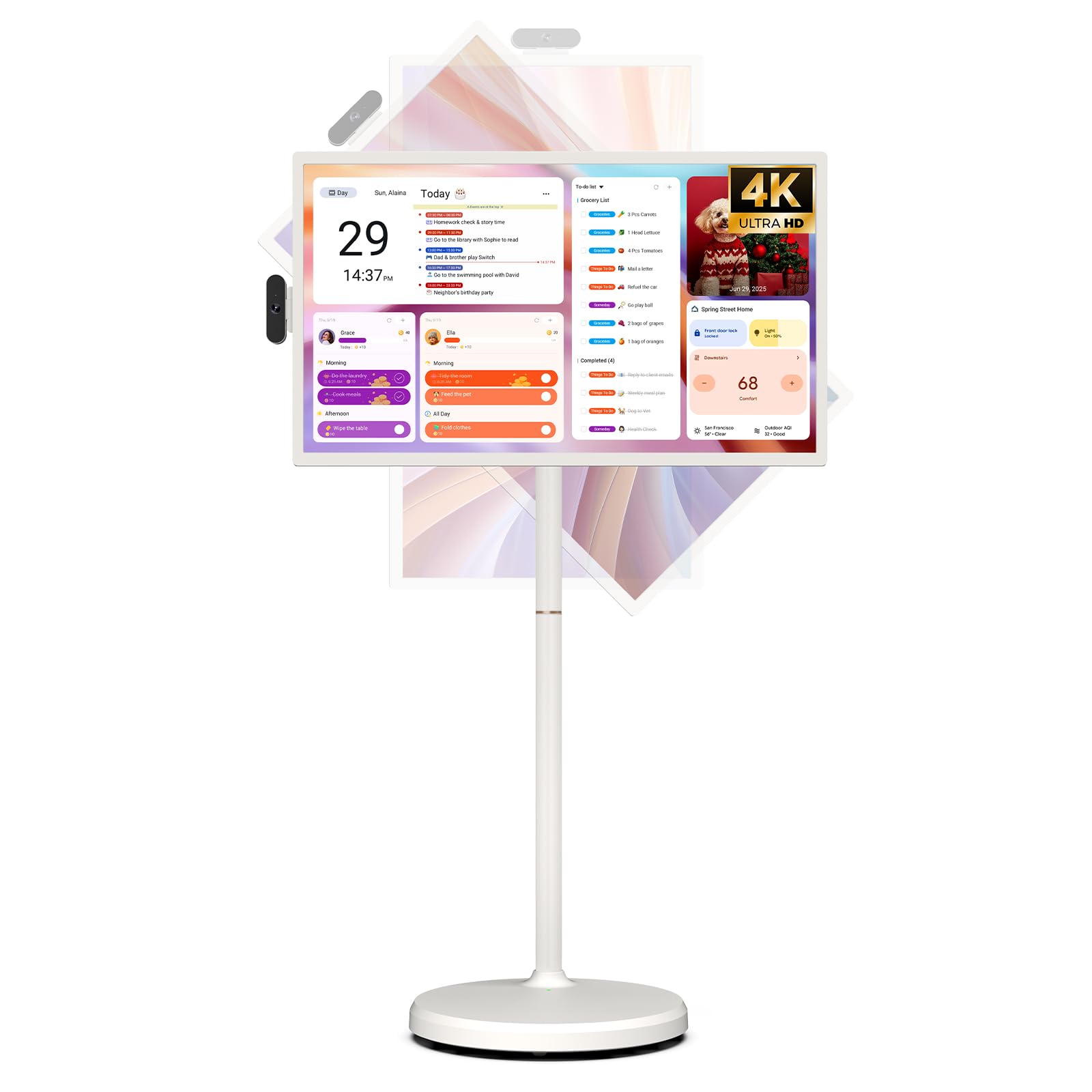
Image: The ApoloSign 32-inch UHD 4K Smart Portable TV Gen2, highlighting its large screen and mobile stand.
5. Configuración
Asamblea
- Desempaque todos los componentes de la caja.
- Attach the stand pole sections to the rolling base using the provided screws.
- Carefully mount the TV display onto the top of the assembled stand pole, ensuring it clicks securely into place.
- Connect the internal power cable from the stand to the display.
- Attach the 8MP camera module to the designated slot on top of the display.
Encendido inicial y conexión a la red
- Connect the power adapter to the TV and a power outlet. The device will begin charging.
- Press the power button located on the back of the display to turn on the TV.
- Siga las instrucciones en pantalla para seleccionar su idioma y región.
- Conéctese a su red Wi-Fi seleccionándola de la lista e ingresando la contraseña.
- Inicia sesión con tu cuenta de Google para acceder a Google Play Store y otros servicios.
Emparejamiento de control remoto
- Insert batteries into the voice remote control.
- On the TV screen, navigate to Settings > Remotes & Accessories > Add Accessory.
- Press and hold the specified pairing buttons on the remote (refer to remote's mini-guide) until the indicator light blinks.
- Select the remote control from the list on the TV screen to complete pairing.
6. Instrucciones de funcionamiento
Navegación básica
- Pantalla táctil: Tap, swipe, and pinch to navigate menus, open apps, and interact with content.
- Control remoto por voz: Use the directional pad and selection buttons for menu navigation. Press the voice button to activate voice commands for searching or launching apps.
Screen Rotation and Adjustment
The screen can be rotated 90 degrees between landscape and portrait modes. It also allows for height adjustment, left/right swivel, and tilting to achieve the desired viewángulo de ing.

Image: Illustrations demonstrating the various ways the ApoloSign TV screen can be adjusted: height, tilt, and rotation.
Apps and Google Play Store
Running on a customized Android 15 OS and Google certified, you can download and install any app available on the Google Play Store. Access streaming services, social media, productivity tools, and games.

Image: The ApoloSign TV screen showing the Android 15 interface with icons for popular apps like Netflix, YouTube, Spotify, and TikTok.
Wireless and Wired Casting
Share content from your mobile phone, tablet, or laptop to the TV screen.
- Transmisión inalámbrica: Use the built-in MixCast feature or other compatible casting protocols. Ensure your device and the TV are on the same Wi-Fi network.
- Wired Casting: Connect external devices like gaming consoles or laptops via the HDMI port. The TV supports 4K HDMI output.
Video: A demonstration of how to screen mirror a mobile phone, tablet, or laptop to the ApoloSign Smart Portable TV.
Calendar Widget and Screensavers
The interactive desktop calendar widget syncs with Google Calendar, Outlook, and Google Tasks to help manage your schedule. Utilize dynamic screensavers to transform the TV into a digital clock, photo frame, or market billboard.

Image: The ApoloSign TV screen showcasing its digital calendar feature, displaying daily schedules and events.

Image: The ApoloSign TV screen demonstrating different digital screensaver options, including a photo display and a music player interface.
Uso de la cámara
The integrated 8MP camera is ideal for video calls and conferences. Ensure the camera is correctly installed and facing the desired direction.
7. Mantenimiento
Limpieza
- Desenchufe siempre el dispositivo antes de limpiarlo.
- Utilice un paño suave y sin pelusa ligeramente seco.ampLimpie la pantalla con agua o un limpiador de pantallas. Evite productos químicos agresivos.
- Wipe the body of the TV and stand with a dry, soft cloth.
Cuidado de la batería
- Para una vida útil óptima de la batería, evite descargarla por completo con frecuencia.
- Guarde el dispositivo en un lugar fresco y seco cuando no lo utilice durante períodos prolongados.
- Cargue la batería periódicamente si va a estar guardada durante un tiempo prolongado para evitar una descarga profunda.
Actualizaciones de software
Regularly check for and install software updates to ensure optimal performance and access to the latest features. Updates can usually be found in the device's settings menu.
8. Solución de problemas
- Device not powering on or shutting off abruptly:
Ensure the power adapter is securely connected and the battery is charged. If the issue persists, perform a soft reset by holding the power button for 10-15 seconds. If problems continue, contact customer support. - Remote control not responding or selective functionality:
Check the remote's batteries and replace if necessary. Ensure the remote is paired correctly (refer to Section 5). If the remote is still unresponsive, try re-pairing it. - Problemas de conectividad Wi-Fi:
Verify that your Wi-Fi router is working correctly. Restart the TV and your router. Ensure the TV is within range of your Wi-Fi signal. - La duplicación de pantalla no funciona:
Confirm that both the TV and the source device (phone, tablet, laptop) are connected to the same Wi-Fi network. Ensure the casting feature is activated on both devices. - Poor picture or sound quality:
For streaming content, check your internet connection speed. For wired connections (HDMI), ensure cables are securely connected and undamaged. Adjust display settings (resolution, brightness) as needed.
9. Especificaciones
| Característica | Detalle |
|---|---|
| Nombre del modelo | SW3299T-4K |
| Tamaño de pantalla | 32 pulgadas |
| Resolución | 4K UHD 2160p (3840x2160 Pixels) |
| Tecnología de visualización | Pantalla LCD |
| Frecuencia de actualización | 60 Hz |
| Sistema operativo | Androide 15 |
| RAM | 16 GB (8+8 GB) |
| Almacenamiento interno | 256 GB |
| Capacidad de la batería | 15000mAh (up to 8 hours runtime) |
| Cámara | 8MP |
| Conectividad | Bluetooth 5.3, Wi-Fi |
| Puertos | 1 HDMI, 1 USB 2.0, 1 USB 3.0 |
| Descripción del orador | Altavoces de 2.1 canales |
| Método de control | Touch, Voice Remote |
| Dimensiones del producto | 16.14" de profundidad x 28.87" de ancho x 60.26" de alto |
10. Garantía y soporte
Garantía del fabricante
This ApoloSign product is covered by a 1 año de garantía del fabricante A partir de la fecha de compra. Esta garantía cubre defectos de materiales y mano de obra en condiciones normales de uso. Conserve su comprobante de compra para reclamaciones de garantía.
Atención al cliente
For technical assistance, troubleshooting, or warranty inquiries, please contact ApoloSign Official customer support. They offer 24/7 fast support to address any issues you may encounter.
Para obtener más información, visite el Tienda ApoloSign en Amazon.