
1. Introducción
This manual provides essential information for setting up, operating, and maintaining your TCL 32V5C Smart QLED Full HD Android TV. Please read this manual thoroughly before using your television to ensure proper functionality and safety.
The TCL 32V5C series combines a sleek design with QLED and HDR image quality, powered by the advanced Android TV system. It offers a smart visual experience, allowing you to enjoy movies, streaming applications, and multiplayer games with ease.
2. Información importante de seguridad
Siga siempre las precauciones básicas de seguridad al utilizar este televisor para reducir el riesgo de incendio, descarga eléctrica y lesiones.
- No exponga el televisor a la lluvia o la humedad.
- No abra el gabinete; deje cualquier reparación a personal calificado.
- Asegúrese de que haya una ventilación adecuada alrededor del televisor.
- Utilice únicamente el cable de alimentación suministrado por el fabricante.
- Mantenga el televisor alejado de la luz solar directa y de fuentes de calor.
- Limpie el televisor únicamente con un paño suave y seco.
3. ¿Qué hay en la caja?
Verifique que todos los componentes estén presentes antes de continuar con la configuración:
- TCL 32V5C Smart QLED TV
- Mando a distancia
- Cable de alimentación
- Manual de usuario (este documento)
- TV Stand and Support Screws
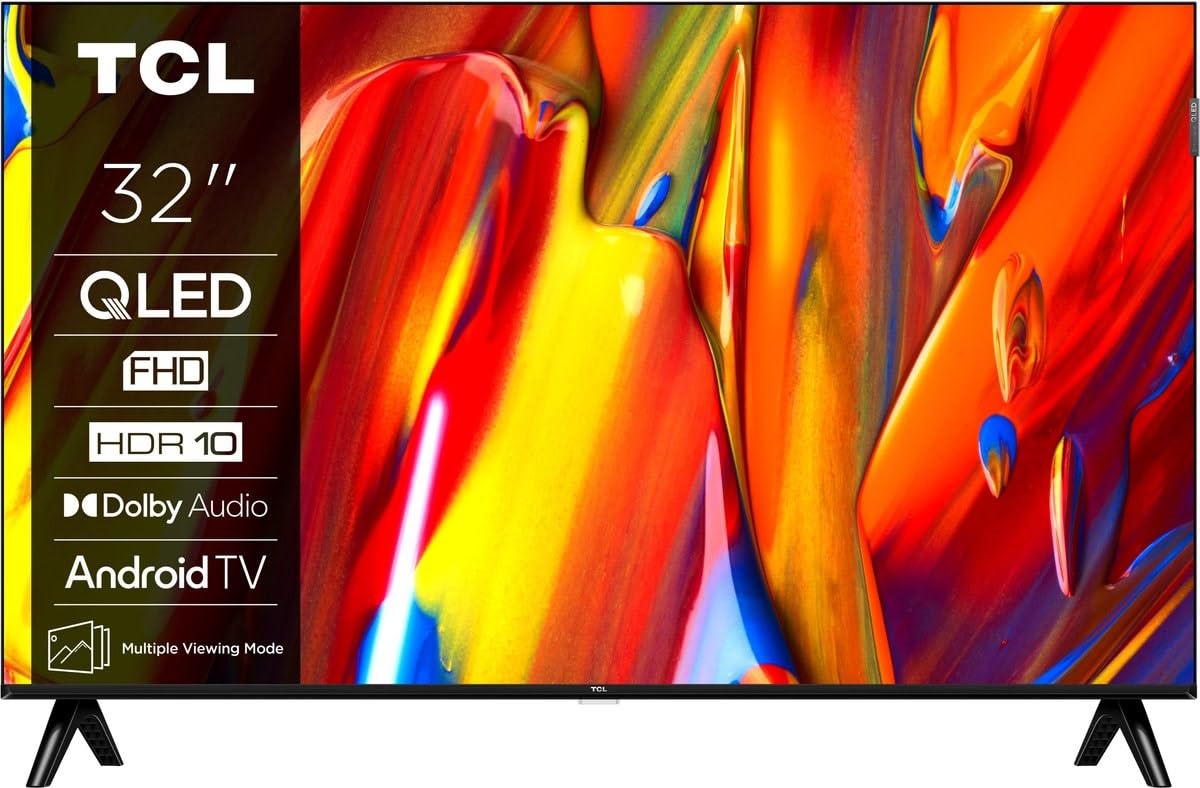
Imagen: Frente view of the TCL 32V5C Smart QLED Full HD Android TV, showcasing its slim design and display features.
4. Guía de configuración
4.1 Fijación del soporte del televisor
Para colocar el soporte incluido:
- Coloque el televisor boca abajo sobre una superficie suave y plana para evitar dañar la pantalla.
- Alinee los componentes del soporte con los orificios de montaje en la parte inferior del televisor.
- Fije el soporte con los tornillos incluidos. Asegúrese de que todos los tornillos estén bien apretados.

Image: Diagram showing the dimensions of the TCL 32V5C TV and the included remote control (RC733A).
4.2 Montaje en pared (opcional)
If you choose to wall mount your TV, ensure you use a VESA-compatible wall mount (100 x 100 mm). Consult a professional for installation to prevent damage or injury.
4.3 Conexión de la alimentación
Connect the power cable to the TV's power input and then plug it into a wall outlet. The TV is designed for 220-240V AC, 50/60Hz power supply.
4.4 Conexión de dispositivos externos
Su televisor TCL 32V5C ofrece varias opciones de conectividad:
- HDMI: Connect Blu-ray players, game consoles, or set-top boxes using one of the two HDMI ports.
- USB: Use the single USB port for media playback from USB drives.
- Ethernet: Para una conexión a Internet por cable estable, conecte un cable Ethernet al puerto LAN.
- Wifi: Conéctese a su red inalámbrica doméstica para acceder a Internet.
- Bluetooth: Empareje auriculares inalámbricos, barras de sonido u otros dispositivos habilitados para Bluetooth.
5. Uso de su televisor
5.1 First-Time Setup and Android TV
Upon first power-on, the TV will guide you through the initial setup process. This includes selecting your language, connecting to Wi-Fi, and logging into your Google account to activate Android TV features.
Android TV provides access to over 400,000 movies and shows from various streaming services. Utilize Google Cast to transfer photos, videos, and music from your smart devices directly to your TV.
5.2 Funciones de control remoto
Use the provided remote control to navigate menus, adjust volume, change channels, and access smart features. Refer to the remote control diagram for specific button functions.
5.3 Calidad de imagen y sonido
Your TV features QLED technology, which uses quantum dot materials to deliver exceptional colors and optical properties, enhancing brightness and fine details for a realistic viewing experience. Direct LED backlighting further improves image quality and energy efficiency.
With HDR10 support, the TV displays a wider range of colors and contrasts, bringing more depth to compatible content. Dolby Audio processing ensures clear and immersive sound quality through the integrated speakers.
6. Mantenimiento
Para garantizar la longevidad y el rendimiento óptimo de su televisor:
- Limpieza de la pantalla: Limpie suavemente la pantalla con un paño suave que no deje pelusa. Para manchas difíciles, limpie ligeramenteampEnjuague el paño con agua o un limpiador de pantallas especializado (no rocíe directamente sobre la pantalla).
- Limpieza del gabinete: Utilice un paño suave y seco para limpiar el mueble del televisor. Evite limpiadores abrasivos o disolventes.
- Ventilación: Asegúrese de que las aberturas de ventilación en la parte posterior del televisor no estén bloqueadas.
- Cable de alimentación: Revise periódicamente el cable de alimentación para detectar posibles daños.
7. Solución de problemas
Si tiene problemas con su televisor, consulte las siguientes soluciones comunes:
| Problema | Posible solución |
|---|---|
| Sin poder | Compruebe que el cable de alimentación esté bien conectado tanto al televisor como a la toma de corriente. Asegúrese de que la toma funcione. |
| No hay imagen, pero hay sonido | Verify the correct input source is selected. Check external device connections (HDMI, etc.). |
| No hay sonido, pero hay imagen | Verifique el nivel de volumen y la configuración de silencio. Asegúrese de que los dispositivos de audio externos estén correctamente conectados y seleccionados. |
| El control remoto no funciona | Reemplace las pilas. Asegúrese de que no haya obstrucciones entre el control remoto y el sensor infrarrojo del televisor. |
| Problemas de conexión Wi-Fi | Restart your router and modem. Reconnect the TV to the Wi-Fi network in the settings menu. |
For further assistance, please contact TCL customer support.
8. Especificaciones
| Característica | Detalle |
|---|---|
| Marca | TCL |
| Número de modelo | 32 V 5 C |
| Tamaño de pantalla | 32 pulgadas |
| Tecnología de visualización | LED Q |
| Resolución | 1080p (Full HD) |
| Frecuencia de actualización | 60 Hz |
| Características especiales | QLED & Android TV, HDR10, Google Cast |
| Tecnología de conectividad | Bluetooth, Ethernet, HDMI, USB, Wi-Fi |
| Puertos HDMI | 2 |
| Puertos USB | 1 |
| Relación de aspecto | 16:9 |
| Dimensiones del producto (Pr. x An. x Al.) | 18P x 71.5l x 46.5H cm (with stand) |
| Peso del artículo (sin soporte) | 3.1 kilogramos |
| Estándar de montaje VESA | 100 x 100 mm |
| Formato de audio | Audio Dolby |
| Tipo de sintonizador | DVB-T2 |
| Color | Negro |
9. Garantía y soporte
9.1 Información de garantía
This product comes with a Limited Warranty. Please refer to the warranty card included in the packaging or visit the official TCL webSitio para conocer los términos y condiciones detallados correspondientes a su región específica.
9.2 Atención al cliente
For technical assistance, troubleshooting not covered in this manual, or service inquiries, please contact TCL customer support through their official websitio o la información de contacto proporcionada en la documentación de su garantía.
A menudo puede encontrar recursos adicionales, preguntas frecuentes y actualizaciones de software en el Oficial de TCL Websitio.