
1. Introducción
Gracias por la compraasing the MONODEAL T23 3-Speed Turntable. This manual provides essential information for the safe and correct operation of your device. Please read it thoroughly before use and retain it for future reference.
2. Información de seguridad
- No exponga la unidad a la lluvia ni a la humedad para evitar incendios o descargas eléctricas.
- No abra el gabinete. Consulte el servicio únicamente a personal calificado.
- Asegúrese de que el adaptador de corriente coincida con su suministro de energía local.
- Place the unit on a stable, level surface away from direct sunlight, heat sources, and excessive dust or vibration.
- Mantener fuera del alcance de los niños.
3. Contenido del paquete
Verifique que todos los artículos estén presentes en el paquete:
- 1 x MONODEAL T23 Record Player
- 1 x 5V 1.5A Power Cord
- 1 x Manual de usuario (este documento)
4. Producto terminadoview
Familiarize yourself with the various parts and controls of your MONODEAL T23 Turntable.

Figura 4.1: Arriba y atrás View of the MONODEAL T23 Turntable with labeled components including Power Switch, Headphone Jack, Mode button, LED Light, USB Port, Power Adapter Input, RCA Output Jacks, 45 RPM Fixator, Tone Arm Raise Lever, Auto Stop Switch, LP Speed Switch, and Stylus.
- Interruptor de encendido/perilla de volumen: Enciende/apaga la unidad y ajusta el volumen.
- Toma de auriculares: Para escuchar en privado con auriculares.
- Botón de modo: Switches between different input modes (e.g., Phono, Bluetooth, USB).
- Luz LED: Indicates power and mode status.
- Puerto USB: Para reproducción USB.
- Entrada del adaptador de corriente: Connects to the provided 5V 1.5A power cord.
- Conectores de salida RCA (L/R): Se conecta al exterior ampAltavoces amplificados o amplificados.
- 45 RPM Fixator: Adapter for 7-inch records with large center holes.
- Palanca de elevación del brazo fonocaptor: Lifts and lowers the tone arm gently.
- Interruptor de parada automática: Habilita o deshabilita la función de parada automática.
- Interruptor de velocidad LP: Selecciona la velocidad de reproducción (33, 45 o 78 RPM).
- Aguja: The needle that reads the grooves of the record.
5. Configuración
- Desembalaje: Retire con cuidado el plato giratorio de su embalaje. Conserve el embalaje para su posterior transporte o almacenamiento.
- Colocación: Place the turntable on a stable, level surface. Ensure there is adequate ventilation around the unit.
- Conexión de energía: Connect the provided 5V 1.5A power cord to the DC IN port on the back of the turntable and then plug it into a wall outlet.
- Guardapolvo: The transparent dust cover can be opened or closed to protect the platter and stylus when not in use.
6. Instrucciones de funcionamiento
6.1 Reproducción de discos de vinilo
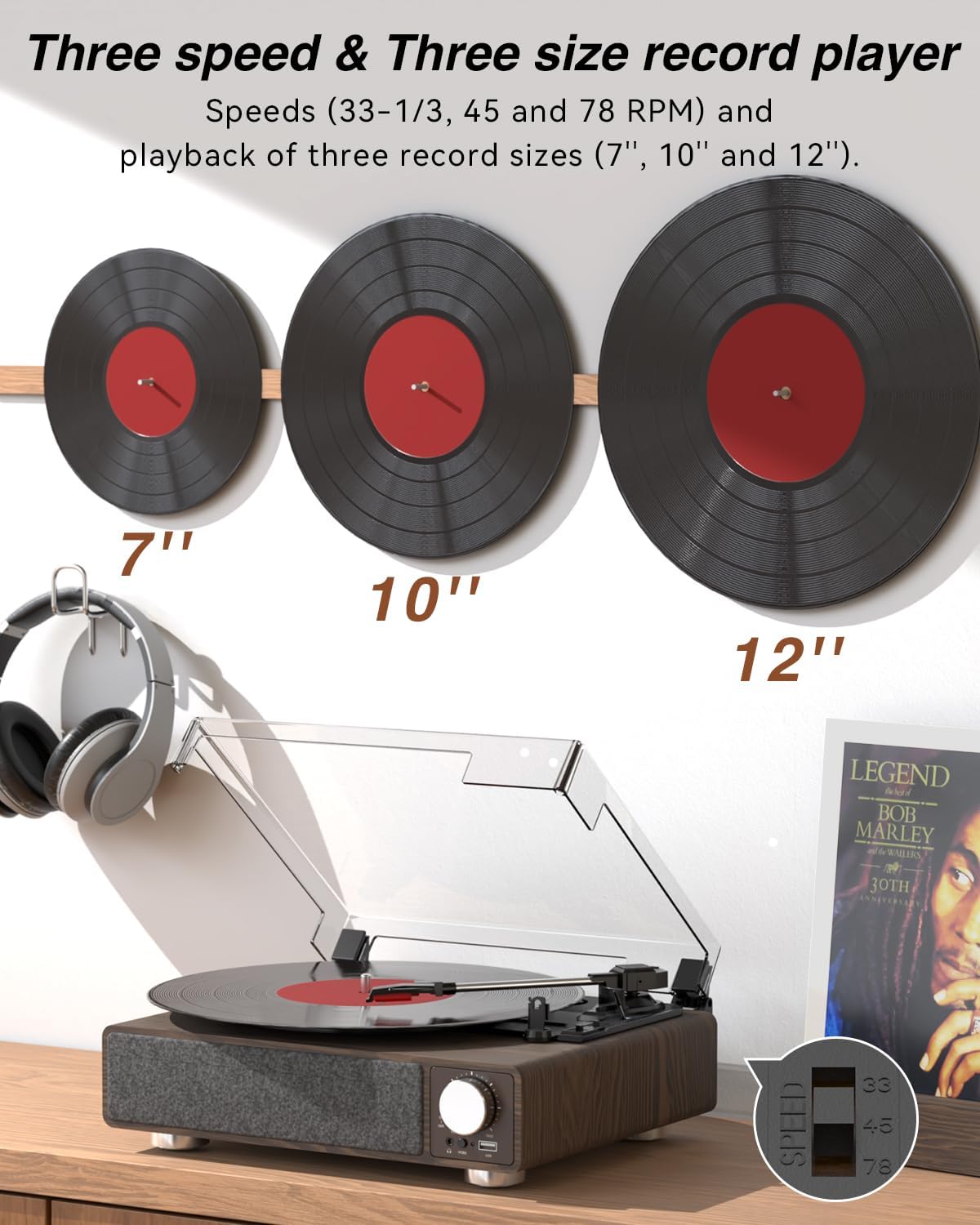
Figura 6.1: The MONODEAL T23 Turntable supports 3 speeds and 3 record sizes.
- Turn the Power Switch/Volume Knob clockwise to turn on the unit.
- Levante la cubierta antipolvo.
- Place a vinyl record on the turntable platter. If playing a 7-inch record with a large center hole, place the 45 RPM fixator on the spindle first.
- Select the appropriate speed (33, 45, or 78 RPM) using the LP Speed Switch, matching the record you are playing.
- Push the Tone Arm Raise Lever up to lift the tone arm.
- Mueva manualmente el brazo fonocaptor sobre la pista de inicio deseada del disco.
- Push the Tone Arm Raise Lever down to gently lower the tone arm onto the record. Playback will begin.
- Adjust the volume using the Power Switch/Volume Knob.
- Función de parada automática: If the Auto Stop Switch is set to ON, the turntable will automatically stop rotating when the record finishes playing. If set to OFF, it will continue to rotate.
- To stop playback, lift the tone arm using the lever and return it to the tone arm rest. Turn the Power Switch/Volume Knob counter-clockwise to turn off the unit.
6.2 Bluetooth Transmission (BT OUT)
This feature allows you to stream audio from the turntable to external Bluetooth speakers or headphones.

Figura 6.2: Bluetooth transmission from the turntable to external devices.
- Ensure the turntable is powered on and in Phono mode (playing a record).
- Press and hold the Mode button until the LED indicator flashes blue, indicating Bluetooth transmission pairing mode.
- Place your Bluetooth speaker or headphones in pairing mode.
- The turntable will automatically search for and connect to the nearest Bluetooth device. Once connected, the LED indicator will turn solid blue.
- Audio from the record will now play through your connected Bluetooth device.
6.3 Bluetooth Reception (BT IN)
This feature allows you to stream audio from your mobile device (phone, tablet) to the turntable's built-in speakers.
Figura 6.3: Bluetooth reception by the turntable from a smartphone.
- Enciende el tocadiscos.
- Press the Mode button repeatedly until the LED indicator flashes blue, indicating Bluetooth reception pairing mode.
- On your mobile device, enable Bluetooth and search for available devices. Select "MONODEAL T23" from the list.
- Una vez conectado, el indicador LED se volverá azul fijo.
- Play audio on your mobile device, and it will sound through the turntable's speakers. Adjust volume using the turntable's volume knob or your mobile device.
Reproducción USB 6.4
The turntable supports playing audio files desde una unidad flash USB.
- Insert a USB flash drive into the USB port on the front of the turntable.
- Press the Mode button to switch to USB mode. The LED indicator will change to reflect USB mode.
- The turntable will automatically begin playing audio files from the USB drive. Use the control buttons (if available, or refer to the specific model's USB control instructions) to navigate tracks.
6.5 salida RCA
Conecte el plato giratorio a un dispositivo externo. ampAltavoces amplificados o amplificados para un sonido mejorado.

Figura 6.4: RCA output for external speakers and headphone jack for private listening.
- Ensure the turntable and your external audio system are turned off.
- Connect an RCA cable (not included) to the RCA Output Jacks (L/R) on the back of the turntable.
- Connect the other end of the RCA cable to the corresponding audio input on your ampAltavoces amplificados o amplificados.
- Encienda tanto el tocadiscos como el sistema de audio externo.
- Play a record as described in Section 6.1. Audio will be routed through your external system. Adjust volume on both devices as needed.
Conector de auriculares 6.6
For private listening, connect headphones to the 3.5mm headphone jack on the front of the unit.
- Plug your 3.5mm headphones into the Headphone Jack.
- Adjust the volume using the Power Switch/Volume Knob.
7. Mantenimiento
7.1 Limpieza del plato giratorio
- Limpie el exterior de la unidad con un paño suave y seco. No utilice limpiadores abrasivos ni disolventes.
- Mantenga la cubierta antipolvo cerrada cuando no esté en uso para evitar la acumulación de polvo.
7.2 Cuidado del lápiz
- Manipule el lápiz con sumo cuidado. Evite tocar la punta con los dedos.
- Limpie el lápiz periódicamente utilizando un cepillo suave, cepillándolo suavemente de atrás hacia adelante.
- A worn stylus can damage records and degrade sound quality. Replace the stylus when signs of wear appear (e.g., distorted sound, skipping).
7.3 Cuidado de registros
- Always hold records by their edges or center label.
- Guarde los discos verticalmente en sus fundas en un lugar fresco y seco.
- Limpie los discos periódicamente con un cepillo o una solución especial para limpiarlos, a fin de eliminar el polvo y la estática.
8. Solución de problemas
| Problema | Posible causa | Solución |
|---|---|---|
| Sin poder | Power cord not connected; Power outlet not working; Unit not turned on. | Ensure power cord is securely connected; Try a different outlet; Turn the Power Switch/Volume Knob clockwise. |
| No hay sonido de los parlantes incorporados | Volume too low; RCA output connected; Bluetooth transmission active. | Increase volume; Disconnect RCA cables if not using external speakers; Ensure Bluetooth transmission is off if you want sound from built-in speakers. |
| Sonido distorsionado o saltado | Record dirty or damaged; Stylus dirty or worn; Turntable not level; Excessive vibration. | Clean record; Clean or replace stylus; Place turntable on a stable, level surface; Ensure turntable is away from sources of vibration. |
| El emparejamiento de Bluetooth falla | Device too far; Device not in pairing mode; Interference. | Move devices closer; Ensure both devices are in pairing mode; Turn off other Bluetooth devices nearby. |
| Auto stop not working | Auto Stop Switch is OFF. | Set the Auto Stop Switch to ON. Note: Some records may stop prematurely or not at all due to variations in groove patterns. |
9. Especificaciones
| Característica | Especificación |
|---|---|
| Nombre del modelo | T23 |
| Marca | MONODEAL |
| Dimensiones del producto | 11.81 x 9.84 x 4.31 pulgadas (30 x 25 x 11 cm) |
| Peso del artículo | 5.77 libras (2.62 kg) |
| Material | Madera |
| Velocidades de reproducción | 33-1/3, 45, 78 RPM |
| Tamaños de registros admitidos | 7", 10", 12" |
| Conectividad | Bluetooth (Reception & Transmission), USB, RCA Output, Headphone Jack |
| Fuente de poder | Eléctrico con cable (5 V 1.5 A) |
| Características especiales | Built-in Stereo Speakers, Auto Stop, Belt-Drive System |
10. Garantía y soporte
MONODEAL products are designed and manufactured to the highest quality standards. For warranty information and technical support, please refer to the warranty card included with your purchase or visit the official MONODEAL website. Please have your model number (T23) and purchase date available when contacting support.