
1. Introducción
Gracias por la compraasing the JVC XS-N1154B Bluetooth Speaker. This manual provides essential information for the safe and efficient operation of your device. Please read it thoroughly before use and retain it for future reference.
2. Información de seguridad
- No exponga el altavoz a temperaturas extremas, luz solar directa o humedad alta.
- Evite dejar caer o someter el altavoz a impactos fuertes.
- No intente desmontar ni modificar el altavoz. Esto anulará la garantía.
- Mantenga el altavoz alejado del agua y otros líquidos, a pesar de su clasificación de resistencia al agua, para evitar daños a los componentes internos.
- Utilice únicamente el cable de carga y el adaptador de corriente especificados.
- Limpie el altavoz con un paño suave y seco. No utilice limpiadores abrasivos ni disolventes.
3. Contenido del paquete
Asegúrese de que todos los artículos estén presentes en el paquete:
- JVC XS-N1154B Bluetooth Speaker
- Cable de carga
- Manual de usuario
- Control remoto (si está incluido)
4. Producto terminadoview
Familiarícese con los componentes y controles del altavoz.
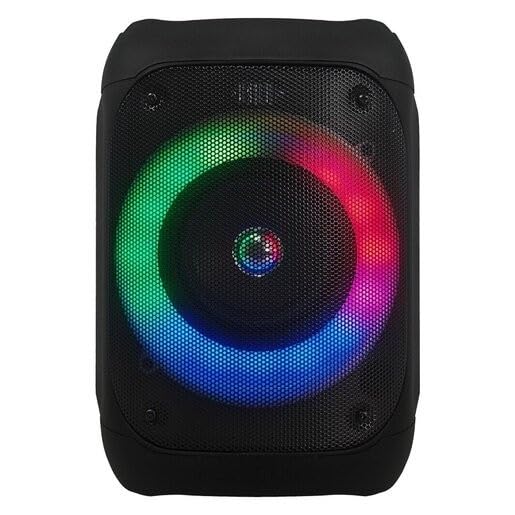
Figura 1: Frente view of the JVC XS-N1154B Bluetooth Speaker, showcasing the speaker grille and integrated music-activated LED lights.
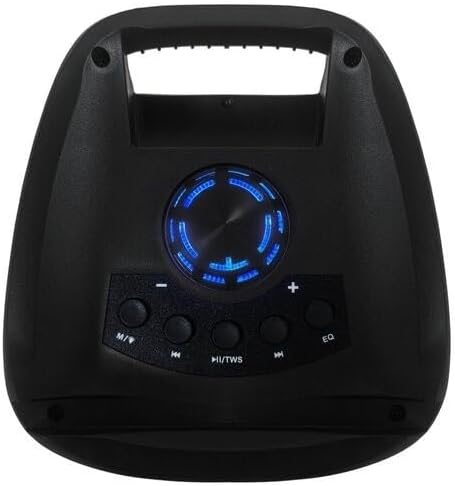
Figura 2: Arriba view of the JVC XS-N1154B Bluetooth Speaker, displaying the control panel with various buttons and the volume knob.
Funciones del panel de control:
- Botón de encendido: Enciende o apaga el altavoz.
- Botón de modo (M): Switches between Bluetooth, USB, SD Card, and FM Radio modes.
- Play/Pause (►||) / TWS Button: Plays or pauses audio. Long press for TWS (True Wireless Stereo) pairing.
- Previous Track (◀◀) Button: Skips to the previous track or tunes down in FM mode.
- Next Track (►►) Button: Skips to the next track or tunes up in FM mode.
- Botón EQ: Recorre los ajustes preestablecidos del ecualizador.
- Perilla de volumen: Rotates to adjust the volume level.
5. Configuración
5.1 Carga del altavoz
- Conecte el cable de carga al puerto de carga del altavoz.
- Plug the other end of the cable into a suitable USB power adapter (not included) or a powered USB port.
- La luz indicadora de carga se iluminará, generalmente en rojo, durante la carga.
- Una vez cargada por completo, la luz indicadora podría cambiar de color (p. ej., apagarse o ponerse azul/verde). Desconecte el altavoz de la fuente de alimentación.
5.2 Encendido / Apagado
- Para encender: Press and hold the Power button until the speaker powers on and you hear an audible prompt.
- Para apagar: Mantenga presionado el botón de encendido nuevamente hasta que el altavoz se apague.
6. Instrucciones de funcionamiento
6.1 Emparejamiento Bluetooth
- Ensure the speaker is powered on and in Bluetooth mode. If not, press the Mode (M) button to switch to Bluetooth mode. The speaker will indicate it is ready for pairing (e.g., a blinking LED or audible prompt).
- En su dispositivo móvil (teléfono inteligente, tableta, computadora portátil), habilite Bluetooth y busque los dispositivos disponibles.
- Select "JVC XS-N1154B" from the list of devices.
- Una vez emparejado, el altavoz proporcionará una confirmación audible y la luz indicadora de Bluetooth se volverá fija.
- Ahora puedes reproducir audio desde tu dispositivo a través del altavoz.
6.2 Reproducción de tarjeta USB/SD
- Insert a USB flash drive or an SD card (with supported audio files) en el puerto correspondiente del altavoz.
- The speaker will automatically switch to USB or SD card mode and begin playing audio. If not, press the Mode (M) button to select the correct input.
- Use the Previous Track (◀◀), Next Track (►►), and Play/Pause (►||) buttons to control playback.
6.3 Funcionamiento de la radio FM
- Presione el botón Mode (M) para cambiar al modo de radio FM.
- To auto-scan and save available stations, press and hold the Play/Pause (►||) button. The speaker will scan and store stations automatically.
- Use the Previous Track (◀◀) and Next Track (►►) buttons to navigate between saved FM stations.
6.4 modos de luz LED
The speaker features music-activated LED lights. These lights typically synchronize with the audio playback. There may be an additional button or a combination of buttons to cycle through different light modes or to turn them off. Refer to the remote control section for specific controls if available.
6.5 Control de volumen
Rotate the Volume Knob on the top panel clockwise to increase volume and counter-clockwise to decrease volume.
6.6 Uso del control remoto
If your package includes a remote control, it provides convenient access to various functions:
- Fuerza: Encendido/apagado
- Modo: Switch input sources (Bluetooth, USB, SD, FM)
- Volumen +/-: Ajustar el volumen
- Reproducir/Pausa: Controlar la reproducción
- Anterior Siguiente: Skip tracks/stations
- EQ: Change equalizer presets
- CONDUJO: Control LED light modes (if applicable)
7. Mantenimiento
7.1 Limpieza
Wipe the speaker's exterior with a soft, dry, lint-free cloth. Do not use liquid cleaners, sprays, or solvents, as these may damage the finish or internal components. Ensure all ports are dry before use, especially given its waterproof nature.
7.2 Almacenamiento
When not in use for extended periods, store the speaker in a cool, dry place, away from direct sunlight and extreme temperatures. It is recommended to charge the battery periodically to maintain its lifespan.
8. Solución de problemas
| Problema | Posible causa | Solución |
|---|---|---|
| El altavoz no se enciende. | La batería está agotada. | Cargue el altavoz completamente. |
| No hay sonido. | Volume is too low or muted. Device not paired correctly. | Increase volume. Re-pair Bluetooth device. Check audio source. |
| El emparejamiento de Bluetooth falla. | El altavoz no está en modo de emparejamiento. El dispositivo está demasiado lejos. Hay interferencias. | Asegúrate de que el altavoz esté en modo de emparejamiento Bluetooth. Acerca el dispositivo. Apaga los demás dispositivos Bluetooth. |
| La tarjeta USB/SD no se reproduce. | Incorrecto file Formato. La tarjeta/unidad no se insertó correctamente. | Asegurar audio files are in a supported format. Reinsert the USB drive/SD card. Press Mode button to select correct input. |
| La recepción de radio FM es mala. | Señal débil. | Reubique el altavoz en un área con mejor recepción. |
9. Especificaciones
- Modelo: XS-N1154B
- Marca: JVC
- Conectividad: Bluetooth, USB, Tarjeta SD
- Radio: Radio FM digital
- Potencia de salida: 4 vatios
- Modo de salida de audio: Estéreo
- Método de control: Remoto
- Material: Plástico
- Impermeable: Sí
- Fuente de energía: Funciona con pilas
- Dimensiones: Approximately 18.6D x 18.9W x 25.5H cm
- Peso: Aproximadamente 1.2 kg
- Dispositivos compatibles: Computadoras portátiles, teléfonos inteligentes
10. Garantía y soporte
10.1 Información de garantía
This JVC XS-N1154B Bluetooth Speaker comes with a Garantía de 1 años Desde la fecha de compra. Esta garantía cubre defectos de fabricación y mano de obra en condiciones normales de uso. No cubre daños causados por mal uso, accidentes, modificaciones no autorizadas ni desgaste normal.
10.2 Atención al cliente
For technical assistance, warranty claims, or further inquiries, please contact JVC customer support through their official website or the retailer where the product was purchased. Please have your product model number (XS-N1154B) and proof of purchase ready when contacting support.