
Thundeal TD93 Pro
Manual del usuario del miniproyector Thundeal TD93 Pro
Model: TD93 Pro | Brand: Thundeal
1. Introducción
This manual provides detailed instructions for the setup, operation, and maintenance of your Thundeal TD93 Pro Mini Projector. Please read this manual thoroughly before using the product to ensure proper functionality and to extend its lifespan.

Image 1.1: Thundeal TD93 Pro Mini Projector overview.
2. ¿Qué hay en la caja?
Verifique que todos los artículos enumerados a continuación estén incluidos en su paquete:
- Proyector Thundeal TD93 Pro
- Mando a distancia
- Cable de alimentación
- Manual de usuario (este documento)
- AV Cable
- Cable HDMI
- Cubierta de la lente del proyector

Image 2.1: Package contents of the TD93 Pro Projector.
3. Product Specifications and Features
3.1. Especificaciones técnicas
| Número de modelo | TD93 Pro (Item Model Number: TD97) |
| Resolución nativa | 1920 x 1080 (Full HD) |
| Compatibilidad con resolución máxima | 2K 4K UHD (de señal HD) |
| Brillo | 12000 lúmenes |
| Relación de contraste | 15000:1 |
| Relación de aspecto | 4:3 / 16:9 / Automático |
| Sistema operativo | Sistema operativo Android 9.0 |
| Conectividad inalámbrica | 2.4G / 5G WiFi, Bluetooth-compatible |
| Memoria | RAM 1G DDR3 + ROM 8G |
| Corrección trapezoidal | 6D Keystone (4-point corner +/- 60°, Vertical +/- 60°) |
| Función de zoom | 50-100% Proportional Reduction |
| Tamaño de proyección | 49 to 300 inches (recommended 93-150 inches) |
| Distancia de proyección | 1.6 to 6.5 meters (recommended 3-5 meters) |
| Lamp Vida | 50,000 horas |
| Audio | Built-in 5W stereo speakers with SRS sound system |
| Características especiales | 3D-Ready (Red-Blue 3D), Auto Horizontal Keystone, Built-In Wi-Fi, Portable, Dust Removal Net |
3.2. Características principales
- High Definition Visuals: Native 1080P resolution with support for 2K/4K UHD signals, delivering clear and vibrant images.
- Sistema operativo Android inteligente: Integrated Android 9.0 operating system allows direct app downloads and streaming.
- Wi-Fi de doble banda: 2.4G and 5G WiFi connectivity for stable and fast wireless streaming and screen mirroring.
- Conectividad Bluetooth: Conecte altavoces o auriculares Bluetooth externos para disfrutar de un audio mejorado.
- Corrección avanzada de imagen: 6D Keystone correction (4-point and vertical) for flexible placement and precise image alignment.
- Proyección flexible: Adjustable zoom from 50% to 100% and support for screen sizes up to 300 inches.
- L de larga duraciónamp: LED lamp designed for up to 50,000 hours of operation.
- Multi-Media Compatibility: Supports various input sources including HDMI, USB, AV, and direct office file reproducción a través de USB.

Image 3.1: Visual comparison of projector brightness and resolution.
4. Guía de configuración
4.1. Ubicación del proyector
El proyector se puede colocar en varias posiciones para adaptarse a sus necesidades. viewentorno ing:
- En un escritorio: Coloque el proyector sobre una superficie plana y estable.
- En un trípode: Utilize the 6mm screw hole on the bottom for tripod mounting.
- Ceiling Hoisting: Mount the projector to the ceiling using a compatible hanger.
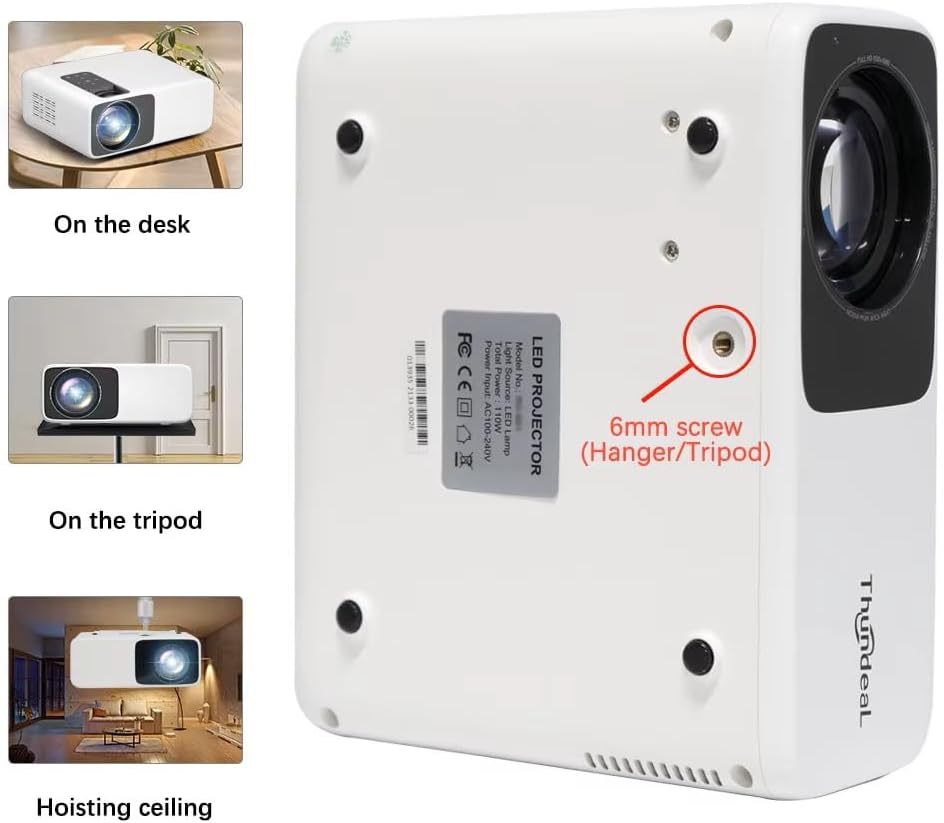
Image 4.1: Projector placement options and mounting point.
Para una óptima viewing, ensure the projector is positioned perpendicular to the screen or wall. Adjust the projection distance (1.6 to 6.5 meters) to achieve your desired screen size (49 to 300 inches). A distance of 3-5 meters for a 93-150 inch screen is recommended for eye comfort.
4.2. Conexión de alimentación
- Conecte el cable de alimentación al puerto de entrada de energía del proyector.
- Conecte el otro extremo del cable de alimentación a una toma eléctrica estándar.
- Presione el botón de encendido del proyector o del control remoto para encenderlo.
5. Instrucciones de funcionamiento
5.1. Multi-Media Connections
The TD93 Pro projector offers various ports for connecting external devices:
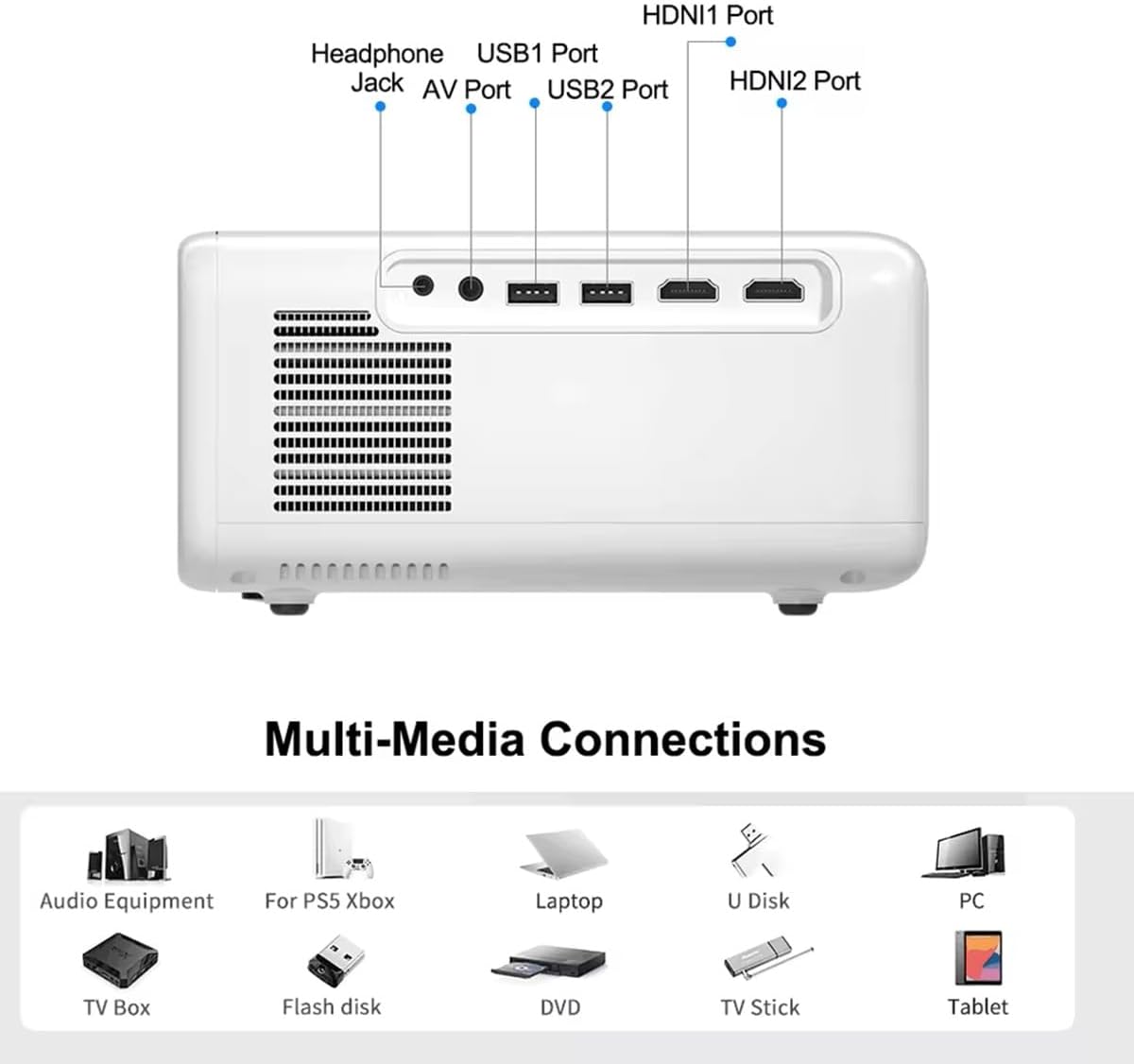
Image 5.1: Available multimedia connection ports.
- Puertos HDMI (HDMI1, HDMI2): Connect devices such as TV boxes, gaming consoles (PS5, Xbox), laptops, or Blu-ray players.
- Puertos USB (USB1, USB2): Connect USB flash drives for direct media playback (photos, videos, office documents).
- Puerto AV: Conecte dispositivos más antiguos utilizando el cable AV proporcionado.
- Toma de auriculares (3.5 mm): Conecte auriculares o altavoces externos.
To switch input sources, use the "Source" button on the remote control or the projector's control panel and select the desired input (HDMI1, HDMI2, AV, USB).
5.2. Conectividad inalámbrica
5.2.1. Conexión WiFi (2.4G/5G)
The projector supports dual-band WiFi for internet access and network features:
- Navigate to the "Settings" menu on the projector's Android interface.
- Select "Network & Internet" and then "Wi-Fi".
- Encienda el Wi-Fi y seleccione la red deseada de la lista.
- Introduzca la contraseña si se le solicita y conéctese.
5.2.2. Conexión Bluetooth
Connect Bluetooth-compatible audio devices like speakers or headphones:
- Vaya a “Configuración” > “Dispositivos conectados” > “Bluetooth”.
- Activar Bluetooth.
- Pon tu dispositivo Bluetooth en modo de emparejamiento.
- Seleccione su dispositivo de la lista de dispositivos disponibles para emparejar.
5.3. Screen Mirroring (Airplay/WiFi-Display)
Wirelessly display content from your Android or iOS phone:

Image 5.2: Screen mirroring from iOS and Android devices.
- Asegúrese de que tanto el proyector como el dispositivo móvil estén conectados a la misma red Wi-Fi.
- On the projector's main interface, select the "Screen Mirroring" or "Airplay/WiFi-Display" application.
- For iOS devices: Open Control Center, tap "Screen Mirroring" or "AirPlay Mirroring", and select the projector from the list.
- For Android devices: Open the notification panel, find "Cast", "Smart View", "Wireless Display", or similar function, and select the projector.
5.4 Ajuste de imagen
5.4.1. Keystone Correction (6D)
The projector features 6D keystone correction to adjust image shape:
- Piedra angular vertical: Adjust +/- 60 degrees vertically using the remote control.
- 4-Point Corner Keystone: Adjust each of the four corners independently by +/- 60 degrees for side projection or irregular surfaces. This allows for precise rectangular image alignment.
Access keystone settings via the projector's menu or dedicated buttons on the remote.
5.4.2. Función de zoom
Adjust the display size from 50% to 100% proportionally without moving the projector. This feature is useful for fine-tuning the image size to fit your screen or wall.
Access the zoom function through the projector's menu settings.
5.5. Sistema operativo Android y uso de aplicaciones
The integrated Android 9.0 OS allows you to download and install applications directly from the Play Store. Ensure the projector is connected to Wi-Fi to access online services and apps.
- Tienda de juegos: Access the Google Play Store to download streaming apps, games, and utilities.
- Reproducción de medios: Use pre-installed media players or download alternatives (e.g., VLC player for AC3 audio support).
6. Mantenimiento
6.1. Eliminación de polvo
The projector is equipped with a built-in dust net for easy cleaning. Regularly clean the dust net to maintain optimal performance and prevent overheating. Press to pop out the dust net for cleaning.
6.2. Sistema de refrigeración
The advanced cooling system is designed to dissipate heat efficiently and extend the lamp's lifespan. Ensure proper ventilation around the projector and avoid blocking air vents during operation.
6.3. Elamp Vida
El LED lamp has an estimated lifespan of 50,000 hours. No lamp replacement is typically required during the product's operational life under normal usage conditions.
7. Solución de problemas
7.1. No Image Displayed
- Compruebe si el proyector está encendido.
- Verifique que la fuente de entrada esté seleccionada correctamente (por ejemplo, HDMI1, USB).
- Asegúrese de que todos los cables estén conectados de forma segura.
- Ajuste el enfoque y la corrección trapezoidal.
7.2. Sin sonido
- Verifique el nivel de volumen en el proyector y el dispositivo fuente conectado.
- Ensure external speakers or headphones are properly connected and powered on if used.
- If using an external source, verify its audio output settings.
- For AC3 audio, ensure you are using a compatible player like VLC.
7.3. Problemas de conectividad (WiFi/Bluetooth)
- Ensure WiFi is enabled and you are connected to the correct network.
- Reinicie el proyector y su enrutador/dispositivo Bluetooth.
- For screen mirroring, confirm both devices are on the same Wi-Fi network.
7.4. La imagen está borrosa o distorsionada
- Ajuste el anillo de enfoque en la lente del proyector.
- Use the keystone correction features to correct any trapezoidal distortion.
- Asegúrese de que la superficie de proyección sea plana y lisa.
8. Garantía y soporte
Para obtener información sobre la garantía y asistencia técnica, consulte la documentación proporcionada al momento de la compra o póngase en contacto con su vendedor. Conserve el recibo de compra como comprobante.
Ask a question about this manual
Ask about setup, troubleshooting, compatibility, parts, safety, or missing instructions. Manuals+ will review the question and use this page’s manual context to help answer it.