
1. Introducción y másview
Thank you for choosing the DDup External Portable CD Player for Car. This device is designed to upgrade your car's audio system, delivering rich, distortion-free sound from your favorite CDs. It supports multiple media formats and offers versatile connectivity options via USB and AUX input. This manual provides detailed instructions for setup, operation, maintenance, and troubleshooting to ensure optimal performance and longevity of your CD player.

DDup Portable CD Player with included accessories. This image displays the DDup portable CD player in white, with its lid open revealing a CD. Alongside the player are its accessories: a USB-A to USB-C cable, a USB extension cable, a 3.5mm AUX audio cable, and a remote control.
2. Características del producto
- Anti-Skip & Shockproof Playback: Equipped with advanced shockproof technology and four anti-skid rubber feet to prevent disc skipping on bumpy roads. The magnetic adsorption cover and internal pin-shaped locking cylinder protect the disc for clear playback.
- USB Connection Mode: Allows direct connection to your vehicle's USB port for automatic disc detection and playback. Includes an extended USB cable and Type-C adapter for broad compatibility.
- AUX Connection Mode: Connects to your car's AUX port using the provided audio cable, powered via a USB port. The included remote control functions exclusively in AUX mode.
- Audio de alta fidelidad: Features an upgraded professional-grade chip for enhanced readability, compatibility, and anti-interference, ensuring crisp, distortion-free sound. Supports CD/CD-R/CD-RW/MP3/WMA/WAV formats. Note: Not compatible with Blu-ray or DVD discs.
- Amplia compatibilidad de vehículos: Suitable for most car stereos that support WAV/MP3 playback. Also compatible with laptops, PCs, smart TVs, and other devices.

Key features of the DDup Portable CD Player for Car. An image highlighting the main features of the portable CD player, including its compact body design, lossless audio quality, USB connection, AUX connection, anti-skip design, and enhanced cooling system. The player is shown placed in a car's center console.
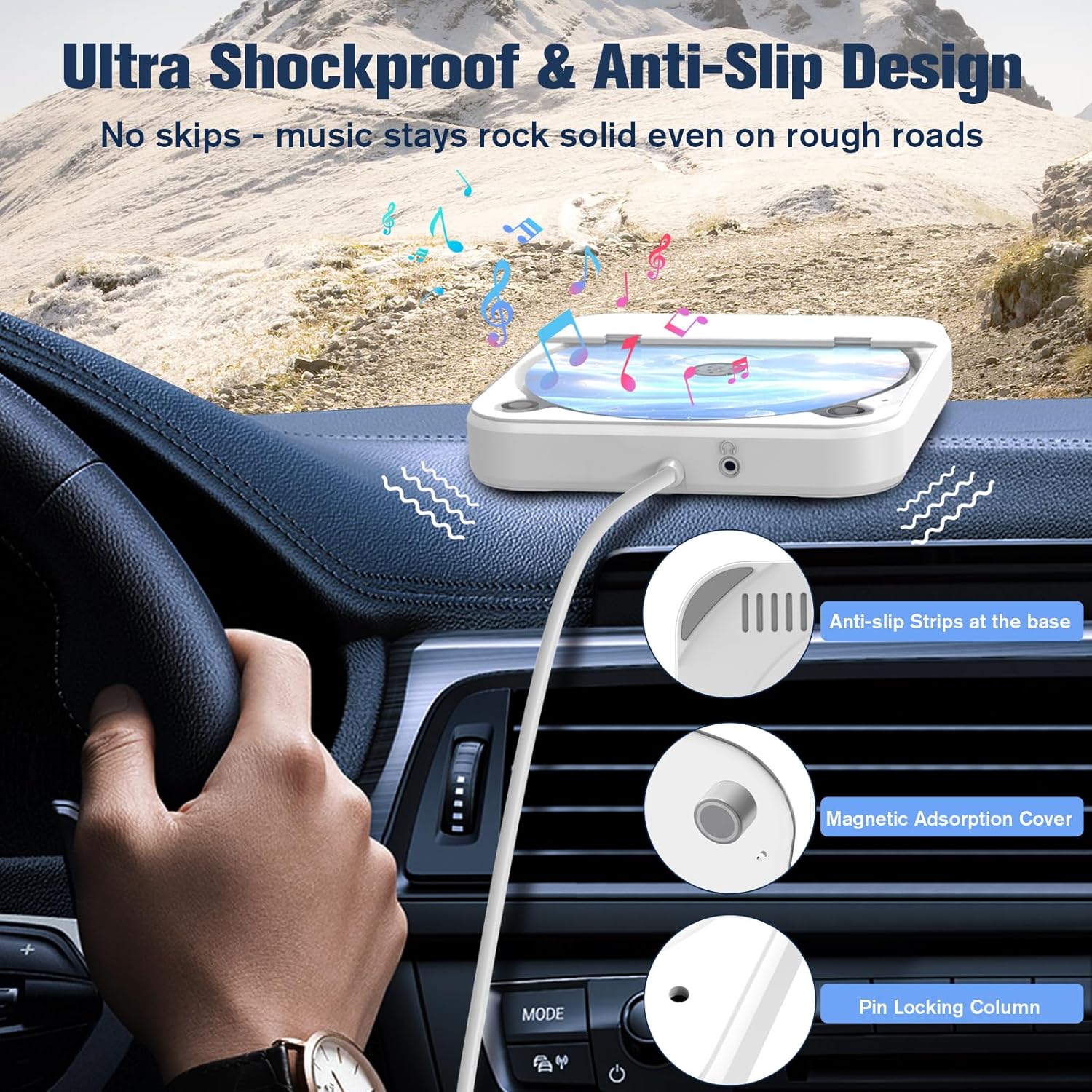
Anti-skip and shockproof design features of the DDup CD player. This image illustrates the anti-skip and shockproof mechanisms of the CD player, showing the anti-slip strips at the base, the magnetic adsorption cover, and the internal pin locking column designed to secure the disc during playback in a moving vehicle.

Internal professional-grade chip for lossless audio decoding. A close-up image of the internal professional-grade chip responsible for lossless audio decoding, emphasizing the technology that restores original CD sound quality. Supported disc formats (CD/CD-R/CD-RW/MP3/WAV) are noted, along with a disclaimer that Blu-ray or DVD discs are not compatible.
3. Contenido del paquete
Por favor verifique que todos los artículos estén presentes en su paquete:
- DDup External Portable CD Player (KC-606)
- Cable de extensión USB
- Adaptador USB tipo C
- Cable de audio AUX de 3.5 mm
- Mando a distancia
4. Instrucciones de configuración
4.1. USB Connection Mode (For cars supporting WAV/MP3 playback via USB)
- Connect the USB end of the CD player's cable to your vehicle's USB port. Use the provided USB extension cable and Type-C adapter if necessary for compatibility or reach.
- Your car stereo should automatically detect the CD player and begin playing discs. No additional setup is typically required.
- Insert a compatible CD (CD/CD-R/CD-RW/MP3/WAV) into the CD player.

USB connection setup for the DDup Portable CD Player in a car. A visual guide demonstrating how to connect the portable CD player using the USB connection. The image shows the player connected to a car's USB port via the included USB extension cable and a USB Type-C converter, with the car's infotainment screen displaying media options.
4.2. AUX Connection Mode (For cars not supporting WAV/MP3 playback via USB or for remote control functionality)
- Connect the USB end of the CD player's cable to a car USB port or a power USB adapter (e.g., car charger) to power the unit.
- Use the provided 3.5mm AUX audio cable to connect the AUX port on the CD player to the AUX input port in your car.
- On your car stereo, select the AUX input mode.
- Insert a compatible CD (CD/CD-R/CD-RW/MP3/WAV) into the CD player.
- The included remote control will function in this mode to control playback.
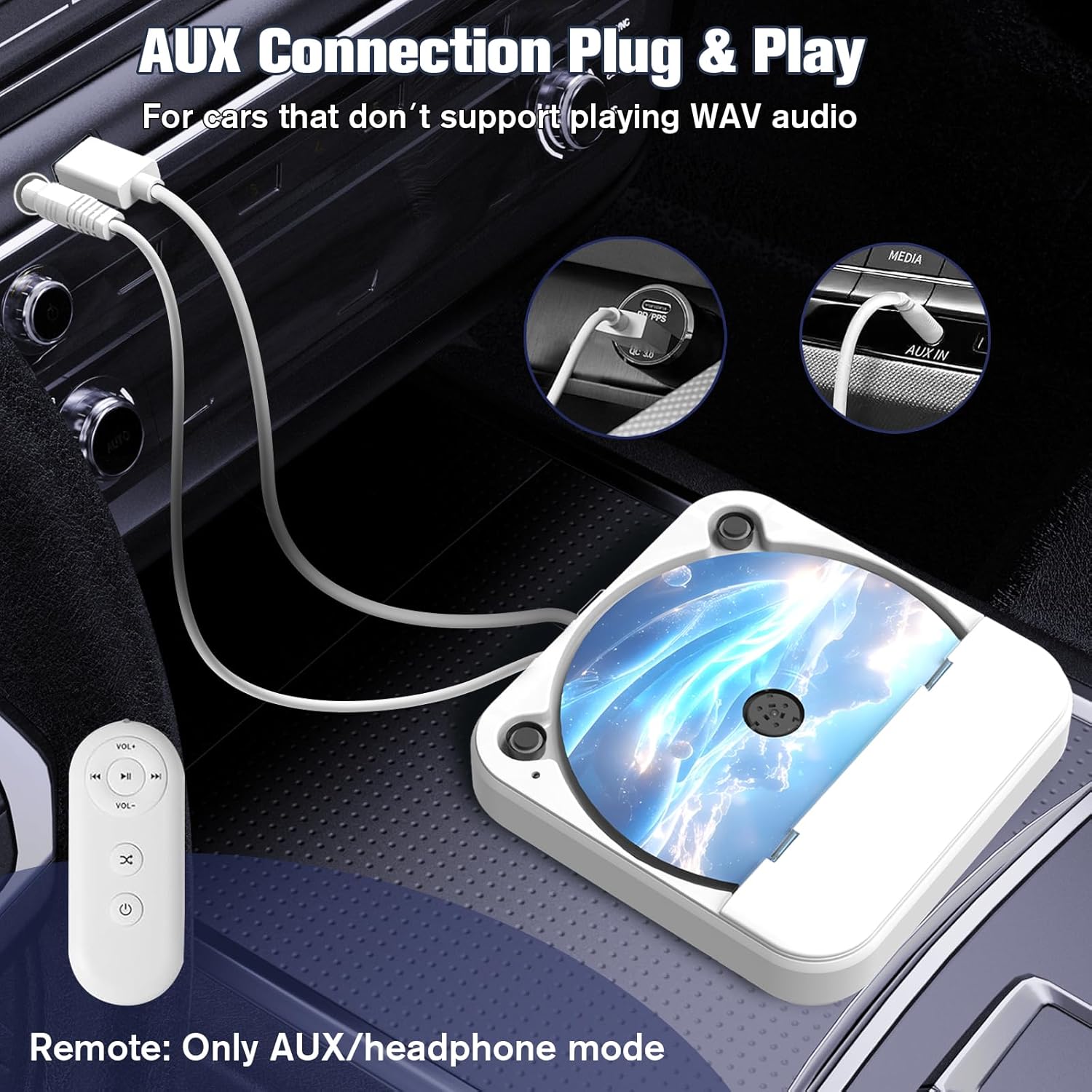
AUX connection setup for the DDup Portable CD Player in a car. This image illustrates the AUX connection method for the portable CD player. It shows the player connected to the car's AUX input and a USB power source (like a car charger) for power. The remote control, which functions only in AUX mode, is also visible.
5. Instrucciones de funcionamiento
5.1. Inserción de un CD
- Gently lift the magnetic adsorption cover of the CD player.
- Coloque el CD en el eje con la etiqueta hacia arriba. Asegúrese de que esté correctamente colocado.
- Close the cover firmly until the magnetic adsorption engages. The internal pin locking column will secure the disc.
5.2. Playback Controls (via Car Stereo or Remote)
Once connected and a CD is inserted, playback will typically begin automatically. Control functions such as Play/Pause, Skip Track, and Volume will be managed through your car's stereo system when using USB mode. In AUX mode, the included remote control can be used for these functions.
- Reproducir/Pausa: Press the Play/Pause button on your car stereo or the remote.
- Pista siguiente: Press the Next Track button on your car stereo or the remote.
- Pista anterior: Press the Previous Track button on your car stereo or the remote.
- Volumen: Adjust volume using your car stereo's volume controls. The remote control also has volume buttons for AUX mode.
6. Mantenimiento
To ensure the longevity and optimal performance of your DDup Portable CD Player, follow these maintenance guidelines:
- Limpieza: Use a soft, dry cloth to clean the exterior of the player. Do not use abrasive cleaners or solvents. For the lens, use a specialized CD lens cleaner if necessary, following its instructions carefully.
- Manejo del disco: Sujete siempre los CD por los bordes. Evite tocar la superficie de reproducción. Guarde los discos en sus estuches cuando no los use para evitar rayones y la acumulación de polvo.
- Almacenamiento: Cuando no esté en uso, guarde el reproductor de CD en un lugar fresco y seco, alejado de la luz solar directa y de temperaturas extremas.
- Protección: The player features anti-slip strips and a magnetic adsorption cover. Ensure these are clean and functioning correctly to maintain disc stability and protection.
7. Solución de problemas
| Problema | Posible causa | Solución |
|---|---|---|
| CD not playing / No sound | Incorrect connection mode selected on car stereo. Conexión de cable suelta. Incompatible disc format. CD sucio o rayado. | Ensure correct input (USB/AUX) is selected on your car stereo. Compruebe que todas las conexiones de cables estén seguras. Verify disc is CD/CD-R/CD-RW/MP3/WAV. Limpie o reemplace el CD. |
| Disc skipping or distorted sound | Bumpy road conditions. Dirty or damaged CD. Player not stable. | Ensure the CD is properly seated and the cover is closed. Limpiar el CD. Place the player on a stable, flat surface. Ensure anti-slip feet are clean. |
| El control remoto no funciona | No en modo AUX. Battery issue (if applicable). | The remote only functions in AUX connection mode. Check remote battery (if replaceable). |
| Player not recognized by car via USB | Car stereo does not support WAV/MP3 playback via USB. Se utilizó un puerto USB incorrecto. | Try AUX connection mode. Consult your car's manual for USB compatibility. Try a different USB port in your car. |
8. Especificaciones
| Marca | DDup |
| Número de modelo | KC-606 |
| Dispositivos compatibles | Speaker, Headphone, Car Stereos, Laptops, PCs, Smart TVs |
| Características especiales | Anti-Skip Protection, CD-R/RW Compatible, Lightweight, Portable, Shockproof |
| Formatos de audio compatibles | MP3, WAV (CD/CD-R/CD-RW also supported) |
| Tipo de conector | Auxiliar, USB |
| Color | Blanco |
| Pilas incluidas | Sí (1 batería de metal de litio) |
| Toma de auriculares | Sin conector para auriculares |
| Dimensiones del paquete | 16.69 x 14.4 x 5.21 cm |
| Peso del artículo | 449 gramos |

Versatile usage scenarios for the DDup Portable CD Player. This image showcases the wide compatibility of the CD player, demonstrating its use with various devices such as a desktop computer, smart TV, laptop, and in-dash car stereo. It clarifies that the player connects via USB/AUX and does not support Bluetooth.
9. Garantía y soporte
This product is subject to a return policy of 30 days for refund or replacement. For specific warranty details, technical support, or any inquiries not covered in this manual, please contact DDup customer service. We are committed to assisting you within 24 hours.