
1. Introducción
Welcome to the user manual for your new ASUS ROG Strix SCAR 16 G635LX-RW158WS gaming laptop. This document provides essential information for setting up, operating, maintaining, and troubleshooting your device. The ROG Strix SCAR 16 is engineered for high-performance gaming, featuring an Intel Core Ultra 9 processor, NVIDIA GeForce RTX 5090 graphics, and a high-refresh-rate display.

Figure 1.1: The ASUS ROG Strix SCAR 16 Gaming Laptop.
2. ¿Qué hay en la caja?
Upon unboxing your ASUS ROG Strix SCAR 16, please verify that all the following items are included:
- ASUS ROG Strix SCAR 16 Gaming Laptop
- Adaptador de corriente
- Guía del usuario (este documento)
- Documentos de garantía
3. Producto terminadoview
The ASUS ROG Strix SCAR 16 is designed for peak gaming performance and productivity. Key features include:
- Procesador: Intel Core Ultra 9 275HX with Intel AI Boost NPU
- Gráficos: NVIDIA GeForce RTX 5090 Laptop GPU with 24GB GDDR7 RAM
- Mostrar: 16-inch, 2.5K (2560 x 1600) WQXGA, 240Hz Refresh Rate, 1200nits Brightness ROG Nebula HDR Display
- Memoria: 32 GB de RAM DDR5
- Almacenamiento: 2TB PCIe 4.0 NVMe M.2 Performance SSD
- Enfriamiento: ROG Intelligent Cooling with Vapor Chamber, Sandwiched Heatsink, Tri-Fan Technology, and Conductonaut Extreme Liquid Metal
- Teclado: Backlit Chiclet Keyboard Per-Key RGB with Copilot key and Touchpad-based NumberPad
- Conectividad: Wi-Fi 7, 2.5G LAN, Thunderbolt 5, HDMI 2.1, USB 3.2 Gen2 Type-A
- Audio: Elegante Amp Technology, 5.1.2 Channel Virtual Surround Sound, Two-Way AI Noise Cancelation
3.1 Componentes principales

Figura 3.1: Sobreview of the laptop's core specifications.
3.2 Sistema de enfriamiento
The ROG Intelligent Cooling system ensures optimal thermal performance, even during intense gaming sessions. It features an end-to-end Vapor Chamber, a sandwiched heatsink design, Tri-Fan Technology, and Conductonaut Extreme Liquid Metal for efficient heat dissipation.

Figure 3.2: ROG Intelligent Cooling system components.
3.3 Tecnología de visualización
Experience stunning visuals with the ROG Nebula HDR display. This 16-inch Mini LED panel offers over 2000 dimming zones, 1200 nits peak brightness, a 240Hz refresh rate with 3ms response time, and 100% DCI-P3 color gamut coverage. It supports Dolby Vision, NVIDIA G-SYNC, and is VESA Certified DisplayHDR 1000.

Figure 3.3: ROG Nebula HDR Display specifications.
3.4 Conectividad y puertos
The laptop offers comprehensive connectivity options for all your peripherals and networking needs, including Wi-Fi 7, 2.5G Ethernet, Thunderbolt 5, HDMI 2.1, and multiple USB ports.

Figure 3.4: Port layout and connectivity options.
Sistema de audio 3.5
Enjoy immersive audio with Smart Amp Technology, 5.1.2 Channel Virtual Surround Sound, and Two-Way AI Noise Cancelation for clear communication.

Figure 3.5: Studio-quality sound features.
3.6 Teclado y panel táctil
The full-size Chiclet keyboard features Per-Key RGB backlighting, dedicated gaming hotkeys, and a touchpad with an integrated NumberPad for enhanced functionality.

Figure 3.6: Keyboard and touchpad with NumberPad.
3.7 Capacidad de actualización
The laptop features a tool-less access design, allowing for easy upgrades. It supports up to 64GB 5600MHz DDR5 memory and up to 4TB PCIe 4.0 storage in RAID 0 configuration.
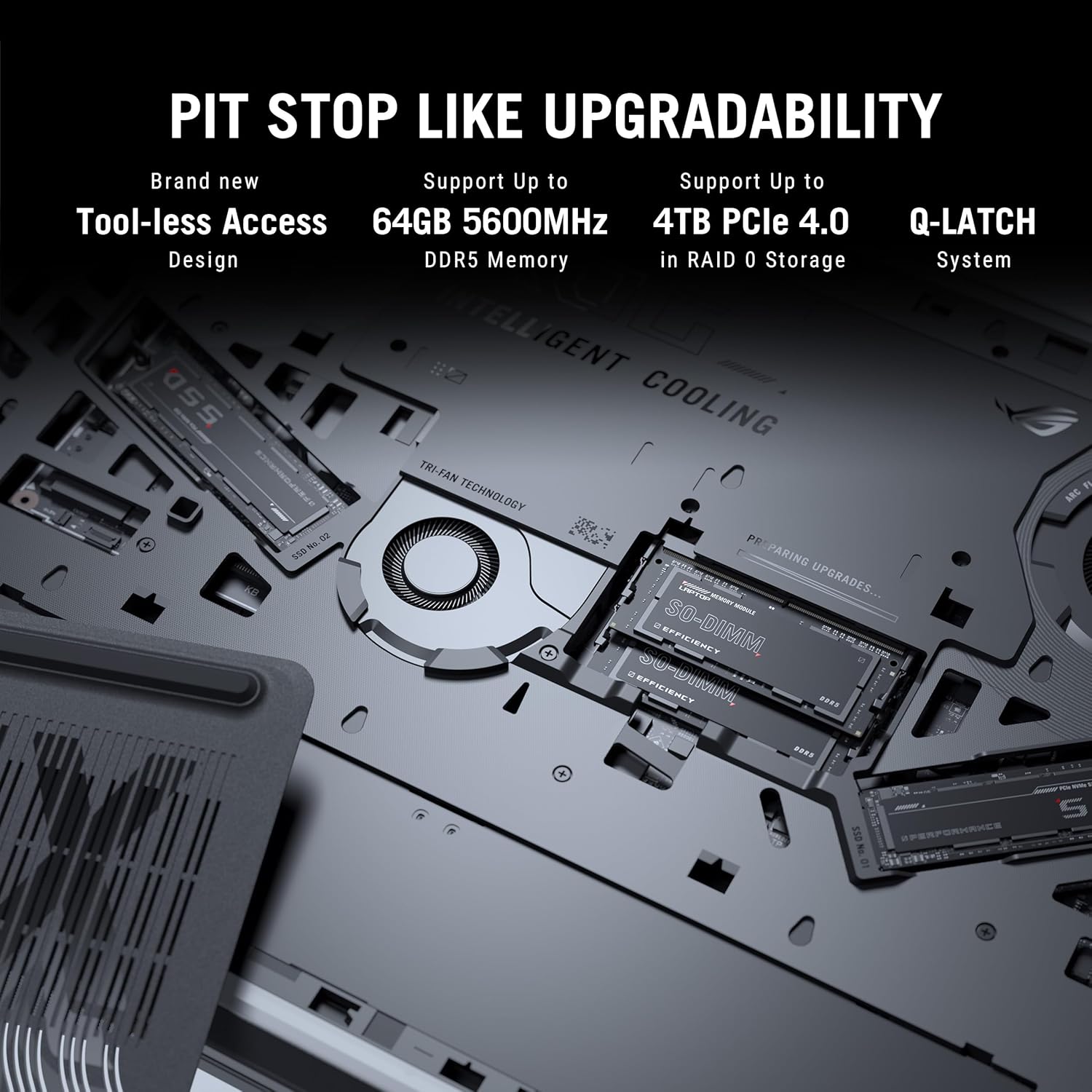
Figure 3.7: Internal components for upgradability.
4. Configuración
4.1 Encendido inicial
- Conecte la electricidad: Plug the power adaptor into the laptop's power port and then into a wall outlet. Ensure the power indicator light illuminates.
- Pantalla abierta: Abra con cuidado la pantalla del portátil hasta que esté cómodo. viewángulo de ing.
- Encendido: Presione el botón de encendido, normalmente ubicado en la parte superior derecha del teclado.
- Configuración inicial: Siga las instrucciones en pantalla para completar la configuración de Windows 11 Home, incluida la selección de idioma, la conexión de red y la creación de la cuenta de usuario.
4.2 Conexión de periféricos
Connect external devices such as a mouse, keyboard, external display, or storage devices to the available USB, HDMI, or Thunderbolt ports as needed.
5. Instrucciones de funcionamiento
5.1 Gestión de energía
- Modo de sueño: Cierre la tapa o presione brevemente el botón de encendido para ingresar al modo de suspensión.
- Cerrar: Haga clic en el botón Inicio y luego en Energía > Apagar.
- Reanudar: Haga clic en el botón Inicio y luego en Energía > Reiniciar.
5.2 Funciones del teclado
Utilice las teclas de función (F1-F12) en combinación con las Fn key for quick access to system controls such as volume, brightness, and wireless settings. The dedicated gaming hotkeys provide quick access to performance modes and other ROG-specific features.
5.3 Configuración de pantalla
Adjust display settings through Windows Settings or the NVIDIA Control Panel for optimal gaming and visual experience. You can configure refresh rate, resolution, and color profiles.
6. Mantenimiento
6.1 Limpieza
- Pantalla: Utilice un paño suave y sin pelusa ligeramenteampLimpiar con agua o un limpiador de pantallas. Evitar productos químicos agresivos.
- Teclado y chasis: Utilice un cepillo suave o aire comprimido para eliminar el polvo. Limpie las superficies con un paño ligeramente húmedo.amp paño.
- rejillas de ventilación: Regularly clean the cooling vents with compressed air to prevent dust buildup and maintain airflow.
6.2 Cuidado de la batería
- Evite descargar completamente la batería con frecuencia.
- Guarde la computadora portátil en un lugar fresco y seco si no la utiliza durante períodos prolongados.
- For optimal battery longevity, consider using battery health management features available in ASUS software.
6.3 Actualizaciones de software
Regularly update your operating system, drivers (especially graphics drivers), and ASUS utilities to ensure optimal performance, security, and compatibility.
7. Solución de problemas
Esta sección aborda problemas comunes que podrías encontrar. Para problemas más complejos, consulta el soporte técnico de ASUS. websitio o póngase en contacto con el servicio de atención al cliente.
7.1 Problemas de energía
- La computadora portátil no enciende: Ensure the power adaptor is securely connected to both the laptop and a working power outlet. Check if the power adaptor's LED is lit. Try a different outlet.
- La batería no se carga: Verify the power adaptor connection. Check for any physical damage to the adaptor or charging port.
7.2 Problemas de visualización
- No hay visualización en la pantalla: Connect an external monitor to check if the issue is with the laptop's internal display. Ensure the display cable (if external) is properly connected. Try pressing Fn + F8 (or the corresponding display toggle key) to switch display output.
- Pantalla parpadeante o distorsionada: Actualice los controladores de gráficos. Compruebe las conexiones del cable de pantalla si usa un monitor externo.
7.3 Problemas de rendimiento
- Rendimiento lento: Close unnecessary applications. Check for background processes consuming high CPU/RAM. Ensure adequate ventilation and clean cooling vents. Update drivers.
- Calentamiento excesivo: Ensure the laptop is on a hard, flat surface to allow proper airflow. Clean the cooling vents. Consider using a laptop cooling pad.
8. Especificaciones
Detailed technical specifications for the ASUS ROG Strix SCAR 16 G635LX-RW158WS.
| Característica | Especificación |
|---|---|
| Marca | Asus |
| Nombre del modelo | ROG Strix SCAR 16 |
| Número de modelo | G635LX-RW158WS |
| Procesador | Intel Core Ultra 9 275HX (2.7 GHz, up to 5.4 GHz, 24 cores, 24 Threads) |
| Gráficos | NVIDIA GeForce RTX 5090 Laptop GPU, 24GB GDDR7 RAM |
| Mostrar | 16-inch, 2.5K (2560 x 1600) WQXGA, 16:10, 240Hz, 1200nits, ROG Nebula HDR |
| Memoria | 32GB DDR5 RAM (Max 64GB) |
| Almacenamiento | 2TB PCIe 4.0 NVMe M.2 Performance SSD |
| Sistema operativo | Inicio de Windows 11 |
| Teclado | Backlit Chiclet Keyboard Per-Key RGB, Copilot key |
| Webleva | Cámara infrarroja FHD 1080P para Windows Hello |
| Conectividad inalámbrica | Wi-Fi 7 (802.11.be), Bluetooth |
| Puertos | Thunderbolt 5 (USB Type-C), HDMI 2.1, USB 3.2 Gen2 Type-A, 2.5G Ethernet, Audio Jack |
| Batería | 90 vatios hora de iones de litio |
| Dimensiones (largo x ancho x grosor) | 35.4L x 26.8W x 2.3Centímetros |
| Peso del artículo | 2.8 kilogramos |
9. Garantía y soporte
9.1 Información de garantía
This genuine ASUS laptop comes with a 1-year Global Warranty and Onsite Domestic Warranty from ASUS, covering manufacturing defects. Physical damage is not covered. To activate your warranty, please register on the ASUS brand websitio.
9.2 Atención al cliente
For product-related queries or immediate assistance, you can contact ASUS customer support:
- Número gratuito: 18002090365 (Monday - Saturday, 09:00 AM - 06:00 PM)
- Correo electrónico: rc_india@asus.com
- Soporte en línea: Visita el soporte oficial de ASUS website for service centers and further assistance: www.asus.com/in/support

Figure 9.1: ASUS 4A Guarantee and support contact details.
10. Notas importantes
No había vídeos oficiales del producto disponibles en los datos proporcionados para incorporar en este manual.


