
Introducción
This manual provides detailed instructions for the installation, operation, and maintenance of your JOYING Single Din Touchscreen Car Stereo, model JY-UTS08N8-R. Please read this manual thoroughly before using the product to ensure proper functionality and to prevent damage.

Figure 1: JOYING Single Din Touchscreen Car Stereo (JY-UTS08N8-R)
Configuración
1. Desembalaje y verificación de componentes
Carefully unpack the unit and verify that all components are present. The package should include:
- 10.1" radio unit
- Single Din Cage
- Manga de montaje
- Paréntesis izquierdo y derecho
- Recorte de plástico
- Extraction Keys
- Manual de instalación
- Antena WiFi (x1)
- Antena GPS (x1)
- Antena 4G (x2)
- Micrófono externo (x1)
- Cables USB (x2)
- Cable de realidad aumentada (x1)
- Cable plano de pantalla (x1)
- Cable ISO (x1)
- Manual de usuario (este documento)

Figura 2: Componentes incluidos
2. Instalación Física
Installation may require an installation frame kit, special ISO harness, amplifier adapter, or CANbus decoder depending on your vehicle's specific requirements. Refer to the included Manual de instalación for detailed steps. The unit features an upgraded installation structure allowing adjustment of left and right bracket positions for optimal fit in various car center consoles.

Figure 3: Installation Structure Adjustment
3. Cableado y conexiones
Connect the provided cables to the corresponding ports on the rear of the head unit and to your vehicle's wiring harness. Ensure all connections are secure. The unit features various input/output ports including USB, HDMI, Optical, Coaxial, and RCA for audio and video.
- Cable ISO: Connects to the vehicle's main power and speaker harness.
- Antena GPS: Connect for satellite navigation functionality.
- Antena WiFi: Connect for stable wireless internet access.
- Antenas 4G: Connect for mobile data access via SIM card.
- Micrófono externo: Conéctese para mejorar la calidad de las llamadas y los comandos de voz.
- Cables USB: For connecting external devices or media.
- Salida HDMI: For connecting external displays (e.g., headrest monitors).
- Salida digital de fibra óptica y coaxial: For direct connection to external amplifiers with digital inputs for enhanced sound quality.

Figure 4: Rear Port Layout
4. 4G Module Setup
Insert a compatible SIM card into the designated slot for internet access. The unit supports FDD-LTE: B2/B4/B5/B7/B12/B13/B14/B17/B25/B26/B38/B66/B71 and TDD-LTE: B41. Note that the 4G module is for internet access only and does not support phone calls or SMS directly from the unit.
Instrucciones de funcionamiento
1. Initial Boot and Fast Boot
The first boot-up may take approximately 30-40 seconds. Subsequent power-ons will utilize the fast boot feature, allowing the unit to start and enter the user interface within 2 seconds after the car key is turned.
2. Navegación (GPS)
The unit includes precise GPS engines and an antenna for accurate positioning and real-time navigation. You can download offline maps for use in areas without internet connectivity. Mobile phone map data can also be synchronized to the head unit via Apple CarPlay or Android Auto.
3. Apple CarPlay y Android Auto
Connect your mobile phone via USB cable or Bluetooth to access Apple CarPlay or Android Auto. This allows you to use phone applications for navigation, make calls, and stream music directly on the car stereo's display.

Figura 5: Interfaz de Apple CarPlay y Android Auto
4. Multitarea en pantalla dividida
La unidad admite la función de pantalla dividida, lo que le permite ejecutar dos aplicaciones simultáneamente. Por ejemplo,ample, tu puedes view navigation on one side and media playback on the other. To activate, tap the recent apps icon, find the app you want to split, click its icon, and select the split-screen option. Then choose a second app from recent apps.

Figura 6: Multitarea en pantalla dividida
5. Funciones de audio
The unit features a TDA7851 DSP chip and a 48-band graphic equalizer for high-quality sound. It provides 4 audio outputs and 1 subwoofer output. Support for aftermarket amplifiers is available via Fiber Optical or SPDIF Coaxial outputs.

Figura 7: Características de sonido de alta calidad
6. Salida HDMI
The HDMI output allows for a full digital image and sound signal to external displays. This supports projection screen displays for passengers or on-screen displays with 1080P clarity without stuttering. Note that the HDMI cable is not included.

Figura 8: Funcionalidad de salida HDMI
7. Control del volante (SWC)
The unit supports steering wheel controls for easy switching of songs, radio channels, and volume adjustment. If your car has a CAN system, an extra CANbus cable may be required to retain this feature.

Figura 9: Control del volante
8. Otras características
The unit includes AM/FM radio, hands-free calling, Picture-in-Picture (PiP) mode, 3 USB ports, a Micro SD card slot, and a 4G SIM card slot.

Figure 10: Additional Features Overview
9. Configuraciones personalizadas
Customize your user experience with options for changing the car boot logo, setting custom wallpapers, adjusting button light colors, and controlling screen brightness.
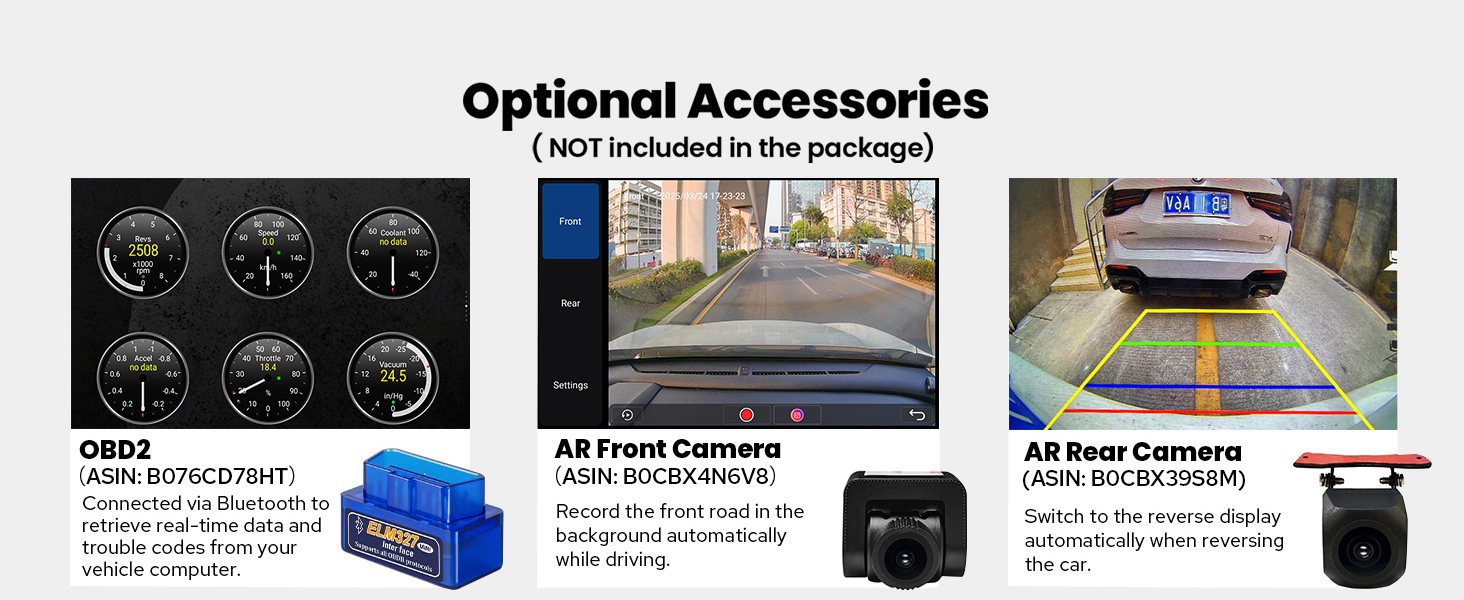
Figura 11: Configuraciones personalizadas
Mantenimiento
Para garantizar la longevidad y el rendimiento óptimo de su estéreo para automóvil JOYING, siga estas pautas de mantenimiento:
- Limpieza de la pantalla: Utilice un paño suave y sin pelusa ligeramente seco.ampLimpie con agua o un limpiador de pantallas específico para dispositivos electrónicos. Evite productos químicos agresivos o materiales abrasivos.
- Limpieza de la unidad: Wipe the exterior of the unit with a dry, soft cloth. Ensure no liquids enter the unit.
- Actualizaciones de software: Revise periódicamente las instrucciones del fabricante. website for available software updates to improve performance and add new features. Follow the provided instructions carefully when performing updates.
- Control de temperatura: The unit features a dual heat sink design and a cooling fan. Ensure proper ventilation around the unit to prevent overheating. The system can be configured to automatically activate the fan if the CPU temperature or radio volume exceeds a set warning value.

Figura 12: Sistema de enfriamiento mejorado

Figure 13: Independent WiFi Antenna
Solución de problemas
If you encounter issues with your JOYING car stereo, refer to the following common problems and solutions:
- Sin energía: Ensure all power cables are correctly connected and the vehicle's fuse is intact.
- Sin sonido: Compruebe las conexiones de los altavoces, amplifier connections (if applicable), and volume settings. Verify that the audio output mode is correctly configured.
- Pérdida de señal GPS: Asegúrese de que la antena GPS esté correctamente instalada y tenga una vista clara. view del cielo. Evite colocarlo debajo de objetos metálicos.
- Problemas de conectividad Bluetooth/Wi-Fi: Ensure Bluetooth/Wi-Fi is enabled on both the head unit and the connected device. Try restarting both devices.
- La pantalla táctil no responde: Perform a soft reset of the unit (refer to the Installation Manual for specific instructions). If the issue persists, contact support.
- CarPlay/Android Auto no se conecta: Ensure your phone's operating system is up to date and try a different USB cable. Verify that the feature is enabled on the head unit.
For persistent issues, consult the detailed troubleshooting section in the Installation Manual or contact JOYING customer support.
Presupuesto
| Característica | Especificación |
|---|---|
| Marca | ALEGRIA |
| Nombre del modelo | UTS08N8 |
| Número de modelo | JY-UTS08N8-R |
| Tamaño de pantalla | 10.1 pulgadas |
| Sistema operativo | Androide |
| Capacidad de almacenamiento de memoria | 128 GB |
| Tipo de pantalla táctil | Capacitivo |
| Tipo de pantalla | CONDUJO |
| Tecnología de conectividad | Bluetooth, Ethernet, HDMI, USB, Wi-Fi |
| Protocolo de conectividad | Bluetooth, wifi |
| Características especiales | Android Auto, Apple CarPlay, DSP, RCA, RDS |
| Modo de salida de audio | Estéreo |
| Sistema de navegación por satélite compatible | BeiDou, GLONASS, GPS |
| Tipo de mapa | América del norte |
| Dispositivos compatibles | Amplifier, Camera, Speaker |
| Método de control | Aplicación, tacto, voz |
| Peso del artículo | 1200 gramos |
Accesorios opcionales
The following accessories are not included in the standard package but can be ordered separately to enhance your car stereo experience:
- Escáner OBD2: Se conecta a través de Bluetooth para recuperar datos en tiempo real y códigos de problemas de la computadora de su vehículo.
- Cámara frontal AR: Records the front road automatically while driving.
- Cámara trasera AR: Switches to reverse display automatically when reversing the car.
- DAB+ Digital Radio Adapter
- DVR (Grabador de video digital)
- TPMS (Sistema de control de presión de neumáticos)
Figura 14: Accesorios opcionales
Garantía y soporte
Your JOYING Single Din Touchscreen Radio (JY-UTS08N8-R) comes with a 2 año de garantía Desde la fecha de compra. Esta garantía cubre defectos de fabricación y mal funcionamiento en condiciones normales de uso.
For warranty claims, technical assistance, or any questions regarding your product, please contact JOYING customer support through the retailer where the product was purchased or visit the official JOYING websitio para obtener información de contacto de soporte.
Conserve su comprobante de compra para validar la garantía.