
SVITOO SVITOO Tab 10 GMS Certified 1027C
SVITOO Kids Tablet 10 Inch User Manual
Model: SVITOO Tab 10 GMS Certified 1027C
Introducción
This manual provides essential instructions for setting up, operating, and maintaining your SVITOO Kids Tablet 10 Inch. Designed for young users, this Android 15 tablet features parental controls, a durable shockproof case, and a vibrant 10-inch HD IPS display. Please read this guide thoroughly to ensure proper use and to maximize your tablet's functionality.
¿Qué hay en la caja?
- SVITOO Kids Tablet 10 Inch
- Protective Cover (Pre-installed)
- Cable de carga USB-C
- Manual de usuario
- Caja de regalo
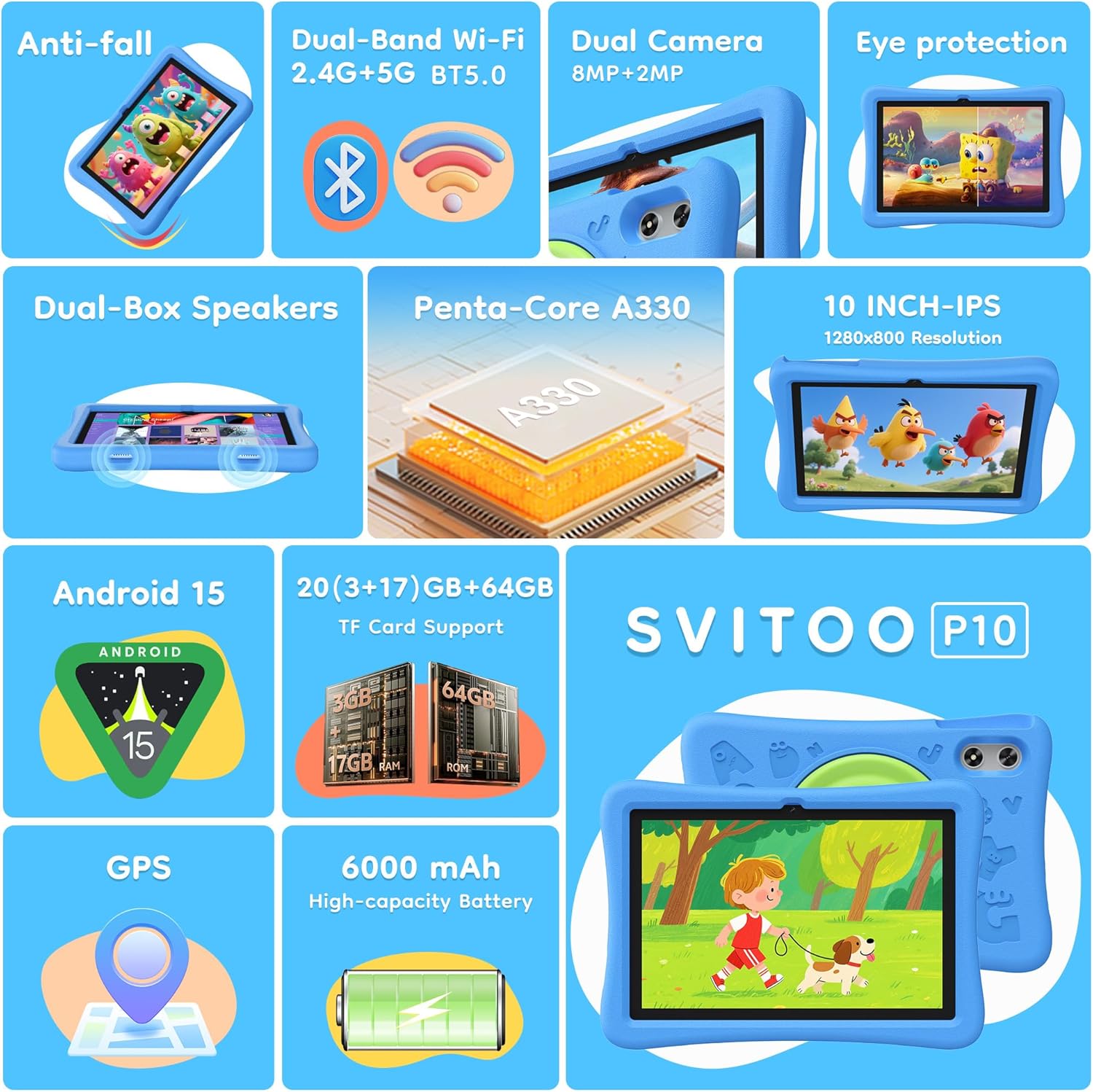
Image: The SVITOO Kids Tablet 10 Inch, shown in its blue protective case, highlighting its robust design suitable for children.
Producto terminadoview
Características principales
- Sistema operativo: Android 15 with GMS Certification for full Google Play access.
- Mostrar: 10-inch HD IPS (1280 x 800 pixels) touchscreen with eye protection mode.
- Procesador: Unisoc T7200 8-core CPU for smooth performance.
- Almacenamiento de memoria: 20GB RAM (3GB physical + 17GB virtual) and 64GB internal storage, expandable up to 1TB via microSD card (sold separately).
- Cámaras: Cámara trasera de 8 MP y cámara frontal de 2 MP.
- Conectividad: Dual-Band Wi-Fi (2.4/5 GHz) and Bluetooth 5.0.
- Batería: Batería de alta capacidad de 6000 mAh para uso prolongado.
- Audio: Dual-box speakers and a 3.5mm headphone jack.
- Durabilidad: Kid-friendly EVA shockproof case with a 360° rotating handle and 180° rotating stand.
- Controles parentales: Advanced settings for screen time limits, content filtering, and app management.
Componentes de la tableta
Familiarícese con los componentes físicos de su tableta:

Imagen: Un detalle view of the tablet's side and rear, indicating the USB Type-C port, headphone jack, power ON/OFF button, volume controls, speakers, rear camera, and front camera.
- Puerto USB tipo C: Para carga y transferencia de datos.
- Toma de auriculares (3.5 mm): Para conectar auriculares con cable.
- Botón de encendido / apagado: Para encender/apagar la tableta o ponerla en reposo.
- Botones de volumen: Para ajustar el volumen del audio.
- Oradores: Dual-box speakers for audio output.
- Cámara frontal: Para videollamadas y selfies.
- Cámara trasera: Para tomar fotografías y vídeos.
- Ranura para tarjeta microSD: Located under a protective flap, for storage expansion.

Image: The tablet's protective case featuring a versatile 360-degree rotating handle that also functions as a 180-degree rotating stand, allowing for various viewángulos de ing.
Guía de configuración
- Cargue la tableta: Antes del primer uso, cargue completamente la tableta utilizando el cable USB-C provisto y un adaptador de corriente compatible.
- Encendido: Mantenga presionado el botón de encendido/apagado hasta que la pantalla se ilumine.
- Configuración inicial: Siga las instrucciones en pantalla para seleccionar su idioma, conectarse a una red Wi-Fi y configurar su cuenta de Google.
- Google Kids Space / Parental Controls: During setup, you will have the option to configure Google Kids Space or other parental control settings. It is highly recommended to set these up immediately to ensure a safe environment for your child.
- Instalar aplicaciones: Once setup is complete, you can download age-appropriate apps and games from the Google Play Store.
Instrucciones de funcionamiento
Navegación básica
- Pantalla de inicio: Swipe left or right to access different app pages.
- Cajón de aplicaciones: Desliza el dedo hacia arriba desde la parte inferior de la pantalla para view todas las aplicaciones instaladas.
- Notificaciones y configuraciones rápidas: Swipe down from the top of the screen to access notifications and quick settings like Wi-Fi, Bluetooth, and screen brightness.
- Atrás, Inicio, Aplicaciones recientes: Use the navigation buttons at the bottom of the screen to go back, return to the home screen, or view aplicaciones abiertas recientemente.
Cargar la tableta
Connect the USB-C charging cable to the tablet's USB-C port and the other end to a power adapter. The battery icon on the screen will indicate charging status. A full charge provides approximately 12 hours of mixed use.

Image: The tablet connected to a charger, displaying a battery icon with 99% charge, illustrating the charging process and battery life features like Night Mode and Energy Saving.
Modo de protección ocular
To reduce eye strain, especially during prolonged use, activate the Eye Protection Mode (often called Night Mode or Reading Mode) from the quick settings panel or display settings. This mode adjusts screen colors to warmer tones.
Controles parentales
The SVITOO Kids Tablet features robust parental controls to help manage your child's digital experience. These controls are integrated with Android 15 and Google Family Link.

Image: A family using the tablet, with an overlay showing various parental control options such as setting screen time limits, blocking harmful apps/websites, approving app downloads, and tracking child's location.
Configuring Parental Controls:
- Configuración de acceso: Ir a Ajustes > Bienestar digital y controles parentales or search for "Family Link" in your app drawer.
- Establecer límites de tiempo frente a la pantalla: Define daily limits for tablet usage to encourage balanced screen time.
- Filtrado de contenido: Bloquear el acceso a contenido inapropiado websitios y aplicaciones.
- App Approvals: Require parental approval for new app downloads or in-app purchases.
- Seguimiento de ubicación: Monitor your child's device location (if enabled and configured).
For detailed instructions on Google Family Link, please refer to Google's official support documentation.
Mantenimiento
- Limpieza: Utilice un paño suave y sin pelusa para limpiar la pantalla y el cuerpo de la tableta. Evite limpiadores abrasivos o disolventes.
- Cuidado de la batería: To prolong battery life, avoid fully discharging the tablet frequently. Charge it regularly and avoid exposing it to extreme temperatures.
- Actualizaciones de software: Keep the tablet's operating system and apps updated to ensure optimal performance and security.
- Almacenamiento: Store the tablet in a cool, dry place away from direct sunlight when not in use.
- Estuche protector: The included EVA shockproof case provides protection against drops and bumps. Ensure it is properly fitted at all times.
Solución de problemas
| Problema | Solución |
|---|---|
| La tableta no enciende. | Ensure the tablet is fully charged. Connect it to a charger for at least 30 minutes, then try powering it on again. |
| La pantalla no responde. | Perform a force restart by holding the Power ON/OFF button for 10-15 seconds. If the issue persists, contact support. |
| Problemas de conexión Wi-Fi. | Check if other devices can connect to the Wi-Fi network. Restart your router and the tablet. Forget the network and reconnect. |
| Las aplicaciones fallan o son lentas. | Close background apps. Clear app cache (Settings > Apps > [App Name] > Storage > Clear Cache). Ensure sufficient storage space is available. Restart the tablet. |
| La batería se agota rápidamente. | Reduce el brillo de la pantalla. Cierra las aplicaciones que no uses. Desactiva el Wi-Fi/Bluetooth cuando no las uses. Comprueba el uso de la batería en la configuración para identificar las aplicaciones que consumen mucha energía. |
Presupuesto
| Característica | Detalle |
|---|---|
| Nombre del modelo | SVITOO Tab 10 GMS Certified 1027C |
| Sistema operativo | Androide 15 |
| Tamaño de pantalla | 10 pulgadas |
| Resolución de pantalla | 1280 x 800 píxeles (HD IPS) |
| Procesador | 1.8 GHz (Unisoc T7200 8-core CPU) |
| RAM | 20 GB (3 GB físicos + 17 GB virtuales) |
| Almacenamiento interno | 64 GB |
| Almacenamiento expandible | Up to 1TB via MicroSD (sold separately) |
| Coprocesador gráfico | Mali-G57 processor Imagination Tech |
| Tipo inalámbrico | 802.11a/b/g/n/ac (Dual-Band 2.4/5 GHz) |
| Bluetooth | Bluetooth 5.0 |
| Capacidad de la batería | 6000 mAh |
| Duración media de la batería | 12 horas |
| Cámara frontal | 2 megapíxeles |
| Cámara trasera | 8 megapíxeles |
| Peso del artículo | 2.44 libras |
| Dimensiones del producto | 9.7 x 6.4 x 0.4 pulgadas |
Garantía y soporte
Your SVITOO Kids Tablet comes with a Protección del fabricante por 1 años. This warranty covers manufacturing defects under normal use. It does not cover damage caused by misuse, accidents, natural disasters, or unauthorized modifications.
For technical support, warranty claims, or any questions regarding your product, please contact SVITOO customer service through your Amazon order page. Look for the "Contact Us" option next to your order details.
Conserve su comprobante de compra para fines de garantía.