
1. Introducción
Thank you for choosing the GOBOULT Astra Neo Bluetooth In-Ear Earbuds. This manual provides essential information for setting up, operating, and maintaining your earbuds to ensure optimal performance and longevity. Please read this manual thoroughly before use.
2. Información de seguridad
- No exponga los auriculares ni el estuche de carga a temperaturas extremas, humedad o líquidos.
- Evite dejar caer, golpear o desmontar el dispositivo.
- Utilice únicamente el cable de carga proporcionado o un cable tipo C certificado para cargar.
- Escuche a niveles de volumen moderados para evitar daños auditivos.
- Mantener fuera del alcance de los niños y las mascotas.
3. Contenido del paquete
Verifique que todos los artículos estén presentes en su paquete:
- GOBOULT Astra Neo Earbuds (Left and Right)
- Estuche de carga
- Cable de carga tipo C
- Almohadillas para los oídos (varios tamaños)
- Manual de usuario
- Tarjeta de garantía
4. Producto terminadoview
The GOBOULT Astra Neo earbuds feature a sleek design with touch controls and a compact charging case. The case includes breathing LED lights for status indication.

Image: GOBOULT Astra Neo Earbuds and Charging Case. The image displays the black earbuds removed from their charging case, which features a glowing blue LED strip.

Image: GOBOULT Astra Neo Comfort Grip Case and Earbuds. This image highlights the textured surface of the charging case and earbuds, along with the breathing case lights.
5. Configuración
5.1 Carga de los auriculares y el estuche
Antes del primer uso, cargue completamente los auriculares y el estuche de carga.
- Coloque los auriculares en el estuche de carga. Asegúrese de que estén correctamente colocados.
- Conecte el cable de carga tipo C al puerto de carga del estuche y a una fuente de alimentación.
- The LED indicator on the case will illuminate during charging and turn off or change color when fully charged.
A 10-minute charge provides approximately 100 minutes of playtime.

Image: GOBOULT Astra Neo Fast Charging Feature. This image illustrates the 70-hour playtime and the fast charging capability: 10 minutes of charge equals 100 minutes of playtime.
5.2 Pairing with a Device (Bluetooth 5.4)
The Astra Neo uses Bluetooth 5.4 with Blink & Pair technology for quick and stable connections.
- Abre el estuche de carga. Los auriculares entrarán automáticamente en modo de emparejamiento.
- En su dispositivo (teléfono inteligente, tableta, computadora portátil), habilite Bluetooth.
- Buscar available Bluetooth devices and select "GOBOULT Astra Neo" from the list.
- Una vez conectado, un mensaje de voz confirmará que el emparejamiento se realizó correctamente.

Image: GOBOULT Astra Neo Bluetooth 5.4 Pairing. This image shows a smartphone screen displaying a successful Bluetooth 5.4 connection to 'Astra Neo', emphasizing power efficiency and stable connection.
6. Instrucciones de funcionamiento
6.1 Controles táctiles
The Astra Neo earbuds feature intuitive touch controls on each earbud:
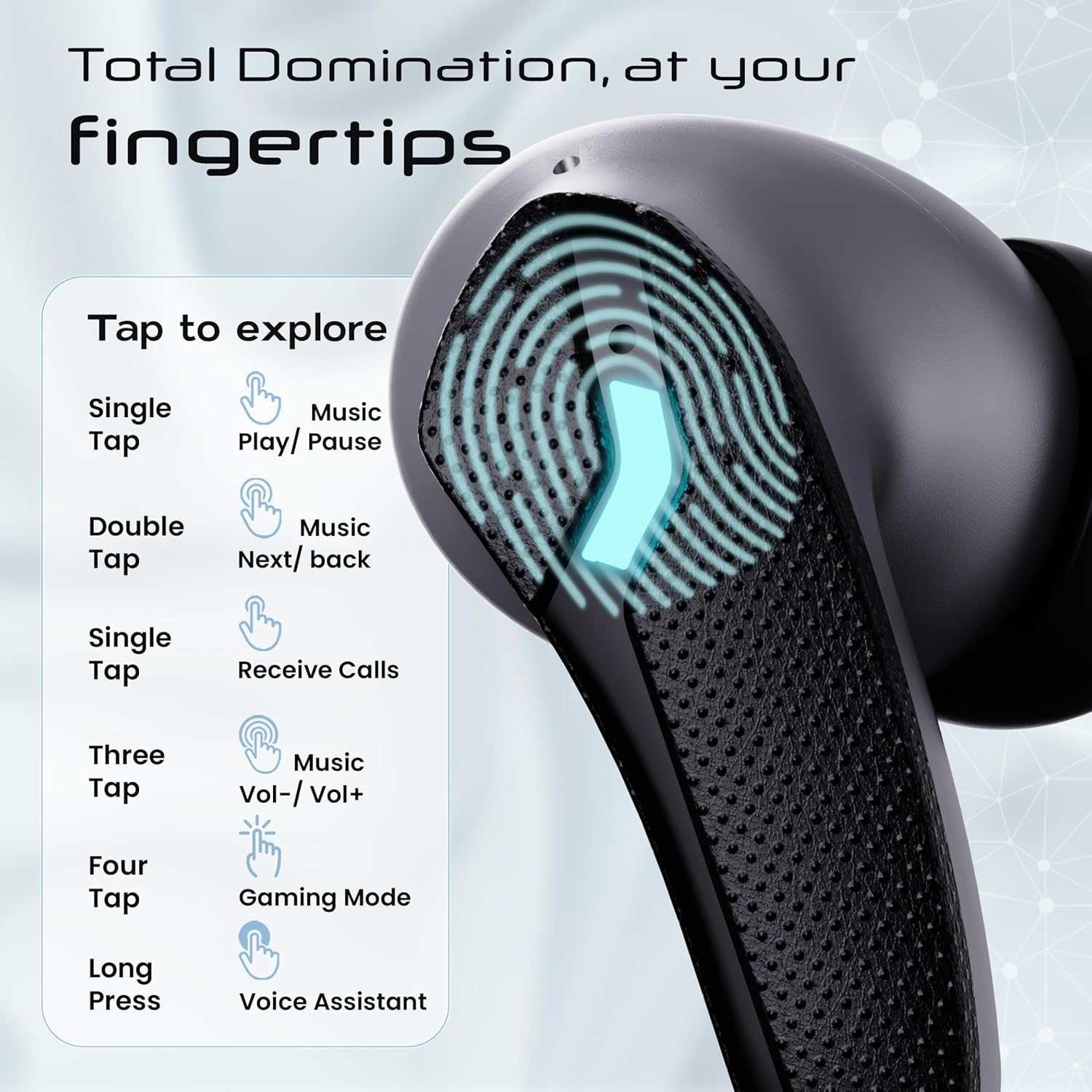
Image: GOBOULT Astra Neo Touch Controls Guide. This graphic details the various touch gestures for controlling music, calls, gaming mode, and voice assistant.
- Solo toque: Play/Pause music, Receive Calls.
- Doble toque: Music Next/Back (specific earbud for each function).
- Three Tap: Music Volume Up/Down (specific earbud for each function).
- Four Tap: Activar el modo de juego.
- Pulsación larga: Activate Voice Assistant (Google Assistant/Siri).
6.2 Modo de juego (40 ms de baja latencia)
Activate Gaming Mode for a synchronized audio experience during gameplay, reducing audio delay to 40ms.
- To activate: Four tap on either earbud.
- To deactivate: Four tap again on either earbud.

Image: GOBOULT Astra Neo Gaming Mode with 40ms Low Latency. This image depicts a user playing a mobile game with the earbuds, highlighting the ultra-low latency feature for an immersive gaming experience.
6.3 ZEN Quad Mic ENC for Calls
The ZEN Quad Mic Environmental Noise Cancellation (ENC) system ensures clear voice calls by filtering out background noise.

Image: GOBOULT Astra Neo ZEN Quad Mic ENC Technology. This image illustrates the internal components and the function of the 4 microphones for clear in-game communication and crystal-clear calling with Acoustic Echo Cancellation (AEC).
6.4 modos de ecualización
The Astra Neo earbuds support 4 EQ modes for customized audio experiences. Refer to the product packaging or official GOBOULT website for specific instructions on how to switch between these modes, as this functionality is typically managed via a companion app or specific touch gestures not detailed here.
7. Mantenimiento
7.1 Limpieza
- Limpie suavemente los auriculares y el estuche de carga con un paño suave, seco y sin pelusa.
- No utilice productos químicos agresivos, disolventes de limpieza ni detergentes fuertes.
- Limpie periódicamente los contactos de carga de los auriculares y del estuche para garantizar una carga adecuada.
7.2 Resistencia al agua (IPX5)
The Astra Neo earbuds are IPX5 water-resistant, meaning they are protected against sweat, rain, and splashes. They are not designed for submersion in water.
- No sumerja intencionalmente los auriculares en agua.
- If exposed to sweat or rain, wipe them dry before placing them back in the charging case.

Image: GOBOULT Astra Neo IPX5 Water Resistance and Voice Assistant. This image highlights the earbuds' sweatproof, rainproof, and splashproof capabilities, along with compatibility with Google Assistant and Hey Siri.
7.3 Almacenamiento
Cuando no los utilice, guarde los auriculares en su estuche de carga para protegerlos y mantenerlos cargados.
8. Solución de problemas
- Los auriculares no se emparejan: Asegúrate de que ambos auriculares estén en el estuche de carga y abre la tapa para volver a conectarlos. Revisa la configuración de Bluetooth de tu dispositivo e intenta conectarlos de nuevo.
- Solo funciona un auricular: Vuelve a colocar ambos auriculares en el estuche, cierra la tapa, espera unos segundos y vuelve a abrirla. Esto suele resincronizarlos.
- Sin sonido: Comprueba el volumen tanto en tu dispositivo como en los auriculares. Asegúrate de que los auriculares estén bien conectados al dispositivo.
- Problemas de carga: Clean the charging contacts on the earbuds and inside the case. Ensure the charging cable is securely connected and the power source is active.
- Mala calidad de llamada: Asegúrese de que los micrófonos no estén obstruidos. Intente trasladarse a un entorno más tranquilo.
9. Especificaciones
Key technical specifications for the GOBOULT Astra Neo Earbuds:
| Característica | Especificación |
|---|---|
| Nombre del modelo | Astra Neo |
| Versión de Bluetooth | 5.4 |
| Recreo | Hasta 70 horas (con estuche de carga) |
| Carga rápida | 10 minutos de carga = 100 minutos de tiempo de reproducción |
| Baja latencia | 40 ms (modo de juego) |
| Tamaño del controlador | 13mm BoomX Drivers |
| Micrófono | ZEN Quad Mic ENC |
| Resistencia al agua | IPX5 |
| Método de control | Tocar |
| Tecnología de conectividad | Bluetooth, inalámbrico |
| Toma de auriculares | Conector de carga rápida tipo C |
| Peso del artículo | 47 gramos |
| Dimensiones del producto | 6.2 x 5.3 x 3.2 cm |
| Tipo de batería | Polímero de litio |
| Alcance de Bluetooth | 10 metros |
| Impedancia | 32 ohmios |

Image: GOBOULT Astra Neo 13mm BoomX Drivers. This image highlights the 13mm BoomX drivers, emphasizing crystal clear sound and support for MSBC, SBC, and AAC codecs.
10. Garantía y soporte
The GOBOULT Astra Neo Earbuds come with a Garantía del fabricante por 1 año from the date of purchase. This warranty covers manufacturing defects. For warranty claims or technical support, please refer to the contact information provided on your warranty card or visit the official GOBOULT websitio.