
1. Introducción
This manual provides detailed instructions for the installation, operation, and maintenance of your Joying 11.6 Inch Double Din Car Stereo. This advanced head unit features Android 13, Apple CarPlay, Android Auto, a powerful 8GB RAM + 128GB ROM configuration, and a range of connectivity options including Bluetooth, Wi-Fi, and 4G. Please read this manual thoroughly before using the device to ensure proper functionality and safety.
2. Producto terminadoview y componentes
The Joying 11.6 Inch Double Din Car Stereo is designed to enhance your in-car entertainment and navigation experience. It features a large IPS screen with 1920x1080 resolution, a Qualcomm Snapdragon 6125 Octa Core 2.0GHz processor, and a robust audio system.
2.1 Contenido del paquete
Al desembalar, verifique que todos los elementos enumerados a continuación estén presentes y en buenas condiciones:
- Unidad de radio de 11.6" (x1)
- Double Din Cage (x1)
- Left & Right Bracket (x1 pair)
- Reinforced Shims (x1 set)
- Plastic Trim Out (x1)
- Manual de instalación (x1)
- Antena WiFi (x1)
- Antena GPS (x1)
- Antena 4G (x2)
- Micrófono externo (x1)
- Cable USB (x2)
- Cable de realidad aumentada (x1)
- Cable plano de pantalla (x1)
- Cable ISO (x1)
- Manual de usuario (x1)
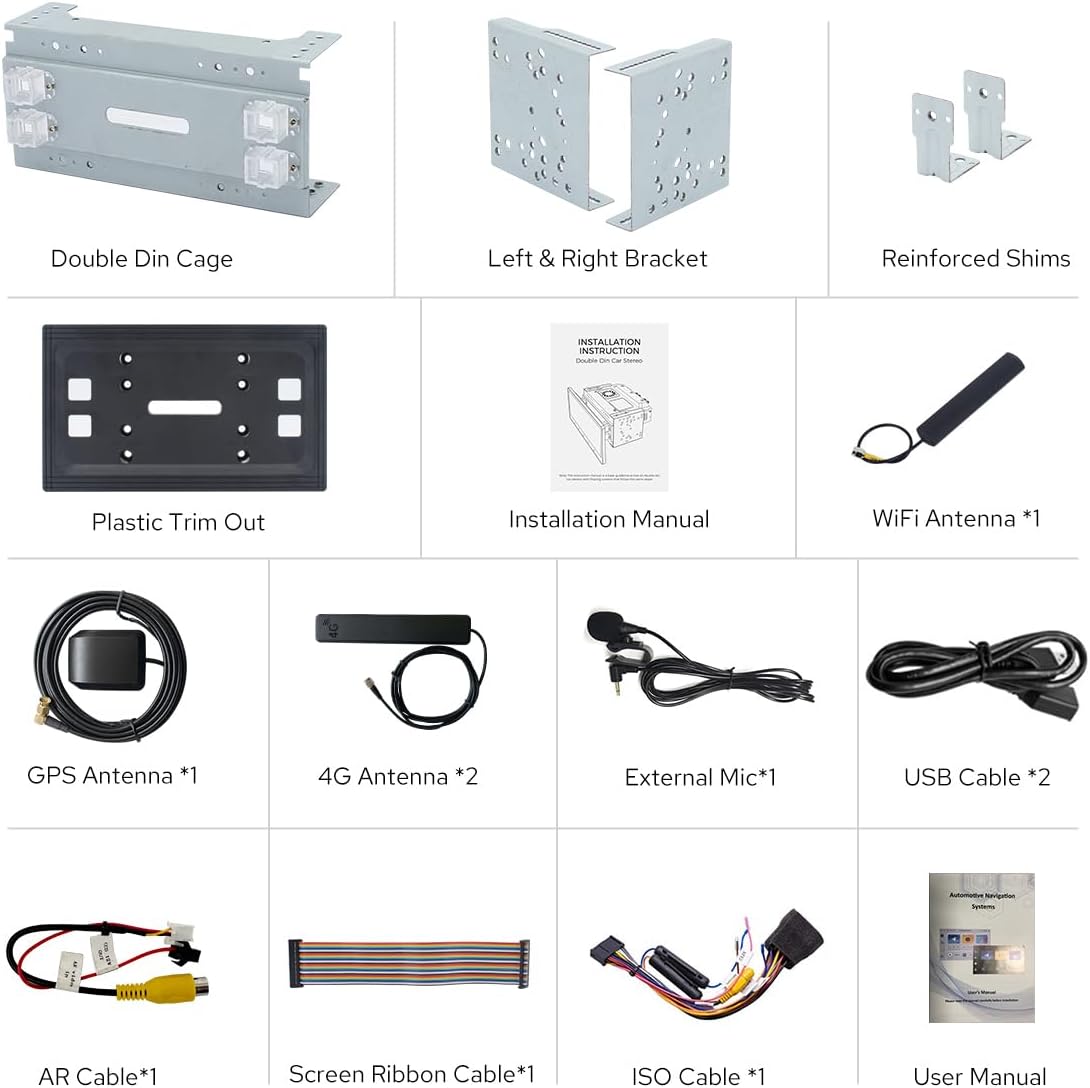
Figure 2.1: Dimensions of the head unit and a visual representation of all included package contents.
3. Configuración e instalación
Una instalación correcta es crucial para el óptimo rendimiento del estéreo de su auto. Se recomienda que la instalación la realice un profesional cualificado.
Notas de instalación generales 3.1
- For installation, you may require an installation frame kit with an inner size of 178 x 102mm, a special ISO harness, an amplifier adapter, or a CANbus decoder, depending on your vehicle's specific requirements.
- This unit does not support factory car GPS antennas, factory backup rear cameras, factory Bluetooth, factory USB ports, or factory microphones. Only JOYING accessories are supported for these functions.
- Refer to the dedicated Installation Manual included in the package for detailed wiring diagrams and step-by-step instructions.
3.2 Installation Structure and Cooling
The unit features an upgraded installation structure and cooling system for enhanced durability and performance.

Figure 3.1: The fixing position of the left and right brackets can be extended or telescoped to achieve the best fixing position according to your car's center console, adapting to a wider range of vehicles. Note: If your car is a Hyundai or Kia brand, please contact JOYING for a different bracket.

Figure 3.2: The unit features a dual heat sink design for superior heat dissipation, improved temperature control, and enhanced performance stability. You can set a warning value for volume or CPU temperature; when the CPU temperature or radio's volume rises and exceeds the warning value, the fan will be turned on automatically for cooling to avoid overheating.
3.3 Conexiones de antena
Ensure all antennas are securely connected for optimal signal reception.
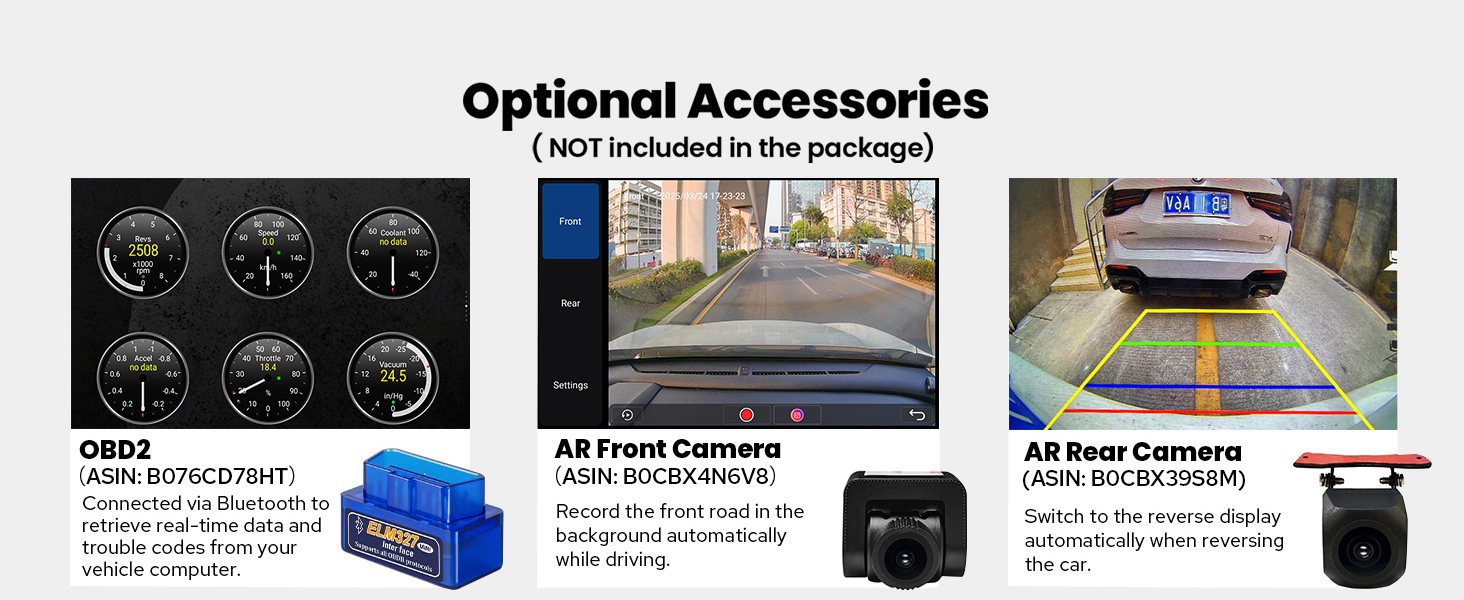
Figure 3.3: The independent WiFi antenna ensures stable signal quality and provides fast and smooth internet access. It supports 802.11a/b/g/n/AC standards with 2.4GHz/5GHz spectral bands.
4. Instrucciones de funcionamiento
This section details the various functions and features of your Joying car stereo.
4.1 Initial Startup and User Interface
The unit features a fast boot time. Once the car key is turned, it will start up and enter the user interface in approximately 2 seconds. The first boot-up may take 30-40 seconds.

Figure 4.1: The main user interface of the Joying 11.6 Inch Double Din Car Stereo, displaying navigation, media, and various application shortcuts.

Figure 4.2: The unit runs on Android 13 and offers both Left-Hand Drive (LHD) and Right-Hand Drive (RHD) user interface options for user convenience.
4.2 Funciones de audio
Experience high-quality sound with advanced audio processing capabilities.
- Salida digital de fibra óptica y coaxial: If your external amplifier has Optical Fiber or Coaxial Digital Input, this unit provides a direct digital output for ultimate sound quality.
- DSP Chip and Equalizer: Equipped with a TDA7851 DSP Chip and a 48-Band Graphic Equalizer for precise sound customization.
- Potencia máxima de salida: Delivers 4x50W maximum output power.
- Mercado de accesorios AmpSoporte de lifier: Features 4*Audio Outputs and 1*SUB Output for connecting aftermarket ampsalvavidas.

Figura 4.3: Sobreview of the audio features, highlighting the TDA7851 DSP Chip, 48-Band Graphic Equalizer, 4x50W Max Output Power, and support for aftermarket amplifiers via Fiber Optical, SPDIF Coaxial, and Center Channel Outputs.
4.3 Conectividad y navegación
Stay connected and navigate with ease using the integrated features.
- Módulo 4G incorporado: Insert a SIM card for internet access. Supported types include FDD-LTE: B2/B4/B5/B7/B12/B13/B14/B17/B25/B26/B38/B66/B71 and TDD-LTE: B41. Note: This module does not support phone calls or SMS.
- Navegacion GPS: Equipped with precise GPS engines and an included GPS antenna for accurate and real-time navigation. Supports offline maps where data can be downloaded and saved. You can also synchronize mobile phone map data via Apple CarPlay or Android Auto.
- Apple CarPlay y Android Auto: Connect your mobile phone via USB cable or Bluetooth to access phone apps on the larger screen, facilitating navigation, calls, and music playback.

Figure 4.4: The unit supports both Apple CarPlay and Android Auto, allowing seamless integration with your smartphone for navigation, communication, and entertainment.
4.4 Funciones de visualización
Utilize the advanced display capabilities for enhanced user experience.
- Multitarea en pantalla dividida: Run two applications simultaneously on the screen. Tap the recent apps icon, find the app you want to run in split-screen, click its icon to bring up the split-screen button, and tap it. The first app will display on the left side, then choose the second app from recent apps.
- Salida HDMI: A full digital image and sound-sending interface that can send uncompressed audio and video signals. Supports projection screen display for passengers in the headrest and on-screen display with 1080P clear picture and zero delays. Note: The HDMI cable is not included.

Figure 4.5: The split-screen multitasking feature allows simultaneous use of two applications, such as navigation and video playback.
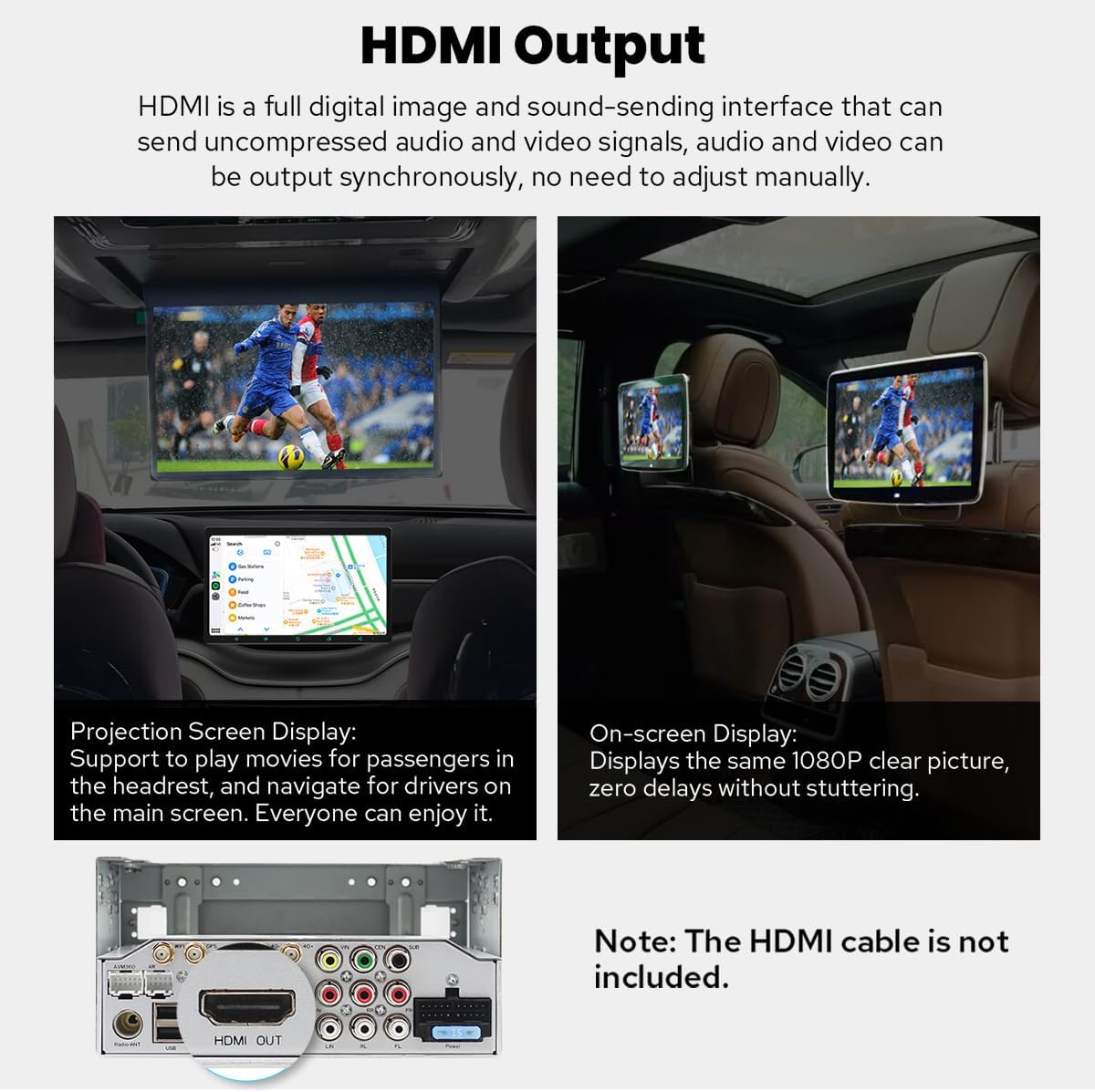
Figure 4.6: The HDMI output allows for external display connections, providing entertainment for rear passengers or mirroring the main screen.
4.5 Personalization and Other Features
Customize your stereo and utilize additional functionalities.
- Configuraciones personalizadas: Customize the car boot logo, choose from various wallpapers, change button colors, and adjust screen brightness.
- Control del volante (SWC): Supports steering wheel controls for easy song switching, radio channel changes, and volume adjustment, contributing to a safer driving experience. Note: Cars with a CAN system may require an extra CANbus cable.
- Otras características: Includes Fast Boot, GPS Navigation, AM/FM Radio, Hands-free Call, Picture-in-Picture, 3 USB Ports, Micro SD Card Slot, and 4G SIM Card Slot.

Figure 4.7: Personalization options allow users to tailor the stereo's appearance and settings to their preferences.

Figure 4.8: Steering wheel control integration provides convenient and safe operation of the stereo while driving.

Figure 4.9: A summary of additional features available on the Joying car stereo.
5. Mantenimiento
To ensure the longevity and optimal performance of your Joying car stereo, follow these general maintenance guidelines:
- Limpieza de la pantalla: Utilice un paño suave y sin pelusa para limpiar suavemente la pantalla. Para manchas difíciles, limpie ligeramenteampEnjuague el paño con agua o una solución limpiadora de pantallas. Evite productos químicos agresivos o materiales abrasivos.
- Limpieza general: Mantenga la unidad y el área circundante libres de polvo y residuos. Utilice un cepillo suave o aire comprimido para limpiar las rejillas de ventilación y los puertos.
- Control de temperatura: Avoid exposing the unit to extreme temperatures. The built-in cooling system helps manage internal temperatures, but prolonged exposure to direct sunlight or extreme cold can affect performance.
- Actualizaciones de software: Periodically check the official JOYING website or contact support for available software updates to ensure your unit has the latest features and bug fixes.
6. Solución de problemas
Esta sección aborda problemas comunes que puede encontrar y proporciona soluciones.
- Slow Initial Boot-up: The first boot-up after installation or a full power cycle may take approximately 30-40 seconds. Subsequent startups (from standby) will be much faster, typically around 2 seconds. This is normal operation.
- No GPS Signal / Poor Reception: Ensure the GPS antenna is properly installed and has a clear line of sight to the sky. Verify that the antenna cable is not damaged or kinked. Remember, the unit does not support factory car GPS antennas.
- Bluetooth/USB/Microphone Not Working: This unit does not support factory car Bluetooth, USB, or microphone systems. Ensure you are using the included external microphone and USB cables, and that they are properly connected.
- La cámara trasera no muestra: The unit does not support factory backup rear cameras. Ensure you are using a compatible aftermarket camera and that it is correctly wired to the unit's video input.
- Los controles del volante no funcionan: Verify that the SWC wires are correctly connected. If your car has a CAN system, an additional CANbus cable may be required for SWC functionality.
- Sobrecalentamiento de la unidad: The unit has a dual heat sink design and a fan. If you notice excessive heat, ensure proper ventilation around the unit. Check the fan settings in the system menu; the fan can be set to automatically turn on if CPU temperature or volume exceeds a set warning value.
7. Especificaciones
Detailed technical specifications for the Joying 11.6 Inch Double Din Car Stereo.
| Característica | Especificación |
|---|---|
| Dimensiones del producto | 5.91 x 7.99 x 4.72 pulgadas |
| Peso del artículo | 2.65 libras |
| Número de modelo | JY-UTD11N8 |
| Diagonal de pantalla visible | 12" / 30 cm |
| Tecnología de conectividad | Bluetooth, Ethernet, HDMI, USB, Wi-Fi |
| Tipo de controlador | Androide |
| Características especiales | Android Auto, Apple CarPlay, DSP, Equalizer, RDS |
| Dispositivos compatibles | Amplifier, Camera, Speaker |
| Puertos HDMI totales | 1 |
| Tipo de conector | coaxiales, ópticos |
| Modo de salida de audio | Estéreo |
| Configuración de canales de sonido envolvente | 5.1 |
| Compatibilidad con codificación de vídeo | H264/H265/MP4/AVI/MKV/FLV |
8. Accesorios opcionales
Enhance the functionality of your Joying car stereo with these optional accessories (not included in the standard package):
- OBD2 Scanner (ASIN: B076CD78HT): Se conecta a través de Bluetooth para recuperar datos en tiempo real y códigos de problemas de la computadora de su vehículo.
- AR Front Camera (ASIN: B0CBX4N6V8): Graba automáticamente la carretera principal en segundo plano mientras conduce.
- AR Rear Camera (ASIN: B0CBX39S8M): Cambia automáticamente a la pantalla inversa al dar marcha atrás con el vehículo.

Figure 8.1: Optional accessories that can be purchased separately to expand the capabilities of your car stereo.
9. Garantía y soporte
For information regarding product warranty, please refer to the warranty card included with your purchase or visit the official JOYING webSitio. Los términos y condiciones de la garantía pueden variar.
For technical support, troubleshooting assistance, or inquiries about compatible accessories, please contact JOYING customer service through their official channels. Keep your purchase receipt and product model number (JY-UTD11N8) ready when contacting support.