
Introducción
The Waveform DualMini 2x2 MIMO Window Antenna is designed to enhance 4G and 5G cellular internet performance for compatible routers and hotspots. This omnidirectional antenna offers improved data rates, lower latencies, and greater reliability by optimizing cellular signal reception. Its low-profile and lightweight design allows for flexible installation in various environments, including homes and RVs.
This manual provides essential information for the proper setup, operation, maintenance, and troubleshooting of your DualMini antenna.

Image: The Waveform DualMini antenna, a white rectangular device with two coaxial cables, shown next to its instruction manual.
Configuración e instalación
Proper installation of the DualMini antenna is crucial for optimal performance. The antenna is designed for flexibility, supporting both indoor and outdoor placements.
1. Opciones de montaje
The DualMini offers multiple mounting solutions to suit your specific needs and location where the signal is strongest.
- Window Suction Cups: For easy attachment to windows, ideal for temporary or indoor use.
- Pole Mount Adapter: Allows mounting on a pole for elevated outdoor placement.
- Soporte de escritorio: Provides a stable base for placement on flat surfaces indoors.
- Montaje directo en pared: For permanent installation on a wall.

Image: Illustration of the DualMini antenna mounted in various configurations, including on a wall, a pole, a window with suction cups, and on a desktop stand.
For best results, outdoor installation is recommended as it generally provides superior signal reception. Identify the side of your house or RV that receives the strongest cellular signal for optimal placement.
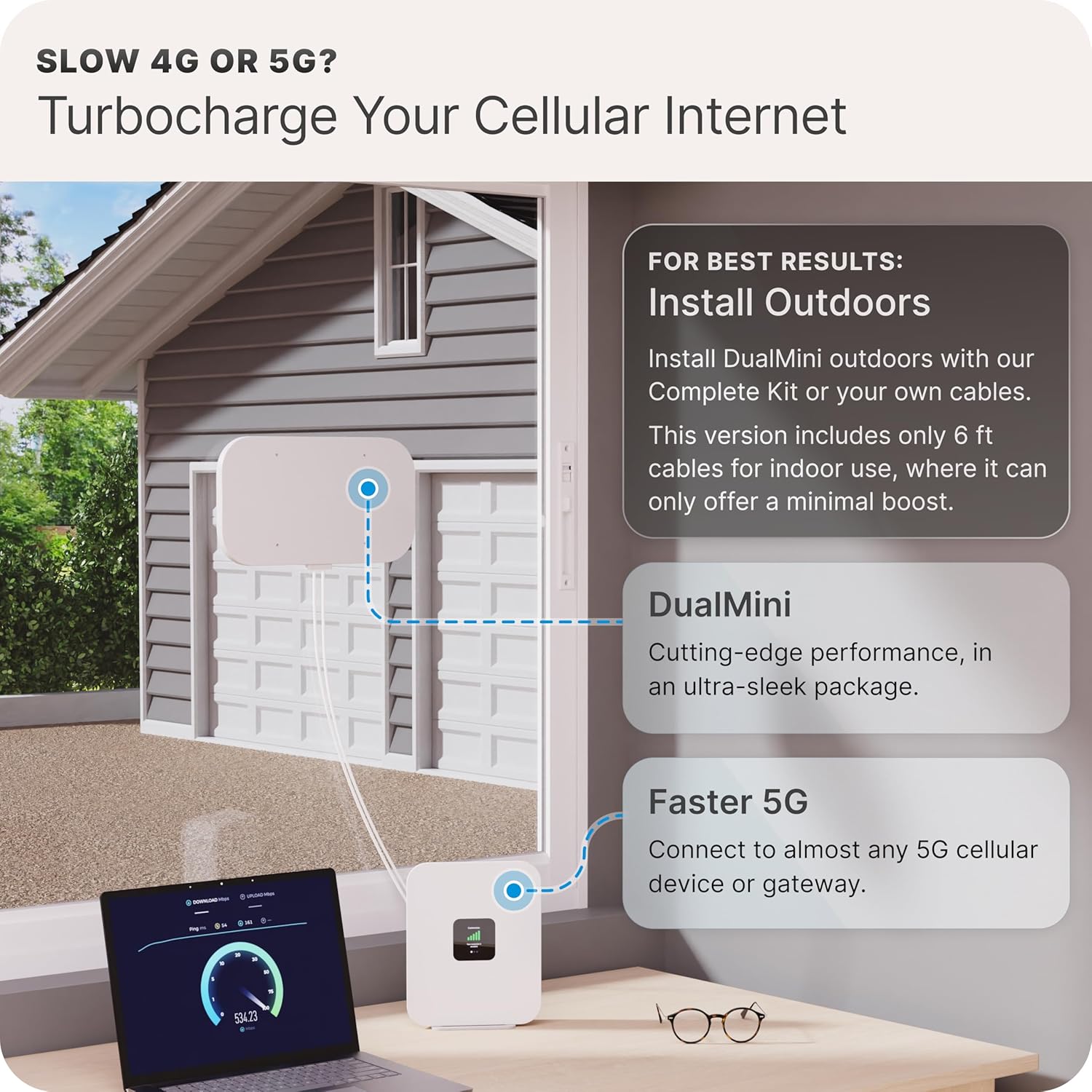
Image: A visual representation of an outdoor antenna installation, demonstrating how it connects to a cellular router inside a building to enhance internet speed.
2. Cable Routing (Antenna Only Kit)
This "Antenna Only" kit requires you to supply your own coaxial cables and antenna mount. Ensure the cables are of appropriate length and quality for your installation. If you purchased a Complete Kit, it includes a Window Entry Cable and UltraFlex Twin cables for easier routing without drilling.

Image: A diagram showing how a flat Window Entry Cable allows coaxial cables to pass through a window frame, facilitating outdoor antenna placement while keeping the router indoors.
3. Connecting to Your Router or Gateway
Connect the two coaxial cables from the DualMini antenna to the external antenna ports on your 4G LTE or 5G gateway/router. Most devices have two ports for MIMO (Multiple-Input, Multiple-Output) functionality. Some gateways may require TS9 adapters, which are typically included with Complete Kits.

Image: A cellular gateway with two coaxial cables connected to its external antenna ports, demonstrating the final connection step.
After connecting, reboot your router or gateway to ensure it recognizes the external antenna. Monitor your device's signal strength and internet speed to confirm improved performance.
Compatibilidad
The DualMini antenna is compatible with a wide range of 4G LTE and 5G gateways, modems, and routers that feature external antenna ports. This includes devices from brands like Inseego, Netgear (M5, M6 series), Peplink, Cradlepoint, GL.iNet, Cudy, TP-Link, and Teltonika. It supports major carriers such as Verizon, T-Mobile, AT&T, Rogers, Telus, and Bell.

Image: A collage of logos representing various compatible 5G routers and cellular service providers, indicating broad compatibility for the DualMini antenna.
Operating the DualMini Antenna
The Waveform DualMini is an omnidirectional antenna, meaning it receives signals from all directions. This eliminates the need for precise aiming towards a cell tower, simplifying installation and operation.
Once installed and connected, the antenna passively enhances the cellular signal received by your router or hotspot. Its 2x2 MIMO design utilizes multiple signal paths to improve data throughput and connection stability. The antenna operates across a broad frequency range of 600 to 6000 MHz, supporting various 4G and 5G bands.
For optimal performance, ensure the antenna is placed in a location with the strongest available signal, typically outdoors and with minimal obstructions.
Mantenimiento
The Waveform DualMini antenna is designed for durability and requires minimal maintenance.
- Limpieza: Limpie periódicamente el exterior de la antena con un paño suave.amp Paño para eliminar el polvo o la suciedad. Evite el uso de productos químicos agresivos o limpiadores abrasivos.
- Inspección de cables: Regularly check coaxial cables for any signs of wear, damage, or loose connections, especially if installed outdoors. Ensure all connections are secure and weatherproofed if exposed to elements.
- Seguridad de montaje: Verify that the antenna's mounting hardware remains secure, particularly after severe weather conditions.
No internal user-serviceable parts are present. Do not attempt to open the antenna housing.
Solución de problemas
If you experience issues with your DualMini antenna, consider the following troubleshooting steps:
- Mala señal/velocidades lentas:
- Relocate Antenna: Experiment with different antenna placements. Even small changes in location (e.g., a few feet higher, or on a different side of the building) can significantly impact signal strength.
- Comprobar conexiones: Ensure all coaxial cables are securely connected to both the antenna and your router/gateway.
- Reiniciar el enrutador: Power cycle your cellular router or hotspot.
- Obstrucciones: Minimize obstructions between the antenna and the nearest cell tower. Trees, buildings, and dense materials can degrade signal.
- Calidad del cable: Ensure you are using high-quality coaxial cables, especially for longer runs, to minimize signal loss.
- Antenna Not Recognized by Router:
- Verificar compatibilidad: Confirm your router/gateway has external antenna ports and is compatible with passive external antennas.
- Verificar adaptadores: If using TS9 adapters, ensure they are correctly seated and functional.
- Configuración del enrutador: Some routers may require a setting change to utilize external antennas. Consult your router's manual.
- Conexión intermitente:
- Cables seguros: Ensure cables are not loose or damaged, which can cause intermittent signal.
- Factores ambientales: Heavy rain or snow can temporarily affect cellular signals.
If issues persist after attempting these steps, contact Waveform customer support for further assistance.
Presupuesto
| Característica | Especificación |
|---|---|
| Número de modelo | DMIN-ANT |
| Tipo de antena | 2x2 MIMO Omnidirectional Panel Antenna |
| Rango de frecuencia | 600 - 6000 MHz |
| Ganancia máxima | Hasta 5.2 dBi |
| Peak Radiative Efficiency | 85% |
| Conectores | Weatherproofed SMA-M |
| Longitud del cable (integrado) | 6 feet (Ultra-flexible) |
| Color | Blanco |
| Peso del artículo | 3.29 libras |
| Dimensiones del paquete | 14.25 x 8.5 x 4.3 pulgadas |
| Fabricante | Forma de onda |
| Código Postal | 199284950788 |

Image: A visual breakdown of the components included in the "Antenna Only" kit, detailing the DualMini antenna and its various mounting accessories.
Garantía y soporte
For specific warranty information regarding your Waveform DualMini antenna, please refer to the documentation included with your purchase or visit the official Waveform websitio.
Waveform is known for its responsive customer support. If you require assistance with installation, troubleshooting, or have any product-related questions, you can contact Waveform customer service. They provide technical support and guidance to help you optimize your antenna's performance.
Contact information can typically be found on the Waveform websitio o en el embalaje del producto.