
Introducción
This manual provides detailed instructions for the proper use and maintenance of your MOVE SPEED SP20 Portable SSD. Please read this guide thoroughly before using the device to ensure optimal performance and longevity. The MOVE SPEED SP20 is a high-speed portable solid-state drive designed for reliable data transfer and storage across various devices.
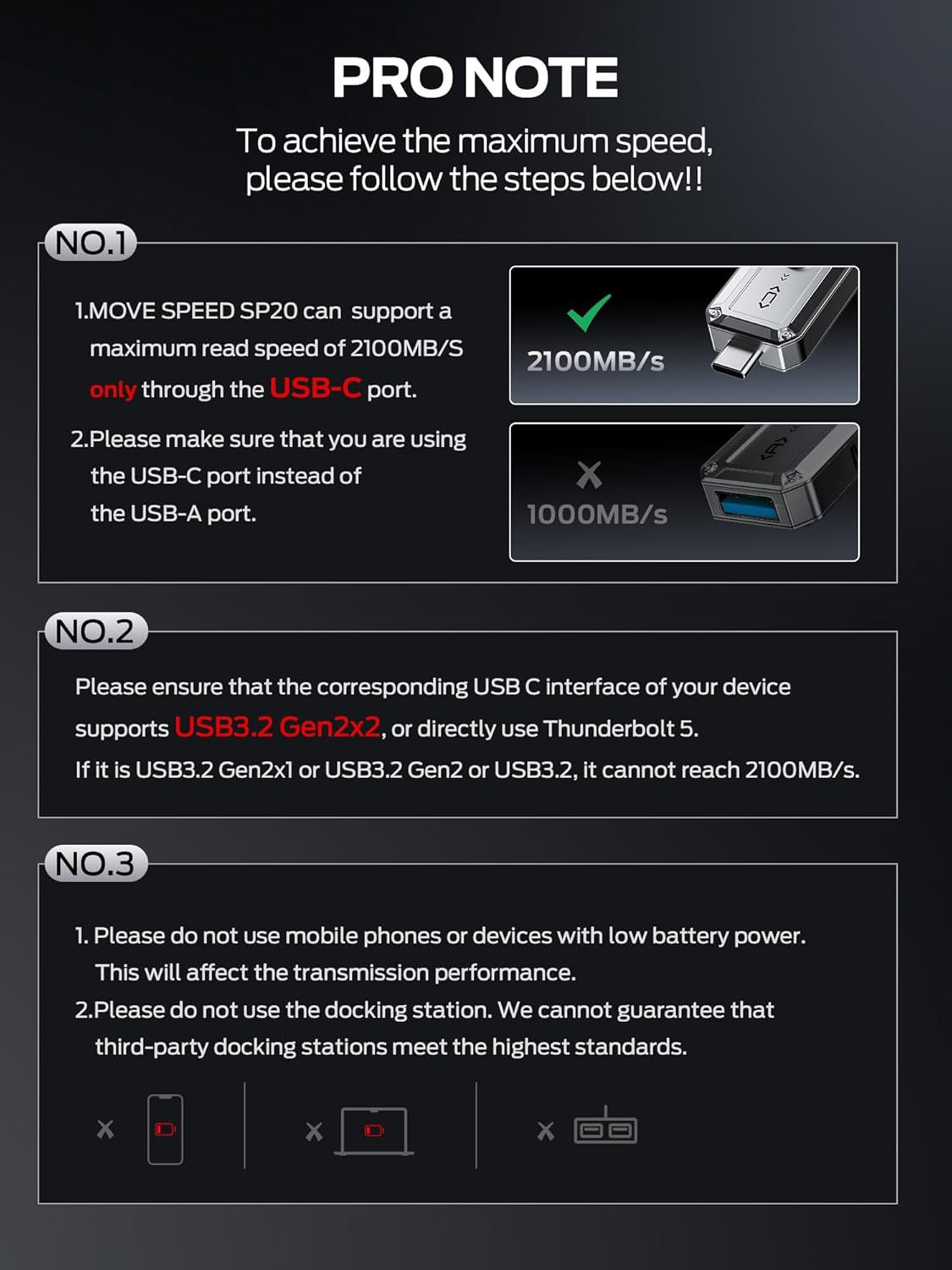
Image: The MOVE SPEED SP20 Portable SSD, showcasing its compact design and dual USB-C and USB-A connectors.
Configuración y conexión
To achieve the maximum advertised speeds, specific connection requirements must be met. The device features both USB-C and USB-A interfaces for broad compatibility.
Interface Requirements for Maximum Speed
- Puerto USB-C: The MOVE SPEED SP20 supports a maximum read speed of 2100MB/s exclusively through its USB-C port.
- Puerto USB-A: The maximum read speed through the USB-A port is 1000MB/s.
For optimal performance (up to 2100MB/s), ensure your device's USB-C interface supports USB 3.2 Gen2x2 or directly use a Rayo 5 interface. Devices with USB 3.2 Gen2x1, USB 3.2 Gen2, or standard USB 3.2 interfaces will not reach 2100MB/s. Avoid using docking stations, as the speed will be limited by the lowest interface speed in the chain.

Image: A visual guide detailing the required USB-C interface (USB 3.2 Gen2x2 or Thunderbolt 5) for achieving 2100MB/s read speed, compared to 1000MB/s for USB-A.
Conexión a dispositivos
The dual interfaces allow for convenient data transfer between various devices:
- Interfaz USB-A: Primarily for computers (Windows, Mac).
- Interfaz USB-C: For mobile phones (e.g., iPhone 15 Pro or later) and computers with compatible USB-C ports.

Image: The portable SSD connected to various devices, demonstrating its wide compatibility with USB-A and USB-C ports.
Instrucciones de funcionamiento
Transferencia de datos
Simply plug the appropriate connector (USB-A or USB-C) into your device. The drive should be recognized automatically. You can then drag and drop files, or use your device's file Sistema de gestión para transferir datos.
4K ProRes Video Capture
The MOVE SPEED SP20 supports 4K 60Hz ProRes HDR video capture for compatible devices such as the iPhone 15 series (iPhone 15 Pro or later). Ensure your device supports 4K video recording to utilize this feature.
Video: An official demonstration of the MOVE SPEED External SSD 2100MB/s, highlighting its features and usage.
Información de capacidad
It is important to understand the difference between how hard drive manufacturers calculate capacity and how operating systems display it.
Decimal vs. Binary Calculation
Hard disk manufacturers calculate capacity in decimal (1TB = 1,000,000,000,000 bytes). Operating systems, however, display capacity in binary (1TB ≈ 1,099,511,627,776 bytes or 1024GB). This difference results in the actual available space being approximately 7% to 10% less than the nominal value.
Por ejemploample, a 2TB hard drive will typically show approximately 1.81TB on a computer. Additionally, formatting the drive will occupy a small amount of space, resulting in a final available capacity between approximately 1.75TB and 1.81TB. This is a standard practice across all hard drives and is not indicative of a quality issue.
Formatting and File Sistema
The hard disk needs to be formatted, and a file system (such as NTFS or FAT32) needs to be established. If your computer has a pre-installed system, there may be space reserved for system recovery partitions or pre-installed software by the manufacturer. File system overhead usually accounts for 1% to 3% of the total capacity. Recovery partitions can take up to 10 to 20GB for both Windows and Mac systems.

Image: A detailed chart explaining the capacity difference between manufacturer's decimal calculation and operating system's binary display, including space occupied by formatting.
Notas de rendimiento
Ultra-Fast Speed
The MOVE SPEED SP20, with its USB 3.2 Gen2x2 interface, offers a read speed of up to 2100MB/s and a write speed of 1800MB/s. These speeds are laboratory-derived. To achieve these rates, professional software, equipment, and a compatible USB 3.2 Gen2x2 or Thunderbolt 5 interface are required.

Image: A comparison graphic highlighting the significantly faster data transfer speeds of the MOVE SPEED SP20 for large files like 500GB Blu-ray movies.
TLC Reliable Transfer
The device utilizes TLC (Triple-Level Cell) NAND technology, which ensures stable and continuous data transfer, even when handling large files (over 100GB) or during demanding tasks like gaming. This technology helps maintain consistent speed throughout the transfer process, enhancing data security and user experience.

Image: An illustration of the internal High Quality TLC NAND and High Performance Controller, alongside a graph showing consistent write speeds for the SP20, preventing frame drops during 4K video recording.
Mantenimiento
To ensure the longevity and optimal performance of your MOVE SPEED SP20 Portable SSD, consider the following:
- Eyección segura: Siempre expulse de forma segura la unidad de su sistema operativo antes de desconectarla físicamente para evitar la corrupción de datos.
- Temperatura: The device may get warm during extended use, especially during large data transfers. This is normal. Allow it to cool if it becomes excessively hot.
- Protección física: The zinc alloy enclosure provides shock resistance. However, avoid dropping the device from significant heights or subjecting it to extreme physical impact.
- Limpieza: Utilice un paño suave y seco para limpiar el exterior de la unidad. Evite los limpiadores líquidos.
Solución de problemas
Velocidades de transferencia lentas
- Interface Check: Verify that you are using the USB-C port for maximum speed and that your device supports USB 3.2 Gen2x2 or Thunderbolt 5. Using a lower-spec port (e.g., USB 3.2 Gen2x1, USB 3.2, or USB-A) will result in lower speeds.
- Conexión directa: Avoid using docking stations or USB hubs, as they can limit transfer speeds. Connect the SSD directly to a compatible port on your computer or phone.
- Energía del dispositivo: Do not use the SSD with mobile phones or devices that have low battery power, as this can affect transmission performance.
- Calidad del cable: Ensure you are using a high-quality USB 3.2 Gen2x2 compatible cable.
Unidad no reconocida
- Vuelva a enchufar: Disconnect and reconnect the drive.
- Pruebe otro puerto: Test the drive with a different USB port on your device.
- Compruebe el Administrador de dispositivos (Windows) / Utilidad de discos (Mac): Ensure the drive is visible in your system's disk management tools. It may need to be initialized or formatted if it's a new drive or if the file El sistema es incompatible.
- Actualizaciones de controladores: Asegúrese de que los controladores USB de su computadora estén actualizados.
Presupuesto
| Capacidad de almacenamiento digital | 2TB |
| Interfaz del disco duro | USB 3.0 (Note: Supports USB 3.2 Gen2x2 via Type-C) |
| Tecnología de conectividad | USB |
| Marca | VELOCIDAD DE MOVIMIENTO |
| Característica especial | Portátil, resistente a los golpes |
| Factor de forma del disco duro | 1 pulgadas |
| Descripción del disco duro | Disco duro de estado sólido |
| Dispositivos compatibles | Desktop, Gaming Console, Laptop, Smartphone |
| Tipo de instalación | Disco duro externo |
| Color | Plata |
| Velocidad de lectura | 2100 megabytes por segundo |
| Velocidad de escritura | 1800 Megabytes Per Second (approximate, based on feature bullets) |
| Velocidad de transferencia de datos | 2100 megabytes por segundo |
| Factor de forma | 2.5 pulgadas |
| Plataforma de hardware | Mac, PC |
| Material del recinto | Aleación de zinc |
| Peso del artículo | 48.4 gramos |
| Dimensiones del artículo (largo x ancho x grosor) | 3" de largo x 0.9" de ancho x 0.5" de grosor |
Garantía y soporte
MOVE SPEED provides a one-year warranty for this product. If you encounter any quality problems, please contact MOVE SPEED customer support for assistance. They are committed to arranging an immediate replacement if necessary.
For further support, please refer to the official MOVE SPEED website or contact their customer service directly. Contact information can typically be found on the product packaging or the brand's official online presence.