
1. Información importante de seguridad
Please read this manual thoroughly before installation and use. Keep this manual for future reference.
- Capacidad de peso: Do not exceed the maximum weight capacity of 33 lbs (15 kg) per arm. Exceeding this limit may result in serious injury or product damage.
- Tamaño del monitor: Este soporte está diseñado para monitores de entre 13 y 39 pulgadas.
- Compatibilidad VESA: Ensure your monitor has VESA mounting patterns of 75x75 mm or 100x100 mm. If your monitor does not have these patterns, a VESA adapter (sold separately) may be required.
- Grosor del escritorio: El C-clamp is suitable for desks 0.39"-1.77" thick. The grommet mount is suitable for desks 0.39"-1.77" thick with a hole diameter of 0.39"-2.36".
- Material del escritorio: Do not install this product on tempered glass desks or other fragile table tops. Ensure your desk is structurally sound to support the combined weight of the mount and monitors.
- Asamblea: Assemble the product according to the instructions. Incorrect assembly can lead to product failure or injury.
- Partes móviles: Mantenga las manos y los dedos alejados de las partes móviles durante el ajuste para evitar pillarse los dedos.
2. Producto terminadoview
The MOUNT PRO Dual Monitor Desk Mount provides an ergonomic solution for mounting two monitors, offering extensive adjustability and integrated features for an organized workspace.
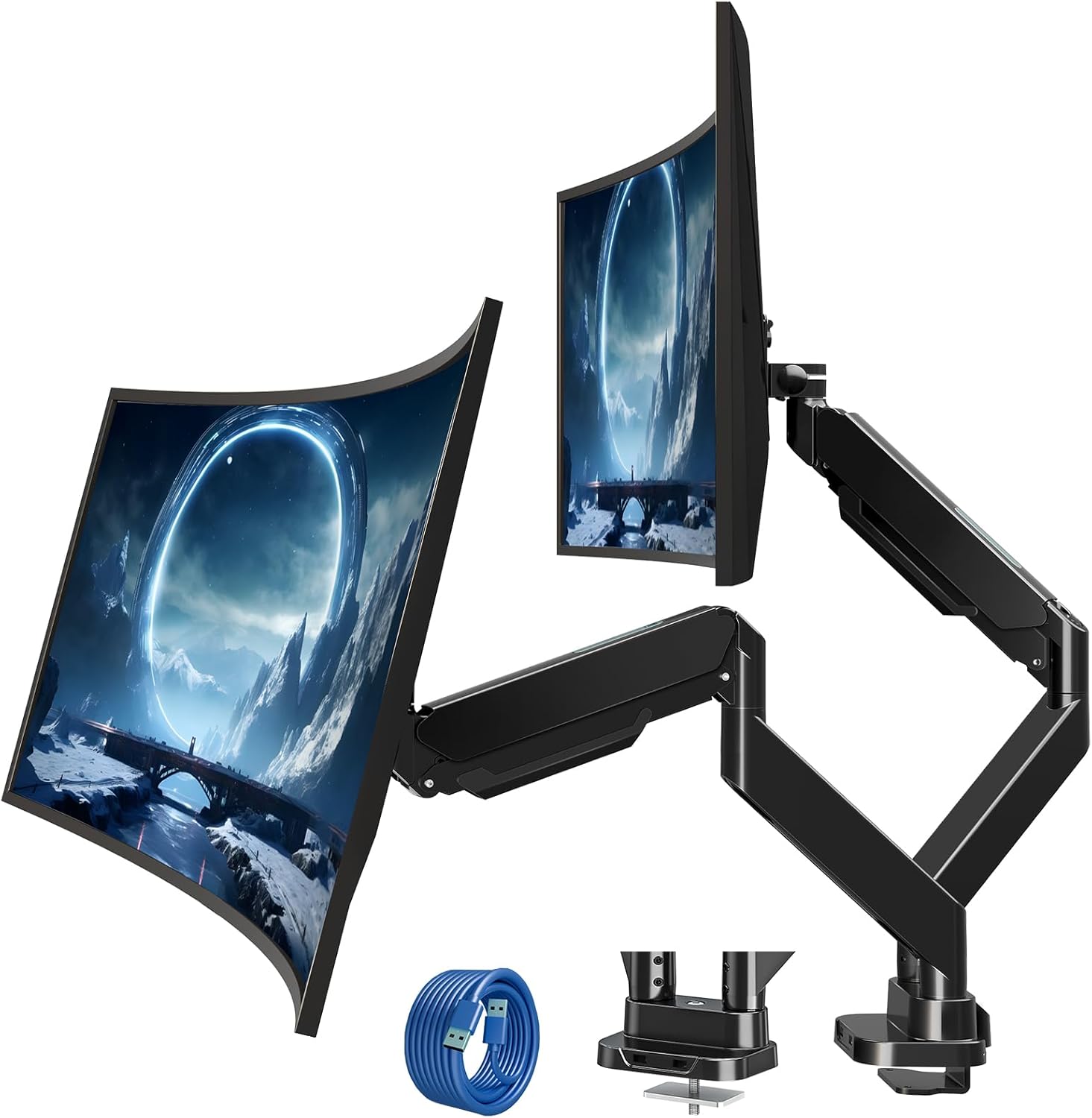
Figure 2.1: MOUNT PRO Dual Monitor Desk Mount with two monitors.
2.1 Características principales
- Supports two flat or curved monitors from 13" to 39" in size.
- Each arm supports monitors weighing between 4.4 lbs (2 kg) and 33 lbs (15 kg).
- Compatible with VESA patterns 75x75 mm and 100x100 mm.
- Full range of motion: tilt +90°/-45°, swivel 180°, rotation 360°.
- Adjustable height and extension for optimal viewángulos de ing.
- Integrated cable management system.
- Two USB ports at the base for convenient charging and data transfer.

Figure 2.2: Compatibility details for monitor size, weight, and VESA standards.

Figure 2.3: The mount's capability to support large and heavy monitors, up to 33 lbs per arm.
3. Contenido del paquete
Verifique que todos los componentes estén presentes y sin daños. Si alguna pieza falta o está dañada, contacte con atención al cliente.
- Monitor Arms (x2)
- Escritorio Clamp Base
- Herrajes para montaje con ojal
- VESA Plates (x2)
- Cable de extensión USB
- Kit de hardware (tornillos, arandelas, espaciadores)
- Llaves Allen (varios tamaños)
- Manual de instrucciones
4. Guía de instalación
4.1 Comprobación previa a la instalación
Before beginning installation, confirm your monitor and desk meet the following requirements:
- Tamaño del monitor: 13"-39"
- Peso del monitor: 4.4-33 lbs (per arm)
- Patrón VESA: 75x75 mm or 100x100 mm
- Grosor del escritorio (C-clamp/Ojal): 0.39"-1.77"
- Grommet Hole Diameter (Grommet mount only): 0.39"-2.36"

Figure 4.1: Compatibility requirements for monitors and desk.
4.2 Compatibilidad de escritorio
Ensure your desk edge or grommet hole is suitable for installation. Avoid installing on desks with fragile materials like tempered glass.

Figure 4.2: Desk edge requirements for secure clamp instalación.
4.3 opciones de montaje
El soporte ofrece dos métodos de instalación: C-clamp o montaje con ojal.
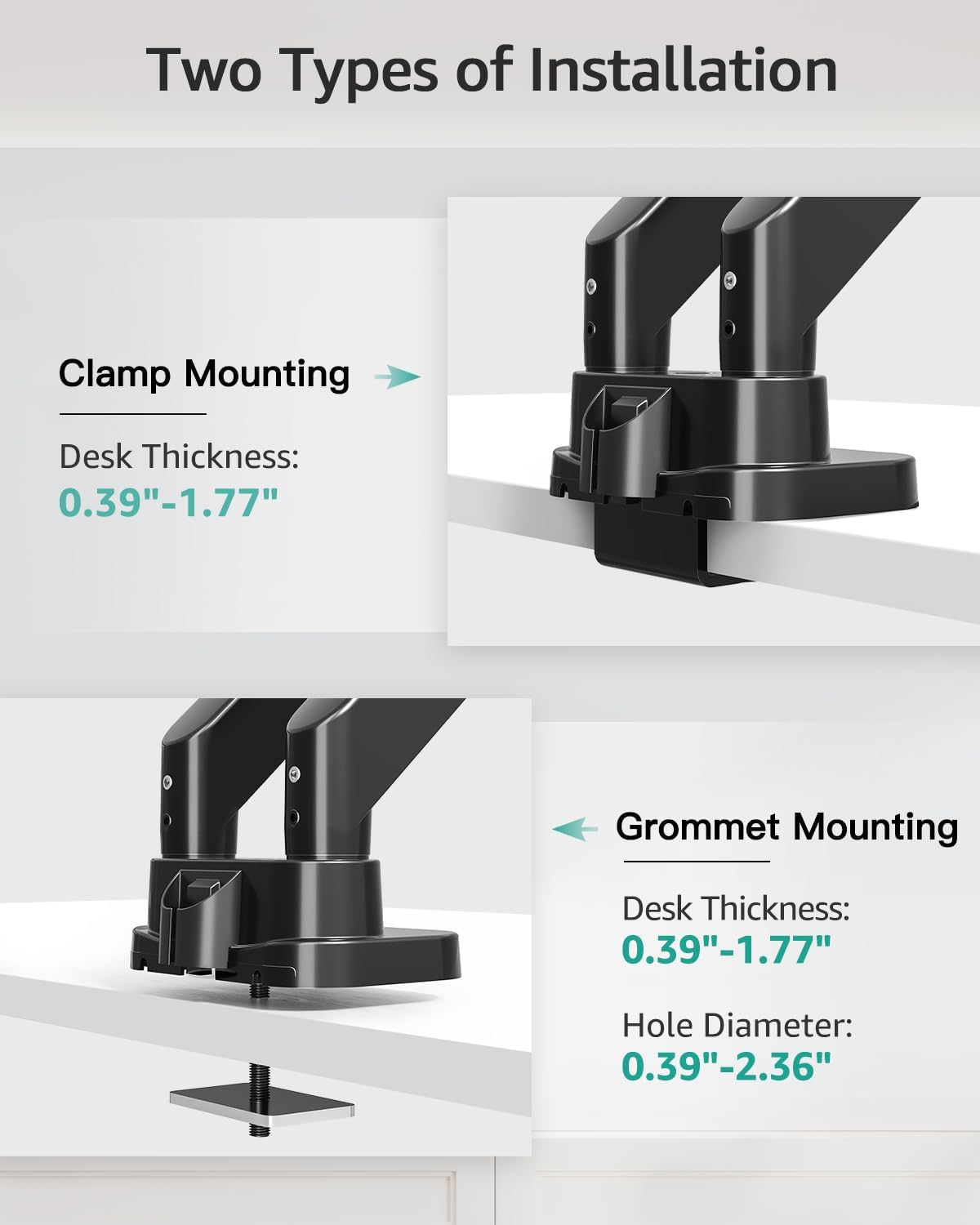
Figure 4.3: Visual representation of C-clamp y métodos de montaje de ojales.
4.3.1 Cl Camp Instalación
- Coloque el C-clamp to the desk base.
- Position the base on the desired location on your desk.
- Apriete el C-clamp Atornille hasta que el soporte esté firmemente fijado al escritorio.
4.3.2 Grommet Installation
- Desmontar el C-clamp from the base and attach the grommet plate.
- Inserte el perno de ojal a través del orificio del escritorio.
- Secure the mount from underneath the desk using the provided washer and nut.

Figure 4.4: Steps for easy base installation using either C-clamp or grommet method.
4.4 Conexión de monitores
- Attach the VESA plate to the back of your monitor using the appropriate screws and spacers from the hardware kit. Ensure the screws are tightened securely.
- Slide the monitor with the attached VESA plate onto the monitor arm's VESA head. The quick-release design allows for easy attachment.
- Asegúrese de que el monitor esté bloqueado de forma segura en su lugar.

Figure 4.5: Detail of VESA quick release boards and monitor locking mechanism.
5. Operación y ajustes
The MOUNT PRO Dual Monitor Desk Mount offers a wide range of adjustments to customize your viewExperiencia de aprendizaje.
5.1 Posicionamiento del monitor (inclinación, giro, rotación)
Each monitor arm allows for flexible positioning:
- Inclinación: Adjust the monitor angle up to 90° upwards and 45° downwards.
- Girar: Gire el monitor horizontalmente hasta 180° hacia la izquierda o hacia la derecha.
- Rotación: Gire el monitor 360° para cambiar entre orientación horizontal y vertical.

Figure 5.1: Illustrates the full range of motion including swivel, tilt, and 360° rotation.
5.2 Height and Extension Adjustment
The gas spring arms allow for smooth vertical and horizontal adjustments.
- Altura máxima: Monitors can be raised up to 21.5 inches from the desk surface.
- Extensión máxima: Arms can extend up to 20.9 inches.

Figure 5.2: Maximum height and extension capabilities of the monitor arm.
5.3 Ajuste de la tensión del resorte de gas
The gas spring tension must be adjusted to match the weight of your monitor for optimal stability and ease of movement. Hold the arm in a horizontal position during adjustment.
- For lighter monitors (monitor raises up): Turn the adjustment screw clockwise towards the "-" symbol to reduce tension.
- For heavier monitors (monitor drops down): Turn the adjustment screw counter-clockwise towards the "+" symbol to increase tension.
A scale line on the arm indicates the approximate gas spring force value, with each division representing about 2 lbs. Adjust until the arm holds the monitor's position stably.

Figure 5.3: Gas spring tension adjustment mechanism with a visual scale.
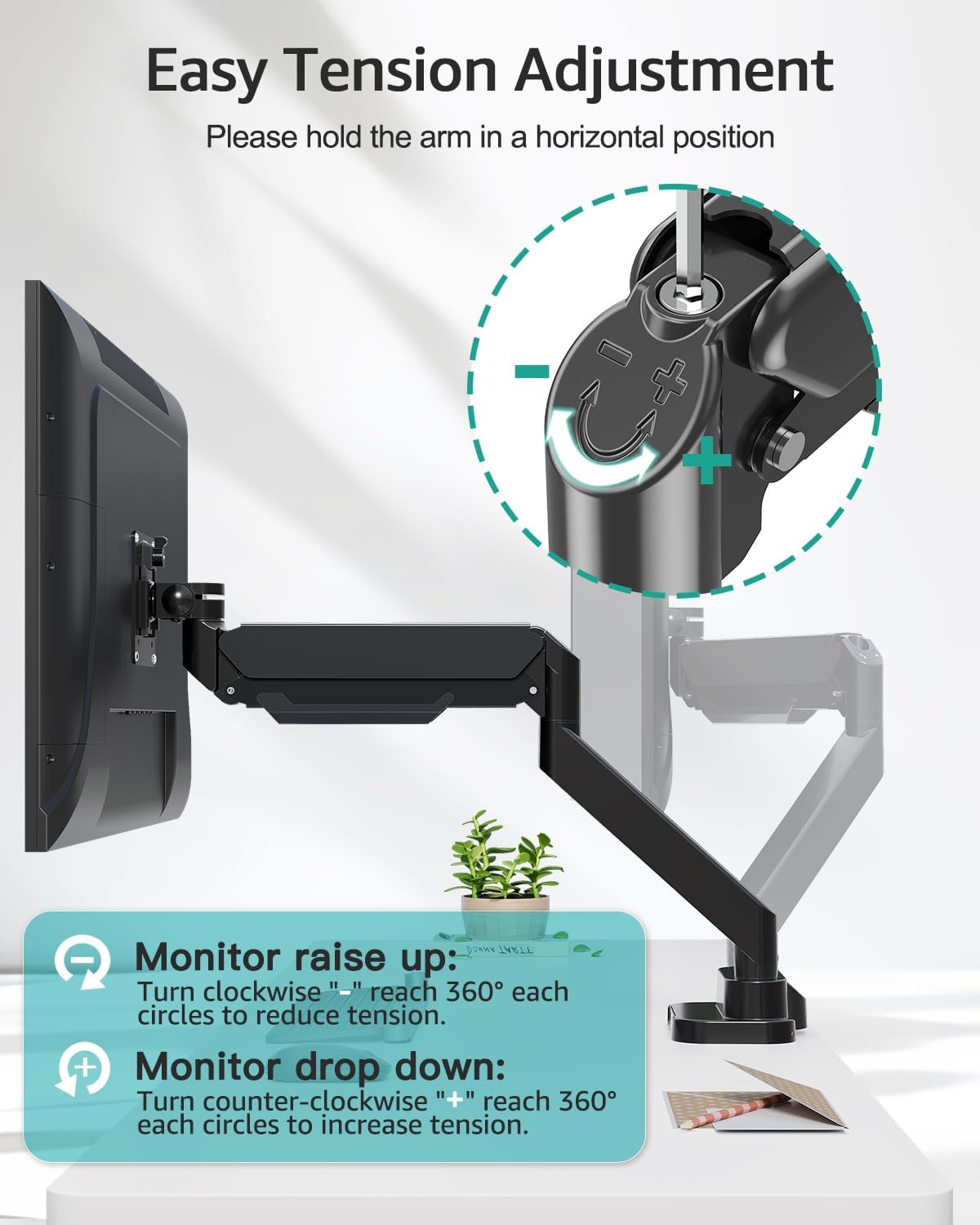
Figure 5.4: Detailed instructions for adjusting tension to suit monitor weight.
5.4 Gestión de cables
Route your monitor cables through the integrated cable management channels along the arms to maintain a tidy workspace.
5.5 puertos USB
The base of the mount includes two USB ports. Connect the provided USB extension cable from the mount's base to your computer to enable these ports for charging devices or data transfer.

Figure 5.5: Cable management system and integrated USB ports for desktop organization.
6. Mantenimiento
- Revise periódicamente todos los tornillos y conexiones para asegurarse de que permanezcan firmes y seguros.
- Limpie el soporte con un paño suave.amp Paño. Evite limpiadores abrasivos o disolventes.
- Periodically verify that the gas spring tension is still appropriate for your monitor's weight.
7. Solución de problemas
7.1 Monitor Sags or Does Not Stay in Position
- Solución: The gas spring tension is too low for the monitor's weight. Increase the tension by turning the adjustment screw counter-clockwise towards the "+" symbol (refer to Section 5.3).
7.2 Monitor Arm is Too Stiff or Hard to Move
- Solución: The gas spring tension is too high for the monitor's weight. Decrease the tension by turning the adjustment screw clockwise towards the "-" symbol (refer to Section 5.3).
7.3 Mount Feels Unstable on Desk
- Solución: Vuelva a apretar el C-clamp or grommet bolt. Ensure the desk thickness is within the specified range (0.39"-1.77") and the desk material is sturdy.
7.4 Monitor Does Not Fit VESA Plate
- Solución: Verify your monitor's VESA pattern is 75x75 mm or 100x100 mm. If not, a VESA adapter may be required. Some monitors may require removing a cover or original stand before attaching the VESA plate.
8. Especificaciones
| Característica | Especificación |
|---|---|
| Marca | MONTAJE PRO |
| Modelo | B0F7LRZF4F |
| Compatibilidad del tamaño del monitor | 13" - 39" (flat or curved) |
| Capacidad de peso (por brazo) | 4.4 - 33 libras (2 - 15 kg) |
| Compatibilidad VESA | 75x75 mm, 100x100 mm |
| Ángulo de inclinación | +90° / -45° |
| Ángulo de giro | 180° |
| Rotación | 360° |
| Altura máxima | 21.5 pulgadas |
| Extensión máxima | 20.9 pulgadas |
| Grosor del escritorio (Clamp/Ojal) | 0.39" - 1.77" |
| Diámetro del orificio del ojal | 0.39" - 2.36" |
| Material | Metal |
| Color | Negro |
| Peso del artículo | 14.63 libras |
9. Garantía y soporte
MOUNT PRO products are designed and manufactured to high-quality standards. This product is covered by a limited warranty from the date of purchase. For warranty details, technical support, or to report missing/damaged parts, please contact MOUNT PRO customer service through the retailer where the product was purchased or visit the official MOUNT PRO websitio.
Please have your model number (B0F7LRZF4F) and purchase information ready when contacting support.