
MeesMeek 5282
Manual del usuario del reloj despertador con proyección MeesMeek: reloj LCD digital
Brand: MeesMeek | Model: 5282
Introducción
This manual provides detailed instructions for the setup, operation, maintenance, and troubleshooting of your MeesMeek Projection Alarm Clock (Model 5282). Please read this guide thoroughly to ensure proper use and to maximize the features of your device.
Producto terminadoview
The MeesMeek Projection Alarm Clock is designed to provide clear time display, alarm functions, and convenient projection of time onto a wall or ceiling. It features a 3.9-inch LCD screen displaying time, alarm time, calendar date, day of the week, and temperature. The clock supports both USB and battery power options.

Imagen 1: Frente view of the MeesMeek Projection Alarm Clock, displaying current time, date, and temperature, with the projection feature active.
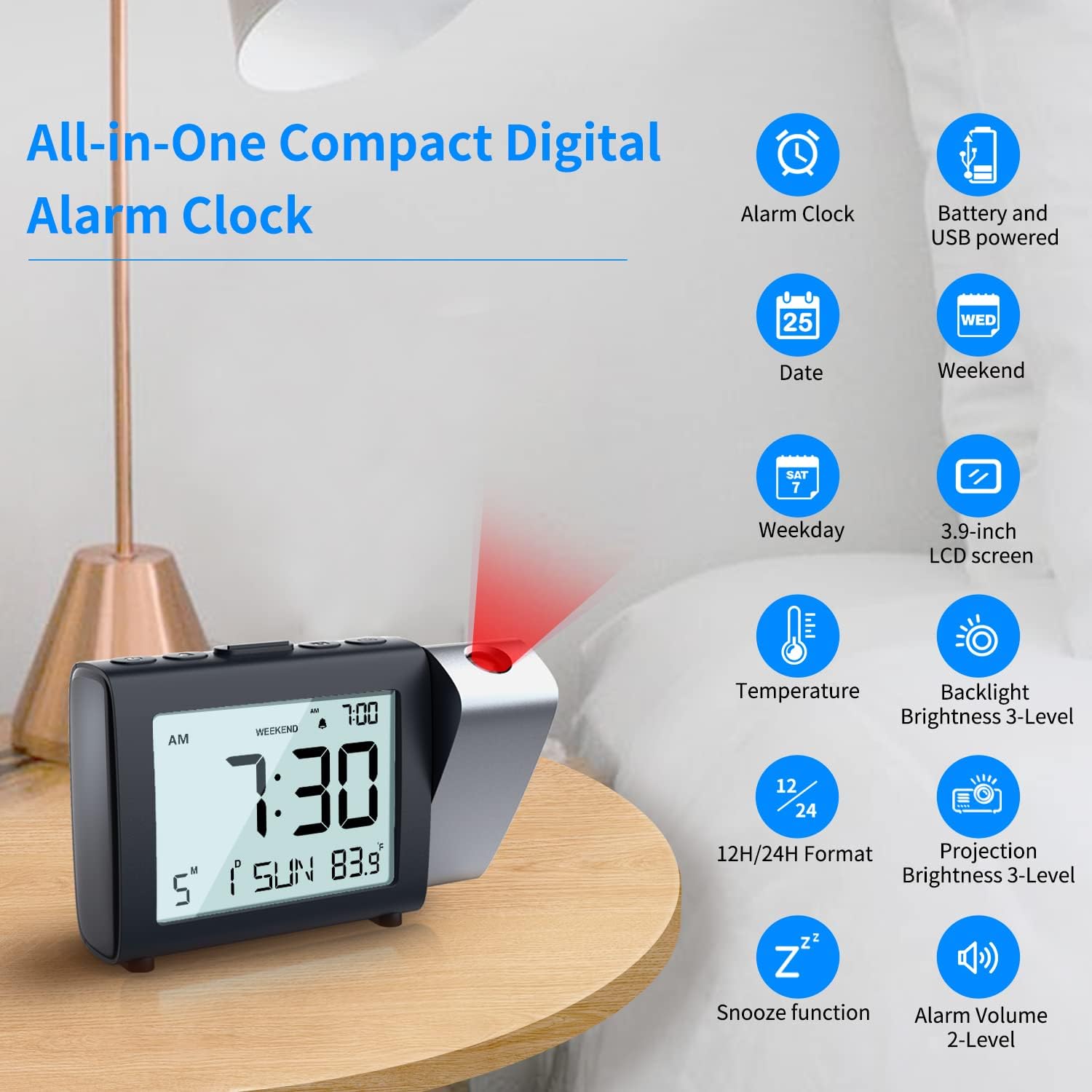
Imagen 2: Másview of the MeesMeek Projection Alarm Clock's key features and display elements.
Configuración
1. Encender el reloj
El reloj se puede alimentar de dos maneras:
- Energía del USB: For continuous projection and backlight, connect the provided micro USB cable to the clock and the 5V 1A power adapter to a wall outlet.
- Energía de la batería: For basic alarm clock functions and as a backup during power outages, insert 3 AAA batteries (not included) into the battery compartment. Note: When powered by batteries only, the projection and backlight will turn off after 5 seconds to conserve power.

Image 3: Illustration of connecting the USB power adapter and inserting AAA batteries for clock operation.
2. Configuración de hora y fecha
Refer to the individual control buttons on the top of the clock for setting the year, month, date, and time. The clock supports both 12-hour and 24-hour formats.
Video 1: Demonstrates how to easily set the calendar (year, month, date) and switch between 12H/24H time formats on the MeesMeek Projection Alarm Clock.
3. Configuración de la alarma
The alarm can be set with two levels of volume. You can also activate a "Weekend Mode" which prevents the alarm from sounding on Saturdays and Sundays.
4. Ajuste de la proyección
The projector can swivel 180° to direct the time display onto your ceiling or wall. Use the focus ring to adjust the sharpness of the projected image. Projection brightness can be set to 4 levels.

Image 4: Details on adjusting the projection angle, flipping the display, and using the focus ring for clarity.
Instrucciones de funcionamiento
1. Información de la pantalla LCD
The 3.9-inch LCD screen displays the following information:
- Current Time (12H/24H format selectable)
- Hora de alarma
- Fecha del calendario
- Día de la semana
- Temperatura

Imagen 5: Detallada view of the LCD display and options for adjusting alarm volume, projection brightness, and backlight brightness.
2. Función de repetición
When the alarm sounds, press the "Snooze" button on the top of the clock to temporarily silence the alarm for 9 minutes. The alarm will sound again after this period.

Image 6: Illustration of the snooze function and weekend mode feature.
3. Modo fin de semana
Activate the "Weekend Mode" to prevent the alarm from sounding on Saturdays and Sundays. This feature is useful for maintaining a consistent alarm schedule during weekdays without needing to manually turn off the alarm on weekends.
4. Brillo de la luz de fondo
The LCD backlight has 4 adjustable brightness levels (Off, Low, Medium, High) for comfortable viewfuncionando en diversas condiciones de iluminación.
5. Projection Brightness
The projection brightness can be adjusted to 4 levels (Off, Low, Medium, High) to suit your preference and room lighting.
Mantenimiento
To ensure optimal performance and longevity of your MeesMeek Projection Alarm Clock, please follow these maintenance tips:
- Copia de seguridad de la batería: Before initial use, insert 3 AAA batteries as a backup. This prevents the clock from resetting in case of a power failure.
- Conexión de energía: If the projection and backlight are not continuously on even when plugged in, check that the USB cable is securely connected and making good contact.
- Limpieza: Use a soft, dry cloth to clean the clock's surface and LCD screen. Avoid using abrasive cleaners or solvents.
Solución de problemas
If you encounter any issues with your MeesMeek Projection Alarm Clock, refer to the following common solutions:
- Projection is upside down: Press and hold the projection button for 3 seconds to flip the projected image.
- La proyección está borrosa: Scroll the focus wheel located on the back of the clock to adjust the sharpness of the projected image.
- Projection/Backlight turns off after 5 seconds: This is normal behavior when the clock is powered by batteries only to save power. For continuous display, ensure the clock is plugged into a USB power source.
- Clock not keeping time: Ensure fresh AAA batteries are installed for backup and that the USB power connection is stable.
Presupuesto
| Característica | Detalle |
|---|---|
| Marca | Mees manso |
| Número de modelo | 5282 |
| Tipo de pantalla | Digital |
| Dimensiones del producto | 7" de ancho x 3.5" de alto |
| Fuente de poder | Eléctrico con cable, alimentado por batería |
| Pilas necesarias | 3 pilas AAA (no incluidas) |
| Características especiales | Calendar Display, Temperature Display, Adjustable Brightness, 12H/24H, Projection Clock, Alarm, Snooze, Weekend Mode |
| Tipo de montaje | Superficie de la mesa |
| Material | Plástico |
| Peso del artículo | 9.9 onzas (280 gramos) |
Información de garantía
Este producto viene con un Garantía limitada. For specific details regarding the terms and conditions of your warranty, please refer to the documentation included with your purchase or contact MeesMeek customer support.
Atención al cliente
For further assistance, technical support, or inquiries regarding your MeesMeek Projection Alarm Clock, please contact MeesMeek customer service. Contact information can typically be found on the product packaging or on the official MeesMeek websitio.
Ask a question about this manual
Ask about setup, troubleshooting, compatibility, parts, safety, or missing instructions. Manuals+ will review the question and use this page’s manual context to help answer it.