
1. Introducción
This manual provides essential information for the safe installation, operation, and maintenance of your TOMZN TOB9-VAP 63A 1P+N WiFi Smart Switch Energy Meter. This device is a miniature circuit breaker (MCB) with integrated energy metering (Kwh, Voltage, Ampedad, Wattage), monitoring, and timer relay functions, compatible with TUYA Smartlife applications. It is designed to protect electrical circuits from overloads and short circuits while offering smart control and energy consumption insights.
2. Información de seguridad
ADVERTENCIA: Riesgo de descarga eléctrica.
- La instalación y el mantenimiento deben ser realizados únicamente por personal calificado.
- Desconecte siempre la alimentación del disyuntor principal antes de instalar o realizar mantenimiento al dispositivo.
- Asegúrese de que todas las conexiones del cableado sean seguras y cumplan con los códigos eléctricos locales.
- No opere el dispositivo si parece dañado.
- This device is designed for indoor use in dry environments unless otherwise specified for specific outdoor enclosures.
- The device is rated for 1P+N (Single Phase + Neutral) systems. Ensure correct polarity during installation.
3. Producto terminadoview
The TOMZN TOB9-VAP is a versatile smart circuit breaker offering protection and advanced monitoring capabilities.
3.1. Características principales
- Protección contra sobrecarga y cortocircuito: Prevents damage caused by excessive current.
- Energy Metering (Kwh, V, A, W): Monitors real-time and historical energy consumption.
- Conectividad WiFi: Remote control and monitoring via smartphone app.
- Timer Relay Function: Schedule on/off times for connected loads.
- VA Protection: Volumen ajustabletage y Amperage protection settings.
- TUYA Smartlife Compatible: Integrates with popular smart home platforms.
- Construcción duradera: Made with high-quality insulating, flame-retardant, and UV-resistant materials.
- Conexiones seguras: Screw-type terminals for stable electrical connections.
3.2. Componentes e indicadores

Figure 1: TOMZN TOB9-VAP WiFi Smart Switch Energy Meter (Metering VA Protection, 1-63A Adjustable). This image shows the device with its input (Power) and output (Load) terminals, WiFi indicator, CE mark, signal light, and the main power button. The display indicates 'Metering VA protection In: 1-63A'.

Figure 2: TOMZN TOB9-63M WiFi Smart Switch Energy Meter (Metering). This variant includes energy metering capabilities (kW·h, W, V, A) but may not have the adjustable VA protection of the TOB9-VAP.
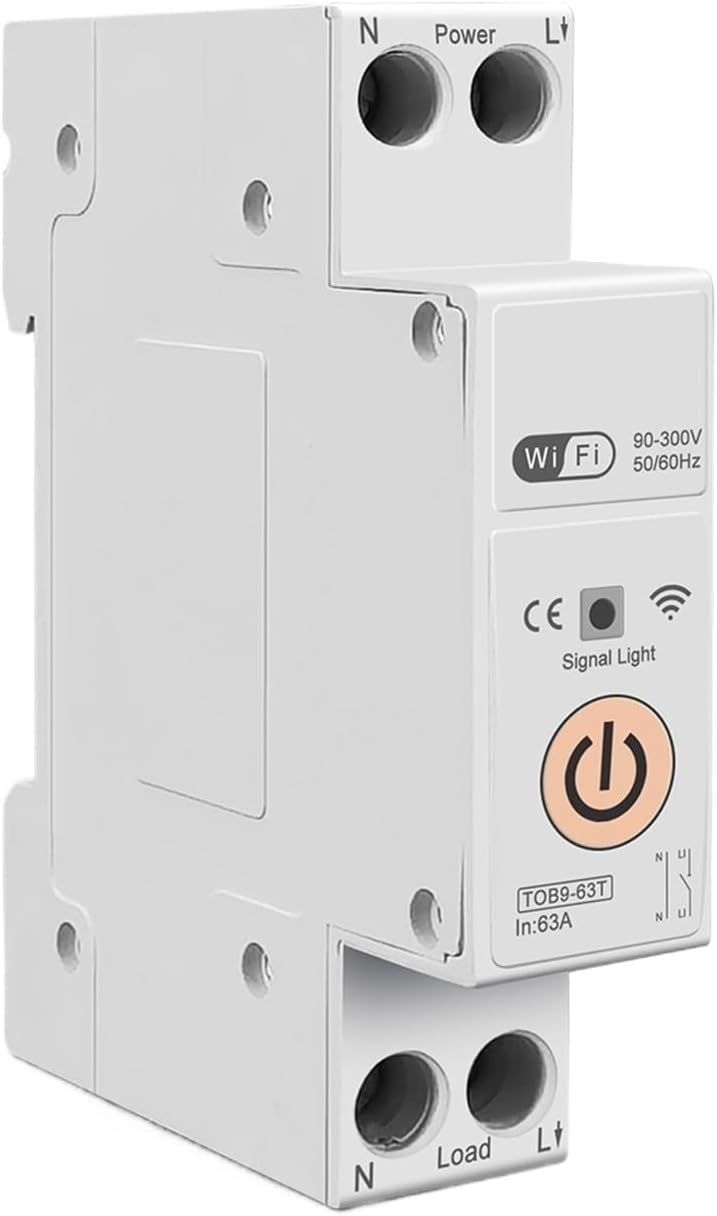
Figure 3: TOMZN TOB9-63T WiFi Smart Switch (No Metering). This basic variant provides WiFi control and circuit protection without energy metering functions.
- Power Terminals (N, L): Input connections for neutral and live wires.
- Load Terminals (N, L): Output connections for neutral and live wires to the load.
- Indicador WiFi: Muestra el estado de la conexión WiFi.
- Luz de señal: Indica el estado del dispositivo.
- Botón de encendido principal: Manual ON/OFF control for the circuit breaker.
- Display (TOB9-VAP/TOB9-63M): Shows real-time energy data (Kwh, W, V, A) and protection settings.
4. Configuración
4.1. Instalación y cableado
- Desconexión de energía: Before starting, ensure the main power supply to the installation area is completely disconnected.
- Montaje: Mount the TOB9-VAP on a standard DIN rail within an appropriate electrical enclosure.
- Cableado de entrada: Connect the incoming neutral wire to the 'N' terminal under 'Power' and the incoming live wire to the 'L' terminal under 'Power'. Ensure secure screw-type connections.
- Cableado de salida: Connect the neutral wire to your load to the 'N' terminal under 'Load' and the live wire to your load to the 'L' terminal under 'Load'.
- Verificación: Verifique nuevamente todas las conexiones para verificar que estén bien ajustadas y la polaridad sea correcta.
- Restaurar energía: Una vez completada y verificada la instalación, restablezca la energía al circuito principal.
4.2. App Pairing (TUYA Smartlife)
- Descargar aplicación: Descargue la aplicación 'TUYA Smart' o 'Smart Life' desde la tienda de aplicaciones de su teléfono inteligente.
- Registrarse/Iniciar sesión: Crea una cuenta o inicia sesión en tu cuenta existente.
- Agregar dispositivo: In the app, tap '+' to add a new device. Select 'Electrical' > 'Circuit Breaker (Wi-Fi)'.
- Modo de emparejamiento: Ensure the TOB9-VAP's WiFi indicator is blinking rapidly. If not, press and hold the main power button for 5-10 seconds until it blinks rapidly to enter pairing mode.
- Conéctese a Wi-Fi: Follow the in-app instructions to connect the device to your 2.4GHz WiFi network. (5GHz networks are not supported).
- Cambio de nombre del dispositivo: Once paired, you can rename the device for easy identification in the app.
5. Instrucciones de funcionamiento
5.1. Operación manual
- Encender / apagar: Press the main power button on the device to manually switch the circuit breaker ON or OFF.
5.2. App Control and Monitoring
- ENCENDIDO/APAGADO remoto: Use the TUYA Smartlife app to remotely switch the circuit breaker ON or OFF.
- Monitoreo de energía: View real-time and historical data for Kwh consumption, current (A), voltage (V) y potencia (W) directamente en la aplicación.
- Temporizador/Horario: Set up schedules or countdown timers for automatic ON/OFF operations.
- VA Protection Settings: Adjust the over-voltage, bajo voltage, over-current, and over-power protection thresholds within the app. The device will automatically trip if these thresholds are exceeded.
- Automatización de escenas: Integrate the device into smart scenes with other TUYA-compatible devices.
6. Mantenimiento
- Inspección regular: Periodically inspect the device and its wiring for any signs of damage, loose connections, or overheating.
- Limpieza: Limpie el exterior del dispositivo con un paño seco y suave. No utilice limpiadores líquidos ni disolventes.
- Actualizaciones de firmware: Check the TUYA Smartlife app for any available firmware updates to ensure optimal performance and security.
- Control profesional: For any internal issues or complex repairs, consult a qualified electrician.
7. Solución de problemas
| Problema | Posible causa | Solución |
|---|---|---|
| El dispositivo no se enciende. | No hay suministro de energía; cableado suelto; falla interna. | Check main power supply. Verify all wiring connections. If problem persists, contact support. |
| WiFi indicator not blinking/connecting. | Incorrect pairing mode; weak WiFi signal; 5GHz network. | Ensure device is in rapid blinking pairing mode. Move device closer to router. Ensure router is 2.4GHz. |
| El dispositivo se dispara con frecuencia. | Overload/short circuit; incorrect VA protection settings. | Reduce load on the circuit. Check for short circuits. Adjust VA protection thresholds in the app if necessary. |
| Lecturas de energía inexactas. | Cableado incorrecto; mal funcionamiento del dispositivo. | Verifique las conexiones del cableado. Si el problema persiste, contacte con el servicio de asistencia. |
8. Especificaciones
| Característica | Detalle |
|---|---|
| Modelo | TOB9-VAP |
| Corriente nominal | 1-63 A (ajustable) |
| Vol nominaltage | 90-300V AC |
| Frecuencia | 50/60 Hz |
| Polacos | 1P+N |
| Conectividad | WiFi (solo 2.4 GHz) |
| Compatibilidad de aplicaciones | TUYA inteligente/vida inteligente |
| Funciones de protección | Overload, Short Circuit, Over-Voltage, bajo volumentage, Over-Current, Over-Power |
| Dimensiones del paquete | 0.39 x 0.39 x 0.39 pulgadas |
| Peso del artículo | 3.53 onzas |
| Fabricante | Generic (TOMZN) |
| Número de modelo del artículo | JCZWUUZZB-DFE767306BB9FC909ED20C115B9 |
9. Garantía y soporte
Para obtener información sobre la garantía, asistencia técnica o consultas de servicio, consulte la documentación incluida con su compra o contacte directamente con el vendedor. Conserve el recibo de compra como comprobante.