
Información importante de seguridad
Please read all safety instructions before using this product to ensure proper and safe operation.
- Do not expose the earbuds or charging case to extreme temperatures.
- Evite dejar caer o aplicar fuerza excesiva sobre el dispositivo.
- Mantener fuera del alcance de los niños y las mascotas.
- Use only a 5V adapter to charge the charging case to prevent battery damage.
- Do not use the earbuds in the bath or while swimming.
Contenido del paquete
Verifique que todos los artículos estén presentes en su paquete:
- ZIUTY A1 Wireless Earbuds (x1 pair)
- Portable Charging Case (x1)
- Cable de carga USB-C (x1)
- Eartips (pre-installed size M, plus 2 extra pairs in sizes S & L)
- Manual de usuario (este documento)
Producto terminadoview
Familiarize yourself with the components of your ZIUTY A1 Wireless Earbuds.
Auriculares y estuche de carga
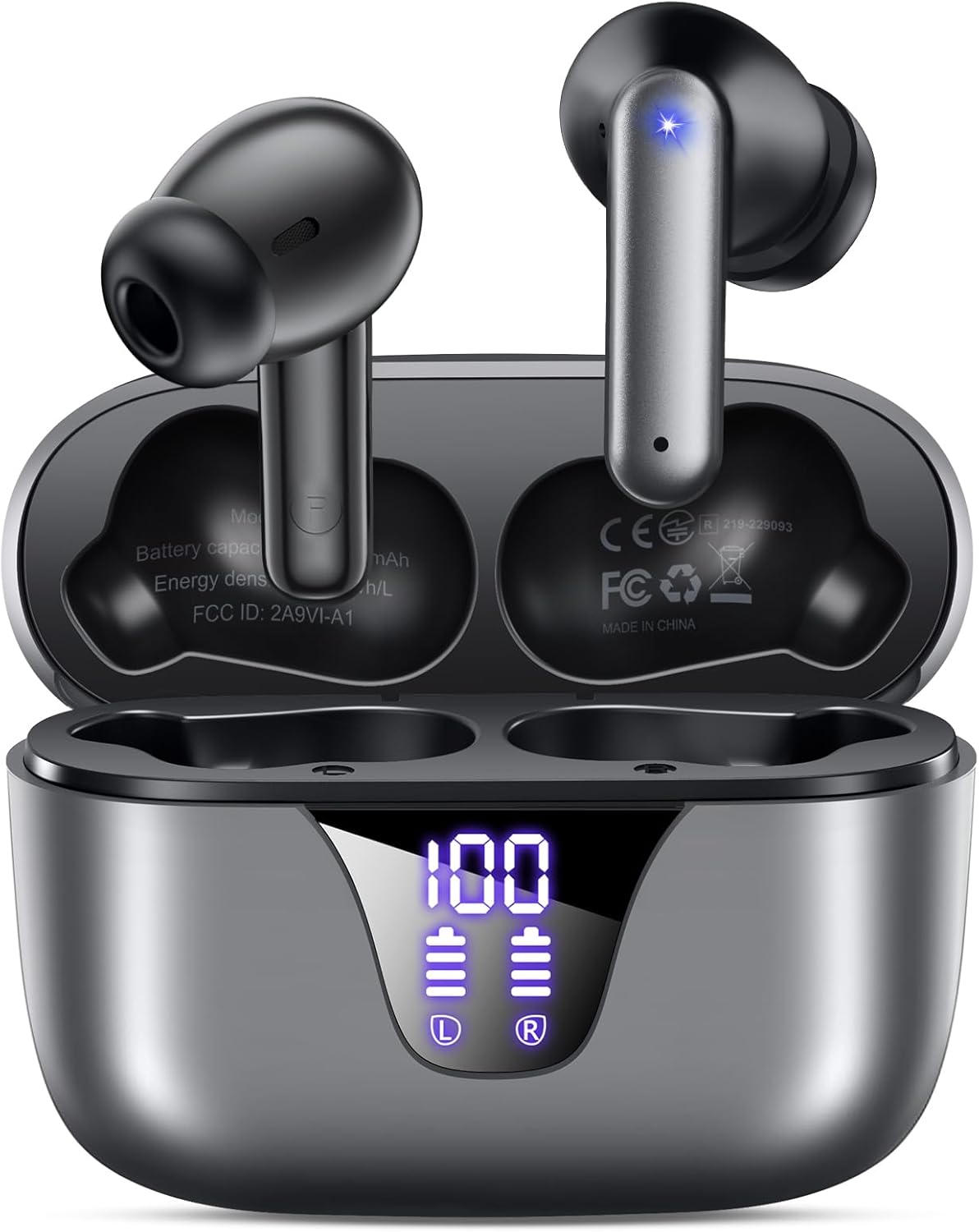
Image: ZIUTY A1 Wireless Earbuds shown inside their open charging case. The case features an LED digital display indicating battery levels for both the case and individual earbuds.
Pantalla LED de potencia

Image: Close-up of the ZIUTY A1 charging case's LED display, showing '100' for the case battery and individual battery icons for the left (L) and right (R) earbuds.
The charging case features an LED digital display that shows the exact remaining power percentage (0-100%) for the case and individual battery levels for each earbud.
Configuración
1. Carga de los auriculares y el estuche
Antes del primer uso, cargue completamente los auriculares y el estuche de carga.
- Coloque los auriculares en el estuche de carga. Asegúrese de que estén correctamente colocados en sus respectivas ranuras (Izquierda para izquierda, Derecha para derecha).
- Connect the USB-C charging cable to the charging port on the case and the other end to a 5V USB power adapter (not included).
- La pantalla LED del estuche mostrará el estado de carga. Una carga completa suele tardar aproximadamente 2 horas.

Image: ZIUTY A1 earbuds resting in their charging case, with the LED display showing battery levels.

Image: Diagram illustrating how to connect the USB-C cable to the charging case and a 5V power adapter for charging.
2. Cómo usar los auriculares
Para una calidad de sonido y comodidad óptimas, seleccione el tamaño de punta de oído correcto y asegúrese de que haya un ajuste seguro.
- Choose the ear tips (S, M, L) that provide the best seal and comfort for your ears.
- Insert the earbuds into your ears, gently twisting them to find a snug and stable position.
- The ergonomic semi-in-ear design is intended for a comfortable fit during various activities.

Image: Diagram showing the ergonomic design of the earbuds and the three available ear tip sizes (S, M, L) for a customized fit.

Image: Step-by-step visual guide on how to correctly insert and adjust the earbuds for a secure fit.
3. Emparejamiento con un dispositivo Bluetooth
Los auriculares entrarán automáticamente en modo de emparejamiento cuando se retiren del estuche de carga.
- Abre el estuche de carga y retira ambos auriculares. Se encenderán automáticamente e intentarán emparejarse.
- En su dispositivo (teléfono inteligente, tableta, computadora portátil), habilite Bluetooth y busque los dispositivos disponibles.
- Select "A1" from the list of found devices.
- Una vez conectado, escuchará una confirmación audible y los auriculares estarán listos para usar.
- Los auriculares se volverán a conectar automáticamente al último dispositivo emparejado cuando se retiren del estuche.

Image: Illustration showing the ZIUTY A1 earbuds connecting via Bluetooth 5.3 to a smartphone, indicating a stable and fast connection.

Image: Diagram demonstrating the one-step auto-pairing process when the earbuds are removed from the charging case.
Instrucciones de funcionamiento
Controles táctiles
The ZIUTY A1 earbuds feature intuitive touch controls for managing audio playback and calls.

Image: Diagram illustrating the touch control area on the earbuds and various functions like Play/Pause, Voice Assistant, Answer/Hang up, Previous/Next Track, and Volume adjustment.

Image: A more detailed visual guide to the touch controls, showing specific tap and hold gestures for different commands.
| Acción | Función |
|---|---|
| Un solo toque (I/D) | Reproducir/Pausar música, Responder/Finalizar llamada |
| Doble toque (L) | Pista anterior |
| Doble toque (R) | Pista siguiente |
| Triple toque (I/D) | Activar Asistente de voz (Siri, Asistente de Google) |
| Press and Hold (L) | Bajar volumen |
| Press and Hold (R) | Subir volumen |
| Press and Hold (L/R) during incoming call | Rechazar llamada |
Realizar y recibir llamadas
Use the touch controls to manage your phone calls:
- Responder/Finalizar llamada: Toque una vez cualquiera de los auriculares.
- Rechazar llamada: Mantenga presionado cualquiera de los auriculares durante una llamada entrante.

Image: Illustration showing a user interacting with a voice assistant (Siri) via the earbuds for clear call support.
Asistente de voz
Activate your device's voice assistant by triple-tapping either earbud. This allows you to issue commands such as making calls or checking information hands-free.
Mantenimiento
Limpieza
La limpieza regular ayuda a mantener un rendimiento y una higiene óptimos.
- Clean the charging contacts on both the earbuds and inside the charging case with a dry cotton swab or alcohol pad.
- Gently clean the mesh of the ear tips to remove any dust or earwax that might affect sound volume.
- Wipe the exterior of the earbuds and case with a soft, dry cloth.

Image: Visual guide demonstrating how to clean the earbud charging contacts and ear tip mesh to resolve potential volume or charging issues.
Almacenamiento
Cuando no los utilice, guarde los auriculares en su estuche de carga para protegerlos y garantizar que permanezcan cargados.
Solución de problemas
If you encounter issues with your ZIUTY A1 earbuds, refer to the following common solutions:
- Los auriculares no se emparejan entre sí: Place both earbuds back into the charging case, close the lid, wait a few seconds, then open the lid and remove them again. They should automatically pair.
- Los auriculares no se conectan al dispositivo: Ensure Bluetooth is enabled on your device and the earbuds are in pairing mode. Forget the device from your Bluetooth list and attempt to re-pair.
- No hay sonido o el volumen es bajo: Check the volume levels on both your device and the earbuds. Ensure the ear tips are clean and properly seated in your ears. Refer to the cleaning instructions in the Maintenance section.
- Problemas de carga: Ensure the charging cable is securely connected and the power adapter is 5V. Clean the charging contacts on both the earbuds and the case.
- Activación accidental del control táctil: When adjusting the earbuds in your ear, grasp them by the sides to avoid touching the control area.
Presupuesto
Key technical specifications for the ZIUTY A1 Wireless Earbuds:
| Característica | Especificación |
|---|---|
| Nombre del modelo | A1 |
| Tecnología de conectividad | Inalámbrico (Bluetooth 5.3) |
| Alcance de Bluetooth | Hasta 15 metros (49 pies) |
| Duración de la batería del auricular | Hasta 8 horas |
| Tiempo total de reproducción (con estuche) | Hasta 50 horas |
| Capacidad de la batería del estuche de carga | 500 mAh |
| Tiempo de carga | Aproximadamente 2 horas |
| Tamaño del controlador de audio | Controlador dinámico de 14.5 mm |
| Rango de frecuencia | 20 Hz - 20,000 Hz |
| Nivel de resistencia al agua | IPX7 (resistente al agua) |
| Tipo de control | Control táctil |
| Peso del auricular | Aproximadamente 0.14 oz (3.9 g) por auricular |
| Componentes incluidos | Auriculares, estuche de carga, cable USB-C, almohadillas, manual del usuario |
Garantía y soporte
Información de garantía
ZIUTY provides an 18-month battery promise for this product. This warranty covers defects in materials and workmanship under normal use.
Atención al cliente
For any questions, technical assistance, or warranty claims, please contact ZIUTY customer service. Refer to the product packaging or the official ZIUTY webSitio para obtener información de contacto actualizada.