
1. Producto terminadoview
The LongPlus 4K PoE Security Camera System, Model LP8MC84B2, provides advanced surveillance capabilities for both home and business environments. This system includes 4K (8MP) cameras, a Network Video Recorder (NVR) with a pre-installed 2TB Hard Disk Drive (HDD), and utilizes H.265+ video compression for efficient storage. Key features include 24/7 recording, spotlight color night vision, and clear video streaming. The Power over Ethernet (PoE) design simplifies installation by providing both power and data through a single Ethernet cable.

Image: LongPlus 4K PoE Security Camera System with NVR and four bullet cameras.
2. ¿Qué hay en la caja?
Verifique que todos los artículos enumerados a continuación estén incluidos en su paquete:
- 1 NVR de 8 canales con adaptador de 48/1.875 V
- 4 cámaras PoE 4K
- 1 x USB ratón
- 1 cable Cat1 de 5 m.
- 1 x cable HDMI 1M
- 4 cables Cat18 de 5M
- 2 conectores adicionales
- 4 x Paquetes de Tornillos y Otros Accesorios
- 1 x Guía de inicio rápido
3. Instrucciones de configuración
Follow these steps to set up your LongPlus 4K PoE Security Camera System:
- Conecte el NVR a un monitor: Use the provided HDMI or VGA cable to connect the NVR to a compatible monitor.
- Encienda el NVR: Connect the NVR to a power source using the provided power adapter and turn on the NVR power switch.
- Conectarse a la red: Connect an Ethernet cable from the NVR's LAN port to your router's LAN port for internet access.
- Conectar cámaras: Connect each PoE camera to any available PoE camera port on the NVR using the provided Ethernet cables. The cameras will receive both power and data through these cables.
- Conectar el ratón USB: Conecte el mouse USB a un puerto USB del NVR para navegar por el sistema.
- Configuracion inicial: Follow the on-screen prompts on your monitor to complete the initial setup, including setting a password and configuring network settings.
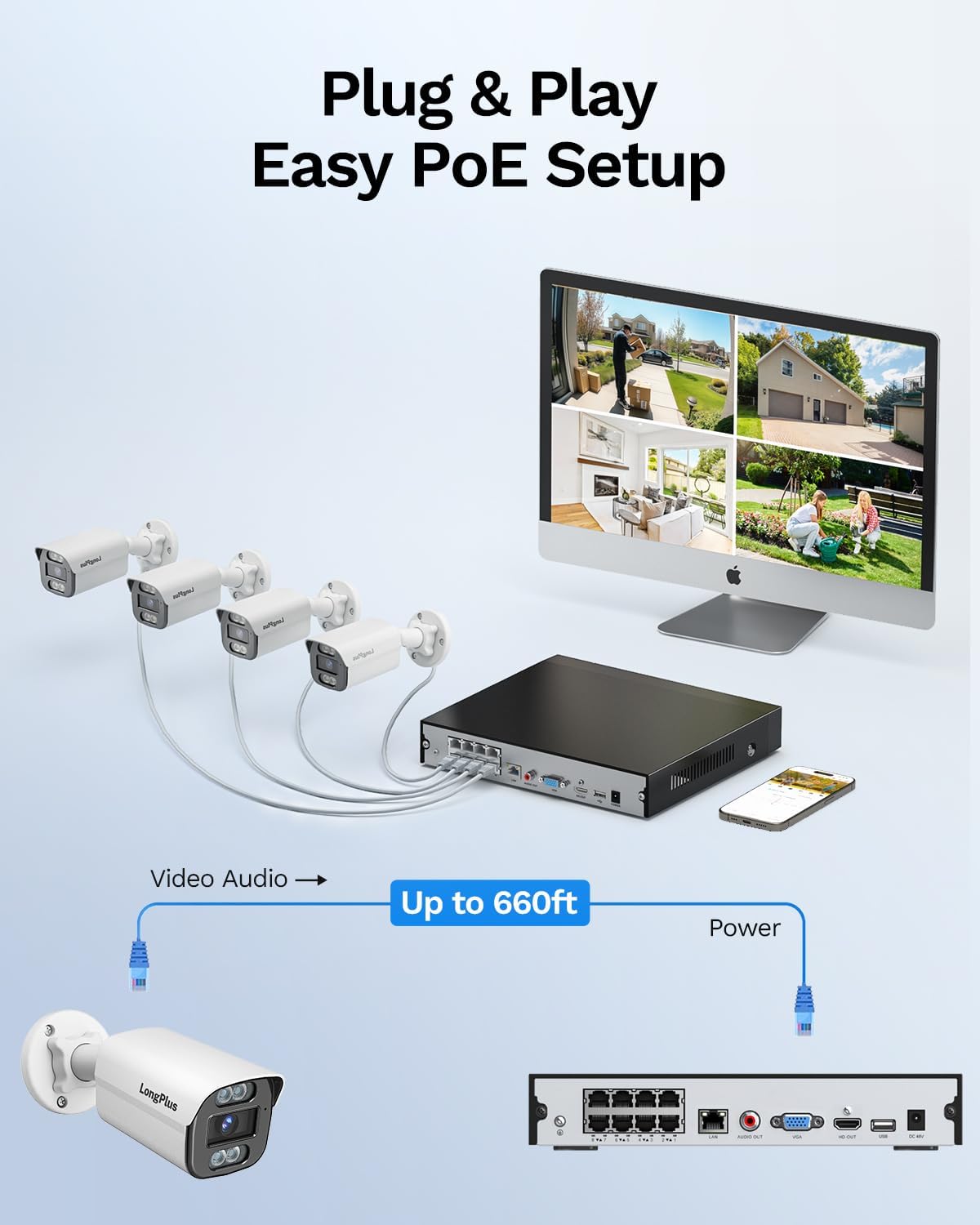
Image: Simplified PoE setup showing NVR, cameras, and monitor connections.
Video: LongPlus 8MP 16CH NVR Security System Unboxing & Setup Guide. This video demonstrates the unboxing process and step-by-step setup of the NVR and cameras.
4. Instrucciones de funcionamiento
4.1. 4K UHD y gran angular View Ángulo
The system captures video in crystal-clear 4K (3840x2160) resolution, providing enhanced detail and clarity. The cameras feature a 132° wide view angle, offering broader coverage and minimizing blind spots in your surveillance area.

Image: Demonstration of 4K UHD video quality, highlighting clear details day and night.

Image: Comparison illustrating the 132° wide view angle of LongPlus cameras.
4.2. Detección de movimiento con IA y zonas de actividad
The smart PoE cameras utilize AI object detection to accurately identify humans and vehicles, reducing false alarms. You can define specific activity zones within the camera's field of view to focus detection on critical areas and ignore motion in irrelevant regions. Privacy masks can also be set to exclude certain areas from recording.

Image: Smart AI detection identifying persons and vehicles, triggering alerts.
4.3. Triple Night Vision Modes
The system offers three night vision modes to suit various lighting conditions:
- Visión nocturna IR: Visión infrarroja estándar en blanco y negro.
- Visión nocturna en color: Proporciona alimentos a todo color.tage in low-light conditions, allowing for better identification of details up to 100ft/30m.
- Visión nocturna inteligente: Automatically switches between IR and color modes based on detected activity.
4.4. Audio and Strobe Light Alarm / Two-way Audio
When motion is detected, the cameras can automatically trigger an audio alarm and red & blue strobe lights to deter intruders. The built-in two-way audio feature allows for real-time communication through the camera, enabling you to speak to visitors or warn off unwanted individuals.

Image: Two-way audio functionality with integrated strobe light alarm.
4.5. Flexible Storage and Playback
The NVR includes a 2TB HDD for 24/7 continuous recording, expandable up to 10TB. H.265+ compression technology significantly reduces file sizes, saving storage space without compromising video quality. Bank-level encrypted cloud storage is also available as an option. The Longvision APP/Client allows for easy playback of recorded footage, with events highlighted on the timeline for quick review.

Image: Interface demonstrating 24/7 recording and smart playback features.

Image: Explanation of H.265+ compression for efficient storage.
4.6. Acceso remoto y uso compartido
Accede a foo en vivotage and recorded videos remotely via the Longvision app, compatible with iOS, Mac, Windows, and Android devices. The system supports up to 32 users, allowing you to share access with family members or colleagues.

Image: Remote access to live camera feeds via the Longvision app.
Video: LongPlus 4Channel PoE Security Camera System Overview. This video showcases the system's features including PoE setup, app monitoring, 4K UHD, night vision, motion detection, and alarm functions.
5. Mantenimiento
To ensure optimal performance and longevity of your security system, regular maintenance is recommended:
- Limpiar las lentes de la cámara: Limpie periódicamente las lentes de la cámara con un paño suave.amp Paño para eliminar el polvo y las manchas que puedan afectar la claridad de la imagen.
- Comprobar conexiones: Ensure all cable connections (power, Ethernet, video) are secure and free from damage.
- Actualizaciones de firmware: Regularly check for and install firmware updates for the NVR and cameras to benefit from new features and security enhancements.
- Review Grabaciones: Repita periódicamenteview comida grabadatage para garantizar que el sistema capture los eventos según lo esperado.
- Ubicación del NVR: Asegúrese de que el NVR esté ubicado en un área bien ventilada para evitar el sobrecalentamiento.
6. Solución de problemas
If you encounter issues with your LongPlus security system, consider the following common troubleshooting steps:
- Sin visualización de video:
- Verify all power and video cables are securely connected.
- Asegúrese de que el monitor esté configurado en la fuente de entrada correcta (HDMI/VGA).
- Reinicie el NVR.
- La detección de movimiento no funciona:
- Check motion detection settings in the NVR interface or app.
- Ensure activity zones are correctly configured and not excluding desired areas.
- Ajuste la configuración de sensibilidad.
- Problemas de acceso remoto:
- Confirm the NVR is connected to the internet.
- Check network settings on the NVR and your router.
- Ensure the Longvision app is updated to the latest version.
- Mala calidad de imagen:
- Limpiar la lente de la cámara.
- Compruebe si hay obstrucciones en el campo de visión de la cámara. view.
- Asegúrese de que haya suficiente iluminación para un rendimiento óptimo de la visión nocturna.
7. Especificaciones
| Característica | Detalle |
|---|---|
| Marca | LargoPlus |
| Tecnología de conectividad | Cableado |
| Resolución de captura de video | 3840x2160, 4K |
| Características especiales | High Efficiency Video Coding, Red & Blue Flashing Lights, Easy to Install, Waterproof, Vehicle Detection, Adjustable, Motion Sensor, Siren Alarm/Flexible Storage (Local Storage/Cloud Storage), Smart Playback, Vehicle/Person/Animal Detection |
| Número de canales | 8 |
| Capacidad de almacenamiento de memoria | 2 TB (ampliable hasta 10 TB) |
| Color | Blanco |
| Fuente de poder | Eléctrico con cable |
| Dimensiones del artículo L x W x H | 13.29 x 10.23 x 9.4 pulgadas |
| Compatibilidad del sistema operativo | Android, Mac OS, Windows, iOS |
| Usos recomendados | Indoor, Outdoor, Surveillance |
| Dispositivos compatibles | Cameras, Laptops, Personal Computers, Smartphones |
| Otras características de la cámara | Delantero trasero |
| Tecnología con poca luz | Visión nocturna |
| Rango de visión nocturna | 100 pies |
| Velocidad de cuadros | 30 |
| Modo de grabación | Grabación activada por movimiento (predeterminada); grabación programada, grabación 24 horas al día, 7 días a la semana |
| Puertos USB totales | 2 |
| Interfaz de hardware | Ethernet, HDMI, USB, VGA |
| Tipo de lente | Gran angular |
| Entrada de vídeo | VGA, USB, Ethernet, HDMI |
| Viewángulo de ing | 132 grados |
| Fabricante | LongPlus Direct |
| Peso del artículo | 13.26 libras |
| Fecha de primera disponibilidad | 12 de junio de 2025 |
8. Garantía y soporte
LongPlus ofrece una 2 año de garantía for this product, ensuring coverage against manufacturing defects. Additionally, lifetime technical support is available to assist with any inquiries or operational issues you may encounter. For support, please contact LongPlus customer service.