
Introducción
Thank you for choosing the Nerf GAM83056A-BLU Gaming Headphones. These headphones are designed to enhance your gaming experience with comfortable wear, clear audio, and seamless communication. Featuring a built-in microphone and a sleek black and blue design, they are suitable for extended gaming sessions across various platforms.
Información de seguridad
Lea atentamente todas las instrucciones de seguridad antes de usar este producto. Conserve este manual para futuras consultas.
- Evite escuchar música a niveles altos de volumen durante períodos prolongados para evitar daños auditivos.
- No exponga los auriculares a temperaturas extremas, humedad o líquidos.
- No intente desmontar ni modificar los auriculares. Esto anulará la garantía.
- Mantener fuera del alcance de los niños pequeños debido a que contiene piezas pequeñas que podrían representar un peligro de asfixia.
- Use only with compatible devices and accessories.
Contenido del paquete
Asegúrese de que todos los artículos estén presentes en el paquete:
- 1 x Nerf GAM83056A-BLU Gaming Headphones with Integrated Microphone
- 1 x Manual de instrucciones del usuario (este documento)

Image: The Nerf GAM83056A-BLU Gaming Headphones shown in their retail box, highlighting the product and its key features.
Producto terminadoview
Familiarize yourself with the components of your new gaming headphones:
- Diadema ajustable: Para un ajuste cómodo en varios tamaños de cabeza.
- Cushioned Ear Cups: Ergonomically designed for extended wear and passive noise cancellation.
- Micrófono integrado: Flexible boom microphone for clear voice communication.
- Conector de audio de 3.5 mm: Standard connector for compatibility with multiple devices.
- Inline Control (if applicable): For volume adjustment and microphone mute (refer to specific model features).
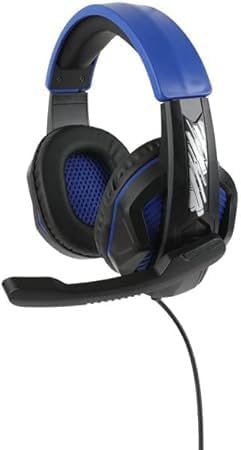

Image: Left: Side view of the headphones showing the adjustable headband, ear cup, and the extended microphone. Right: Front view of the headphones, highlighting the ear cup design and overall structure.
Configuración
Follow these steps to set up your Nerf GAM83056A-BLU Gaming Headphones:
- Conectar al dispositivo: Locate the 3.5mm audio jack on your gaming console controller, PC, laptop, or other compatible device. Insert the 3.5mm plug from your headphones firmly into the audio jack.
- Ajustar la diadema: Gently slide the adjustable headband to fit comfortably over your head. The ear cups should fully enclose your ears without excessive pressure.
- Posición del micrófono: Adjust the flexible microphone boom so that the microphone is positioned near your mouth for optimal voice pickup. Ensure it is not obstructing your vision.
- Comprobación inicial del volumen: Before starting your game or communication, set the volume on your device to a low level. Gradually increase the volume to a comfortable listening level.
Instrucciones de funcionamiento
Using your Nerf GAM83056A-BLU Gaming Headphones for various activities:
Juego de azar
- Once connected, the headphones will provide immersive stereo sound for your games.
- Utilize the integrated microphone for in-game voice chat with teammates. Ensure your device's audio settings recognize the headphone's microphone as the input source.
- Adjust game audio and chat volume independently through your gaming platform's settings for balanced sound.
Communication (Voice Calls, Online Meetings)
- For voice calls or online meetings on PC/laptop, ensure the headphones are selected as both the audio output and microphone input device in your system's sound settings or the application's settings.
- Speak clearly into the microphone for optimal voice clarity.
Volume Control and Microphone Mute (if applicable)
If your headphones feature an inline control:
- Volume Wheel/Slider: Rotate or slide to increase or decrease the audio volume.
- Interruptor de silencio del micrófono: Toggle the switch to mute or unmute your microphone. This is useful for privacy during calls or when you don't want your voice transmitted in-game.
Mantenimiento
Para garantizar la longevidad y el rendimiento óptimo de sus auriculares, siga estas pautas de mantenimiento:
- Limpieza: Use a soft, dry, lint-free cloth to wipe down the ear cups and headband. For stubborn dirt, slightly dampEnjuague el paño con agua. No utilice productos químicos agresivos ni limpiadores abrasivos.
- Almacenamiento: Cuando no los use, guarde los auriculares en un lugar limpio y seco, alejados de la luz solar directa y de temperaturas extremas. Evite que el cable se enrede.
- Cuidado de cables: No tire del cable para desconectar los auriculares. Sujete siempre el enchufe. Evite dobleces o torceduras pronunciadas en el cable.
Solución de problemas
Si tiene problemas con sus auriculares, consulte los siguientes problemas y soluciones comunes:
| Problema | Posible causa | Solución |
|---|---|---|
| No hay sonido de los auriculares |
|
|
| El micrófono no funciona |
|
|
| Distorsión del sonido o estática |
|
|
Si el problema persiste después de probar estas soluciones, comuníquese con el servicio de atención al cliente.
Presupuesto
| Característica | Detalle |
|---|---|
| Nombre del modelo | GAM83056A-BLU |
| Tecnología de conectividad | Con cable (conector de 3.5 mm) |
| Colocación de orejas | Sobre la oreja |
| Tamaño del controlador de audio | 40 milímetros |
| Sensibilidad | 100 dB |
| Impedancia | 32 ohmios |
| Control de ruido | Cancelación pasiva de ruido |
| Micrófono | Built-in, Flexible Boom |
| Material | Plastic, Memory Foam, Metal |
| Color | Black And Blue |
| Peso del artículo | 10 onzas (aprox. 283 gramos) |
| Dispositivos compatibles | PC, Gaming Consoles, Laptops |
| Rango de edad recomendado | 8 años y más |
| Fabricante | Nerf |
| País natal | Porcelana |
Garantía y soporte
This product comes with a standard manufacturer's warranty. Please refer to the warranty card included with your purchase for specific terms and conditions, or visit the manufacturer's official websitio para obtener información detallada sobre la garantía.
For technical support, troubleshooting assistance beyond this manual, or warranty claims, please contact Nerf customer service. Contact information can typically be found on the product packaging or the manufacturer's websitio.
Please have your product model number (GAM83056A-BLU) and proof of purchase ready when contacting support.