
1. Instrucciones de seguridad importantes
- Lea estas instrucciones detenidamente antes de utilizar el dispositivo.
- Conserve estas instrucciones para futuras consultas.
- Preste atención a todas las advertencias en el producto y en las instrucciones de funcionamiento.
- Siga todas las instrucciones.
- No utilice este aparato cerca del agua.
- Limpiar únicamente con un paño seco.
- No obstruya las aberturas de ventilación. Instale el producto según las instrucciones del fabricante.
- No lo instale cerca de fuentes de calor como radiadores, rejillas de calefacción, estufas u otros aparatos (incluidos ampificadores) que producen calor.
- Proteja el cable de alimentación para que no sea pisado ni aplastado, especialmente en los enchufes, receptáculos y en el punto donde sale del aparato.
- Utilice únicamente accesorios especificados por el fabricante.
- Desenchufe este aparato durante tormentas eléctricas o cuando no lo utilice durante períodos prolongados.
- Encargue todas las tareas de mantenimiento a personal técnico cualificado. Se requiere realizar el mantenimiento cuando el aparato haya sufrido algún daño, como por ejemplo si el cable de alimentación o el enchufe están dañados, si se ha derramado líquido o han caído objetos en el interior del aparato, si el aparato ha estado expuesto a la lluvia o la humedad, si no funciona con normalidad o si se ha caído.
2. Contenido del paquete
Verifique que todos los artículos enumerados a continuación estén incluidos en su paquete:
- GOBOULT X400 Soundbar
- BoomX Subwoofer
- Mando a distancia
- Manual de usuario (este documento)
- Tarjeta de garantía
- Adaptador/cable de corriente
- Cable auxiliar

Imagen: Más alláview of the GOBOULT X400 system components and key features.
3. Guía de configuración
3.1 Colocación
For optimal audio performance, place the soundbar centrally below your television. Position the BoomX subwoofer on the floor near the soundbar, ensuring it has adequate space for bass dispersion. The two satellite speakers should be placed to the left and right of your listening area for a true 5.1 surround sound experience.

Image: Recommended placement of the soundbar and subwoofer in a home environment.
3.2 Conexión del subwoofer
Connect the wired BoomX subwoofer to the 'SUBWOOFER OUT' port on the soundbar using the provided cable.
3.3 Conexión de alimentación
Connect the power cable to the soundbar's power input and then plug it into a wall outlet. Ensure the power switch on the soundbar (if present) is in the 'ON' position.
3.4 Conexiones de entrada de audio
The GOBOULT X400 offers multiple connectivity options:
- ARCO HDMI: For the best audio quality and control, connect an HDMI cable from your TV's HDMI ARC port to the soundbar's HDMI ARC port. This allows your TV remote to control the soundbar's volume.
- Óptico: Conecte un cable óptico desde la salida óptica de su televisor a la entrada ÓPTICA de la barra de sonido.
- Auxiliar: Use a 3.5mm auxiliary cable to connect devices with an AUX output to the soundbar's AUX input.
- USB: Inserte una unidad USB en el puerto USB para reproducir audio files directamente.
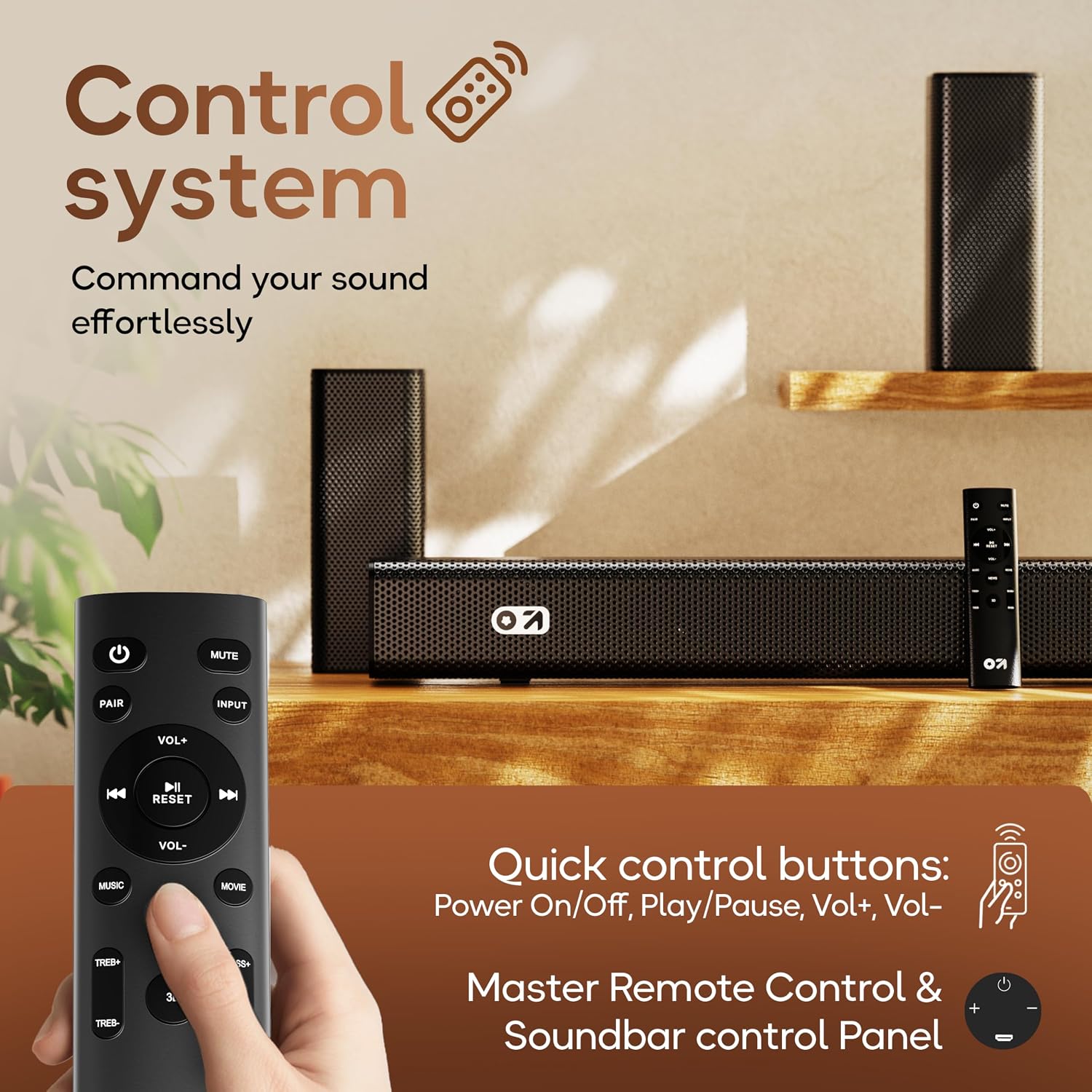
Imagen: Detallada view of the soundbar's input ports for various audio sources.
3.5 5.1 Channel Surround Sound Configuration
The X400 system includes a soundbar, a subwoofer, and two satellite speakers to deliver a 5.1 channel surround sound experience. Ensure the satellite speakers are connected to the soundbar and positioned appropriately to create an immersive audio field around the listener.

Image: Visual guide for setting up the 5.1 channel surround sound system.
4. Instrucciones de funcionamiento
4.1 Encendido y apagado
Presione el Fuerza Botón en el control remoto o en la barra de sonido para encender o apagar la unidad.
4.2 Selección de la fuente de entrada
Presione el Aporte button on the remote control to cycle through available input sources: Bluetooth, HDMI ARC, Optical, AUX, USB. The selected input will be displayed on the soundbar's LED panel.
4.3 Control de volumen
Utilice el VOL+ y vol- Botones en el control remoto o la barra de sonido para ajustar el nivel de volumen.
4.4 Emparejamiento Bluetooth
- Select Bluetooth input mode on the soundbar. The LED display will show "BT" and flash, indicating it's in pairing mode.
- En su dispositivo móvil, habilite Bluetooth y busque dispositivos disponibles.
- Select "GOBOULT X400" from the list. Once connected, the LED display will show a steady "BT".
4.5 modos de ecualización
The GOBOULT X400 features multiple equalizer (EQ) modes to optimize your listening experience. Press the dedicated Película, Música, o Noticias buttons on the remote control to switch between modes.
4.6 Funciones de control remoto

Image: Layout and functions of the GOBOULT X400 remote control.
- Fuerza: Enciende o apaga la barra de sonido.
- Silenciar: Silencia o reactiva el sonido.
- Aporte: Selecciona la fuente de entrada de audio.
- VOL + / VOL-: Ajusta el volumen principal.
- Reproducir/Pausa: Controls media playback (Bluetooth/USB modes).
- Anterior Siguiente: Skips tracks (Bluetooth/USB modes).
- Modos de ecualización (películas, música, noticias): Selecciona el sonido preestablecido profesionalfiles.
- PAR: Inicia el emparejamiento Bluetooth.
- REINICIAR: Restablece la configuración de sonido a los valores predeterminados.
- TREB+/TREB-: Ajusta los niveles de agudos.
- BAJO+/BAJO-: Ajusta los niveles de graves.
5. Mantenimiento
To ensure the longevity and optimal performance of your GOBOULT X400 soundbar system, follow these maintenance guidelines:
- Limpieza: Use a soft, dry cloth to clean the surfaces of the soundbar and subwoofer. Do not use liquid cleaners, aerosols, or abrasive materials, as they may damage the finish or internal components.
- Ventilación: Asegúrese de que las aberturas de ventilación de la barra de sonido y el subwoofer no estén bloqueadas. Un flujo de aire adecuado evita el sobrecalentamiento.
- Almacenamiento: Si va a almacenar la unidad durante un período prolongado, desconéctela del tomacorriente y guárdela en un lugar fresco y seco, alejado de la luz solar directa y de temperaturas extremas.
- Exposición al agua: While the product is water-resistant, avoid direct exposure to water or high humidity to prevent damage.
6. Solución de problemas
If you encounter issues with your GOBOULT X400, refer to the following common problems and solutions:
| Problema | Posible causa | Solución |
|---|---|---|
| Sin poder | Cable de alimentación no conectado; toma de corriente no activa | Asegúrese de que el cable de alimentación esté conectado de forma segura a la barra de sonido y a una toma de corriente que funcione. |
| Sin sonido | Incorrect input source; Volume too low; Mute activated; Incorrect cable connection | Seleccione la fuente de entrada correcta. Suba el volumen. Desactive el silencio. Compruebe las conexiones del cable de audio. |
| El emparejamiento de Bluetooth falla | La barra de sonido no está en modo de emparejamiento; Dispositivo demasiado lejos; Interferencia | Ensure soundbar is in Bluetooth pairing mode. Move device closer. Clear previous pairings on your device. |
| El control remoto no funciona | Batteries depleted; Obstruction; Remote out of range | Replace remote control batteries. Remove any obstructions between remote and soundbar. Ensure remote is within operating range. |
| El subwoofer no produce graves | Subwoofer cable loose; Bass level set too low | Check the connection of the subwoofer cable to the soundbar. Increase bass level using the remote control. |
7. Especificaciones
Detailed technical specifications for the GOBOULT X400 Soundbar System:

Imagen: interna view of the BoomX Dual Driver, highlighting its design for enhanced bass response.
| Característica | Especificación |
|---|---|
| Marca | GOBOULT |
| Nombre del modelo | Caja de bajo X400 |
| Potencia máxima de salida del altavoz | 400 vatios |
| Cantidad de canales de audio | 5.1 |
| Tecnología de conectividad | Auxiliary, Bluetooth, USB, HDMI ARC, Optical |
| Versión de Bluetooth | 5.3 |
| Alcance de Bluetooth | 10 metros |
| Modo de salida de audio | Rodear |
| Tipo de altavoz | Barra de sonido con subwoofer con cable |
| Método de control | Remoto |
| Características del producto | Bass Boost, LED Light, USB Port, Water Resistant |
| Fuente de poder | Eléctrico con cable |
| Dimensiones del artículo (Pr. x An. x Al.) | 8 cm de profundidad x 9 cm de ancho x 7.5 cm de alto (barra de sonido) |
| Peso del artículo | 7.6 kilogramos |
8. Garantía y soporte
8.1 Información de garantía
The GOBOULT X400 Soundbar System comes with a Garantía del fabricante de 1 años from the date of purchase. This warranty covers manufacturing defects and ensures reliable operation under normal use. Please retain your purchase receipt and the warranty card for any warranty claims.
8.2 Atención al cliente
For technical assistance, troubleshooting, or warranty inquiries, please contact GOBOULT customer support. Refer to the contact information provided on your warranty card or visit the official GOBOULT websitio para detalles de soporte.